
Hello,
If you wish to uncheck a product as New, then you need select “No” in “Mark product as “New”” field when editing a product:

Thank you.
Regards,
Eva Kemp.

Hello,
If you wish to uncheck a product as New, then you need select “No” in “Mark product as “New”” field when editing a product:
Thank you.
Regards,
Eva Kemp.
Hello,
Please try to add this code in custom.css file:
.top-bar .wishlist-link a i:before, .top-bar .wishlist-link a span, .top-bar .top-links li a, .login-link:before, .register-link:before, .top-bar .wishlist-link a:hover span, .top-bar .top-links li a:hover {
   color: white !important;
}

@media (max-width: 480px) {
.my-account-link:before {
 color: white;
}}
If there are still some issues please provide us with wp-admin panel credentials in Private Content.
Thank you.
Regards,
Eva Kemp.
Hello,
We’re glad you’ve found the solution.
If there are ant questions don’t hesitate to ask us.
Regards,
Eva Kemp.
Hello,
The problem is you didn’t rename default.custom.css to custom.css via FTP in wp-content/themes/legenda directory.
Please do this.
Thank you.
Regards,
Eva Kemp.
Hello,
You can edit the file wp-content/themes/legenda/woocommerce/global/form-login.php (line 30), find the code <input type="hidden" name="redirect" value="<?php echo esc_url( $redirect ) ?>" /> and change the value <?php echo esc_url( $redirect ) ?> to the home page link.
Thank you.
Regards,
Eva Kemp.
Hello @pramo,
First of all you must rename default.custom.css to custom.css via FTP in wp-content/themes/legenda directory, then enable it in Theme Options > Custom CSS.
This code should be added to custom.css file:
.header-type-4 .shopping-cart-link {
display:none;
}
Thank you.
Regards,
Eva Kemp.
Hello,
You’re welcome.
Regards,
Eva Kemp.
Hello,
Please provide us with wp-admin panel credentials in Private Content.
Thank you.
Regards,
Eva Kemp.
Hello,
The problem is your images have different dimensions.
Try to upload the images of similar sizes.
Thank you.
Regards,
Eva Kemp.
Hello,
Please provide us with FTP and wp-admin panel credentials in Private Content.
Thank you.
Regards,
Eva Kemp.
Hello,
I’ve added the following code into custom.css file:
li#menu-item-353 a {
font-size: 16px;
color: red;
}
Please check the menu now.
Thank you.
Regards,
Eva Kemp.
Hello,
What is the password for FTP account?
Could you please change wp-admin panel password to some without special characters?
Thank you.
Regards,
Eva Kemp.
Hello,
You’re welcome.
Regards,
Eva Kemp.
Hello,
That warning doesn’t affect your site work and translation.
You can find how to translate theme files in our documentation:
https://www.8theme.com/demo/docs/royal/#!/0_how_to_translate
So you can work without any worries.
Thank you.
Regards,
Eva Kemp.
Hello,
Do you mean you want to reorder tabs on a single product page?
If so this article should help you:
http://docs.woothemes.com/document/editing-product-data-tabs/
You can upload your screenshot to some image storage ( http://imgur.com/ for example) and provide us with a link.
Thank you.
Regards,
Eva Kemp.
Hello,
Unfortunately we don’t have parallax feature for video files.
I’ve set Full Width for youtube video in the row settings:
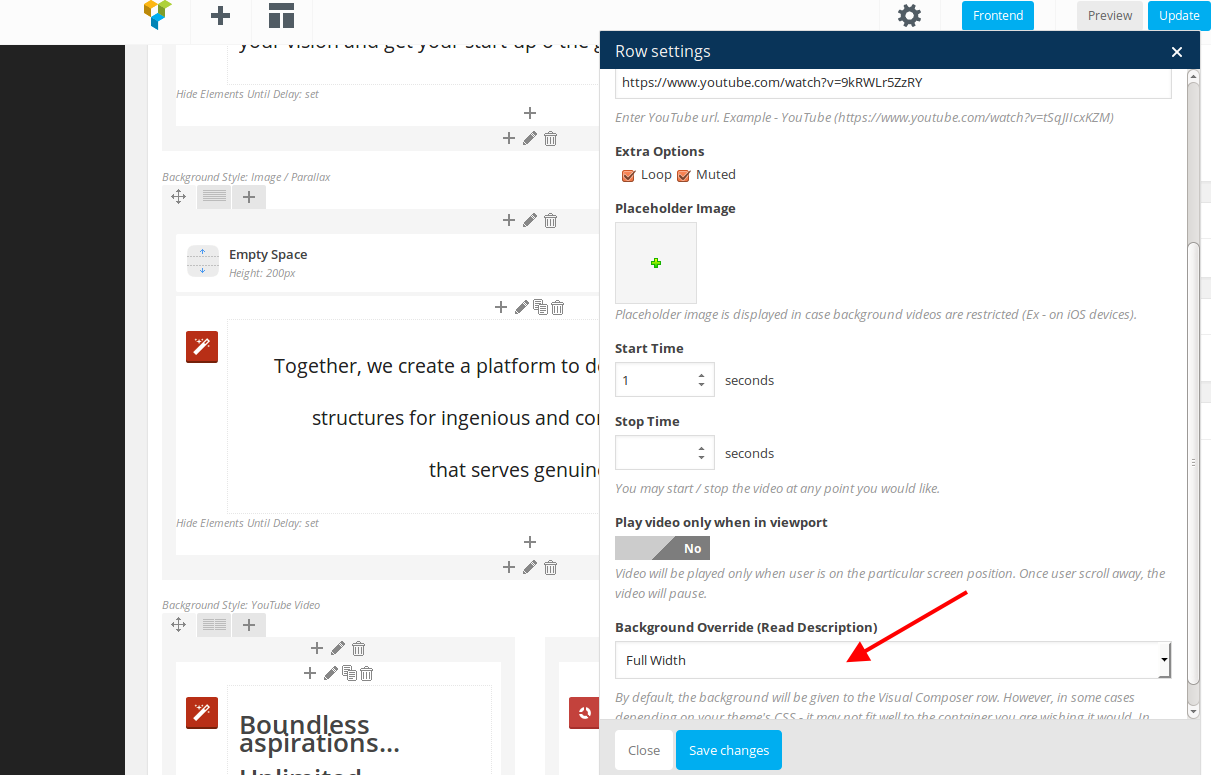
Please specify the exact issues you have with some images.
Thank you.
Regards,
Eva Kemp.
Hello,
Please provide us with the link where your changes doesn’t work and wp-admin panel/FTP credentials to check the issue.
Thank you.
Regards,
Eva Kemp.
Hello,
Sorry, but this requires additional customization and is a paid service.
You may create a ticket at https://support.8theme.com/ for the assistance if you agree.
Thank you.
Regards,
Eva Kemp.
Hello,
As we told you:
“We’ll try to update the theme from our side to check the issue with footer and menu click.”
That’s why we need FTP credentials.
We’re unable to provide you with “what we’re going to upload to your FTP” as we need debug this issue.
Thank you for understanding.
Regards,
Eva Kemp.
Hello,
Please try to add “!important” to the code:
.currency {
    display: none !important;
}
Regards,
Eva Kemp.
Hello,
The problem may be caused by cache on a server or you have some cache plugin installed.
Try to clear server cache and check your custom.css again.
Regards,
Eva Kemp.
Hello,
In this topic we recommend you to check some options on a server at your hosting provider.
Please do this as the issue may be caused because some functions are disabled.
Thank you.
Regards,
Eva Kemp.
Hello,
The problem may be caused by your server configuration.
You should contact your host and ask if php version is not less that 5.3 version, “allow_url_fopen” and “file_get_contents()” functions are enabled, memory limit is increased to 128M.
If this doesn’t help please provide us with FTP and wp-admin panel credentials in Private Content.
Thank you.
Regards,
Eva Kemp.
Hello,
You can add an image for header background using this code in custom.css:
.header-vertical-enable .page-wrapper .header-type-vertical2 {
 background-image: url('path_to_your_image');
}
Regards,
Eva Kemp.
Hello,
The problem was caused by wp-config.php file. There were a lot of spaces in the beginning of the code. I’ve removed it and now wp-admin panel is opened.
Thank you.
Regards,
Eva Kemp.
Hello,
Please provide us with your site link to assist you.
Thank you.
Regards,
Eva Kemp.
Hello,
You can disable it in Theme Options > General > Show loader icon until site loading > Off.
Thank you.
Regards,
Eva Kemp.
Hello,
Please provide us with wp-admin panel and FTP credentials and we’ll help you to install demo data.
Thank you.
Regards,
Eva Kemp.
Hello,
Please provide us with FTP credentials in Private Content.
Thank you.
Regards,
Eva Kemp.
Hello,
You’re welcome.
Regards,
Eva Kemp.









