
Hello,
Please provide us with the link to your site and wp-admin panel credentials in Private Content.
Thank you.
Regards,
Eva Kemp.

Hello,
Please provide us with the link to your site and wp-admin panel credentials in Private Content.
Thank you.
Regards,
Eva Kemp.
Hello,
Please add this code in custom.css file:
div#woocommerce_top_rated_products-2 span.small-coast {
display: none !important;
}
Thank you.
Regards,
Eva Kemp.
Hello,
1. I’ve checked the “Soins” menu item and haven’t found description in the subcategories:
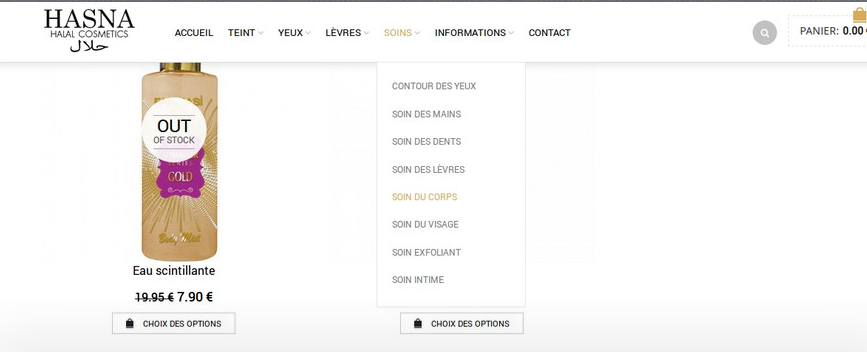
Do you see the problem in all browsers?
Also try to clear cache in your browser.
3. The images are small on a single product page:
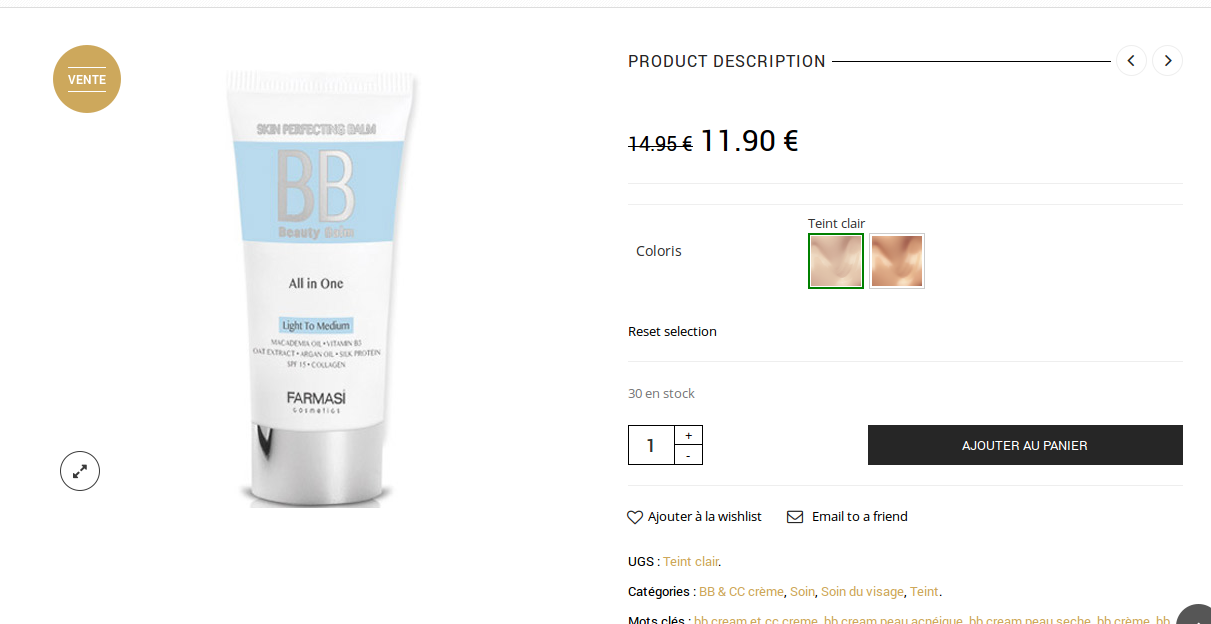
You can add this code in custom.css to make the images the same size:
.product-content-image {
    height: 350px !important;
}
To create custom.css you need rename default.custom.css to custom.css via FTP in wp-content/themes/royal directory and enable it in wp-admin > Theme Options > Custom CSS.
4. Add this code in custom.css file:
p.stock.in-stock, span.sku_wrapper, span.tagged_as {
display: none !important;
}
Thank you.
Regards,
Eva Kemp.
Hello,
After making changes you should regenerate thumbnails due to Woocommerce recommendations:
http://wordpress.org/plugins/regenerate-thumbnails/
Regards,
Eva Kemp.
Hello,
Unfortunately we don’t have such features for the fixed header and logo. Sorry.
You can add social media icons inserting the code into Text widget and add it to “Place in header top bar” widget area. The code of icons can be found on help pages of social websites.
Please take our apologies for inconveniences.
Regards,
Eva Kemp.
Hello,
Please provide us with wp-admin panel and FTP credentials in Private Content.
Also we’re unable to open your files with screenshots.
Please try to reupload them.
Thank you.
Regards,
Eva Kemp.
Hello,
You can update the theme when a new version is released as that fix will be implemented in the new version.
Thank you.
Regards,
Eva Kemp.
Hello,
Please try to disable all third-party plugins and check the footer again.
Thank you.
Regards,
Eva Kemp.
Hello,
We’ve divided the second file and sent those file parts to you.
Please check your email.
Thank you.
Regards,
Eva Kemp.
Hello,
We’ve divided the second file and sent those file parts to you.
Please check your email.
Thank you.
Regards,
Eva Kemp.
Hello,
We’re unable to access your site. There is an error “Server not found”.
Concerning the contact form you needn’t copy the whole file shortcodes.php. You should use functions.php of the child theme and rewrite just the function and code you want to change. Please read this article carefully: http://codex.wordpress.org/Child_Themes
Thank you.
Regards,
Eva Kemp.
Hello,
I’ve added the following code in style.css of the child theme:
.payment_methods li label { margin-top: -20px; }
Please check Checkout page now.
Regards,
Eva Kemp.
Hello,
Please provide us with wp-admin panel credentials.
Thank you.
Regards,
Eva Kemp.
Hello,
Sorry but we don’t have such feature in the theme.
You may try to add Custom Menu widget into “Place in header top bar” area in Appearance > Widgets.
Thank you.
Regards,
Eva Kemp.
Hello,
Please read this article http://codex.wordpress.org/Child_Themes > “Referencing / Including Files in Your Child Theme” paragraph. There you’ll find how to add files from subfolders.
Thank you.
Regards,
Eva Kemp.
Hello,
Please update the theme to the latest 1.3 version.
Thank you.
Regards,
Eva Kemp.
Hello,
The problem is you have low php version. Please contact your host and ask to increase it at least to 5.3 version.
Thank you.
Regards,
Eva Kemp.
Hello,
You need contact at http://support.8theme.com/ for further information.
Thank you.
Regards,
Eva Kemp.
Hello,
Please clarify what problems exactly are you experiencing?
What words can’t be translated?
Thank you.
Regards,
Eva Kemp.
Hello,
You can read more about backups here: http://codex.wordpress.org/WordPress_Backups
Please don’t worry. It’s just a standard process to keep your files safe.
Please proceed with update.
Thank you.
Regards,
Eva Kemp.
Hello,
Yes, there is a bug in the theme which will be fixed in the next update. Now you can remove page heading via custom.css adding this code:
.page-heading {
display: none !important;
}
Please take our apologies for inconveniences.
Regards,
Eva Kemp.
Hello,
I’m unable to access your site getting an error “Server not found”.
Have you changed site url or there are some problems at your hosting provider?
Regards,
Eva Kemp.
Hello,
You can send sreenshots to some image storage (for example, http://imgur.com/ ) and just provide us with links.
Also please show us a screenshot what space you want to remove.
Thank you.
Regards,
Eva Kemp.
Hello,
Sorry, but there is a bug in the theme and it’ll be fixed in the next update. Meanwhile we recommend you to use shortcode [button] as written in our documentation:
https://www.8theme.com/demo/docs/royal/#!/6_royal_shortcodes
Thank you.
Regards,
Eva Kemp.
Hello,
Sorry, but we don’t provide support for mail services settings, but for the problems related to our theme. If you still have issues with getting emails via contact form, then please provide us with correct login credentials to admin panel and FTP and we’ll check whether it’s related to our theme or your server configuration. The credentials you provided before are no longer active.
Thank you.
Regards,
Eva Kemp.
Hello,
You may try to use some plugin in this case as we don’t have such feature in our theme.
Sorry.
Regards,
Eva Kemp.
Hello,
Please add this code into custom.css file:
#contact_container h2 { display: none !important; }
Regards,
Eva Kemp.
Hello,
We’ve already had such discussion on our forum.
We’ve improved our theme as much as we could. And we have already emphasized if someone of our customers has experience in development and has proposals concerning changes in the theme (we mean only specific changes in the code in particular files, rather than general phrases like “Reduce CSS File” etc), we are asking to declare them here or contact us via the contact form https://www.8theme.com/contact-us/
If the recommended changes are effective and reduce time load of the theme, you will receive financial compensation.
Thank you for understanding.
Regards,
Eva Kemp.
Hello,
I see your theme version is still 2.2. Have you reverted back all changes?
Please provide us with FTP credentials and we’ll help you with the update.
Also please confirm you have a backup created.
Thank you.
Regards,
Eva Kemp.
Hello,
Sorry but without having look at your site it’s hard to assist you.
Are you unable to provide us with wp-admin panel credentials in Private Content to check the issue?
Thank you.
Regards,
Eva Kemp.









