
Hello,
Please ask your host to check how much memory is used at your account? Perhaps some processes use a lot of memory and it may cause the issue.
Thank you.
Regards,
Eva Kemp.

Hello,
Please ask your host to check how much memory is used at your account? Perhaps some processes use a lot of memory and it may cause the issue.
Thank you.
Regards,
Eva Kemp.
Hello,
As I see you’re using very old theme version.
Please update it to the latest one – 2.4.1, as some bugs were fixed in there.
Now Visual Composer is no longer built-in, but is implemented in the theme as a separate plugin, which is suggested to be installed immediately after the theme installation. The plugin archive is included in the theme archive and to start working with it you just need to click “Install plugin” button.
Also delete wpbakery folder from wp-content/themes/legenda before update.
Don’t forget to create a backup of all your files and databases before upgrading, and read instructions carefully on how to update your template properly: https://www.8theme.com/demo/docs/legenda/index.html#!/installation
Thank you.
Regards,
Eva Kemp.
Hello,
Could you please clarify what you want to change?
Did you make modifications in the original theme files and style.css file?
We recommend to make style changes in custom.css file or child theme.
If you had some changes in the theme files written then you have to contact your host and ask them to restore the site from back up.
Thank you.
Regards,
Eva Kemp.
Hello,
I’ve checked backend VC editor and it’s working correctly:
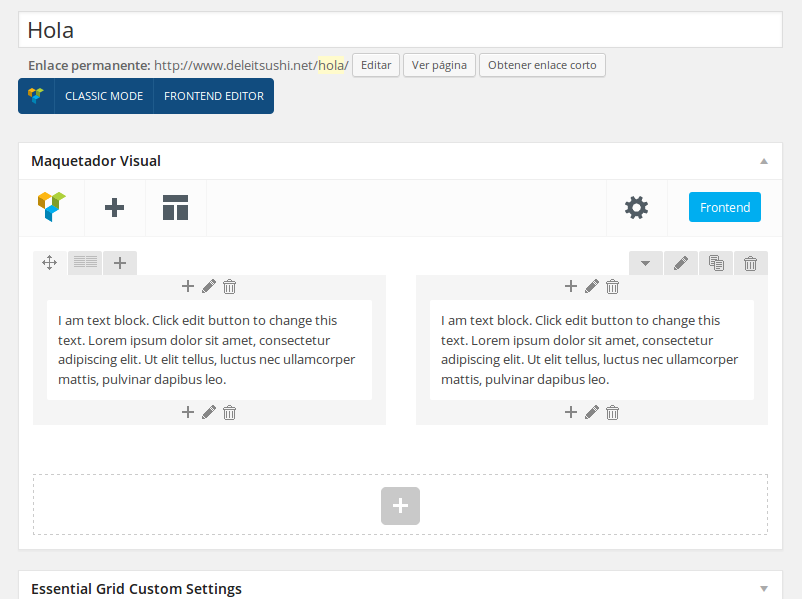
Could you please show a screenshot of what you see and what page you’re trying to edit?
Thank you.
Regards,
Eva Kemp.
Hello,
Please go to Settings > Visual Composer and select Content Types where you want VC editor to be displayed.
Thank you.
Regards,
Eva Kemp.
Hello,
Have you checked this on mobile device? Does such problem persists there too?
When you resize a browser window you should reload a page.
Thank you.
Regards,
Eva Kemp.
Hello,
Please provide us with FTP credentials as well.
Thank you.
Regards,
Eva Kemp.
Hello,
Please add this code in custom.css file:
.product-categories > li > a, .sidebar-widget .widget-title {
    padding-left: 20px !important;
}
Thank you.
Regards,
Eva Kemp.
Hello,
Sorry for a delay.
We couldn’t import demo slider for you because ZipArchive extension isn’t enabled on your server.
Please contact your hosting provider and ask them to activate this function.
Thank you.
Regards,
Eva Kemp.
Hello,
Could you please show a screenshot what you want to remove and a link to your site?
Thank you.
Regards,
Eva Kemp.
Hello,
I’ve selected “Redirect to the cart page after successful addition” in Woocommerce > Settings > Products tab.
Please check your site now.
Regards,
Eva Kemp.
Hello,
Please provide us with wp-admin panel credentials to check the issue.
Thank you.
Regards,
Eva Kemp.
Hello,
You can remove loading icon in Theme Options > General > Show loader icon until site loading > Off.
Please provide us with your site link and wp-admin panel credentials in Private Content to check the issue with spaces.
Thank you.
Regards,
Eva Kemp.
Hello,
Please try to use this code:
.header-wrapper.header-type-10.header-scrolling {
background-color: #FF99B3 !important;
}
Thank you.
Regards,
Eva Kemp.
Hello,
Sorry, but we don’t have such option. You can only remove the title if you want.
Thank you.
Regards,
Eva Kemp.
Hello,
You’re welcome.
Regards,
Eva Kemp.
Hello,
“SQUARETAC Copyright” has extra class “text-center” added in the column.
I’ve edited the column for “trial” static block and added the same class.

Now you can check the footer.
Thank you.
Regards,
Eva Kemp.
Hello,
I’ve added the following code into custom.css file:
.vc_custom_1413455381954 {
   bottom: -10px !important;
}
Please check the page now.
Thank you.
Regards,
Eva Kemp.
Hello,
Could you please show a screenshot where you want to add an image? You can add it as background editing the row in Visual Composer.
Thank you.
Regards,
Eva Kemp.
Hello,
We haven’t had such issues before with our themes.
Please clarify with more details. Is that notification shown when you try to make some changes in the theme?
Could you please show a screenshot and provide us with wp-admin panel credentials?
Thank you.
Regards,
Eva Kemp.
Hello,
To find duplicate slugs, go to Products > Tags and there you’ll see “small”, “medium” and “large” slugs that are already used.
Thank you.
Regards,
Eva Kemp.
Hello,
This issue is related to your server configuration. Contact your hosting provider and ask them to increase the values for upload_max_filesize and post_max_size functions.
Thank you.
Regards,
Eva Kemp.
Hello,
You’re welcome.
Have a good day!
Regards,
Eva Kemp
Hello,
You’re welcome.
Regards,
Eva Kemp.
Hello @ploywebdesign,
You’re welcome.
Regards,
Eva Kemp.
Hello,
You’re welcome.
Regards,
Eva Kemp.
Hello,
Please provide us with the direct page link where we can see the problem.
Thank you.
Regards,
Eva Kemp.
You’re welcome.
Regards,
Eva Kemp.
Hello,
We’re unable to view your screenshots because after download the files can’t be opened.
The path of the files is shown: “W:\constellation web issues\ISSUE1.pdf”. It’s the path of your drive.
Please upload screenshots to some image storage (for example, http://imgur.com/ ).
Thank you.
Regards,
Eva Kemp.
Hello,
You have file default.custom.css, but you must rename it to custom.css via FTP in the directory wp-content/themes/royal.
Thank you.
Regards,
Eva Kemp.









