
Hello,
You need also resave Permalinks settings.
Please try this.
Thank you.
Regards,
Eva Kemp.

Hello,
You need also resave Permalinks settings.
Please try this.
Thank you.
Regards,
Eva Kemp.
Hello,
Unfortunately it can be done only for all dividers.
Sorry.
Regards,
Eva Kemp.
Hello,
I’ve decreased margin-bottom value for the row in Design Options:
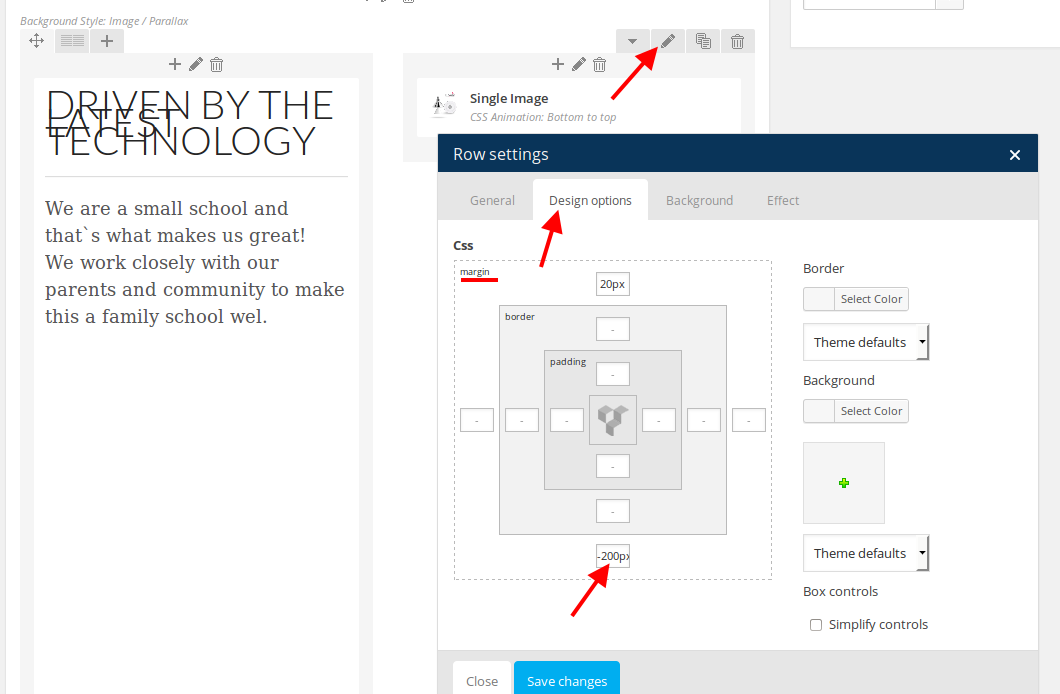
You can do the same for other rows if you need.
Thank you.
Regards,
Eva Kemp.
Hello,
I’ve checked your site in Firefox browser and haven’t seen any issues.
Could you please show a screenshot and provide us with the direct link where you see the problem?
Thank you.
Regards,
Eva Kemp.
Hello,
Could you please provide us with FTP credentials as well?
Thank you.
Regards,
Eva Kemp.
Hello,
That icons are placed in one image.
If you want to use only some of them you have to insert the links with your own icons.
Regards,
Eva Kemp.
Hello,
To achieve what you want you need disable zoom effect in Theme Options > Single Product Page. After that your image will be displayed fine.
Thank you.
Regards,
Eva Kemp.
Hello,
To remove capitalization you need add this code in custom.css file:
.menu > li > a, .menu .menu-full-width .nav-sublist-dropdown ul > li > a {
    text-transform: lowercase;
}
If you want to increase font size you can use this code:
.menu > li > a, .menu .menu-full-width .nav-sublist-dropdown ul > li > a {
    font-size: 15px;
}
Do you mean you wish to increase the width of the menu section?

Thank you.
Regards,
Eva Kemp.
Hello,
We’ve just updated the plugin Ultimate VC Addons.
Please make sure you have icon icons.png in the directory wp-content/themes/images/sprite.
Or provide us with FTP login details.
Thank you.
Regards,
Eva Kemp.
Hello,
Please try to add this code in custom.css file:
@media (max-width: 480px) {.header-type-10 .navbar-header {
    text-align: right !important;
    right: 12px;
}}
How to create custom.css file you can watch here (the tutorial is for other theme but the process identical) http://www.youtube.com/watch?v=Qok2zRedRMY&list=PLMqMSqDgPNmD4uhGI1IBhr1iaEy81TMff&feature=share&index=1
Thank you.
Regards,
Eva Kemp.
Hello,
Ok. Let us know when you need further assistance from us.
Thank you.
Regards,
Eva Kemp.
Hello,
Do you still need our help?
Thank you.
Regards,
Eva Kemp.
Hello,
Please provide us with wp-admin panel and FTP credentials to check the issue.
Thank you.
Regards,
Eva Kemp.
Hello,
You’re welcome.
Regards,
Eva Kemp.
Hello,
We’re glad you’ve found the solution.
Don’t hesitate to contact us if there are any questions.
Regards,
Eva Kemp.
Hello,
That’s great.
Enjoy your work.
Regards,
Eva Kemp.
Hello,
We’re glad you managed to fix it.
Let us know if there are any questions.
Thank you.
Regards,
Eva Kemp.
Hello,
1. Please provide us with your site link to give you the correct code for custom.css file.
2. You can select what products to show entering their ids in Products element of Visual Composer editor.
Regards,
Eva Kemp.
Hello,
You need use shortcode [etheme_products]. More information can be found at this link:
https://www.8theme.com/demo/docs/royal/#!/6_royal_shortcodes
Thank you.
Regards,
Eva Kemp.
Hello @commersant19,
Sorry, but your request is a bit unclear.
Could you please clarify with more details?
Show us your site link or screenshots for better understanding.
Thank you.
Regards,
Eva Kemp.
Hello,
Sorry, but there is a bug for the footer on a separate page.
Footer 1 and Footer 2 areas are shown from Appearance > Widgets.
This bug should be fixed in future update.
Thank you.
Regards,
Eva Kemp.
Hello,
Please provide us with FTP credentials as well to investigate this issue.
Thank you.
Regards,
Eva Kemp.
Hello,
Please contact your host and ask them to enable “allow_url_fopen” function and increase values for upload_max_filesize and post_max_size functions.
If this doesn’t help ask them to change php version to 5.3 if possible.
Thank you.
Regards,
Eva Kemp.
Hello,
If you want to change portfolio slug you need to edit wp-content/themes/royal/framework/portfolio.php , find the line 28:
$args = array(
and change the following code (line 41) :
'rewrite' => array('slug' => 'portfolio')
Replace “portfolio” with your text.
Thank you.
Regards,
Eva Kemp.
Hello,
Some images can’t be found. Please reupload them and add to the products again.
Thank you.
Regards,
Eva Kemp.
Hello,
To move the divider to right you need add this code in custom.css:
hr.divider.break {
margin-left: 1000px;
}
Please check the second video settings on youtube. Perhaps you’ve enabled some restrictions for it.
Thank you.
Regards,
Eva Kemp.
Hello,
I’ve updated Visual Composer plugin.
Please check it.
Thank you.
Regards,
Eva Kemp.
Hello,
Do you wish to decrease that space?
Please clarify.
Thank you.
Regards,
Eva Kemp.
Hello,
You’re welcome.
Regards,
Eva Kemp.
Hello @Morten,
We’ve updated the plugin for you.
Thank you.
Regards,
Eva Kemp.









