
Hello,
I’ve enabled “languages area” in Theme Options > Header.
Please check it now.
Thank you.
Regards,
Eva Kemp.

Hello,
I’ve enabled “languages area” in Theme Options > Header.
Please check it now.
Thank you.
Regards,
Eva Kemp.
Hello @ozlars,
Please don’t worry about this notification.
It won’t affect your site work.
The issue will be fixed in the next update.
Thank you.
Regards,
Eva Kemp.
Hello,
You’re welcome.
Regards,
Eva Kemp.
Hello,
We’ve already had such discussion on our forum.
We’ve improved our theme as much as we could. And we have already emphasized if someone of our customers has experience in development and has proposals concerning changes in the theme (we mean only specific changes in the code in particular files, rather than general phrases like “Reduce CSS File” etc), we are asking to declare them here or contact us via the contact form https://www.8theme.com/contact-us/
If the recommended changes are effective and reduce time load of the theme, you will receive financial compensation.
Thank you for understanding.
Regards,
Eva Kemp.
Hello,
1. You can change URL on a logo in theme-functions.php (lines 934, 936) file in the wp-content/themes/legenda/framework directory. Replace the code <?php echo home_url(); ?> with your link.
2. You can add any widgets into “Place in header top bar” area in Appearance > Widgets.
3. 4. Unfortunately we can’t see your screenshot as your site is unavailable.
5. 6. Please open access to your site to be able to assist you.
Thank you.
Regards,
Eva Kemp.
Hello,
I’ve updated Revolution Slider plugin to the latest version. Please check it now.
Also we recommend you to update the theme to the latest 2.4.1 version.
Don’t forget to create a back up of the files and database before update.
Thank you.
Regards,
Eva Kemp.
Hello,
1. Please provide us with wp-admin panel credentials to check the issue with Viteo brand.
2. To change font size please use this code in custom.css file:
.top-panel a {
    font-size: 13px !important;
}
Thank you.
Regards,
Eva Kemp.
Hello,
You can add Custom Menu widget in “Place in header top bar” widget area in Appearance > Widgets.
But please note it’s usually used for sidebars.
Thank you.
Regards,
Eva Kemp.
Hello,
Sorry, but this is not the theme issue.
Please refer to these articles concerning the problem:
http://www.webpagetest.org/forums/showthread.php?tid=12792
https://wordpress.org/support/topic/plugin-wordpress-seo-by-yoast-sitemap-blocked-by-robotstxt-already-checked-my-robots-file
https://wordpress.org/support/topic/sitemap-contains-urls-which-are-blocked-by-robotstxt-2
Thank you.
Regards,
Eva Kemp.
Hello,
Please provide us with a link to a page where you want to add borders to your images.
Have you modified style.css file?
We don’t recommend to change original file, but you should make changes in custom.css file.
Please watch this tutorial how to create custom.css:
https://www.youtube.com/watch?v=Qok2zRedRMY
Thank you.
Regards,
Eva Kemp.
Hello,
Our documentation has a good instruction how to create footer: https://www.8theme.com/demo/docs/legenda/index.html#!/footer
Please follow the steps in there.
It should help you.
Thank you.
Regards,
Eva Kemp.
Hello,
Do you wish all products blocks on the Shop page to be the same sizes?
Please provide us with the link to your page.
Thank you.
Regards,
Eva Kemp.
Hello,
As I see there are empty slides in Revolution Slider:
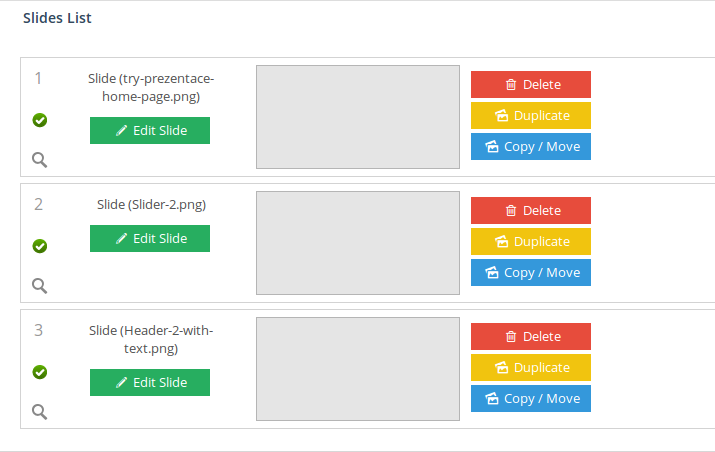
That’s why you see space on the home page.
Please reupload your images for the slider.
Thank you.
Regards,
Eva Kemp.
Hello,
We’re very sorry for a long delay.
White space problem is caused by too large paddings for the video section. We’ve corrected them and spaces are gone now.
Also we’ve been investigating the problem of background display for sections and can’t understand what is causing the bug with the parallax effect on your site. This option is added in our theme with the help of additional plugin Ultimate Addons for Visual Composer. We’ve activated a default theme and the bug persists there too. So this is related to the plugin work. We’d recommend you to contact this plugin support team for the solution.
Thank you for understanding.
Regards,
Eva Kemp.
Hello,
Font family for products description is Open Sans.
To change the font for h1 tag use this code in custom.css file:
h1 {
  font-family: Open Sans;
}
Thank you.
Regards,
Eva Kemp.
Hello,
Unfortunately there is no such attribute. You can specify what products to show by ids:
[etheme_products title=" " ids=""]
Please refer to our documentation:
https://www.8theme.com/demo/docs/legenda/index.html#!/legenda_shortcodes
Thank you.
Regards,
Eva Kemp.
Hello,
Please provide us with the link to tha page with banners and wp-admin panel/FTP credentials in Private Content.
Thank you.
Regards,
Eva Kemp.
Hello,
Unfortunately we don’t have such option in the theme. You can add Facebook button using some social media plugin.
Thank you.
Regards,
Eva Kemp.
Hello,
Please add this code into custom.css file:
.wpb_teaser_grid .et_isotope .et_isotope-item {
    width: 750px !important;
}
Thank you.
Regards,
Eva Kemp.
Hello,
Thank you for sharing the solution.
We’re glad you’ve fixed it.
Enjoy your work.
Regards,
Eva Kemp.
Hello,
Your captcha image isn’t showing so we can’t log in to wp-admin panel.
To have excerpt shown on the Blog page you can use “Read more” button https://www.8theme.com/knowledge-base/using-read-more-button-on-wordpress-blog/
Please try it.
Thank you.
Regards,
Eva Kemp.
Hello,
You can add this code into custom.css file:
.product-category .mask-container {
width: 200px !important;
}
Thank you.
Regards,
Eva Kemp.
Hello,
This feature is related to Woocommerce configuration, so you need contact them concerning your question.
Thank you.
Regards,
Eva Kemp.
Hello,
That warning doesn’t affect your site work and translation.
You can find how to translate theme files in our documentation:
https://www.8theme.com/demo/docs/royal/#!/0_how_to_translate
So you can work without any worries.
Thank you.
Regards,
Eva Kemp.
Hello,
I’ve checked your site and products are added to the cart without any problems.
Please try to clear browser cache and check again.
Thank you.
Regards,
Eva Kemp.
Hello,
Please remove all existing plugin folders in wp-content/plugins and try to install them again.
If the issue still persists create a back up of the database and files and try to reinstall the theme. Please note Woocommerce plugin should be installed the first.
Thank you.
Regards,
Eva Kemp.
Hello,
I’ve just checked your products pages and haven’t seen 404 errors.
Could you please clarify where you’re getting them?
Thank you.
Regards,
Eva Kemp.
Hello,
You need go to Woocommerce > Settings > Products tab and select “Show subcategories” in the field “Shop Page Display”.
Thank you.
Regards,
Eva Kemp.
Hello @LindaMendible,
All plugins are external extensions which are included into theme because for each product we purchase “Extended license” and that’s why we are able to include it into them. This plugin works fine without activation and you can always get actual version if you want directly from us. Just ask and we’ll send you current version. We update plugins with theme updates time to time so with each next theme update, plugins will be also updated. The option with registering of the plugin has been already added to plugin and this only allow you to get automatic updates and support for this plugin directly from author if you need. You don’t need to register this product because it is not required but if you want to get those features, then you need to purchase this plugin directly from author. This is how it works for all themes on Themeforest and not only in our case.
Concerning RSS images, please provide us with the link and a screenshot where they should be shown.
Thank you.
Regards,
Eva Kemp.
Hello,
As I see you’re using old theme version. Please update it to 1.3 version. It must fix the problem.
Thank you.
Regards,
Eva Kemp.









