
Hello,
You need back up all files and database before the update.
Please read WordPress documentation:
http://codex.wordpress.org/WordPress_Backups
Thank you.
Regards,
Eva Kemp.

Hello,
You need back up all files and database before the update.
Please read WordPress documentation:
http://codex.wordpress.org/WordPress_Backups
Thank you.
Regards,
Eva Kemp.
Hello,
I’ve edited the code.
Please check the header now.
Thank you.
Regards,
Eva Kemp.
Hello,
Please contact your host and ask if it’s possible to change php version to 5.3 for your site on a server.
This may fix the problem.
Thank you.
Regards,
Eva Kemp.
Hello,
Please contact your host and ask them to increase memory_limit value.
Thank you.
Regards,
Eva Kemp.
Hello,
Do you mean grey background under the menu section?
Then please add this code in custom.css:
.header-scrolling .header-custom-block {
   background-color: #1E0203 !important;
}
Thank you.
Regards,
Eva Kemp.
Hello,
Please provide us with FTP credentials as well.
Thank you.
Regards,
Eva Kemp.
Hello,
We’re glad the solution has been found.
Enjoy your work.
Thank you.
Regards,
Eva Kemp.
Hello,
If you want to remove main product image you need use this code in custom.css file:
.product-images-slider {
    display: none !important;
}
Thank you.
Regards,
Eva Kemp.
Hello,
Please try to use this code in custom.css file:
.spreadplugin-checkout-link.button {
background-image: none;
}
.spreadplugin-checkout-link:before {
width: 72px !important;
height: 68px !important;
margin: 0px 35px 0 0 !important;
background: url('http://freerunner.wpengine.com/wp-content/uploads/2014/10/cart_icon_spreadplugin.png') no-repeat 0 0 !important;
}
Thank you.
Regards,
Eva Kemp.
Hello,
Please add this code in custom.css file:
@media (max-width: 480px) {header {
    background-color: black !important;
}}
Thank you.
Regards,
Eva Kemp.
Hello,
The reason is you’re using child theme and such info is written in its style.css.
Please don’t worry. It won’t hurt your site.
Thank you.
Regards,
Eva Kemp.
Hello,
Sorry, but we don’t guarantee full compatibility of 3rd-party plugins with our theme.
It’s impossible for theme author to make the theme compatible with all existing extensions.
Please take our apologies.
Regards,
Eva Kemp.
Hello,
The problem may be related to your host:
http://stackoverflow.com/questions/20135530/why-isnt-my-webm-file-playing-in-firefox
Please contact them concerning this issue.
Concerning the youtube videos at the end of the video, you need use some plugin or visit youtube helpbase where some solution may be given.
Thank you.
Regards,
Eva Kemp.
Hello @ziloub,
Please check row settings > Design options in Visual Composer editor if you have any values set for paddings or margins.
Thank you.
Regards,
Eva Kemp.
Hello,
Please check if allow_url_fopen is enabled at your host. Also ask your hosting provider to increase the values for upload_max_filesize and post_max_size functions. Check what php version is used. It shouldn’t be less than 5.3 version.
Regards,
Eva Kemp.
Hello,
You can remove that icon on mobile using this code in custom.css file:
@media (max-width: 480px) {div#sitelock_shield_logo {
display: none;
}}
Thank you.
Regards,
Eva Kemp.
Hello,
I’ve disabled “Force Full Width” in Revolution Slider settings and now the slider is working fine.
Please check.
Thank you.
Regards,
Eva Kemp.
Hello,
Please create a ticket http://support.8theme.com/ and our developers will look into this issue more deeper.
Thank you.
Regards,
Eva Kemp.
Hello,
You forgot to close the tag in the code that’s why it didn’t work.
To change color for submenu items use this code:
.menu .nav-sublist-dropdown ul > li > a {
    color: color_value !important;
}
.header-vertical-enable .page-wrapper .header-type-vertical .container .menu .nav-sublist-dropdown {
background-color: color_value !important;
}Thank you.
Regards,
Eva Kemp.
Hello,
Please try to use this code:
.side-area-icon i:hover:before {
color: white !important;
}
instead of this one:
.side-area-icon i:hover {
color: white !important;
}
Thank you.
Regards,
Eva Kemp.
Hello,
Please don’t worry concerning this warning. It won’t affect your site work.
This issue will be fixed in the next update.
Thank you.
Regards,
Eva Kemp.
Hello,
Could you please clarify with more details what problems are you experiencing with the translation?
Thank you.
Regards,
Eva Kemp.
Hello @shaneryanmurphy,
Sorry for a long delay.
Unfortunately we don’t have such feature currently but our developers are working on it to implement in future updates.
Please take our apologies for inconveniences.
Regards,
Eva Kemp.
Hello,
You need select variable products, not simple products in the product editor:
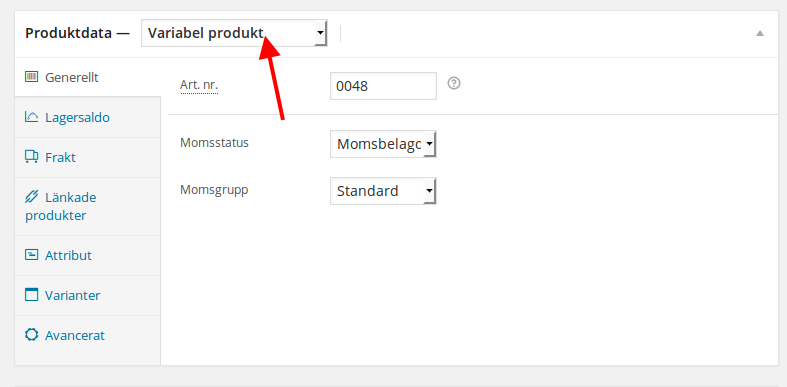
Also please read carefully Woocommerce documentation concerning the variations:
http://docs.woothemes.com/document/product-variations/
Thank you.
Regards,
Eva Kemp.
Hello,
We’re sorry for a delay.
Please try the solution below.
In order to be able to scan the plugins for strings you have to select “Translate by WPML” from WPML > Theme and plugin localization.
Then you will be presented with a list of your plugins and then you have to select the plugin and scroll to the bottom of the page and press scan.
Afterwards you can go to string translation module and search for these strings.
Thank you.
Regards,
Eva Kemp.
Hello,
As I see the path for original cross icon is wp-content/themes/legenda-pomp/images/black_cross.png in your pop up. Have you made any changes in the files? Do you have such folder legenda-pomp?
Please provide us with wp-admin panel and FTP credentials.
Thank you.
Regards,
Eva Kemp.
Hello,
You can try this plugin from Woocommerce http://docs.woothemes.com/document/catalog-visibility-options/ or use the solution from these articles:
http://stackoverflow.com/questions/16509966/showing-add-to-cart-for-logged-in-users-only-woocommerce
http://www.kriesi.at/support/topic/woocommerce-price-only-when-user-login/
Thank you.
Regards,
Eva Kemp.
Hello,
Please check Slide 2 and Slide 3 in LayerSlider settings. You have added Layers for them.
Remove them and you’ll have only one slide.
Thank you.
Regards,
Eva Kemp.
Hello,
Please try to install the theme via FTP as described in the documentation:
https://www.8theme.com/demo/docs/blanco/index.html#!/installation
Thank you.
Regards,
Eva Kemp.
Hello,
Please provide us with FTP credentials as well.
Thank you.
Regards,
Eva Kemp.









