
Hello,
Please provide us with wp-admin panel credentials in Private Content.
Thank you.
Regards,
Eva Kemp.

Hello,
Please provide us with wp-admin panel credentials in Private Content.
Thank you.
Regards,
Eva Kemp.
Hello,
The Accordion element is shown on all tabs because you appended in to the column with Tabs element.
To have it separated from other tabs you can try to add Tabs element in a row, inside the first tab create other row and insert Text element there. Then append FAQ element to the column inside the first tab. It’ll be similar to accordion. You can check the page how I’ve created test tabs under your original tabs.
Thank you.
Regards,
Eva Kemp.
Hello,
Have you changed your domain name or there are problems at your host? We can’t view the site.
Please provide us with correct wp-admin panel link and the login deatils.
Thank you.
Regards,
Eva Kemp.
Hello,
Please provide us with FTP and wp-admin panel credentials in Private Content.
Thank you.
Regards,
Eva Kemp.
Hello,
Have you imported all parts of Essential Grid .json file?
Thank you.
Regards,
Eva Kemp.
Hello @SMARTEBENE,
Please check your email for Ultimate VC Addons plugin.
Regards,
Eva Kemp.
Hello @SMARTEBENE,
The plugin archive has been sent to your email address.
Please check.
Regards,
Eva Kemp.
Hello,
You can remove the 3rd title adding this code into custom.css file:
.blog-post .post-title {
   display: none;
}
Please try it.
Thank you.
Regards,
Eva Kemp.
Hello @Jonasurs,
The plugin archive has been sent to your email address.
Please check.
Regards,
Eva Kemp.
Hello,
Theme Options in admin panel can be translated in wp-content/themes/legenda/languages. If you check our default .po file – default.po – you’ll find all text in there.
Thank you.
Regards,
Eva Kemp.
Hello,
Sorry, but your question is unclear.
Could you please clarify with more details?
Show us a screenshot for clear understanding.
Thank you.
Regards,
Eva Kemp.
Hello @danghaitrieu91,
You’re welcome.
Regards,
Eva Kemp.
Hello,
You need check your translations and edit all the symbols. For example, in WPML > String Translation I’ve found the following string with the word d'avis
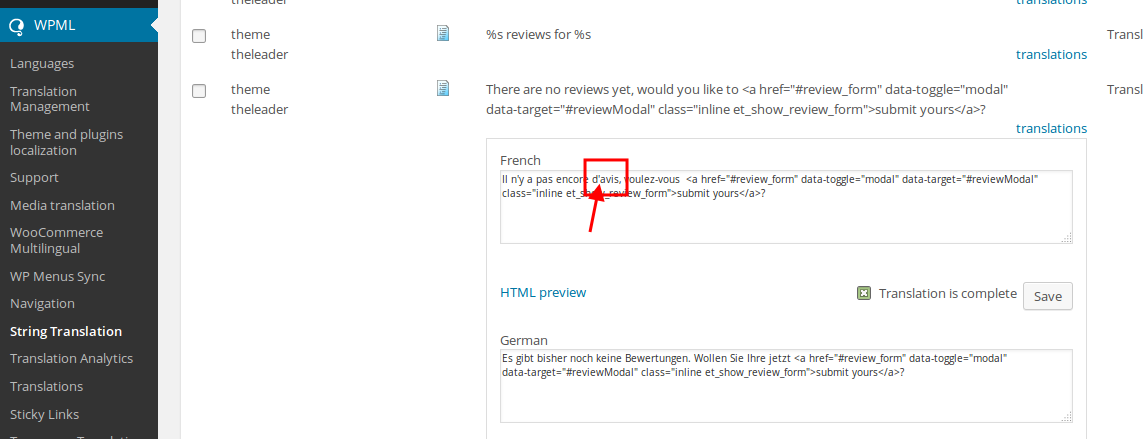
You need to replace this symbol with the code as shown at this link http://www.ascii.cl/htmlcodes.htm
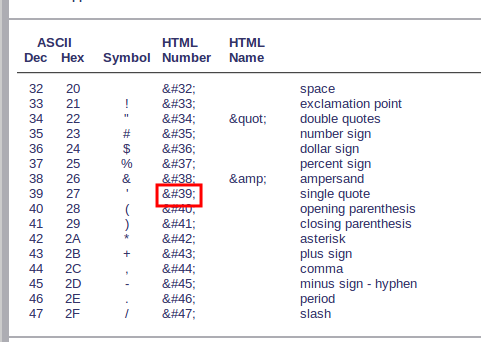
So check all your translation and replace the apostrophe symbol with the code.
Thank you.
Regards,
Eva Kemp.
Hello @explorework,
To make “Add to cart” button work for Pricing Tables you need add a link for this button.
To make a product be added into the cart you need add the link http://makeinindiadigital.com/?add-to-cart=19057 for the button (edit this code <li><a href="#" class="button">Add to Cart</a></li> and replace # with the correct link), where 19057 is the product id which needs to be added.
Product ID can be found in Products
http://storage6.static.itmages.com/i/14/1225/h_1419508638_9000963_2404a15efa.png
Thank you.
Regards,
Eva Kemp.
Hello @Arrakis,
We’ve sent an archive to your email address.
Please check.
You don’t need a license key. You can always get the latest updates of plugins from us.
Regards,
Eva Kemp.
Hello,
I’ve updated the theme and plugins Revolution Slider and Visual Composer.
Please check your site now.
Regards,
Eva Kemp.
Hello,
Sorry for a long delay.
We used slider for categories pages. Add Revolution Slider shortcode in the category description in Products > Categories > edit category > Description.
Thank you.
Regards,
Eva Kemp.
Hello,
I’ve imported Royal Marriage template using Essential Grid element from Visual Composer editor on the page Marriage http://www.orion-crusades.com/marriage/
You have to upload your own images in Essential Grid as it’s not allowed to use our images from the demo site.
Regards,
Eva Kemp.
Hello @danghaitrieu91,
To display description you need add this code in the file wp-content/themes/legenda/woocommerce/archive-product.php (after the code you added for a thumbnail)
<? if(isset($cat->description) && $cat->description !='' && !is_shop()) {
	            ?>
	            	<div class="product-category-description">
		            	<?php echo do_shortcode($cat->description); ?>
	            	</div>
	            <?php
            }


         ?>
Thank you.
Regards,
Eva Kemp.
Hello,
FTP credentials are incorrect.
Please check and provide us with the correct ones.
Thank you.
Regards,
Eva Kemp.
Hello,
You need add this shortcode [share] in Text widget and drag it to “Place in header top bar” area in Appearance > Widgets.
Regards,
Eva Kemp.
Hello,
You didn’t close div tag in the file. That’s why there was a problem.
We’ve edited the code and now it’s ok.
Please check.
Thank you.
Regards,
Eva Kemp.
Hello,
Please add this code into custom.css file:
.aelia_tax_display_by_country.widget_wc_aelia_billing_country_selector_widget {
margin-left: 150px;
margin-top: -30px;
}
How to create custom.css you can watch in this tutorial.
Thank you.
Regards,
Eva Kemp.
Hello,
Thank you for your feedback.
We appreciate very much.
We’ve taken your request into our account.
Thank you.
Regards,
Eva Kemp.
Hello,
Please provide us with an email address where we can send the plugins.
Thank you.
Regards,
Eva Kemp.
Hello,
In the theme package you’ll find various templates in the folder “XML_Data”. You can import the home page as shown in our documentation
https://www.8theme.com/demo/docs/legenda/index.html#!/demo_data_installation
Thank you.
Regards,
Eva Kemp.
Hello,
You can upload any image with .jpg or .png extension.
You can set a thumbnail size in Info Circle settings > Thumbnail tab > Thumbnail Icon Size

Also you can change the size for Information Area beside the “Thumbnail” tab in the settings.
Thank you.
Regards,
Eva Kemp.
Hello,
To have sidebar visible you need select other header type, not vertical one.
Then select layout with sidebar in Theme Options > Products Page Layout.
Thank you.
Regards,
Eva Kemp.
Hello,
I’ve made screenshots from video and as you can see there is no problem on our side:
http://imgur.com/86P2ZmF
The video isn’t pixelated. What browser and OS are you checking in?
Thank you.
Regards,
Eva Kemp.
Hello,
You can create a a user for us in wp-admin panel. After that you’ll be able to delete it.
Regards,
Eva Kemp.










