
Hello,
As I see you’ve already installed Visual Composer plugin:
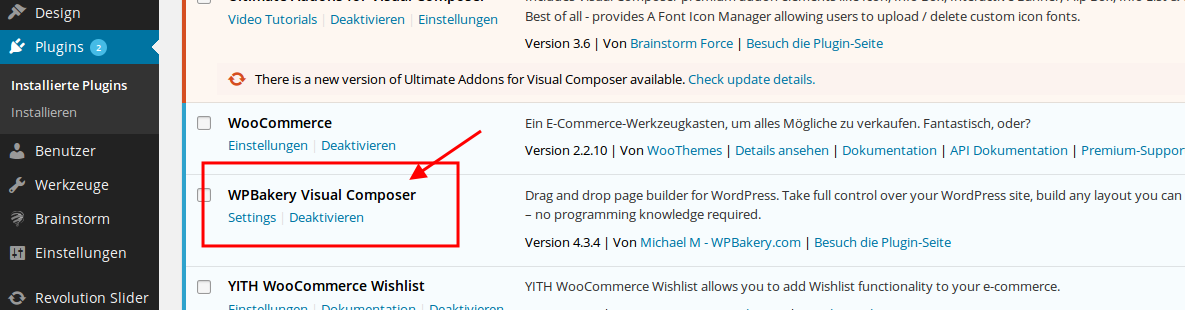
Please specify what problems you’re experiencing with it.
Thank you.
Regards,
Eva Kemp.

Hello,
As I see you’ve already installed Visual Composer plugin:
Please specify what problems you’re experiencing with it.
Thank you.
Regards,
Eva Kemp.
Hello @Pusbratkis,
Please provide us with FTP and wp-admin panel credentials in Private Content.
Thank you.
Regards,
Eva Kemp.
Hello,
As I see breadcrumbs are shown on Shop page now.
Please check.
Thank you.
Regards,
Eva Kemp.
Hello,
Thank you for the access.
I’ve just checked your site again and “Return to previous page” text is translated now:
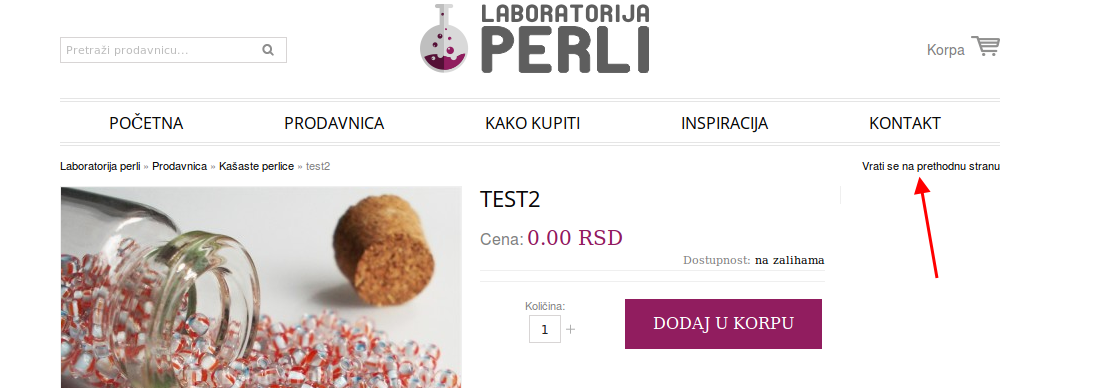
Please check it.
Thank you.
Regards,
Eva Kemp.
Hello @carlatgallardo@gmail.com,
I’ve updated VC plugin for you.
Please let us know if you need more help.
Thank you.
Regards,
Eva Kemp.
Hello,
You’re welcome.
Regards,
Eva Kemp.
Hello @Mijat,
Please provide us with wp-admin panel and FTP credentials.
Thank you.
Regards,
Eva Kemp.
Hello @ephil,
What theme and Visual Composer plugin versions are you using?
Regards,
Eva Kemp.
Hello @DZHAVAELCOUTURE,
What is your site url?
Thank you.
Regards,
Eva Kemp.
Hello,
As I see your SSL certificate is working fine and there are no warnings:
http://imgur.com/WrLdpvy
What problems are you experiencing?
Thank you.
Regards,
Eva Kemp.
Hello,
Sorry, but we can’t recommend any plugins for you as we don’t guarantee full compatibility with the theme.
You may try to test some plugins which you find.
Please take our apologies for inconveniences.
Regards,
Eva Kemp.
Hello,
We’re glad your issue is resolved.
Have a great year too!
Thank you.
Regards,
Eva Kemp.
Hello,
Please give us your email address and we’ll send a new plugin version to you.
Regards,
Eva Kemp.
Hello,
1. Yes, you’re correct.
2. Sorry for misunderstanding. There are no features to divide a submenu into columns.
3. To make submenu items to be spread you need use et-co1-1 to et-col12 in CSS classes of the menu.
4. I’ve added this code into custom.css file to make submenu transparent:
.main-nav .menu > li.menu-full-width .nav-sublist-dropdown, .main-nav .menu > li .nav-sublist-dropdown .container, .fixed-header .menu > li.menu-full-width .nav-sublist-dropdown {
    background-color: rgba(255, 255, 255, 0.5) !important;
}
.main-nav .menu > li .nav-sublist-dropdown .container > ul > li a, .fixed-header .menu > li .nav-sublist-dropdown .container, .fixed-header .menu > li .nav-sublist-dropdown .container > ul > li a {
    background-color: transparent !important;
    color: black !important;
}
.main-nav .menu > li.menu-full-width .nav-sublist-dropdown .container > ul > li > a, .fixed-header .menu > li.menu-full-width .nav-sublist-dropdown .container > ul > li > a {
    color: black !important;
}
Please check.
Regards,
Eva Kemp.
Hello,
Please provide us with wp-admin panel credentials in Private Content to check the issue.
Thank you.
Regards,
Eva Kemp.
Hello,
Please add this code into custom.css file:
.mobile-nav-heading.close-mobile-nav, .mobile-menu-block.st-menu {
   background-color: white;
}
How to create custom.css you can watch in this tutorial (it’s for Legenda theme but the process is the same).
Thank you.
Regards,
Eva Kemp.
Hello,
We’re glad your issue is resolved.
Have a nice day.
Regards,
Eva Kemp.
Hello,
Please try to disable 3rd-party plugins and check your panel then. Some plugins may cause slow loading.
Thank you.
Regards,
Eva Kemp.
Hello,
Please provide us with a link to your site and wp-admin panel credentials in Private Content.
What links are you getting 404 error on?
Regards,
Eva Kemp.
Hello,
If you want to have both logo centered and the header transparent, it can’t be done.
You can only select one of the features.
To have logo centered you need choose other header type in Theme Options > Header. But to have the header transparent only header types 2 or 3 should be selected.
Sorry for inconveniences.
Regards,
Eva Kemp.
Hello,
Your plugins folder was renamed. I’ve renamed it to original.
Also I have installed base demo content for the theme and it’s working fine.
Please check your site now.
Thank you.
Regards,
Eva Kemp.
Hello,
Could you please clarify with more details?
What section is missing?
Sorry, but I don’t see any problems. I checked the links as you described and it worked for me. Have you tried checking with another browser?
Thank you.
Regards,
Eva Kemp.
Hello,
Sorry, but this requires additional customization and isn’t for free.
You can create a ticket at http://support.8theme.com/ and our developers will look into your issue.
Thank you.
Regards,
Eva Kemp.
Hello,
You didn’t rename default.custom.css to custom.css.
How to create custom.css you can watch in this tutorial (it’s for Legenda theme but the process is the same).
Thank you.
Regards,
Eva Kemp.
Hello,
In this case you can try to use other VC element for Google map:
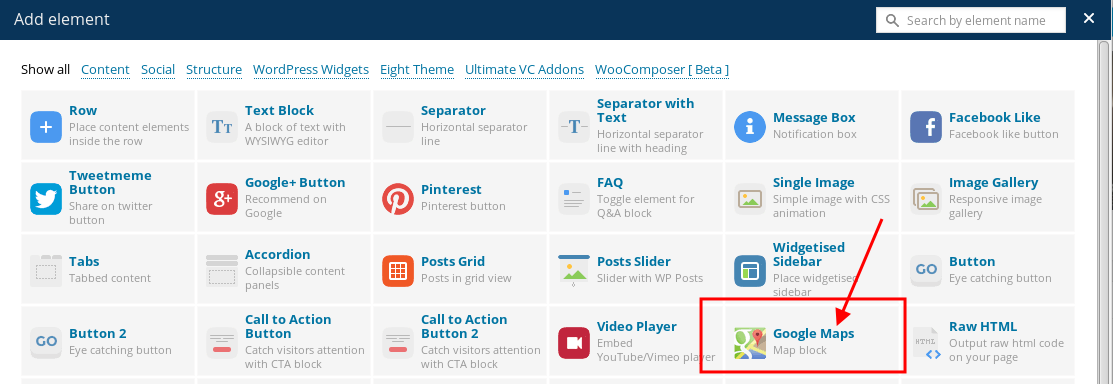
It won’t be shown for full width.
Thank you.
Regards,
Eva Kemp.
Hello,
Sorry, but there is no possibility to choose a category in Product Categories element, that’s why I recommended you to use other VC element where such possibility is present.
Thank you for understanding.
Regards,
Eva Kemp.
Hello,
Please provide us with an email address and we’ll send new plugins versions to you.
Thank you.
Regards,
Eva Kemp.
Hello,
You can try to edit the media query located in the responsive style sheet file wp-content/themes/royal/css/responsive.css (line 1005).
Changed it from
@media only screen and (max-width: 1200px)
to
@media only screen and (max-width: 992px)
Thank you.
Regards,
Eva Kemp.
Hello,
Concerning that error you should contact your hosting provider and ask them to increase memory limit value.
Thank you.
Regards,
Eva Kemp.
Hello @Agan-san,
You’re welcome.
Regards,
Eva Kemp.









