
Hello @Agan-san,
The plugin has been sent.
Please check.
Regards,
Eva Kemp.

Hello @Agan-san,
The plugin has been sent.
Please check.
Regards,
Eva Kemp.
Hello,
Please provide us with a link to your page where social icons are displayed and FTP credentials in Private Content.
Thank you.
Regards,
Eva Kemp.
Hello,
You can change body text color adding the code in custom.css file, for example:
p {color: red;}
How to create custom.css you can watch in this tutorial (it’s for Legenda theme but the process is the same).
Thank you.
Regards,
Eva Kemp.
Hello,
Please provide us with wp-admin panel credentials in Private Content.
Thank you.
Regards,
Eva Kemp.
Hello,
I’ve added this code in custom.css file:
.navbar-collapse {
    padding-left: 300px;
}
Please check the menu now.
Thank you.
Regards,
Eva Kemp.
Hello,
You can replace the image http://allstatesmovingstorage.com/wp-content/themes/royal/images/assets/payments.png in Footer Copyright in Appearance > Widgets.
Thank you.
Regards,
Eva Kemp.
Hello,
You’re welcome.
Have a nice evening.
Regards,
Eva Kemp.
Hello @kvaugust,
The credentials to wp-admin panel are incorrect.
Also try to deactivate all 3rd-party plugins and check logo again. Some plugins may create a conflict.
Thank you.
Regards,
Eva Kemp.
Hello,
You’re welcome.
Regards,
Eva Kemp.
Hello,
You need select Content types where VC editor should be used. Check it in Settings > Visual Composer.
Thank you.
Regards,
Eva Kemp.
Hello,
1. Your original images should be approximately 1 200px × 900px dimensions.
2. I’ve selected Home page as a front page in wp-admin panel > Settings > Reading.
Please check now.
Regards,
Eva Kemp.
Hello,
You’re welcome.
Regards,
Eva Kemp.
Hello,
You’re welcome.
Regards,
Eva Kemp.
Hello,
Do you want to add the code on Checkout page?
If so you need contact Woocommerce support team as this page is configured by them.
Thank you.
Regards,
Eva Kemp.
Hello,
You need edit a row in Visual Composer editor and select Background tab in the row settings:
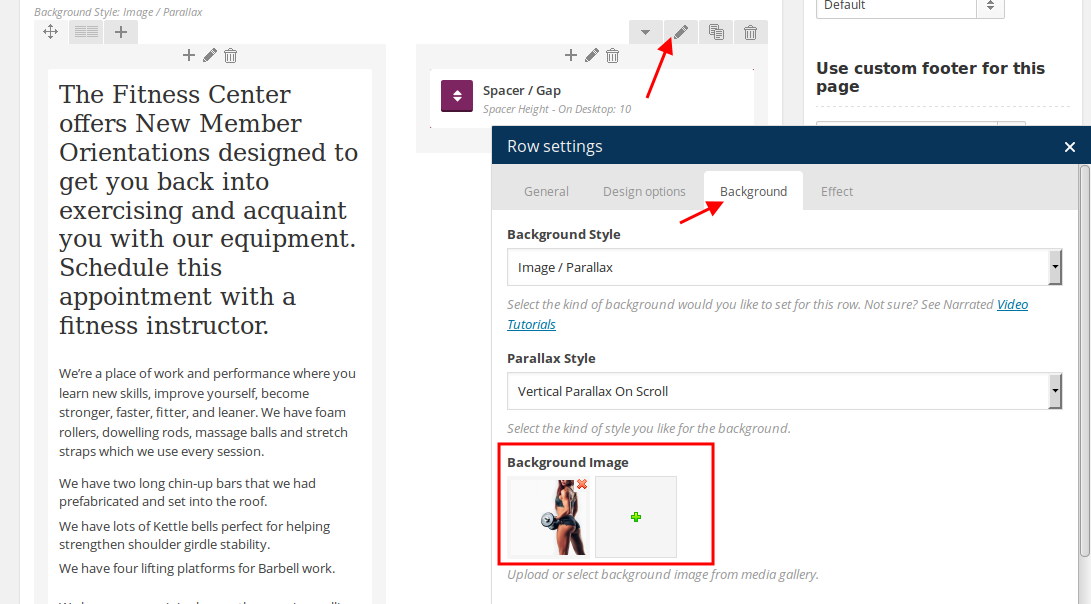
Thank you.
Regards,
Eva Kemp.
Hello,
Please provide us with FTP credentials.
Thank you.
Regards,
Eva Kemp.
Hello,
When I activate original Royal theme the problem with menu disappears. So you need check modifications you made in your child theme.
Concerning the footer please add Static Block widget into Footer 1 or Footer 2 area in Appearance > Widgets.
Thank you.
Regards,
Eva Kemp.
Hello,
In this case you need select Number of items on tablet in Products element settings in Visual Composer editor:
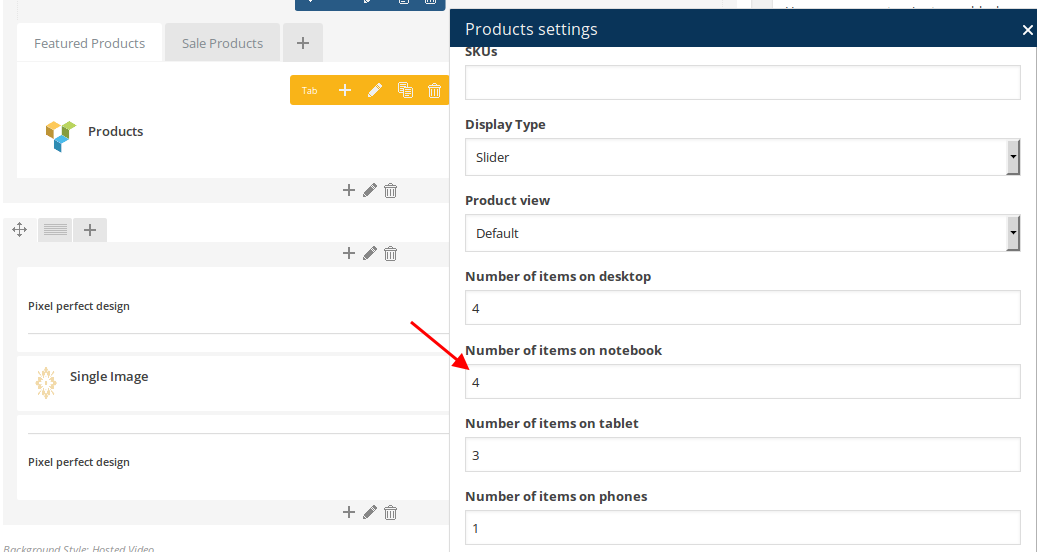
Thank you.
Regards,
Eva Kemp.
Hello,
Please provide us with FTP and wp-admin panel credentials in Private Content.
Thank you.
Regards,
Eva Kemp.
Hello,
We can send a new plugin version to your email address (provide us with it) or we’ll update the plugin for you if you give us FTP and wp-admin panel credentials in Private Content.
Thank you.
Regards,
Eva Kemp.
Hello,
We’ve sent 2 plugins archives to you – Revolution Slider and Visual Composer.
Please check.
Regards,
Eva Kemp.
Hello,
We provide support only for WordPress themes, not Magento, that’s why you have to contact other author and there is other support team for Magento themes.
Thank you for understanding.
Regards,
Eva Kemp.
Hello,
We’re getting Internal Server Error on the site.
Are there any problems at your host?
Please check it.
Thank you.
Regards,
Eva Kemp.
Hello,
You need edit the file et-links.php in wp-content/themes/blanco directory.
Thank you.
Regards,
Eva Kemp.
Hello,
Sorry for a long delay.
I’ve updated the theme, but also Woocommerce plugin should be updated.
But the update process us failed.
Please check plugins folder permissions and owner whether they are correct. You can ask your host to check it.
Thank you.
Regards,
Eva Kemp.
Hello,
Please update the theme to 2.5 version. Don’t forget to create a back up before update!
https://www.youtube.com/watch?v=KdWESIIPU1k
Thank you.
Regards,
Eva Kemp.
Hello,
Sorry for a delay.
We’ve updated etheme.js file and now the tabs are working.
Please check.
Thank you.
Regards,
Eva Kemp.
Hello @martijntje,
To display description you need add this code in the file wp-content/themes/legenda/woocommerce/archive-product.php (after line 38):
<? if(isset($cat->description) && $cat->description !='' && !is_shop()) {
	            ?>
	            	<div class="product-category-description">
		            	<?php echo do_shortcode($cat->description); ?>
	            	</div>
	            <?php
            }


         ?>
Regards,
Eva Kemp.
Hello,
Please check if you enabled responsive design in Theme Options > Responsive.
If the problems are still there please provide us with wp-admin panel credentials in Private Content.
Thank you.
Regards,
Eva Kemp.
Hello,
Please add this code to custom.css file:
.header-type-10 .menu-wrapper .navbar-collapse .menu-main-container .menu > li > a {
   border-color: transparent !important;
}
Thank you.
Regards,
Eva Kemp.










