
Hello,
In custom.css file you have the code
.page-heading{display:none;}
You need remove it to get Product title shown.
Thank you.
Regards,
Eva Kemp.

Hello,
In custom.css file you have the code
.page-heading{display:none;}
You need remove it to get Product title shown.
Thank you.
Regards,
Eva Kemp.
Hello @socialtap, @Nebulas,
Please check your email address.
The archive with pages variants has been sent.
Thank you.
Regards,
Eva Kemp.
Hello,
I’ve added this code in style.css of the child theme:
.languages-area {
   display: block;
}
Now you can add widgets into “Place in header top bar” widget area.
Thank you.
Regards,
Eva Kemp.
Hello,
We’ve sent a new VC plugin version to admin@sunzhaifun.com email address.
Please check it.
Thank you.
Regards,
Eva Kemp.
Hello,
We’re glad your issue has been resolved.
If there are any questions let us know.
Have a nice day!
Regards,
Eva Kemp.
Hello,
You need remove horizontal lines from all posts as I’ve done for “Addison Oaks Wedding – John and Aly Part 2” post.
Please check how it’s shown on Blog page now.
Thank you.
Regards,
Eva Kemp.
Hello,
All plugins are external extensions which are included into theme because for each product we purchase “Extended license” and that’s why we are able to include it into them. The plugins work fine without activation and you can always get actual version if you want directly from us. Just ask and we’ll send a current version to you. We update plugins with theme updates from time to time so plugins will be also updated with each next theme update. The option with registering of the plugins has been already added to plugin and this only allows you to get automatic updates and support for this plugin directly from an author if you need. You don’t need to register the products because it is not required but if you want to get those features, then you need to purchase the plugins directly from the author. This is how it works for all themes on Themeforest and not only in our case.
Thank you for understanding.
Regards,
Eva Kemp.
Hello,
I’ve changed color in Theme Options > Color Scheme.
Please check now.
Thank you.
Regards,
Eva Kemp.
Hello,
Could you please provide us with FTP credentials to check the translation?
Thank you.
Regards,
Eva Kemp.
Hello,
I don’t see background for rows even in Firefox. Have you removed it?
Thank you.
Regards,
Eva Kemp.
Hello,
This requires additional customization.
Please create a ticket at https://support.8theme.com/ and provide FTP and wp-admin panel credentials in Private Content. Our specialists will look into your issue.
Thank you.
Regards,
Eva Kemp.
Hello,
You can disable page heading in Pages > edit your page and select “Show Page Heading” > Disable in Page Layout box on the right.
Thank you.
Regards,
Eva Kemp.
Hello,
Please try to check the issue with default WordPress theme.
If the problem persists then it’s caused by some of the plugins.
Sorry, but we can’t modify plugins files as they were created by other authors.
Thank you for understanding.
Regards,
Eva Kemp.
Hello,
Could you please provide us with FTP credentials?
Thank you.
Regards,
Eva Kemp.
Hello,
Please add this code in custom.css file:
.post-news img, img {
height: 200px;
}
Concerning your 3rd query, images height can’t be changed via custom.css as this is essential grid plugin settings. You need check them.
Thank you.
Regards,
Eva Kemp.
Hello,
As I see the navigation arrows are placed the way as you wanted

Is your issue solved?
Thank you.
Regards,
Eva Kemp.
Hello @UrbnDesignz,
I’ve selected Default template from Page Attributes in Home page editor instead of Blank template that you used.
Please check your Home page now.
Thank you.
Regards,
Eva Kemp.
Hello,
I’ve updated the plugins.
Please check your site now and clear browser cache before.
Thank you.
Regards,
Eva Kemp.
Hello,
1. Please add this code in custom.css file:
.header-type-7 .menu-wrapper {
    background-color: #252525;
}
Change color value to yours.
2. To change font of menu items use this code in custom.css:
.menu > li a, .menu .nav-sublist-dropdown ul > li > a {
    font-family: "Roboto";
}
3. Add the following code in custom.css file:
.type-label-2 .sale {
    padding: 0px 0px;
    margin-top: 18px;
}
.type-label-2 {
    height: 50px;
    width: 50px;
}
4. Use this code:
.languages-area .widget-title span {
    background: none repeat scroll 0% 0% #F2F2F2;
}
We’ll provide you with a new version of Visual Composer as soon as possible.
Thank you for your patience.
Regards,
Eva Kemp.
Hello,
Unfortunately our search form provides results only for products names. You may try to use some plugins to be able to search for products by tags.
Sorry for inconveniences.
Thank you.
Regards,
Eva Kemp.
Hello,
As I see icons are shown now:
Is your issue resolved?
Thank you.
Regards,
Eva Kemp.
Hello,
You can select other menu for mobile device.
Go to Appearance > Menus > Manage Locations tab and select a menu for Mobile menu or create a new one specially for mobiles.
Thank you.
Regards,
Eva Kemp.
Hello,
I’ve added margin-left value on the row settings where image is placed:
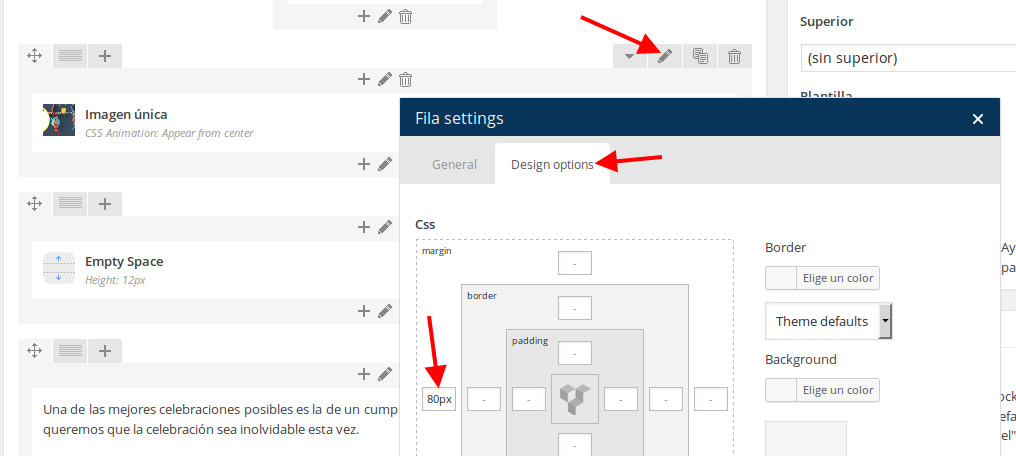
Please check the page now.
Thank you.
Regards,
Eva Kemp.
Hello,
I’ve edit the code in custom.css to this one:
@media (max-width: 480px){
.et_section.parallax-section {
height: 100px;
background-attachment: fixed !important;
background-size: 400px 620px !important;
background-position: inherit !important;
}
}
Please check the parallax effect now.
Thank you.
Regards,
Eva Kemp.
Hello @Agan-san,
We’ve sent the plugin archive to your email address.
Please check it.
Thank you.
Regards,
Eva Kemp.
Hello @jonnebee,
I’ve updated the file etheme.js.
Please check tabs now and clear browser cache before.
Thank you.
Regards,
Eva Kemp.
Hello,
The credentials to wp-admin admin panel are incorrect.
Please check them.
Thank you.
Regards,
Eva Kemp.
Hello,
Please provide us with a page link and wp-admin panel credentials to check the issue.
Thank you.
Regards,
Eva Kemp.
Hello,
Please provide us with a link to your site and wp-admin panel credentials in Private Content.
Thank you.
Regards,
Eva Kemp.
Hello,
1. Please add this code in custom.css file:
header, .fixed-header-area {
    background-color: #5d5c62 !important;
}
2. Add this code in custom.css:
.menu > li > a {
    color: white;
}
How to create custom.css you can watch in this tutorial (it’s for Legenda theme but the process is the same).
Thank you.
Regards,
Eva Kemp.









