
Hello,
Please check if this slug is present in some categories or tags and remove it.
Thank you.
Regards,
Eva Kemp.

Hello,
Please check if this slug is present in some categories or tags and remove it.
Thank you.
Regards,
Eva Kemp.
Hello,
Please try to remove the plugin that was added in our theme and install the one you have purchased separately.
Thank you.
Regards,
Eva Kemp.
Hello,
The login details are incorrect.
Please check them.
Thank you.
Regards,
Eva Kemp.
Hello,
Unfortunately there is no such possibility. Sorry.
Regards,
Eva Kemp.
Hello,
Is your issue resolved now?
Thank you.
Regards,
Eva Kemp.
Hello,
You need replace the code in the file wp-content/themes/royal/framework/vc.php under the title ” ! Single Image” (from line 1591 to 1706) with this code:
vc_map( array(
	'name' => __( 'Single Image', 'js_composer' ),
	'base' => 'vc_single_image',
	'icon' => 'icon-wpb-single-image',
	'category' => __( 'Content', 'js_composer' ),
	'description' => __( 'Simple image with CSS animation', 'js_composer' ),
	'params' => array(
		array(
			'type' => 'textfield',
			'heading' => __( 'Widget title', 'js_composer' ),
			'param_name' => 'title',
			'description' => __( 'Enter text which will be used as widget title. Leave blank if no title is needed.', 'js_composer' )
		),
		array(
			'type' => 'attach_image',
			'heading' => __( 'Image', 'js_composer' ),
			'param_name' => 'image',
			'value' => '',
			'description' => __( 'Select image from media library.', 'js_composer' )
		),
		$add_css_animation,
		array(
			'type' => 'textfield',
			'heading' => __( 'Image size', 'js_composer' ),
			'param_name' => 'img_size',
			'description' => __( 'Enter image size. Example: "thumbnail", "medium", "large", "full" or other sizes defined by current theme. Alternatively enter image size in pixels: 200x100 (Width x Height). Leave empty to use "thumbnail" size.', 'js_composer' )
		),
		array(
			'type' => 'dropdown',
			'heading' => __( 'Image alignment', 'js_composer' ),
			'param_name' => 'alignment',
			'value' => array(
				__( 'Align left', 'js_composer' ) => '',
				__( 'Align right', 'js_composer' ) => 'right',
				__( 'Align center', 'js_composer' ) => 'center'
			),
			'description' => __( 'Select image alignment.', 'js_composer' )
		),
		array(
			'type' => 'dropdown',
			'heading' => __( 'Image style', 'js_composer' ),
			'param_name' => 'style',
			'value' => getVcShared( 'single image styles' )
		),
		array(
			'type' => 'dropdown',
			'heading' => __( 'Border color', 'js_composer' ),
			'param_name' => 'border_color',
			'value' => getVcShared( 'colors' ),
			'std' => 'grey',
			'dependency' => array(
				'element' => 'style',
				'value' => array( 'vc_box_border', 'vc_box_border_circle', 'vc_box_outline', 'vc_box_outline_circle' )
			),
			'description' => __( 'Border color.', 'js_composer' ),
			'param_holder_class' => 'vc_colored-dropdown'
		),
		array(
			'type' => 'checkbox',
			'heading' => __( 'Link to large image?', 'js_composer' ),
			'param_name' => 'img_link_large',
			'description' => __( 'If selected, image will be linked to the larger image.', 'js_composer' ),
			'value' => array( __( 'Yes, please', 'js_composer' ) => 'yes' )
		),
		array(
			'type' => 'href',
			'heading' => __( 'Image link', 'js_composer' ),
			'param_name' => 'link',
			'description' => __( 'Enter URL if you want this image to have a link.', 'js_composer' ),
			'dependency' => array(
				'element' => 'img_link_large',
				'is_empty' => true,
				'callback' => 'wpb_single_image_img_link_dependency_callback'
			)
		),
		array(
			'type' => 'dropdown',
			'heading' => __( 'Link Target', 'js_composer' ),
			'param_name' => 'img_link_target',
			'value' => $target_arr,
			'dependency' => array(
				'element' => 'img_link',
				'not_empty' => true
			)
		),
		array(
			'type' => 'textfield',
			'heading' => __( 'Extra class name', 'js_composer' ),
			'param_name' => 'el_class',
			'description' => __( 'If you wish to style particular content element differently, then use this field to add a class name and then refer to it in your css file.', 'js_composer' )
		),
		array(
			'type' => 'css_editor',
			'heading' => __( 'Css', 'js_composer' ),
			'param_name' => 'css',
			// 'description' => __( 'If you wish to style particular content element differently, then use this field to add a class name and then refer to it in your css file.', 'js_composer' ),
			'group' => __( 'Design options', 'js_composer' )
		)
	)
) );
Please save the original file before making changes.
Thank you.
Regards,
Eva Kemp.
Hello,
Please try to use this code:
<a href='http://your_link'><div class='type-label-2'>
<span>Shop</span>
<div class='sale'>Sales</div>
<span>Now</span>

</div></a>
Thank you.
Regards,
Eva Kemp.
Hello,
Sorry, but without wp-admin panel it’s hard to investigate what a problem can be.
Are you using Posts Slider element to show your posts? If so you need to use Posts Grid element instead.
Thank you.
Regards,
Eva Kemp.
Hello,
You can change sorting settings in Woocommerce > Settings > Products tab > Default Product Sorting.
If you want to remove categories from sidebar you need remove that widget from Shop sidebar area in Appearance > Widgets.
Thank you.
Regards,
Eva Kemp.
Hello,
We need FTP credentials, not only for wp-admin panel.
If you don’t know where to find FTP login details you can ask your host.
Thank you.
Regards,
Eva Kemp.
Hello,
1. You can download the latest versions of plugins at this link:
https://www.8theme.com/download-plugins/
2. Unfortunately there is no such option for Posts Grid element.
Sorry.
Regards,
Eva Kemp.
Hello,
What version of VC plugin are you currently using?
You can download the latest versions at this link https://www.8theme.com/download-plugins/ .
Thank you.
Regards,
Eva Kemp.
Hello,
Sorry, but this is referred to Woocommerce configuration.
You should contact their support.
Thank you.
Regards,
Eva Kemp.
Hello,
You’re welcome.
Regards,
Eva Kemp.
Hello,
Thank you for sharing this solution.
We appreciate it.
If there are any questions don’t hesitate to contact us.
Thank you.
Regards,
Eva Kemp.
Hello,
Is your issue resolved now?
Thank you.
Regards,
Eva Kemp.
Hello,
Please check your site on mobile devices. There shouldn’t be any problems.
When you resize a browser window you must reload a page.
Thank you.
Regards,
Eva Kemp.
Hello,
Go to Theme Options > Blog Layout and select Grid for “Blog Layout”.
Thank you.
Regards,
Eva Kemp.
Hello,
Please provide us with FTP credentials as well.
Thank you.
Regards,
Eva Kemp.
Hello,
You can find all those elements in Visual Composer editor. Ultimate VC Addons plugin should be activated.
Thank you.
Regards,
Eva Kemp.
Hello,
Please provide us with wp-admin panel credentials.
Thank you.
Regards,
Eva Kemp.
Hello,
You’re welcome.
Regards,
Eva Kemp.
Hello,
Please provide us with wp-admin panel credentials and link to the image you want to display.
Thank you.
Regards,
Eva Kemp.
Hello,
As I see the price is shown on mobile too
http://imgur.com/vcGgF7m
Please check once more.
Thank you.
Regards,
Eva Kemp.
Hello,
Have you changed the links to https when you installed SSL certificate?
Please provide us with FTP access.
Thank you.
Regards,
Eva Kemp.
Hello,
You’re welcome.
Regards,
Eva Kemp.
Hello,
You can refer to Woocommerce documentation:
http://docs.woothemes.com/document/managing-products/
http://kb.oboxthemes.com/articles/woocommerce-how-to-manage-inventory-and-stock/
Thank you.
Regards,
Eva Kemp.
Hello,
Sorry, but that was their decision.
Is your issue resolved now?
Thank you.
Regards,
Eva Kemp.
Hello,
I’ve updated the theme via FTP, just overwritten the files and also updated Visual Composer and Revolution Slider plugins. Perhaps the problem was caused by old plugins versions when you tried to update the theme. Please check your site now.
Other subcategories aren’t shown because they don’t have any products:
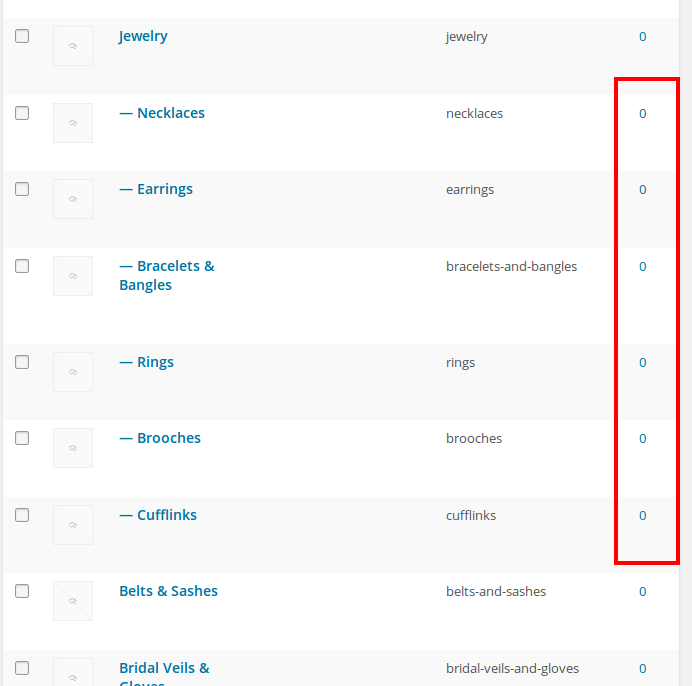
You should add some products to the subcategories to make them appear in the sidebar.
Thank you.
Regards,
Eva Kemp.
Hello,
Please provide us with FTP and wp-admin panel credentials to check the issue.
Thank you.
Regards,
Eva Kemp.









