Forum Replies Created

Viewing 30 posts - 21,781 through 21,810 (of 31,382 total)
  • Avatar: Eva
    Eva Kemp
    Participant
    February 3, 2015 at 09:10

    Hello,

    1. You can change that text in the file wp-content/themes/royal/framework/woo.php (line 837).
    2. Could you please clarify with more details?
    Please provide us with a link where you want to add Google code and specify what you want to achieve.

    Thank you.
    Regards,
    Eva Kemp.
    Avatar: Eva
    Eva Kemp
    Participant
    February 2, 2015 at 21:37

    Hello,

    You’re welcome.

    Regards,
    Eva Kemp.

    Avatar: Eva
    Eva Kemp
    Participant
    February 2, 2015 at 21:35

    Hello,

    Unfortunately sidebar is shown same way for shop page as well as for products categories pages.
    There is no possibility to remove sidebar from shop page and keep it on categories pages.

    Please take our apologies.

    Thank you.
    Regards,
    Eva Kemp.

    Avatar: Eva
    Eva Kemp
    Participant
    February 2, 2015 at 21:31

    Hello,

    To have slider shown on products categories pages you need add slider shortcode in a category description box in Products > Categories > edit a category > Description.

    Thank you.
    Regards,
    Eva Kemp.

    Avatar: Eva
    Eva Kemp
    Participant
    February 2, 2015 at 21:25

    Hello,

    The only way to restore your changes is to restore the file from back up at your hosting provider.
    Please ask them if there is a back up on a server.

    Thank you.
    Regards,
    Eva Kemp.

    Avatar: Eva
    Eva Kemp
    Participant
    February 2, 2015 at 20:15

    Hello,

    Ok, we’re looking forward to your reply.

    Thank you.
    Regards,
    Eva Kemp.

    Avatar: Eva
    Eva Kemp
    Participant
    February 2, 2015 at 20:13

    Hello,

    Please check at your host if allow_url_fopen function is enabled.
    If it’s not then ask your host to enable it and then try to import xml files again.

    Thank you.
    Regards,
    Eva Kemp.

    Avatar: Eva
    Eva Kemp
    Participant
    February 2, 2015 at 20:11

    Hello,

    1. Sorry, but to have summary on blog page you need use “Read more” tag as you did.
    2. Have you made any changes is original theme files?

    Thank you.
    Regards,
    Eva Kemp.

    Avatar: Eva
    Eva Kemp
    Participant
    February 2, 2015 at 19:58

    Hello,

    I’ve selected full width layout in Theme Options > Products Page Layout > Layout.
    Please check your Tienda page and clear browser cache before.
    To use Woocommerce widgets in different language you need use translation files in Woocommerce plugin folder http://docs.woothemes.com/document/woocommerce-localization/

    Thank you.
    Regards,
    Eva Kemp.

    Avatar: Eva
    Eva Kemp
    Participant
    February 2, 2015 at 19:50

    Hello,

    You need add this code as well:

    .back-history:before {
        color: #000 !important;
    }

    Thank you.
    Regards,
    Eva Kemp.

    Avatar: Eva
    Eva Kemp
    Participant
    February 2, 2015 at 19:48

    Hello,

    It’s difficult to provide you some solution without seeing wp-admin panel.
    What template are you using for this page?
    Is it your blog page?
    Have you enabled comments in Settings > Discussion?

    Thank you.
    Regards,
    Eva Kemp.

    Avatar: Eva
    Eva Kemp
    Participant
    February 2, 2015 at 19:45

    Hello,

    You’re welcome.

    Regards,
    Eva Kemp.

    Avatar: Eva
    Eva Kemp
    Participant
    February 2, 2015 at 19:44

    Hello,

    Try to add !important to your code:

    .menu > li.current-menu-item > a {
    color: #906650 !important;
    }

    Thank you.
    Regards,
    Eva Kemp.

    Avatar: Eva
    Eva Kemp
    Participant
    February 2, 2015 at 19:42

    Hello,

    Please try to use this code:

    a.btn.border-grey.product_type_simple {
    background-color: #262626;
    color: white;
    }
    a.btn.border-grey.product_type_simple:hover {
    background-color: #cda85c;
    }

    Thank you.
    Regards,
    Eva Kemp.

    Avatar: Eva
    Eva Kemp
    Participant
    February 2, 2015 at 19:37

    Hello,

    Please provide us with FTP credentials as well.

    Thank you.
    Regards,
    Eva Kemp.

    Avatar: Eva
    Eva Kemp
    Participant
    February 2, 2015 at 19:06

    Hello,

    Please try to add this code in custom.css file:

    @media (max-width: 768px) { .type-label-2, .type-label-1 {
        width: 50px;
        height: 50px;
    }
    .type-label-2 .sale, .type-label-1 .new {
        padding: 0px 0px;
        margin-top: 18px;
    }}

    How to create custom.css you can watch in this tutorial (it’s for Legenda theme but the process is the same).

    Thank you.
    Regards,
    Eva Kemp.

    Avatar: Eva
    Eva Kemp
    Participant
    February 2, 2015 at 18:53

    Hello,

    Could you please provide us with the access to all site files via FTP?
    Also please provide us with a screenshot concerning the 2nd query:

    2. The “page” from the product categories permalink isn’t translatable.

    Thank you.
    Regards,
    Eva Kemp.

    Avatar: Eva
    Eva Kemp
    Participant
    February 2, 2015 at 18:47

    Hello,

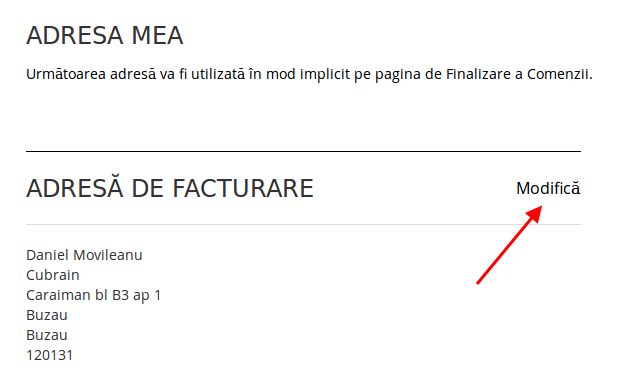
    On My Account page the “Edit” link is shown under the text “The next address will be used by default on the checkout page.”

    Please check it from your side and clear browser cache.

    Thank you.
    Regards,
    Eva Kemp.

    Avatar: Eva
    Eva Kemp
    Participant
    February 2, 2015 at 18:40

    Hello,

    1. Please add this code in custom.css file:

    .product-navigation .prev-product .hide-info, .product-navigation .next-product .hide-info {
        display: none;
    }

    2. Use this code in custom.css:

    .meta-title {
       display: none;
    }

    3. Do you need the code for it if solution for number 2 works?

    Thank you.
    Regards,
    Eva Kemp.

    Avatar: Eva
    Eva Kemp
    Participant
    February 2, 2015 at 18:34

    Hello,

    Please update Ultimate VC Addons plugin to the latest version https://www.8theme.com/download-plugins/ to fix that error.

    Thank you.
    Regards,
    Eva Kemp.

    Avatar: Eva
    Eva Kemp
    Participant
    February 2, 2015 at 18:32

    Hello,

    Please clear browser cache and check variable products pages now.

    Thank you.
    Regards,
    Eva Kemp.

    Avatar: Eva
    Eva Kemp
    Participant
    February 2, 2015 at 18:30

    Hello,

    Sorry, but I don’t see errors concerning Mixed Content. Where do you see those notifications?
    Could you please show a screenshot?

    Thank you.
    Regards,
    Eva Kemp.

    Avatar: Eva
    Eva Kemp
    Participant
    February 2, 2015 at 18:27

    Hello,

    As I see top bar is shown fine. Could you please show a screenshot what exactly you want to change?

    Thank you.
    Regards,
    Eva Kemp.

    Avatar: Eva
    Eva Kemp
    Participant
    February 2, 2015 at 18:24

    Hello,

    Please try to add this code in custom.css file:

    .navbar #st-trigger-effects {
        display: block;
    }

    style.css of child theme is working fine. You need create it as described in the documentation:
    http://codex.wordpress.org/Child_Themes

    Thank you.
    Regards,
    Eva Kemp.

    Avatar: Eva
    Eva Kemp
    Participant
    February 2, 2015 at 18:13

    Hello,

    Please change header type to be able to check the issue from our side or provide us with wp-admin panel credentials in Private Content.
    Thank you.

    Regards,
    Eva Kemp.

    Avatar: Eva
    Eva Kemp
    Participant
    February 2, 2015 at 17:35

    Hello,

    You’re welcome.

    Regards,
    Eva Kemp.

    Avatar: Eva
    Eva Kemp
    Participant
    February 2, 2015 at 17:31

    Hello,

    You’re welcome.

    Regards,
    Eva Kemp.

    Avatar: Eva
    Eva Kemp
    Participant
    February 2, 2015 at 17:00

    Hello,

    You’re welcome.

    Regards,
    Eva Kemp.

    Avatar: Eva
    Eva Kemp
    Participant
    February 2, 2015 at 16:59

    Hello,

    You’re welcome.

    Regards,
    Eva Kemp.

    Avatar: Eva
    Eva Kemp
    Participant
    February 2, 2015 at 16:54

    Hello,

    You can disable that pop up in Theme Options > Single Product Page > Ajax “Add to Cart” > Off.

    Thank you.
    Regards,
    Eva Kemp.

  • 1 2 3 726 727 728 1,045 1,046 1,047
    Viewing 21,810 results - 21,781 through 21,810 (of 31,382 total)
Viewing 30 posts - 21,781 through 21,810 (of 31,382 total)
We're using our own and third-party cookies to improve your experience and our website. Keep on browsing to accept our cookie policy.





