
Hello,
I’ve enabled fixed navigation in Theme Options > General > Fixed navigation > On.
Clear browser cache and check the site.
Thank you.
Regards,
Eva Kemp.

Hello,
I’ve enabled fixed navigation in Theme Options > General > Fixed navigation > On.
Clear browser cache and check the site.
Thank you.
Regards,
Eva Kemp.
Hello,
Sorry, but I don’t see anywhere the countdown timer added in admin panel.
Please specify how you added it to the pages. Where can we see it?
Thank you.
Regards,
Eva Kemp.
Hello,
Yes, you should edit custom.css file.
Thank you.
Regards,
Eva Kemp.
Hello,
I’ve added the code you gave in the first post in the file et-registration.php of your child theme. Please check Registration page now.
Thank you.
Regards,
Eva Kemp.
Hello,
Please provide us with a page link the timer should be shown.
Thank you.
Regards,
Eva Kemp.
Hello,
We edited the file content-product.php in xmarket/woocommerce directory and set crop=true, instead of false. The file was moved to your child theme folder. So the changes should be saved after update.
Thank you.
Regards,
Eva Kemp.
Hello,
Top bar is shown now.

Please clear your browser cache and check again.
Thank you.
Regards,
Eva Kemp.
Hello,
Sorry, but there is no such feature.
It requires additional customization in php files.
Regards,
Eva Kemp.
Hello,
Go to Pages > edit Home page and change “Show Page Heading” to “Off” in the Page Layout box.
Thank you.
Regards,
Eva Kemp.
Hello,
You need have a page where full post will be shown.
You can add this code <a href="link_to_full_post" class="button right read-more">Read More</a> in Category Header where you wrote the text.
Thank you.
Regards,
Eva Kemp.
Hello,
Sorry for a delay.
The issue has been fixed.
Please check your site now.
Thank you.
Regards,
Eva Kemp.
Hello,
If you want to you Sidebar template you need install it in Theme Options > Import/Export > click “Install version” on Sidebar template.
Make you sure you have vertical header type selected in Theme Options > Header (13th or 14th type).
Thank you.
Regards,
Eva Kemp.
Hello,
Are you changing the header type in custom.css?
You should do this in Theme Options > Header.
As I see header type 10 is still chosen there.
Please select the 7th header type in Theme Options > Header.
Thank you.
Regards,
Eva Kemp.
Hello,
1. Could you please provide us with wp-admin panel credentials to check the issue?
2. Please add this code in custom.css file:
.header-type-7 .menu-wrapper {
   background-color: black !important;
}
.header-type-7 .menu-wrapper .menu > li > a {
color: white !important;
}How to create custom.css you can watch in this tutorial (it’s for Legenda theme but the process is the same).
Thank you.
Regards,
Eva Kemp.
Hello,
Now you’ve selected the 10th header type where top bar doesn’t exist. You should select other header type where you see that top bar is shown (nineth, seventh, sixth or other ones).
Please choose the 7th header type and check once more.
Thank you.
Regards,
Eva Kemp.
Hello,
You’re welcome.
Regards,
Eva Kemp.
Hello,
The “SAIGNNNNN” and “logaaaut” words are written in en_GB.po file in the directory wp-content/themes/plyline/languages. You need edit this file to correct the text.
Please check it.
Thank you.
Regards,
Eva Kemp.
Hello,
You can translate “Our offers” text in wp-content/themes/legenda/languages. Our default.po file includes this text. You can check it.
How to translate the theme: https://www.8theme.com/demo/docs/legenda/index.html#!/how_to_translate
Thank you.
Regards,
Eva Kemp.
Hello,
I’ve enabled top bar in Theme Options > Header.
Now it’s shown on your site. Please check.
Regards,
Eva Kemp.
Hello,
You need rename default.custom.css to custom.css.
How to create custom.css you can watch in this tutorial (it’s for Legenda theme but the process is the same).
Thank you.
Regards,
Eva Kemp.
Hello,
I’ve edited the rows for your images and selected Full Width for Background Override:
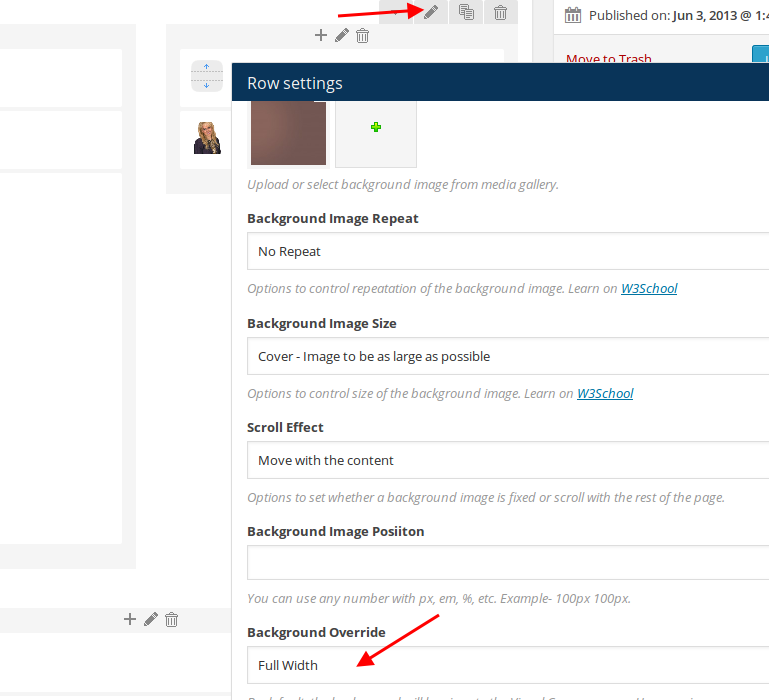
Please check the site now.
Thank you.
Regards,
Eva Kemp.
Hello,
Go to Theme Options > Import/Export and install a template variant.
Thank you.
Regards,
Eva Kemp.
Hello,
What header type are you using?
Is there top bar present on that header type?
Thank you.
Regards,
Eva Kemp.
Hello,
Please add this code in custom.css file:
.header-type-10 .menu-wrapper {
   background-color: white !important;
}
.header-type-10 .menu-wrapper .navbar-collapse .menu-main-container .menu > li > a {
    border-color: white !important;
}
Thank you.
Regards,
Eva Kemp.
Hello,
You can make price font smaller. Please add this code in custom.css file:
.product-slider .product-slide .price .amount {
    font-size: 12px !important;
}
To create custom.css you need rename default.custom.css to custom.css in wp-content/themes/blanco directory via FTP and enable it in Blanco – Theme Settings, tick “Enable Custom CSS file”.
Thank you.
Regards,
Eva Kemp.
Hello,
Please try to use Products element from Visual Composer editor.
Thank you.
Regards,
Eva Kemp.
Hello,
Thank you for sharing the link. It’s really convenient and more easier to find the desired font.
If there are any questions feel free to contact us.
Regards,
Eva Kemp.
Hello,
Please add this code in custom.css file:
.fixed-header-area, .meta-title span {
   background-color: grey !important;
}
Thank you.
Regards,
Eva Kemp.
Hello,
Please update the theme to 1.6.1 and all the required plugins https://www.8theme.com/download-plugins/
If the issue persists after that please provide us with FTP and wp-admin panel credentials in Private Content.
Thank you.
Regards,
Eva Kemp.
Hello @stevhong,
Please provide us with FTP credentials.
Thank you.
Regards,
Eva Kemp.









