Hello,
You need add this code in custom.css file:
.woocommerce-breadcrumb, #breadcrumb {
    display: none;
}
Thank you.
Regards,
Eva Kemp.

Hello,
You need add this code in custom.css file:
.woocommerce-breadcrumb, #breadcrumb {
display: none;
}Thank you.
Regards,
Eva Kemp.
Hello,
Have you tried updating the theme?
Our developers made some customizations and fixed some bugs in the new version.
Please update it and check if the problem persists after that.
Thank you.
Regards,
Eva Kemp.
Hello,
You can install demo data in Theme Options > Import/Export:
https://www.8theme.com/demo/docs/woopress/#!/demo_data_installation
Thank you.
Regards,
Eva Kemp.
Hello,
Please provide us with wp-admin panel credentials and access to FTP.
Thank you.
Regards,
Eva Kemp.
Hello,
You can select sorting in Woocommerce > Settings > Product tab > Display section > Default Product Sorting.
Thank you.
Regards,
Eva Kemp.
Hello,
Please refer to our documentation:
https://www.8theme.com/demo/docs/woopress/#!/woocommerce
The original image for single product should have dimensions 1 425px × 1 900px approximately, then it’ll be scaled to the sizes you set in Woocommerce settings.
Thank you.
Regards,
Eva Kemp.
Hello @corinneo,
Is your issue resolved?
Thank you.
Regards,
Eva Kemp.
Hello @Akrua,
I’ve imported one page template for you too.
Please check it in Pages.
Thank you.
Regards,
Eva Kemp.
Hello,
You’re welcome.
Regards,
Eva Kemp.
Hello,
Do you wish the menu on iPads to be the same as on desktop?
Thank you.
Regards,
Eva Kemp.
Hello @micheledauria,
Have you changed wp-admin panel credentials?
I’m unable to log in.
Please provide us with the correct ones.
Thank you.
Regards,
Eva Kemp.
Hello,
Please add this code in custom.css:
@media (max-width: 480px) { .empty-category-block p {
  margin-left: 50px !important;
} }
Thank you.
Regards,
Eva Kemp.
Hello,
You can add this code post_type=etheme_portfolio in Custom Query in Posts Grid settings.
Please try it.
Thank you.
Regards,
Eva Kemp.
Hello,
As I see you don’t have .po file translated in /wp-content/themes/woopress/languages directory.
Please read our documentation:
https://www.8theme.com/demo/docs/woopress/#!/1_how_to_translate and
http://wpml.org/faq/string-translation-default-language-not-english/
Thank you.
Regards,
Eva Kemp.
Hello,
Unfortunately there is no such possibility.
Please follow the instruction in our documentation:
https://www.8theme.com/demo/docs/woopress/#!/installation_upgrade (1.5 Theme Upgrade).
Thank you.
Regards,
Eva Kemp.
Hello,
Using the previous credentials I see that you’re using old theme version and old WordPress version.
Could you please provide us with the correct wp-admin panel credentials where you see the issue?
Thank you.
Regards,
Eva Kemp.
Hello @pippa,
Sorry, but your question is a bit unclear.
You can update theme to the latest version and remove review-order.php file in the wp-content/themes/woopress/woocommerce/checkout directory.
https://www.8theme.com/demo/docs/woopress/#!/installation_upgrade (1.5 Theme Upgrade).
Thank you.
Regards,
Eva Kemp.
Hello,
Do you mean these special symbols?
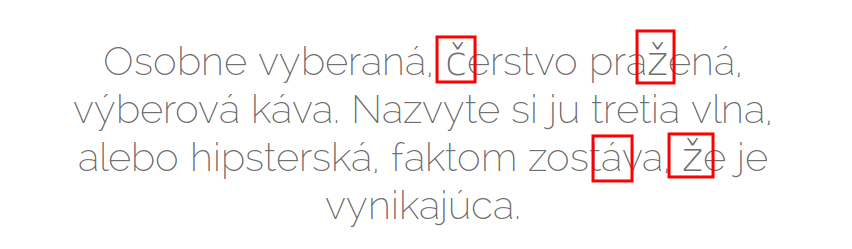
As I see they are shown on the site.
Try to clear your browser cache and check again.
Thank you.
Regards,
Eva Kemp.
Hello,
Please provide us with the link to your site.
Thank you.
Regards,
Eva Kemp.
Hello,
I’ve edited the code.
Please check mobile menu now.
Thank you.
Regards,
Eva Kemp.
Hello @Joost van Kempen,
Have you updated the theme?
Please provide us with FTP and wp-admin panel credentials in Private Content.
Thank you.
Regards,
Eva Kemp.
Hello @Ian Welham,
You should update the theme to 2.6 version
http://themeforest.net/item/legenda-responsive-multipurpose-wordpress-theme/5888906
Please do this.
If the issue persists after update please reply back.
Thank you.
Regards,
Eva Kemp.
Hello,
1. You can always download the latest versions of plugins at this link:
https://www.8theme.com/download-plugins/
2. You can read about licenses here:
http://themeforest.net/licenses/standard?license=regular
Thank you.
Regards,
Eva Kemp.
Hello,
Unfortunately there is no such widget in Appearance > Widgets, only Tag Cloud widget.
You can find some plugin to achieve what you want.
Thank you.
Regards,
Eva Kemp.
Hello,
I’ve added margin value in the row settings of your copyright static block.
Please check it now.
Thank you.
Regards,
Eva Kemp.
Hello,
Slow loading can be caused by 3rd-party plugins.
Try to disable them and check site loading after that.
Thank you.
Regards,
Eva Kemp.
Hello,
As I see products images are shown fine on Shop page:
https://s3.amazonaws.com/fvd-data/notes/168674/1424078078-pUODPB/screen.png
To have products gallery displayed you need add images to Product Gallery section in a product editor.
Could you please specify for what elements you want to change font?
Thank you.
Regards,
Eva Kemp.
Hello,
As I see the icons are centered.

Please clear your browser cache and check again.
Thank you.
Regards,
Eva Kemp.
Hello,
As I see currency symbol is shown:
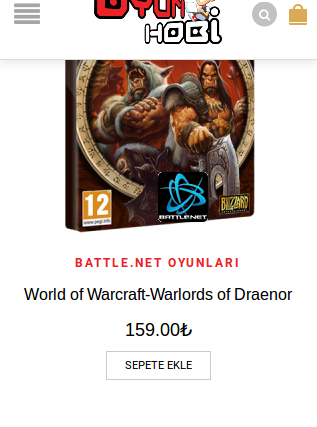
Also I’ve added the code to your custom.css file.
Please check mobile menu now.
Thank you.
Regards,
Eva Kemp.
Hello,
Could you please specify what height you want to set?
Please provide us with a link to your site.
Thank you.
Regards,
Eva Kemp.