


Hello,
you are right. You can upload logo of any size. Logo size can be adjusted with css code if needed.
Regards,
Stan Russell.
Hello,
please navigate to Dashboard > Blanco > Color Scheme and set needed colors

Regards,
Stan Russell
Hello,
you are right. You can upload logo of any size. Logo size can be adjusted with css code if needed.
Regards,
Stan Russell.
Hello,
please provide us with admin credentials for your site in private content
Regards,
Stan Russell
Hello,
we are happy that your problem is solved. Have a nice day!
Regards,
Stan Russell
We are happy that you have solved your problem. Have a nice day!
Regards,
Stan Russell
Hello,
unfortunately our theme does not have this option but you can add second Google Map block as described here: https://www.8theme.com/demo/legenda/google-map/
Regards,
Stan Russell
Hello,
it can be done using custom.css. Please enable it in Theme options > Custom css > Enable
After that please add following code to file ‘custom.css’ that is placed in wp-content/themes/legenda/ (you may rename existing file ‘default.custom.css’ to ‘custom.css’):
.blog-post .post-info {
  display:none;
}
.blog-post .post-description p {
   display:none;
}
Regards,
Stan Russell
Hello,
please provide us with FTP access in private content. Please remember – have you done any changes to your WordPress files and when this problem started to appear?
Regards,
Stan Russell
Hello Bunmizion,
please provide us with admin credentials for your site in private content and describe your problem with more details
Regards,
Stan Russell
Hello Bryantaa,
we have tested your site and cart is working correct for guests:
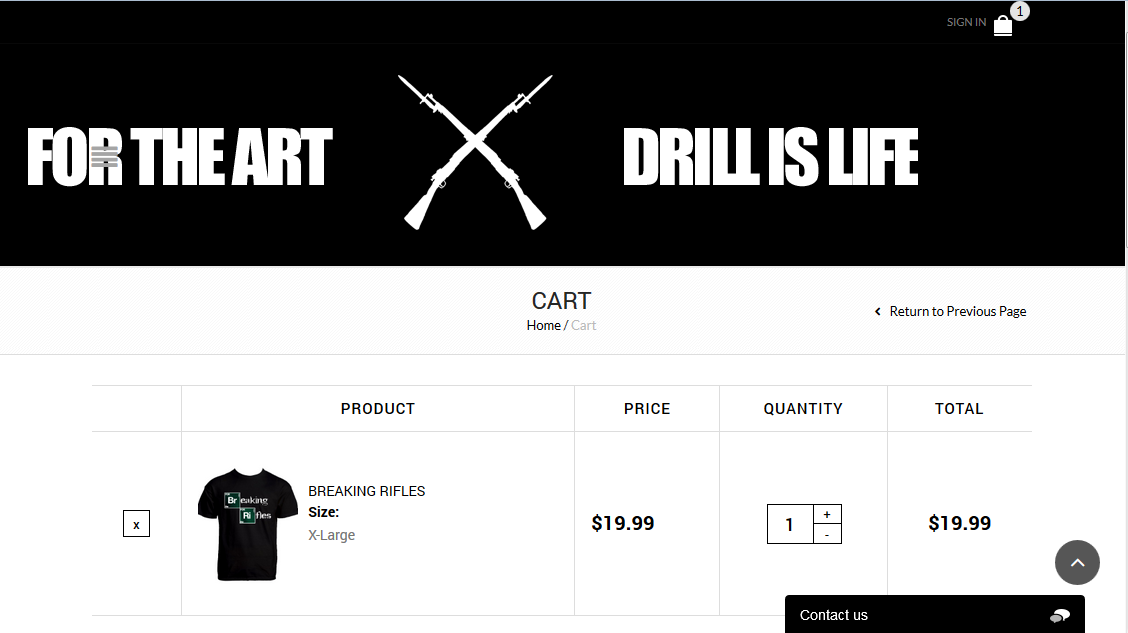
For notification ‘“Your theme has bundled outdated copies of WooCommerce template files…’ – it is normal as our theme is using modified Woocommerce template files. That’s why file versions are different. You may hide this message.
Regards,
Stan Russell
Hello,
to enable ‘Place in top bar’ widget area please navigate to Theme optons > Header > Enable languages area
After that add text widget with your number and link to your contact form in Appearance > Widgets > Place in top bar
Regards,
Stan Russell
Hello,
please provide us with admin credentials in private content.
Regards,
Stan Russell
Hello,
please navigate to Dashboard > Appearance > Install plugin, install and activate Visual Composer

Hello,
1- This notification is normal as our theme uses modified version of Woocommerce template files. That’s why WordPress thinks that our files are older than most recent files of Woocommerce. You may hide that notification.
Please describe is details what problems with permalinks and other stuff do you have?
2- Our theme is compatible with WordPress 4.0, WordPress 3.9, WPML, WooCommerce 2.2.x, WooCommerce 2.1.x
3- Unfortunately we do not have spanish translate files for Legenda.
Read here about translation process:
https://www.8theme.com/demo/docs/legenda/index.html#!/how_to_translate
http://codex.wordpress.org/Translating_WordPress
Regards,
Stan Russell
Hello,
your Visual Composer is updated to version 4.3.4
Regards,
Stan Russell
Hello,
we have checked your site and your static block ‘footer1’ is displayed correct on front end. Does error still appear?
Regards,
Stan Russell.
You are welcome!
Regards,
Stan Russell
Hello,
please provide us with link to your site.
Regards,
Stan Russell
Hello,
we have installed and Activated latest version of Visual Composer on your site. Please check.
Please note that if you will meet problems on pages with section – you’ll need to recreate those pages!
Regards,
Stan Russell
Hello,
this problem was caused by old Visual composer’s files. Legenda v2.1 or older had Visual Composer bundled with theme. It was placed in folder called ‘wpbakery’
From version 2.2 visual Composer is standalone and must be installed as any other plugin. You have updated your theme but ‘wpbakery’ folder left in your themes/legenda/ folder and was causing errors. We have deleted this redundant folder and need link to your site to check it.
Please provide us with admin credentials for your site.
Hello,
please provide us with admin credentials for your site in private content
Regards,
Stan Russell
Hello,
please provide us with link on problem product as we do not see any problems with product images
Regards,
Stan Russell
Hello,
unfortunately there is a bug in our theme. Thank you for pointing it out. It will be fixed in nearest releases. Please accept our apologies for the inconvenience
Regards,
Stan Russell
Hello,
we have tested you site and found that problem was caused by ‘W3 Total Cache’ plugin. It is now disabled.
Regards,
Stan Russell
Hello,
unfortunately we do not see any attached picture from you.
We have created test page for parallax demonstration for you here: http://www.littleyalmi.com/?page_id=8478
Please take a look on screenshot: 
You need to note that parallax background does not occupy place in page payout itself – you need to add content or padding to parallax section. Please check Row Settings > Design options for padding settings on demonstration page.
Hello,
Have you tried installing the theme via FTP?
Here you can read our instruction: https://www.8theme.com/demo/docs/royal/index.html#!/installation_upgrade
Regards,
Stan Russell
Hello,
please provide us with admin credentials for your site.
Regards,
Stan Russell.
Hello,
we have checked your site and found that your footer widget areas have only text, blog and newsletter widgets. Please specify what widgets had disappear and what widget area from?
In addition, please update your Blanco theme as you are using outdated version that does not support WordPress 4.0.
Read here how to do it right: https://www.8theme.com/demo/docs/blanco/index.html#!/upgrade
Regards,
Stan Russell.
Hello,
please add following css code to file ‘custom.css’ in your theme folder:
.navbar-collapse.collapse {
    display: none !important;
}
File must be renamed from ‘default.custom.css’ to ‘custom.css’ and enabled in Theme options > Custom css in order to work
Hello,
You are welcome.
Regards,
Stan Russell.

Free AI store scan · SalesMax
Paste your store address. SalesMax AI shows which upsell moments are missing. No signup.

Free AI speed test · FlashMax
Paste your site address. FlashMax runs Google Lighthouse for phone and desktop, checks Core Web Vitals and lists what to fix. No signup.
 Business 02Elementor
(live demo, opens in a new tab)
 BookStoreBooks & art
(live demo, opens in a new tab)
 MedicalWPBakery
(live demo, opens in a new tab)
 Online CoursesElementor
(live demo, opens in a new tab)
 Phone ServiceElementor
(live demo, opens in a new tab)
 Hemp & CDBElementor
(live demo, opens in a new tab)
 SpaBusiness
(live demo, opens in a new tab)
 Purely HandmadeElementor
(live demo, opens in a new tab)
 FinancesBusiness
(live demo, opens in a new tab)
 Eco Scooter StoreSports & travel
(live demo, opens in a new tab)
 Books StoreBooks & art
(live demo, opens in a new tab)
 PhotographerPortfolio
(live demo, opens in a new tab)
 Furniture Store 03Furniture
(live demo, opens in a new tab)
 Makeup StoreBeauty
(live demo, opens in a new tab)
 TravelBusiness
(live demo, opens in a new tab)
 Default RTLFashion
(live demo, opens in a new tab)