


Hello Radojica,
as we can see – breadcrumbs are displayed on this screenshot of your page:
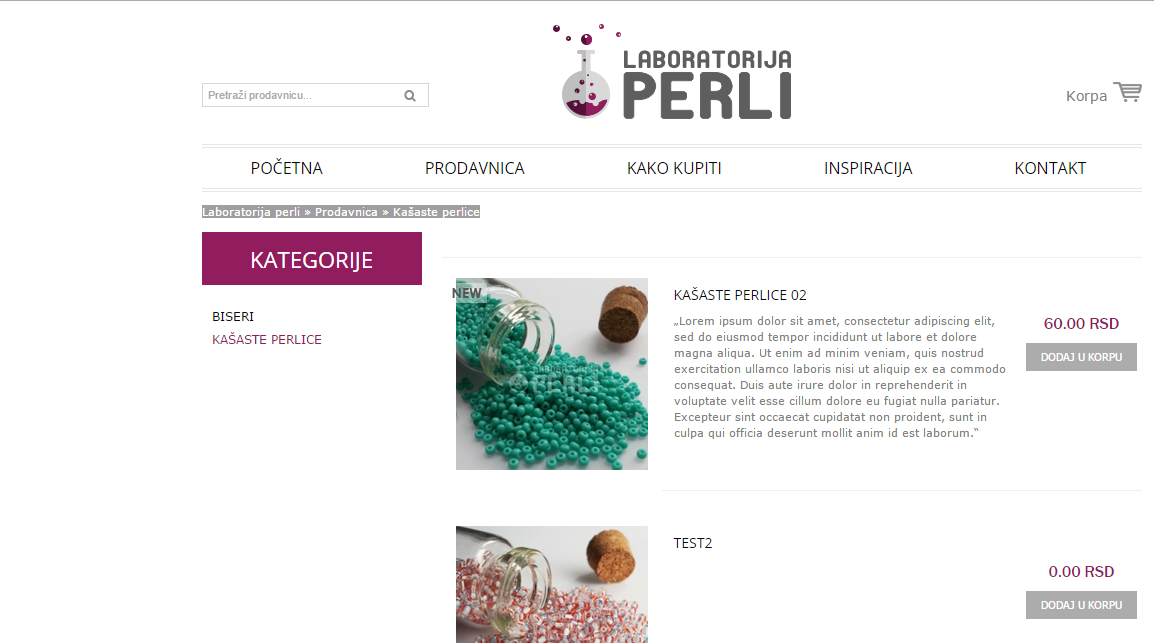
Please clear your browser cache and check.
Regards,
Stan Russell.
Hello,
you can configure shop permalinks in Dashboards > Settings > Permalinks.
If you will meet problems with it – please provide us with admin credentials for your site in private content and we will help you.
Regards,
Stan Russell.
Hello Radojica,
as we can see – breadcrumbs are displayed on this screenshot of your page:
Please clear your browser cache and check.
Regards,
Stan Russell.
Hello,
we can send you Revolution Slider v 4.6.5. – just provide us with your e-mail. If plugin update will not help – please provide us with admin access and we will investigate problem more deep.
Regards,
Stan Russell.
Hello,
what is your Revolution Slider version? Have you updated it? Please provide us with admin credentials for your site in private content.
Regards,
Stan Russell.
Hello,
we have tested your site and everything works correct. Theme options are saved correctly, Visual and Text Editors are working and switching normal. We have created test page and edited its content without problems.
Are you still experiencing these problems with your site? Please provide us with screenshots of errors if possible.
Regards,
Stan Russell.
Hello Joaosg_pt,
please provide us with admin credentials for your site.
Regards,
Stan Russell.
Hello,
please specify – do you want to display video among other projects featured images on portfolio page?
Regards,
Stan Russell.
Hello itspaul,
Child theme is a separate folder for theme customization and must be created by admin himself.
Please read here how to do it right: http://codex.wordpress.org/Child_Themes
If you get any additional questions – feel free to ask!
Regards,
Stan Russell.
Hello,
please check this part of WordPress child themes documentation: http://codex.wordpress.org/Child_Themes#Referencing_.2F_Including_Files_in_Your_Child_Theme
We hope that it will help.
Regards,
Stan Russell.
Hello,
please provide us with admin credentials for your site in private content.
Regards,
Stan Russell.
Hello,
we think that this plugin documentation can help you with your request: http://docs.woothemes.com/document/bundles/
If it will not answer your question – please contact plugin developer here: http://www.woothemes.com/contact-us/
Regards,
Stan Russell.
Hello,
please provide us with admin credentials for your site in private content.
Regards,
Stan Russell.
Hello,
please provide us with your e-mail and we will send it to you.
Regards,
Stan Russell.
Hello,
firstly you need to install and activate all required plugins including Woocommerce plugin.
After that please install demo content according to this part of theme documentation: https://www.8theme.com/demo/docs/royal/index.html#!/demo_data_installation
Regards,
Stan Russell
Hello,
we can not see any problem with your homepage. Please show on screenshot what banners are displayed incorrect.
Regards,
Stan Russell.
Hello,
1) please navigate to file legenda/woocommerce/content-product.php
and change line 85 to:
<span class="out-of-stock"><?php _e('Notify me', ETHEME_DOMAIN) ?></span>
To avoid any problems please make this customization only in child theme:
http://www.codex.wordpress.org/Child_Themes
2) Unfortunately our theme does not have feature to add ”Notify me” button on the product page.
Regards,
Stan Russell.
Hello,
please provide us with admin credentials for your site in private content and link to page with hyperlink problem.
Regards,
Stan Russell.
You are welcome!
Hello,
please check following article from our theme documentation: https://www.8theme.com/knowledge-base/using-read-more-button-on-wordpress-blog/
Regards,
Stan Russell.
Hello,
you can import Demo content for your site without any problems as only few demo blog posts are included in Demo Content. They can be easily removed after Demo data installation.
Regards,
Stan Russell.
Hello,
we have added following css code to yours custom.css file:
.search .et-mega-search form .button {background-color: white !important;}
Please clear browser cache and check your site.
Regards,
Stan Russell.
Hello,
please provide us with admin credentials for your site in private content.
Regards,
Stan Russell.
Hello,
please provide us with admin credentials for your site in private content.
Regards,
Stan Russell.
Hello Cioka,
we have added css code to yours custom.css file. Please clear your browser cache and check your site.
Regards,
Stan Russell.
Hello,
we are happy that your problem is solved. We wish you a nice New Year!
Regards,
Stan Russell.
Hello hooweiliam,
please show us on screenshots what buttons do you want to edit and we will help you as soon as possible!
Regards,
Stan Russell.
Hello,
Could you please provide us with a link where we can reproduce the problem? Please provide us with admin credentials for your site in private content too.
Regards,
Stan Russell.
Hello,
unfortunately some of our plugins do not include license keys. You do not need any keys to use these plugins with our theme but if you want to update them automatically – you need to buy them. Every new release of our theme has latest versions of all bundled plugins included so you need to manually update them.
We have updated all your plugins for you.
Regards,
Stan Russell.
Hello,
please provide us with admin credentials for your site in private content.
Regards,
Stan Russell.
Hello Pernilla,
our theme uses modified Woocommerce template files. That’s why versions of some theme files may be different and indicated by WordPress as outdated. It does not have influence on front-end so you may hide this notice.
If you want to order additional customization – please provide us with admin and FTP access to your site and describe all your requests in private content. It would be helpful if you show us on a screenshot what you want to be done.
Regards,
Stan Russell.

Free AI store scan · SalesMax
Paste your store address. SalesMax AI shows which upsell moments are missing. No signup.

Free AI speed test · FlashMax
Paste your site address. FlashMax runs Google Lighthouse for phone and desktop, checks Core Web Vitals and lists what to fix. No signup.
 Landing WatchElectronics
(live demo, opens in a new tab)
 Real EstateElementor
(live demo, opens in a new tab)
 Marseille04Elementor
(live demo, opens in a new tab)
 Gym StoreSports & travel
(live demo, opens in a new tab)
 Chocolate BoutiqueElementor
(live demo, opens in a new tab)
 TypographyWPBakery
(live demo, opens in a new tab)
 Default RTLFashion
(live demo, opens in a new tab)
 Language CoursesBusiness
(live demo, opens in a new tab)
 Underwear StoreFashion
(live demo, opens in a new tab)
 Jewelry StoreJewellery
(live demo, opens in a new tab)
 Minimalist OutfitsFashion
(live demo, opens in a new tab)
 BookStoreBooks & art
(live demo, opens in a new tab)
 Business 02Elementor
(live demo, opens in a new tab)
 Organic Store 01Food & drinks
(live demo, opens in a new tab)
 Marseille 01Fashion
(live demo, opens in a new tab)
 Pet ShopPets
(live demo, opens in a new tab)