

Hello dietnga,
you are welcome!
Regards,
Stan Russell.

Hello dbattle1225,
please show us the problem on screenshot as we do not see it on your product page.
Regards,
Stan Russell.
Hello dietnga,
you are welcome!
Regards,
Stan Russell.
Hello supportservices,
please specify – are there any problems left on your site?
Regards,
Stan Russell.
Hello smariano,
please use following css code:
.show-quickly{
color:white;
font-weight:bold
}
Regards,
Stan Russell.
Hello Orna Ohayon,
we are happy to help! Have a nice day!
Regards,
Stan Russell
Hello green_mon,
please provide us with admin and FTP credentials for your site in ‘Private content’ section.
We will check this problem and fix it.
Regards,
Stan Russell.
Hello jaemiedelapena,
1) you need to edit file royal\woocommerce\content-single-product.php (line 107)
2) to edit product tab name you need to check this Woocommerce documentation article: https://docs.woothemes.com/document/editing-product-data-tabs/
Please note that we recommend you to make changes to theme files only in Child Theme.
Regards,
Stan Russell.
Hello smariano,
please set needed colors and add following css code to your Global css:
.footer-top a{color:blue!important}
.footer-top a:hover{color:green!important}
.footer-top a:active{color:yellow!important}
.footer-top a:visited{color:brown!important}
Regards,
Stan Russell.
Hello smariano,
you are using outdated versions of these plugins. Please update ‘Visual Composer’ and ‘Ultimate Addons for Visual Composer’ via FTP. You can find them at our Downloads section: https://www.8theme.com/download-plugins/
Regards,
Stan Russell.
Hello smariano,
please set needed values and add following code to your Global custom css:
.top-bar a{color:red}
.top-bar a:hover{color:green}
.top-bar a:active{color:yellow}
.top-bar a{font-weight:bolder}
Regards,
Stan Russell.
Hello OfficiallyMike,
you are welcome! Have a nice day!
Regards,
Stan Russell.
Hello mlamike,
you are welcome!
Regards,
Stan Russell.
Hello heyitslynneg,
please provide us with screenshots of errors if possible and let us know what mobile devices have you tested your site with.
Regards,
Stan Russell.
Hello,
“143” or other numbers are mega-menu items numbers.
we have added following code ot your Global custom css:
.mega-menu-item-388 > a{color:gold!important}
Please check your site.
Regards,
Stan Russell.
Hello Rita,
you are right. It is Screets Live Chat plugin.
Regards,
Stan Russell.
Hello dietnga,
unfortunately we can not reach your site at the moment as it is protected by Wordfence:
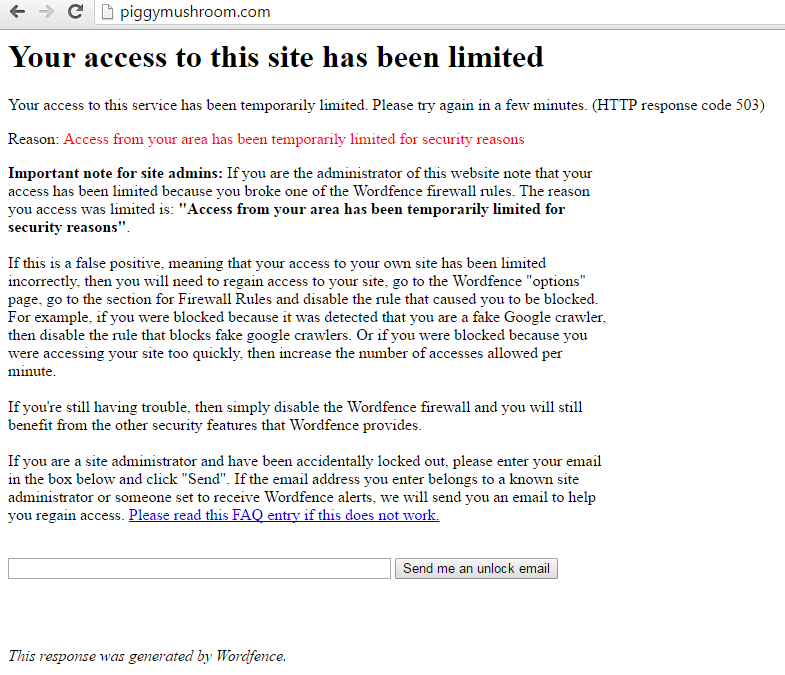
Please check.
Regards,
Stan Russell.
Hello smariano,
here is css code for your menu items:
#mega-menu-item-143 a{color:red}
#mega-menu-item-141 a{color:green}
#mega-menu-item-206 a{color:yellow}
#mega-menu-item-45 a{color:blue}
#mega-menu-item-242 a{color:orange}
#mega-menu-item-267 a{color:pink}
Please add needed lines to your custom.css file. You may set any color name you want.
Regards,
Stan Russell.
Hello Aleksey,
please add following css code to your custom.css file:
.header-logo{
max-width:180px;
}
Regards,
Stan Russell.
Hello karni18,
we are happy that your problem is solved!
Regards,
Stan Russell.
Hello Rita,
you are welcome! Have a nice day!
Regards,
Stan Russell.
Hello Rita,
you are welcome!
Regards,
Stan Russell.
Hello Rita,
we are glad to help!
Regards,
Stan Russell.
Hello bucci729,
we will wait for your reply!
Regards,
Stan Russell.
Hello,
there is an error in your WordPress config file ‘wp-config.php’. This problem is not related to WordPress themes so you need to contact your hosting provider for assistance.
Regards,
Stan Russell.
Hello rakhigulati,
product image for this product is smaller that zoom area. Please upload bigger product image and check the product.
Regards,
Stan Russell.
Hello,
please add following css code to your custom.css file:
h3{font-family: Allura!important;}
h2{font-family:Exo!important;}
Here is video tutorial how to set up custom css:
https://youtu.be/Qok2zRedRMY
Regards,
Stan Russell.
Hello zukustukupuku,
you are welcome!
Regards,
Stan Russell.
Hello JeanineH93,
product images for that product are smaller that zoom area. Please upload bigger images.
Regards,
Stan Russell.
Hello karni18,
sorry for delay. Please show on screenshot which elements must have font ‘Exo’ and which ‘Allura’ and we will provide you with needed css code to fix it.
In addition we can not reach your Dashboard authorization form as it is protected by additional login/password.
Regards,
Stan Russell.
Hello,
we have added following css code to Theme options > Global custom css:
.blog-masonry .active a{font-size:15px;text-transform:none}
Regards,
Stan Russell.

Free AI store scan · SalesMax
Paste your store address. SalesMax AI shows which upsell moments are missing. No signup.

Free AI speed test · FlashMax
Paste your site address. FlashMax runs Google Lighthouse for phone and desktop, checks Core Web Vitals and lists what to fix. No signup.
 Drinks StoreFood & drinks
(live demo, opens in a new tab)
 Agricultural StoreWPBakery
(live demo, opens in a new tab)
 PhotographerPortfolio
(live demo, opens in a new tab)
 Minimalist OutfitsFashion
(live demo, opens in a new tab)
 Home Decor 02 StoreFurniture
(live demo, opens in a new tab)
 Bakery StoreFood & drinks
(live demo, opens in a new tab)
 SunglassesFashion
(live demo, opens in a new tab)
 Crypto Mobile AppElementor
(live demo, opens in a new tab)
 UnderwearFashion
(live demo, opens in a new tab)
 Games StoreToys & games
(live demo, opens in a new tab)
 Luxury Jewelry StoreJewellery
(live demo, opens in a new tab)
 Artmaxy StoreWPBakery
(live demo, opens in a new tab)
 LawyerWPBakery
(live demo, opens in a new tab)
 ArchitectureBusiness
(live demo, opens in a new tab)
 NFT Crypto MarketplaceElementor
(live demo, opens in a new tab)
 Lingerie StoreFashion
(live demo, opens in a new tab)