

Forum Replies Created

Viewing 30 posts - 151 through 180 (of 302 total)
  • Avatar: Oliver_Theis
    Oliver Theiß
    Participant
    April 22, 2022 at 14:23

    Heay……

    this does not work … unfortunately

    so if the rating function is inside the tabs…..
    the possibility is shown to give a rating – so the text field and the stars are visible. 🙂
    I can write a rating . or read one…

    but…..

    If I choose the variant outside the tabs ratings display (This is the function I would like to use)

    it does not work, and then you can not currently open a rating and read….. the function to write a rating is also not visible…

    something is causing an error … that it currently does not work … the link is also not working :((
    Avatar: Oliver_Theis
    Oliver Theiß
    Participant
    April 22, 2022 at 11:11

    hello Olga,

    thanks for your quick feedback ….. when I am home I will text you what I need ……. 🙂

    lg Oliver

    Avatar: Oliver_Theis
    Oliver Theiß
    Participant
    April 21, 2022 at 20:38

    heay..okey…….

    sorry…

    Please contact administrator
    for this information.
    Avatar: Oliver_Theis
    Oliver Theiß
    Participant
    April 21, 2022 at 09:27

    hey ..thanks 🙂

    see privat content area

    Please contact administrator
    for this information.
    Avatar: Oliver_Theis
    Oliver Theiß
    Participant
    April 3, 2022 at 17:00

    ups…… okey thanks a lot :))

    Avatar: Oliver_Theis
    Oliver Theiß
    Participant
    April 3, 2022 at 16:43

    heay Olga,

    thanks fpor your fast replay….

    its one the singel product page…… I did it a long time ago … with Yellow pencil – I do not know how to remove it :/ this was a mistake

    Avatar: Oliver_Theis
    Oliver Theiß
    Participant
    March 27, 2022 at 13:31

    awwwww..okey thanks 🙂

    Avatar: Oliver_Theis
    Oliver Theiß
    Participant
    February 19, 2022 at 17:03

    Heay Rose,

    thanks for your help..have a nice weekend :))

    lg Oliver

    Avatar: Oliver_Theis
    Oliver Theiß
    Participant
    February 15, 2022 at 15:31

    hello all, I have not changed anything on it…. 🙁
    Olga adjusted it for me months ago because it didn’t work…….

    #Hello Olga,
    you had kindly helped me here two months ago…. can you paste it again….thank you and stay healthy

    https://www.8theme.com/topic/category-sidebar-link-header-image-product-quick-view/#post-313876

    lg Oliver

    Avatar: Oliver_Theis
    Oliver Theiß
    Participant
    February 12, 2022 at 12:35

    hello Olga,
    thank you for the super fast feedback

    in the secure area you will find the access data

    Thank you and have a nice weekend

    lg Oliver

    Please contact administrator
    for this information.
    Avatar: Oliver_Theis
    Oliver Theiß
    Participant
    January 9, 2022 at 13:29

    Hallo Rose,

    thanks for the job on sunday 🙂

    What was the wrong setting? have I forgotten something?

    I wish you a nice sunday 🙂

    Avatar: Oliver_Theis
    Oliver Theiß
    Participant
    January 9, 2022 at 11:07

    hello Rose

    ahmm no. that was probably a misunderstanding… 🙁

    I have created a mega menu with a static block, that is shown when I hover with the mouse cursor over “products.”…
    However, the menu disappears when I want to select something….

    this is my problem 🙁

    lG Oliver

    Avatar: Oliver_Theis
    Oliver Theiß
    Participant
    January 6, 2022 at 19:44

    mega…. many thanks

    Have a nice weekend 🙂

    lg Oliver

    Avatar: Oliver_Theis
    Oliver Theiß
    Participant
    January 6, 2022 at 13:08

    Heay Olga….

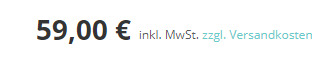
    good, but can you make it so that both are behind the price inj smaller from the font size

    So wie hier siehe screenshot:


    many thanks for the quick implementation and support

    I wish you a nice day

    Avatar: Oliver_Theis
    Oliver Theiß
    Participant
    January 5, 2022 at 17:29

    heay……
    okey..then we try it like this:)

    The access data I have provided here Se privat content area
    many thanks for the help

    lg Oliver

    Please contact administrator
    for this information.
    Avatar: Oliver_Theis
    Oliver Theiß
    Participant
    January 5, 2022 at 12:48

    Hello Olga,

    herewith i send you the feedback of the plugin creator : https://vendidero.de/
    ———————————————————————————————
    Hi Oliver,

    unfortunately we don’t have access to this quick view, as the theme probably chooses a completely custom implementation for it. So you would have to ask the author of the theme which hooks/filters are provided to be able to place more information below the price there in the quick view. Technically, the output can be done e.g. as follows:

    $price_html = ”;
    $output = woocommerce_gzd_template_add_price_html_suffixes( $price_html, $product );

    echo $output;

    Avatar: Oliver_Theis
    Oliver Theiß
    Participant
    December 29, 2021 at 16:21

    heay…… thanks for the support i will ask 🙂

    Avatar: Oliver_Theis
    Oliver Theiß
    Participant
    December 29, 2021 at 12:16

    Hello Olga…..

    I can´t open your link… but I think..I know what you want to show..

    attached is my screenshot…
    why I asked for it…
    According to the current EU law must be this addition to the price when the shopping cart is available in the quick view, otherwise it is a reason for a warning by a lawyer and that can be expensive…

    I can disable the shopping cart in the quick view for now, but maybe you can adjust that in the future….

    Actually, everyone needs the marking…..

    Best regards Oliver

    Avatar: Oliver_Theis
    Oliver Theiß
    Participant
    December 27, 2021 at 11:47

    hello Olga,

    thank you very much for the feedback 🙂

    Wish you a good day

    lg oliver

    Avatar: Oliver_Theis
    Oliver Theiß
    Participant
    December 20, 2021 at 19:01

    hello Olga.

    sorry that I make so much work…

    i think when i have the new hosting and less plugins

    there will be no more problems. well not so much… awww

    and the homesite , if you go in with elementor….. it is not a satic block….

    but, you don’t have to i copy another banner and the button is okey and swap the image and links……

    why.. did the error occur in the preview? was it caused by another plugin? or was it simply caused by cashing….

    have a nice evening

    oliver

    Avatar: Oliver_Theis
    Oliver Theiß
    Participant
    December 20, 2021 at 09:41

    Happy Monday,

    Short feedback,

    I have put everything back in place..

    However, there is still the error in the preview when I want to choose a banner template from you.

    I will switch to kinsta after the holidays to have a better hosting and remove some plugins that I no longer need for optimization. Then my site will probably be more stable

    That is why I have the please

    Can you please look after the preview? why the css changes there directly
    i have another small error…. which does not go away in the left banner… the border radius does not work

    Best regards

    Oliver

    Avatar: Oliver_Theis
    Oliver Theiß
    Participant
    December 19, 2021 at 16:31

    Heay…. :))

    okey..i removed all that but it does not change…. see screenshot
    so I assume that this plugin is not responsible for the error….

    With WP Rocket , I do not use any file optimization , I only use the cache….. what I did , I used it to optimize my data bank tables.. but after that everything was actually ..okey….

    after the last updates and the deaktiviwerung and activation of all plugins something went broken

    I hope you find the next week time to look what is going wrong

    Best regards Oliver

    https://www.deinfitnessfreund.de/wp-content/uploads/2021/12/asset-clean-up.jpg

    Avatar: Oliver_Theis
    Oliver Theiß
    Participant
    December 18, 2021 at 22:32

    Feedback….. i think it has nothing to do with asset clean up plug in at all….. as it is like this on every page… and i had only worked with the plugin on the home page and shop…..

    Even if all plugins are inactive, the problem is there…..
    I hope you can help me……

    greetings Oliver

    Avatar: Oliver_Theis
    Oliver Theiß
    Participant
    December 16, 2021 at 23:28

    have everything sorted :))

    Avatar: Oliver_Theis
    Oliver Theiß
    Participant
    December 16, 2021 at 17:05

    heay….. irgednwie is also my backend area with the products damaged

    see screenshot

    Avatar: Oliver_Theis
    Oliver Theiß
    Participant
    December 16, 2021 at 15:56

    I think I have a big problem….can it be that somehow there is a bug in my theme version…. can you scan this somehow……

    Because…strangely…now the banners on the store page are changed…but it wasn’t me….

    and this morning everything was okey…..

    Can you check or scan…. if anything is breaking my version…. with a tool or something

    Flying Pages Plugin I have uninstalled, but that probably did not cause it….

    NinjaFirewall … also shows me no unauthorized access

    Please contact administrator
    for this information.
    Avatar: Oliver_Theis
    Oliver Theiß
    Participant
    December 16, 2021 at 11:51

    yes, I know

    but i wonder why my settings were deleted with the update … I’ll redo it…

    I wish you a successful day and stay healthy 🙂

    Thanks for the help 🙂

    Avatar: Oliver_Theis
    Oliver Theiß
    Participant
    December 16, 2021 at 11:10

    Nope………….. 🙁

    no , not in this case …

    Look at the screenshots…….
    one is from my Shop Page and the other from my homepage. On the homepage after the update everything has moved in the banners and was centered aligned….
    But it looked before the update exactly the same as on the shope page…

    I have to recreate it or? I think I will redo the homepage
    I can copy the banner from the shoppage and change the images…..

    sorry…. yes, i think i will do that this weekend

    Avatar: Oliver_Theis
    Oliver Theiß
    Participant
    December 15, 2021 at 15:16

    Heay Olga,
    yes, it is visible on the desktop…

    but not on mobile devices….. see screenshot
    the mobile menu icon is not there

    This was always about the payment icon on the mobile devices

    Avatar: Oliver_Theis
    Oliver Theiß
    Participant
    December 15, 2021 at 12:01

    Hello…

    the password is in the private area
    the error has unfortunately not been corrected….
    on mobile devices, the block area where the menu is located is not visible….. This is strange… I do not understand this

    lg Oliver

    Please contact administrator
    for this information.
  • 1 2 3 5 6 7 9 10 11
    Viewing 180 results - 151 through 180 (of 302 total)
Viewing 30 posts - 151 through 180 (of 302 total)
We're using our own and third-party cookies to improve your experience and our website. Keep on browsing to accept our cookie policy.









