Hello,
Please, update theme to version 3.11.1, it’s compatible with WC 3.0.1 that you have.
Regards

Hello,
Please, update theme to version 3.11.1, it’s compatible with WC 3.0.1 that you have.
Regards
Hello,
If problem appears even with default WC theme you need to contact WC support on their support forum. We are able to help only in case problem is related to our theme only.
Also, if you already updated WC to 3.0 you won’t be able to downgrade the plugin version just by uploading older archive because WC 3.0 updates DB fields.
Regards
Hello,
There is option to create the different menu for the mobile without images etc http://prntscr.com/eu9fkb
Regards
Hello,
If you are using version 3.0 of our theme or higher then auto update option is available for you. Go to Dashboard > Updates > choose XStore theme and press update.
Also, you can use manual update via FTP, watch our video tutorial https://www.8theme.com/documentation/xstore/video-tutotials/how-to-update-rate/
Before the update, please, do the backup of all your files, DB and Theme Options just in case.
Regards
Hello,
Do you mean that you have added meta description for your page in plugin fields but it does not work? Does it work with default WP theme?
Also, please, provide link to your site and temporary admin panel access.
Regards
Hello,
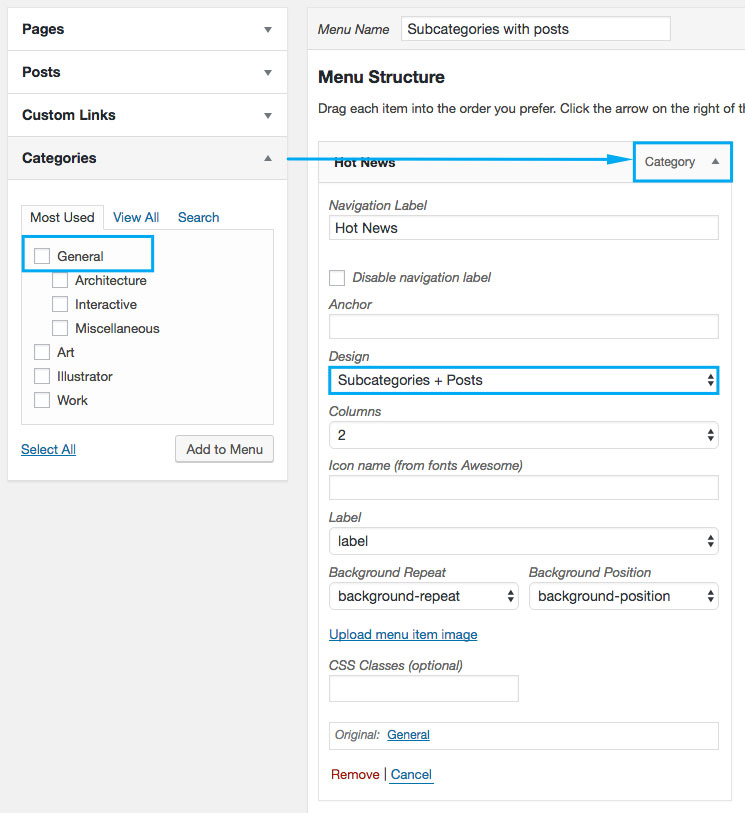
Read theme documentation. To be able to Show subcategories + posts you should add the category with subcategories into menu http://d33v4339jhl8k0.cloudfront.net/docs/assets/5809d09590336070ba24798e/images/580f1b7c9033604deb0ea2d0/file-6j0ACqu9UB.jpg
Make sure that you used categories for these 2 menu items.
Regards
Hello,
Alignment and font-size of the copyrights depend on what code/elements you use to show that content. Also, copyrights have 2 widget areas: 1/2+1/2 and there in no way to change it.
If you need 3 columns I would recommend you to use custom footer and static block options, for example http://prntscr.com/eu99k4
Regards
Hello,
1) You added 200px margin for your button http://prntscr.com/eu9017 There is no place to show this button like you want if you add such margins http://prntscr.com/eu90v7 Use bootstrap classes to align elements inside the row http://prntscr.com/eu935x Also, use VC column responsive settings if you want to change the columns width for the different devices or even hide them http://prntscr.com/eu93uj
2) You have added fixed margins 200px for your test block http://prntscr.com/eu94s5 Of course, they won’t disappear on the mobile devices. Either use % or vw to make margins more flexible or even use columns http://prntscr.com/eu95g4 and hide them for mobile devices in column settings (I have edited your page to show how it could be changed)
3) You have added http://prntscr.com/eu8z8r that’s why it’s not aligned.
So, everything depends on content you add and on margins/paddings you use, it’s not related to theme styles.
Regards
Hello,
Yes, we’ll fix it.
Regards
You are welcome.
Regards
Seems you have Fattal error. Enable WP debug and tell me what error do you have?
Regards
Hello,
Pease, provide me temporary access to admin panel and FTP. We’ll check why you get this error.
Regards
Hello,
This issue is fixed in version 3.11.1.
Do you have any other problems related to our theme?
Regards
Oh, thank you! I’m very happy to hear that. And sorry if face any delays in answering. WC released the new major update and we do our best to make theme compatible with new version.
Regards
Hello,
Sometimes even 777 does not give the necessary result, it’s related to user permissions.
Anyway, everything that Setup Wizard has you can do without it just in different order.
Following steps below:
1) Theme installation
2) Child theme installation
3) Installation of plugins (Appearance > Install plugins)
4) Theme Activation (Theme Options)
4) Demo content import (Theme Options > Import/Export > choose theme version or additional pages you want to import)
You can do this without the wizard.
Regards
Hello,
I have synchronized your translation with updated .pot file.
What other issues do you have?
Regards
You are welcome!
Regards
Hello,
Check now, please.
Regards
Hello,
Check now, please.
Regards
Hello,
Disable plugin WooCommerce Jne Exclusive, seems it’s not compatible with WC 3.0.
Regards
Hello,
Check now. We’ll include the fix for this type of header for the RTL version in next theme update.
Regards
Hello,
Your problem was caused by custom CSS http://prntscr.com/etvnfg I have changed it to hide widgets in the sidebar but show in filters area.
Regards
Hello,
1) to change hover use the following code
.single-product .single_add_to_cart_button:hover {
    background-color: #3892de !important;
    border-color: #3892de !important;
}
2) Go to Theme Options > Typography > Navigation
3) Nope, these are default WC pages.
Regards
Hello,
Search results speed depends on server respond.
General site speed depends on many factors. Below you’ll find main of them
1) Plugins. When you have multiple plugins installed and activated on your site, it can slow it down. So, please, keep enabled only those plugins that you really need for the correct functioning of your site and disable all the plugin that you don’t use. The more plugins you use, the slower it will be.
2) Caching. The most important part of optimizing your site is caching. Combine cached page with gzip compression to get better results. We recommend using W3 Total Cache. Read the beginners guide to setting up W3 Total Cache plugin https://premium.wpmudev.org/blog/w3-total-cache-settings/
Also, a very good plugin is WP Rocket, but it’s paid.
3) Images. Use optimized images only otherwise you will have big images and a slow loading time. Do not upload larger images than what is needed. When you use image editing tool like Photoshop don’t save images without using the option “Save For Web”.
There are different ways on how to compress images. Use special services or WordPress plugins to optimize your images for decreased loading times:
– tinypng.com
– Compressor.io
– Kraken.io
– Ewww Image Optimizer
– Smush Image Compression and Optimization plugin
4) Server/Hosting.
Sometimes slow speed can be a result of your hosting service. If you have checked the above items and the site is still slow, the most likely it is a server/hosting issue. Contact your host and discuss it with them. Because even with the default WP theme site speed could be slow.
Regards
Hello,
Site speed depends on many factors. Below you’ll find main of them
1) Plugins. When you have multiple plugins installed and activated on your site, it can slow it down. So, please, keep enabled only those plugins that you really need for the correct functioning of your site and disable all the plugin that you don’t use. The more plugins you use, the slower it will be.
2) Caching. The most important part of optimizing your site is caching. Combine cached page with gzip compression to get better results. We recommend using W3 Total Cache. Read the beginners guide to setting up W3 Total Cache plugin https://premium.wpmudev.org/blog/w3-total-cache-settings/
Also, a very good plugin is WP Rocket, but it’s paid.
3) Images. Use optimized images only otherwise you will have big images and a slow loading time. Do not upload larger images than what is needed. When you use image editing tool like Photoshop don’t save images without using the option “Save For Web”.
There are different ways on how to compress images. Use special services or WordPress plugins to optimize your images for decreased loading times:
– tinypng.com
– Compressor.io
– Kraken.io
– Ewww Image Optimizer
– Smush Image Compression and Optimization plugin
4) Server/Hosting.
Sometimes slow speed can be a result of your hosting service. If you have checked the above items and the site is still slow, the most likely it is a server/hosting issue. Contact your host and discuss it with them. Because even with the default WP theme site speed could be slow.
Regards
You are welcome!
Regards
Hello,
We’ll release new update today’s evening.
Regards
Hello,
If you are using WC 3.0 then you need to update theme to version 3.11. Do this and check if it fixes your problem.
Also, I would not recommend you to update plugins if they release the major update if you are not sure that your theme and additional plugins are compatible with this new update.
Regards
Hello,
I think we’ll release it today’s evening.
Regards
Hello,
If you faced that notice during Setup Wizard it means that WP does not have enough permissions to write, read or execute.
We include child theme archive in theme package. Also, you can find child theme archive here https://www.8theme.com/download-plugins/
Download it and install and activate it like any WP theme via Appearance > Themes.
If link in your menu goes to wrong home page then go to Appearance > Menus edit the main menu and change the Home item to the page you need.
If you need any other assistance just let me know.
Regards