

Hello,
I see your site is not so slow http://gyazo.com/33402d26c58472492366df69396e2321
We would like to help you, but how long custom.css file loads does not depend on our theme.
Regards,
Olga Barlow

Hello,
I see your site is not so slow http://gyazo.com/33402d26c58472492366df69396e2321
We would like to help you, but how long custom.css file loads does not depend on our theme.
Regards,
Olga Barlow
Hello,
1) We have checked your site using IE and did not face any issues with adding to cart and cart page.
2) I don’t see that PayPal method is activated. Our theme should not affect payment gateways functionality, it’s default WooCommerce setting. Check, please, if this problem persists with default theme too.
Regards,
Olga Barlow
Hello,
Check now, please.
Regards,
Olga Barlow
Hello,
We have checked file https://squaretac.com/wp-content/themes/royal/framework/css/admin.css , we told you to delete the code,but I see you did not do that. It’s still there – lines 47-49. Please, follow our instructions and delete this code
.wp-core-ui .modal { top:4% !important; } from this file https://squaretac.com/wp-content/themes/royal/framework/css/admin.css
Or provide FTP access and we’ll do it.
Regards,
Olga Barlow
Hello,
Check your email, we sent the password to your account on https://support.8theme.com/
Use email and password to login. In your account you’ll be able to create new tickets and check the status and replies for the old ones.
I also was studying the problem and saw that there is the same issue on our demo site too. We have started to work to fix this issue and release new update. Please, follow us on ThemeForest.
Regards,
Olga Barlow
Hello,
Would you be so kind to provide your ticket ID?
Regards,
Olga Barlow
Hello, @Jinhwan Kim,
1) Use special field to display content on single product page (Theme Options > Shop > Product Page Banner). We have created Static block with content you would like to display on Shop page and then just added static block shortcode to display it on shop page.
2) Could you explain more detailed what exactly does not work and for which slider?
Regards,
Olga Barlow
Hello,
1) We don’t use image dimensions in css styles.
2) Unfortunately it’s not possible
3) It’s already done. If you check our theme you’ll see that external CSS are included before external JavaScript
4) We have combined everything that could be combined. If you know any additional ways you can use them.
5) This function is not related to our theme, it’s plugin function. Read more function http://tidyrepo.com/bj-lazy-load/
Regards,
Olga Barlow
Hello, @dbosnj35,
You are right. We reviewed your comment and made a conclusion that version with 3 type of header is incomplete and we’ll make redesign to implement dark header bg and white navigation color for all pages, not for home page only. If you want we could do it also on your site. Or you selected 2 type of header and it’s ok for you now?
Regards,
Olga Barlow
Hello,
Don’t forget to backup all your files before update. Also delete wpbakery and woocommerce folders from wp-content/themes/legenda before update!
As Visual Composer was included in theme as separate plugin you need to install it after update and read new documentation https://www.8theme.com/demo/docs/legenda/index.html#!/visual_composer
Regards,
Olga Barlow
Hello,
Our theme does not use cookies.
Regards,
Olga Barlow
Hello,
We have tested your site and can draw the following conclusion:
– it’s not only iPad & Safari issue, we can see the same on Android devices and even if browser is resized.
– it’s related to Ultimate Addons plugin, because text is displayed out of the circle with default theme too. We think you can try to add custom css styles (to make text smaller on tablets) for this element for responsive layouts or contact with plugin author for more details.
Regards,
Olga Barlow
Hello,
Our theme does’t support IE8. To fix your bug with IE9 add the following code in custom.css:
.mobile-nav{left:-100%;}
.mobile-nav-shown .mobile-nav{left:0;}
You are using too old version, version 2.4.1 does not have this issue any more.
Regards,
Olga Barlow
Hello,
We have sent you files to import these pages.
Regards,
Olga Barlow
Hello,
Provide, please, link to page, where we’ll be able to see the issue and also admin panel and FTP accesses in Private Content.
Regards,
Olga Barlow
Hello,
1) We have sent to your email archive-product.php file. Please, replace the existing idstore/woocommerce/archive-product.php by that one.
2) Check the code of the widget with this banner http://www.sexy-bunny.com/wp-content/uploads/2014/10/banner1.jpg , very likely you did not close
Regards,
Olga Barlow
Hello,
Try to add following styles in custom.css:
.side-area-icon, .menu-icon {
line-height: 19px;
margin-left: 0;
float: none;
position: static;
}
Regards,
Olga Barlow
Hello, @bdavis,
You can use our shortcode [share] to insert social icons (facebook, twitter, mail, pinterest, google+). If your site is not multilingual and Place in header top bar widget area is empty you may use it to display this icons (in version 1.5 we have stylized this shortcode for using in that area).
Regards,
Olga Barlow
Hello everyone,
Thank you for your requests and suggestions!
Our team never stop to work on improvement of our theme and we made some of your propositions a reality.
Update your theme to version 1.5 and you’ll find following features:
Pleasant using!
And we are waiting for you new requests.
Regards,
Olga Barlow
Hello,
Accept our apologies for this inconvenience. We have sent you xml file to import Home Page 12. Also it will be included in theme package.
Regards,
Olga Barlow
Hello,
Ok, we’ll include this code in our next update. Thank you for cooperation, we appreciate it!
Regards,
Olga Barlow
Hello,
This is compatibility issue. We are sorry, but slider won’t work in tabs area. Tabs were created with using anchors that’s why they conflict with slider navigation.
Use this slider beyond the tabs area.
Regards,
Olga Barlow
Hello, @Cory Kent,
Try to disable Ajax add to cart in Theme Options > Single Product Page. As a rule if you want to use such plugin as Smart Coupons this option should be disabled.
To fix Surgeprotector issue we just added woocommerce hook
<?php do_action( ‘woocommerce_single_product_summary’ ); ?>
in theleader/woocommerce/content-single-product.php , because plugin uses it to display Purchase Credit worth.
Regards,
Olga Barlow
Hello, @Surgeprotector
Sorry for delay.
I have checked and want to say that problem related to your changes in template file theleader/woocommerce/global/quantity-input.php. I have revert back the old one and everything works fine.
Your site looks very nice, but, please, if you want to make any changes you need to do them in child theme to be able:
1) update theme to latest version in future and save your changes
2) don’t break main theme
I have added
.single_variation_wrap .quantity-box {display: none;}in child theme style.css to hide input for your variable products.
About your facebook problem. Try to flush fb cache and check if it fix your issue https://www.8theme.com/knowledge-base/clearing-facebooks-share-cache/
Regards,
Olga Barlow
Hello,
All changes were made in custom.css file. We have renamed the old one, because you have copied whole style.css file) and created new file. You need to place only changed or new styles in custom.css, you don’t need to copy all styles from style.css.
Regards,
Olga Barlow
Hello!
Thanks for the purchase. We have removed PSD files from the package as it two heavy and our customers wait for too long to download it.
We have sent you an archive with PSD files to your email. Check, please.
Regards,
Olga Barlow
Hello,
According to theme design, styles for some elements are rewritten in style.css and you need to change them manually.
Please, add the following code in custom.css:
@media (min-width: 980px){
.sidebar-position-without .row-count-4 .product-category, .products-grid .product-category {
width: 25% !important;
}}

.categories-mask h4 {
font-size: 22px;
color: #d7223e !important;
}
Watch our video tutorial how to create and enable custom.css
Regards,
Olga Barlow
Hello,
We took into account your suggestion. Maybe we’ll add such option in one of our next updates, but at present you can implement it only by additional customization if you have appropriate skills.
You can also try to use following workaround: add custom link to your menu with side-area-icon hidden-phone hidden-tablet classes.
See 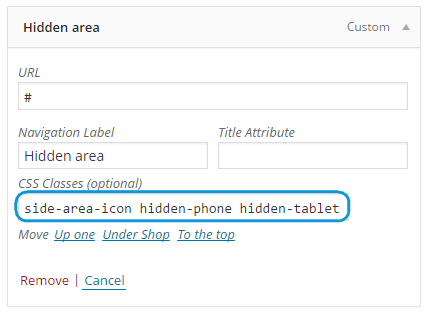
After that hide icon in top .top-bar .side-area-icon {display: none;} if you don’t need it.
Regards,
Olga Barlow
Hello,
We have added missing hook. Check now, please.
Regards,
Olga Barlow
Hello,
1 screenshot – could you, please, explain in details what is wrong with adding to cart?
2, 5 – problem caused by your custom css styles. We have fixed.
3 – fixed
4 – we did not face this issue on your site
Regards,
Olga Barlow










