

Hello, @lorelei,
We have sent you an updated archive. Check your email.
Regards,
Olga Barlow

Hello, @lorelei,
We have sent you an updated archive. Check your email.
Regards,
Olga Barlow
Hello, @mozmocreative,
We are very sorry that you feel this way! There are lot of requests on our forum that cause some delay in answering.
We want to help you, but every time when we see your site it looks fine. We checked parallax in Chrome on Mac and Windows, it works like a charm. We are confused what could be the reason of your issue from your side.
Parallax effect is Ultimate Addons for VC plugin feature, that’s why problems related to compatibility with old versions of browsers should be addressed to plugin author, because we can’t make any changes in plugin files.
Regards,
Olga Barlow
Hello,
We have sent you the latest version of plugin. Please, check your email sorin.manica@gmail.com
Regards,
Olga Barlow
Hello, @VivaDigital,
You’re right, we’ll add note that you need to save menu to see anchor field. But I don’t understand your problem with navigation. I have added menu item About ( Custom Link! ) and it works fine.
So, to create one page menu you need:
1) Create one page, add anchors to rows.
2) Create menu: use Links to add menu items with anchors (not Pages!). Save menu.
3) Add anchors to menu items.
4) Select menu for One page
Regards,
Olga Barlow
Hello,
You faced problem with boxed layout, because your code loads child stylesheet twice. Read this post http://wordpress.stackexchange.com/questions/167639/why-does-my-child-theme-css-get-called-twice
And check your site now.
We have fixed bug with accordion on your site. Check, please. This fix also will be included in next update.
Regards,
Olga Barlow
Hello, @mleihs,
The same thing was with Portfolio. It was fuzzy. Please, edit your translation file with PoEdit. Select gold string, translate it and press “Fuzzy” button after that. String will change its color to black (it means that translation is correct and should be applied). Do it for all fuzzy lines which you need to translate.
At present Portfolio and Home are translated, aren’t they? Or send me the link to page where untranslated words still persist.
Regards,
Olga Barlow
Hello, @Openstream,
Sorry for delay. You may translate only strings you need (not all 1080) in our .po file. We have included some woocommerce files in our theme (not all!) and all strings from these files were included into our theme translation file. So, you need to translate our theme po file and after that WooCommerce po file if some translations will be missing.
Regards,
Olga Barlow
Hello, @mleihs,
Problem with your translation related to unfinished translations. See
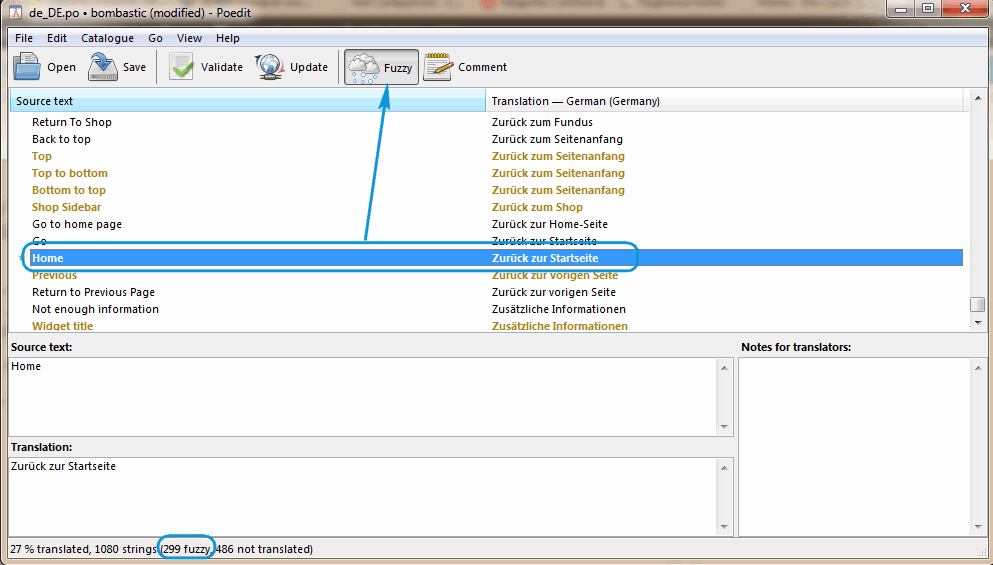
Home string (and also categories and quantity and other 299 lines with gold color) were marked as unfinished. As a rule fuzzy string is a message which has been automatically translated, thus it may be wrong. That’s why such translation is not displayed. You need to mark it as finished if you want to apply this translation.
Regards,
Olga Barlow
Hello,
Problem with registration on checkout step by step if option of auto generate password and username is enabled, will be fixed in update.
The control of the checkout required fields is realized at the end of the process in all types of checkout and that cannot be changed.
Regards,
Olga Barlow
Hello,
Did you make any changes in template files? Can we update your theme?
Please, provide FTP access, we’ll update theme and check your issues.
Regards,
Olga Barlow
Hello,
We are sorry, but if you want to use cart widget in sidebar you need to disable Ajax Filter (Theme Options > Shop > Enable Ajax Filter > Off). WooCommerce Cart widget requires page refreshing and does not work with Ajax.
Regards,
Olga Barlow
Hello,
Could you tell us what version of Safari do you use? We have checked in 7.0, 8.0 and now video is playing fine. We have updated Revolution Slider to latest version.
Regards,
Olga Barlow
Hello,
We have fixed. Clean plugin cache to implement changes.
Regards,
Olga Barlow
Hello,
We have released updated version 1.5.2. You can find it on ThemeForest. Please, update theme.
Regards,
Olga Barlow
Hello,
You are welcome! Would be very appreciate if you leave rating for our theme on ThemeForest.
Regards,
Olga Barlow
Hello,
Please, wait next theme update. This issue will be fixed.
Regards,
Olga Barlow
Hello,
We are sorry, but this is plugin issue. It’s not related with our theme. If you need plugin author support you need to buy plugin and submit a ticket.
All we can help you with is to send you latest plugin version.
Regards,
Olga Barlow
Hello,
Return to previous page uses back() method and loads the previous URL in the history list. But if you enable Ajax filter for shop page it means that page is not reloaded. So, either disable Ajax Filter (Theme Options > Shop > Enable Ajax Filter > Off) or hide Return to previous page link.
Problem on My Account page was fixed, check.
Regards,
Olga Barlow
Hello,
Check now, please.
Regards,
Olga Barlow
Hello, @UrbnDesignz,
Problem is caused by Master Slider. We have disabled it for product slider. Please, don’t replace product slider in product single page with Masterslider, use our default.
Regards,
Olga Barlow
Hello, @houseofstrauss,
Sorry for delay. We have sent you last version of plugin. Check your email.
Regards,
Olga Barlow
Hello,
Due to your server settings we don’t have permissions either create new file or edit existing. We need to be able to edit files to find what causes your issue.
Besides, please, install default WP theme and check if images are ok when it is activated.
Regards,
Olga Barlow
Hello,
Check your tabs now, please.
Regards,
Olga Barlow
Hello,
Problem caused by your WP Fastest Cache plugin. Seems it’s not compatible with VC. Disable it.
Regards,
Olga Barlow
Hello,
Fixed. Check, please.
Regards,
Olga Barlow
Hello,
There are a lot of requests at present, that’s why we answer with some delay. Take our apologies, we do our best.
We think you problem with parallax could be related to old Safari version, because we have checked your site with 7.0 and 8.0 and did not face any issues. Could you:
1) Check if this issue present with our theme only or with default theme?
2) Update your Safari to latest version and check?
Regards,
Olga Barlow
Hello,
We have fixed your issue. Check, please.
Regards,
Olga Barlow
Hello, @mt82,
We have fixed the issue you described. Could you check your site if it works fine?
Regards,
Olga Barlow
Hello,
Please, read plugin documentation to get more information about adjusting slider settings http://revolution.themepunch.com/documentation/
Regards,
Olga Barlow
Hello, @Nico313,
Please, wait our next update. This issue will be fixed.
Regards,
Olga Barlow









