Forum Replies Created

Viewing 30 posts - 121 through 150 (of 5,361 total)
  • Avatar: Justin
    Luca Rossi
    Support staff
    October 27, 2025 at 09:35

    Hello Anastasia,

    1. We believe the checkout page is now functioning correctly. The issue was caused by a conflict with the Advanced Layout settings located under Theme Options > WooCommerce (Shop) > Cart/Checkout Page > Advanced Layout: https://prnt.sc/mUZbQfvymY6T.

    2. To modify the text, please edit your header using Elementor, then select the cart element and update the text as needed: https://prnt.sc/Mekw4Bwgrg9b.

    3. Could you please provide the product URL?

    Thank you.

    Best regards,
    8Theme Team

    Avatar: Justin
    Luca Rossi
    Support staff
    October 27, 2025 at 06:35

    Hello @Blitz,

    1. To modify the style of the scroll progress element, please open your home page and inspect the element: https://prnt.sc/0Y69u-kT25ld

    2. The issue was caused by the custom CSS code shown here: https://prnt.sc/idGdddbn_Zfi. We have removed it.

    Best regards,
    The 8Theme Team

    Avatar: Justin
    Luca Rossi
    Support staff
    October 26, 2025 at 16:37

    Hi @Hanzla Nadeem,

    Can you please try with this code instead?

    
    function filter_wc_add_to_cart_message_html( $message, $products ) {
    return '';
    };
     
    // add the filter
    add_filter( 'wc_add_to_cart_message_html', 'filter_wc_add_to_cart_message_html', 10, 2 );
    

    Hope it helps!

    Avatar: Justin
    Luca Rossi
    Support staff
    October 26, 2025 at 16:34

    Hi @Ian,

    Could you please let us know which browsers you are using?
    We have tested the checkout page on an iPhone 14 Plus, and it appears to be working correctly.

    Best regards,
    The 8Theme Team

    Files is visible for topic creator and
    support staff only.
    Avatar: Justin
    Luca Rossi
    Support staff
    October 26, 2025 at 16:27

    Dear Anastasia,

    Please check Private Content Area.

    Best regards,
    8Theme Team

    Please contact administrator
    for this information.
    Avatar: Justin
    Luca Rossi
    Support staff
    October 26, 2025 at 15:17

    Hello @Blitz,

    We have restored the Scroll Progress Bar element on your homepage.

    You can view it here: https://prnt.sc/p9lOSdz2HIUa

    Please feel free to adjust the styles as needed.

    Best regards,
    The 8Theme Team

    Avatar: Justin
    Luca Rossi
    Support staff
    October 26, 2025 at 15:02

    Hello Anastasia,

    Could you please whitelist our IP address at your earliest convenience?

    Thank you for your assistance.

    Best regards,
    The 8Theme Team

    Please contact administrator
    for this information.
    Avatar: Justin
    Luca Rossi
    Support staff
    October 26, 2025 at 15:01

    Hello @Blitz,

    Kindly translate the “Shop” text into your language.

    Please refer to line 93:

    
    <a href="<?php echo get_permalink($shop_id); ?>"><?php esc_html_e('Shop', 'xstore') ?></a>
    

    Best regards,
    8Theme Team

    Avatar: Justin
    Luca Rossi
    Support staff
    October 26, 2025 at 08:43

    Hello @Wanan,

    Do you mean that when checking out with a cart containing only virtual products, the billing address fields should be hidden?

    Please try adding the following custom code to the functions.php file located in your child theme:

    
    add_filter( 'woocommerce_checkout_fields', 'hide_billing_address_if_virtual_products' );
    
    function hide_billing_address_if_virtual_products( $fields ) {
        // Check if all products in the cart are virtual
        $only_virtual = true;
    
        foreach ( WC()->cart->get_cart() as $cart_item ) {
            if ( ! $cart_item['data']->is_virtual() ) {
                $only_virtual = false;
                break;
            }
        }
    
        // If all products are virtual, remove billing address fields
        if ( $only_virtual ) {
            unset( $fields['billing']['billing_address_1'] );
            unset( $fields['billing']['billing_address_2'] );
            unset( $fields['billing']['billing_city'] );
            unset( $fields['billing']['billing_postcode'] );
            unset( $fields['billing']['billing_country'] );
            unset( $fields['billing']['billing_state'] );
        }
    
        return $fields;
    }
    

    I hope this helps.

    Best regards,
    8Theme Team

    Avatar: Justin
    Luca Rossi
    Support staff
    October 26, 2025 at 08:40

    Hi @Leather Mandi,

    Could you please provide temporary wp-admin access? We need to check your settings.

    To grant WP-Admin access, please proceed to create a new user account with an administrator role through your WordPress Dashboard. Once the account is established, you may securely transmit the username and password to us via the Private Content section designated for this purpose.

    Thank you!

    Avatar: Justin
    Luca Rossi
    Support staff
    October 26, 2025 at 06:40

    Hello Kamil,

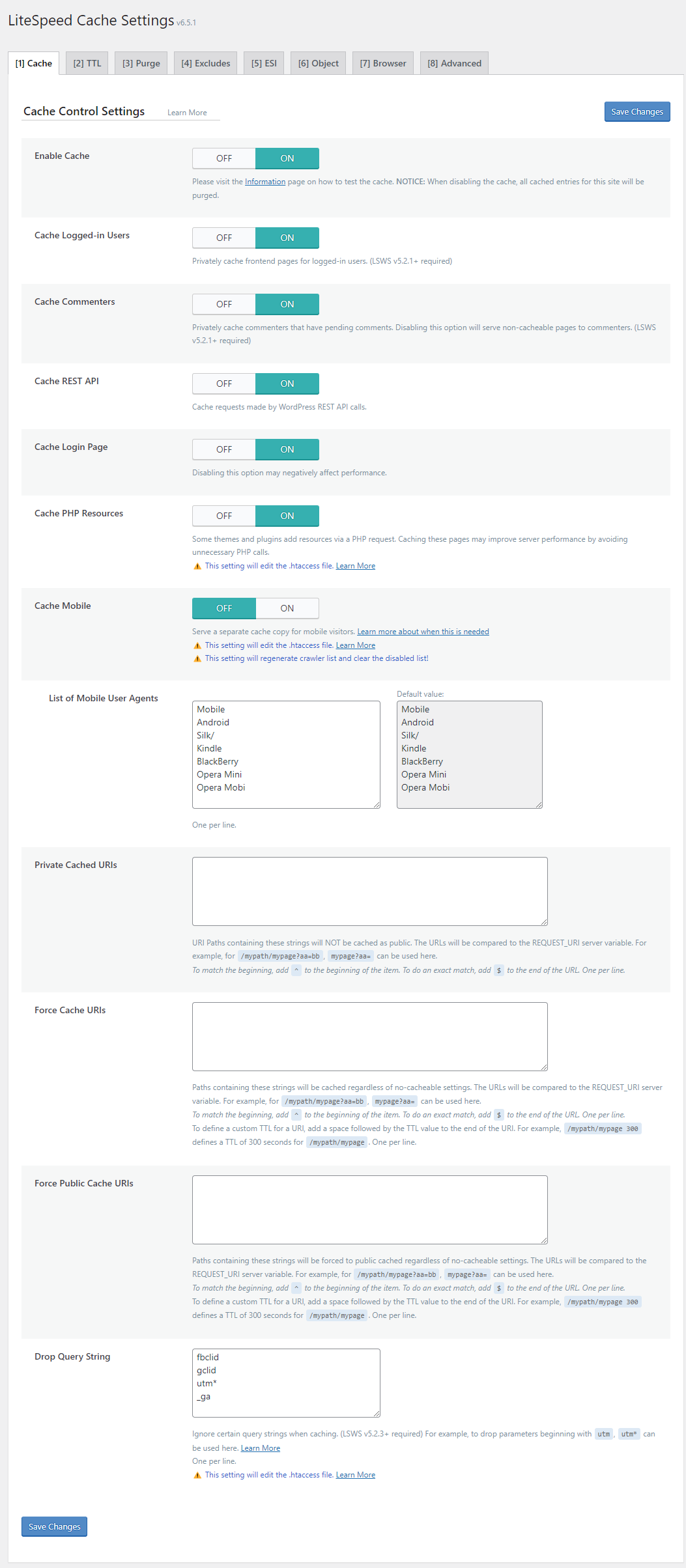
    We have noticed that the LiteSpeed Cache plugin has been reactivated.

    We kindly recommend disabling the Cache for Logged-In Users and Mobile Cache options:
    https://docs.litespeedtech.com/lscache/lscwp/images/cache01.png

    We hope this information is helpful.

    Best regards,
    The 8Theme Team

    Avatar: Justin
    Luca Rossi
    Support staff
    October 26, 2025 at 06:33

    Hi @Blitz,

    Could you please provide temporary wp-admin access? We need to check your settings.

    To grant WP-Admin access, please proceed to create a new user account with an administrator role through your WordPress Dashboard. Once the account is established, you may securely transmit the username and password to us via the Private Content section designated for this purpose.

    Thank you!

    Avatar: Justin
    Luca Rossi
    Support staff
    October 26, 2025 at 06:33

    Hello @Blitz,

    Kindly copy the following file:

    – From the parent theme directory: /wp-content/themes/xstore/woocommerce/global/breadcrumb.php
    – To the child theme directory: /wp-content/themes/xstore-child/woocommerce/global/breadcrumb.php

    After copying, please open the file in the child theme, locate the “Shop” text, and replace it with your preferred text.

    You may refer to the following screenshot for guidance: https://prnt.sc/GzfuYz0oWrjT

    We hope this information is helpful.

    Best regards,
    8Theme Team

    Avatar: Justin
    Luca Rossi
    Support staff
    October 26, 2025 at 06:20

    Dear Anastasia,

    The IP addresses are dynamic. Could you please whitelist access by country?

    We have added the list of countries in the Private Content Area.

    Best regards,
    The 8Theme Team

    Please contact administrator
    for this information.
    Avatar: Justin
    Luca Rossi
    Support staff
    October 24, 2025 at 17:16

    Hello Anastasia,

    Regarding the header issue, please try adding the following custom CSS under XStore > Theme Options > Theme Custom CSS > Global CSS:

    
    header[data-elementor-type="header"] {
        min-height: 106px;
    }
    

    We would like to review the other issues; however, your website becomes inaccessible after refreshing. Could you please contact your hosting provider’s support team regarding this matter?

    https://prnt.sc/Hb7b2e5Sdgf3

    Thank you for your cooperation.

    Kind regards,
    The 8Theme Team

    Avatar: Justin
    Luca Rossi
    Support staff
    October 24, 2025 at 09:44

    Hello Kamil,

    We have temporarily disabled the LiteSpeed Cache plugin.

    Could you please check it again?

    Thank you for your cooperation.

    Best regards,
    The 8Theme Team

    Avatar: Justin
    Luca Rossi
    Support staff
    October 24, 2025 at 09:26

    Hello @Bas Kling,

    This custom CSS code is minimal.
    Please keep it and do not delete it.

    We will also forward this issue to our development team.

    Best regards,
    The 8Theme Team

    Avatar: Justin
    Luca Rossi
    Support staff
    October 24, 2025 at 05:18

    Hello Kamil,

    Could you please resend the new password to us?
    The account in the private content area is no longer working.

    Thank you for your assistance.

    Best regards,
    The 8Theme Team

    Please contact administrator
    for this information.
    Avatar: Justin
    Luca Rossi
    Support staff
    October 23, 2025 at 20:47

    Hi @Hangato,

    Please try adding this custom CSS under XStore > Theme Options > Theme Custom CSS > Global CSS:

    
    .etheme-elementor-nav-menu-item-icon {
        flex-basis: 40px;
    }
    .etheme-elementor-nav-menu-item-icon img {
        max-width: 100% !important;
    }
    

    Kind regards,
    The 8Theme Team

    Avatar: Justin
    Luca Rossi
    Support staff
    October 23, 2025 at 20:42

    Hi @shimon,

    We recommend that you disable all third-party plugins that are not included with XStore (https://www.8theme.com/documentation/xstore/plugins/included-plugins/). After doing so, please clear your browser’s cache and check again. It is possible that one of these additional plugins is causing the issue.

    Let us know the results.

    Avatar: Justin
    Luca Rossi
    Support staff
    October 23, 2025 at 10:44

    Dear @Shimon,

    1. The shop page is now functioning again after we re-saved the permalink settings. Please contact your hosting provider regarding the mod_require configuration to ensure that it remains unchanged.

    2. Please note that the “Make Primary” button originates from the Yoast SEO plugin (https://prnt.sc/P-J4FyB-AhGk) and not from the XStore theme.

    For setting the primary category, please refer to the following guide: https://prnt.sc/EjtOFBsNhtv2

    Best regards,
    8Theme Team

    Avatar: Justin
    Luca Rossi
    Support staff
    October 23, 2025 at 09:58

    Dear @B2 Publicidad,

    Using multiple third-party plugins requires a higher WordPress memory limit than usual.

    A limit of 256MB to 512MB should be sufficient.

    For more information, please visit: https://elementor.com/help/requirements/

    Best regards,
    The 8Theme Team

    Avatar: Justin
    Luca Rossi
    Support staff
    October 23, 2025 at 09:55

    Hi @Lani,

    Please update the previous CSS code to this:

    
    .single-post .content-article.entry-content ul li,
    .single-post .content-article.entry-content ol li {
        font-size: 20px;
        margin-bottom: 0;
    }
    
    .single-post .page-heading.bc-type-left h1.title {
        line-height: 1.2;
    }
    @media(max-width: 768px){
        .single-post .content-article p {
            margin-block-end: 23px;
        }
    }
    

    Hope it helps!

    Avatar: Justin
    Luca Rossi
    Support staff
    October 23, 2025 at 09:49

    Dear @Plethora,

    We have excluded certain WooCommerce cookies from the WP Rocket settings page.

    https://www.awesomescreenshot.com/video/45580628?key=43885001fb2b48ab9bc7e9f465011c88

    Could you please test it on your end?

    Best regards,
    The 8Theme Team

    Avatar: Justin
    Luca Rossi
    Support staff
    October 23, 2025 at 06:58

    Dear @Ravinder,

    Our development team will soon release a new version to ensure the theme is fully compatible with the latest version of WooCommerce.

    Thank you for your patience and continued support.

    Best regards,
    The 8Theme Team

    Avatar: Justin
    Luca Rossi
    Support staff
    October 23, 2025 at 06:56

    Hello @Bas Kling,

    We have applied the custom CSS code to the page you provided earlier.

    
    .e-con-inner > .elementor-widget-etheme_gallery,
    .e-con > .elementor-widget-etheme_gallery {
        width: var(--container-widget-width);
        flex-grow: var(--container-widget-flex-grow);
    }
    

    Kind regards,
    The 8Theme Team

    Please contact administrator
    for this information.
    Avatar: Justin
    Luca Rossi
    Support staff
    October 22, 2025 at 16:21

    Dear @Bas Kling,

    We’ve added a custom CSS code to thix this issue.

    Could you please check now?

    Thank you!

    Please contact administrator
    for this information.
    Avatar: Justin
    Luca Rossi
    Support staff
    October 22, 2025 at 15:40

    Dear @Kamil,

    We recommend that you disable all third-party plugins that are not included with XStore (https://www.8theme.com/documentation/xstore/plugins/included-plugins/). After doing so, please clear your browser’s cache and check again. It is possible that one of these additional plugins is causing the issue.

    Let us know the results.

    Avatar: Justin
    Luca Rossi
    Support staff
    October 22, 2025 at 14:11

    Hello @Nadeem Latif,

    If you require any further assistance, please feel free to create a new topic.

    Thank you.

    Best regards,
    The 8Theme Team

    Avatar: Justin
    Luca Rossi
    Support staff
    October 22, 2025 at 14:11

    Dear @Ian,

    Could you please contact your hosting support and request an increase of the maximum execution time to 600 seconds?

    We have noticed that your website uses a large number of third-party plugins, which may require more than the current limit of 180 seconds.

    Please let us know once this has been done or if you need any further assistance.

    Best regards,
    8Theme Team

  • 1 2 3 4 5 6 177 178 179
    Viewing 150 results - 121 through 150 (of 5,361 total)
Viewing 30 posts - 121 through 150 (of 5,361 total)
We're using our own and third-party cookies to improve your experience and our website. Keep on browsing to accept our cookie policy.