Forum Replies Created

Viewing 30 posts - 3,991 through 4,020 (of 5,361 total)
  • Avatar: Justin
    Luca Rossi
    Support staff
    June 7, 2024 at 05:41

    Hi @Javito,

    We’re not sure this custom CSS code was added by you or any 3rd party plugins.

    Please kindly find and remove it:

    
    .elementor a {
        color: #000000;
    }
    

    If you can’t do it, please add this custom CSS under XStore > Theme Options > Theme Custom CSS > Global CSS:

    
    .etheme-product-grid-item a.button {
        color: #fff;
    }
    

    Hope it helps!

    Avatar: Justin
    Luca Rossi
    Support staff
    June 7, 2024 at 05:33

    Dear Nedim Zidane,

    We hope this message finds you well. We wish to inform you that we are still able to access your website through the following link: https://prnt.sc/ziURgPVkUQME.

    Could you kindly reach out to your hosting provider to investigate this matter further?

    Thank you for your attention to this issue.

    Best regards,
    8Theme’s Team

    Avatar: Justin
    Luca Rossi
    Support staff
    June 7, 2024 at 04:48

    Hi @YT,

    It seems you forgot to upload the JSON files or unsuccessfully to upload them.

    Could you please try uploading to Google Drive instead?

    Thank you!

    Avatar: Justin
    Luca Rossi
    Support staff
    June 7, 2024 at 04:47

    Glad to hear everything is working fine now.

    Best Regards,
    The 8Theme Team

    Avatar: Justin
    Luca Rossi
    Support staff
    June 6, 2024 at 12:59

    Hi @Ankit Khandelwal,

    1. Main Header
       (a). Background - White
       (b). Text color - Black
    
    2. Menu should be 
     (a). Background - White
       (b). Text color - Black

    Can you please confirm that the changes above should be applied to the mobile version?

    Thank you!

    Avatar: Justin
    Luca Rossi
    Support staff
    June 6, 2024 at 12:57

    Dear Satheesh,

    We hope this message finds you well.

    We have identified a concern regarding the default value of the Carousel. To address this, we have adjusted the number of products displayed for each device, and the functionality appears to be restored successfully.

    For your reference, please view the current settings here: [https://prnt.sc/uXS75rJZhpgA](https://prnt.sc/uXS75rJZhpgA)

    Could you kindly clear your cache and verify if the issue persists on your end?

    Thank you for your attention to this matter.

    Best Regards,
    The 8Theme Team

    Avatar: Justin
    Luca Rossi
    Support staff
    June 6, 2024 at 11:15

    Dear @YT,

    We are currently in need of the specific page template available at your website for testing purposes. Could you kindly export it for us?

    https://elementor.com/help/template-library/

    We would greatly appreciate your assistance with this matter.

    Best regards,
    The 8Theme Team

    Avatar: Justin
    Luca Rossi
    Support staff
    June 6, 2024 at 07:45

    Hi @YT,

    Could you please provide temporary wp-admin and FTP access?

    To grant WP-Admin access, please proceed to create a new user account with an administrator role through your WordPress Dashboard. Once the account is established, you may securely transmit the username and password to us via the Private Content section designated for this purpose.

    For FTP access, we require the following details: FTP host, FTP username, FTP password, FTP port, and FTP encryption type. If you need assistance in creating these credentials, please reach out to your hosting provider who will guide you through the process.

    Best Regards,
    8Theme’s Team

    Avatar: Justin
    Luca Rossi
    Support staff
    June 6, 2024 at 05:45

    Hi @Ankit Khandelwal,

    We’ve replied to you there: https://www.8theme.com/topic/remove-the-gap-between-the-images-and-make-module-full-width/#post-398343.

    Best Regards,
    The 8Theme Team

    Avatar: Justin
    Luca Rossi
    Support staff
    June 6, 2024 at 05:43

    Hi @Ankit Khandelwal,

    Could you please check again? We’ve updated the custom CSS a little bit:

    https://prnt.sc/1mUivwcv5qrB

    Thank you!

    Avatar: Justin
    Luca Rossi
    Support staff
    June 6, 2024 at 05:37

    Dear Ankit Khandelwal,

    We hope this message finds you well. We have noticed an issue with the video format in your recent submission. The video appears to be cropped at the top due to its square aspect ratio. You can view the issue here: [Video Link](https://www.youtube.com/embed/OmbTpzndfFI?si=uW0IUuuv9kjhvotN&controls=0). We kindly request that you convert your video to a 16:9 aspect ratio to ensure optimal display across all devices.

    Interestingly, when the video is viewed on an iPad, the issue does not occur, as evidenced here: [Screenshot](https://prnt.sc/BeYxJ7aZzbzi).

    We appreciate your attention to this matter and look forward to the updated version of your video.

    Best Regards,
    The 8Theme Team

    Avatar: Justin
    Luca Rossi
    Support staff
    June 5, 2024 at 16:16

    Hi @Graziano,

    Please also take a look at this file: /wp-content/plugins/et-core-plugin/app/controllers/elementor/general/product-list.php on the line 3184

    
    return new \WP_Query( apply_filters( 'woocommerce_products_widget_query_args', $query_args ) );
    

    So you have to hook to this filter also, the full code maybe like this:

    
    add_filter('woocommerce_get_catalog_ordering_args', 'woocommerce_catalog_orderby');
    add_filter('woocommerce_products_widget_query_args', 'woocommerce_catalog_orderby');
    function woocommerce_catalog_orderby( $args ) {
            $args['order']    = 'ASC'; 
            $args['meta_key'] = 'data_corso'; // ACF
            $args['orderby']  = 'meta_value';
    
        return $args;
    }
    

    Please note that the customization codes are out of scope our support standard. Should you require any further assistance or have additional questions, please do not hesitate to contact us.

    If you require personal customization services, we invite you to submit a request through our customization panel at: https://www.8theme.com/account/#etheme_customization_panel , and continue conversations with the technicians team directly.

    Best Regards,
    The 8Theme Team

    Avatar: Justin
    Luca Rossi
    Support staff
    June 5, 2024 at 16:04

    Hi @Alpha111,

    We’ve already replied to you there: https://www.8theme.com/topic/woocommerce-breadcrumb-overlaping-over-return-to-previous-buton/#post-398296.

    Best Regards,
    8Theme’s Team

    Avatar: Justin
    Luca Rossi
    Support staff
    June 5, 2024 at 16:04

    Hi @Alpha111,

    Please try adding this custom CSS under XStore > Theme Options > Theme Custom CSS > Global CSS:

    
    nav.woocommerce-breadcrumb {
        display: flex !important;
        align-items: center;
    }
    nav.woocommerce-breadcrumb .delimeter {
        margin: 8px 5px 5px;
    }
    nav.woocommerce-breadcrumb span.title{
        max-width: 450px;
        overflow: hidden;
        white-space: nowrap;
        text-overflow: ellipsis;
    }
    

    https://prnt.sc/k1KJfNGb6zPs

    Hope it helps 🙂

    Best Regards,
    8Theme’s Team

    Avatar: Justin
    Luca Rossi
    Support staff
    June 5, 2024 at 11:01

    Dear Fardin,

    We hope this message finds you well. We would like to inform you that we have successfully relocated the button to a position following the “Add to Cart” form. The updated configuration appears to be functioning correctly.

    Could you please take a moment to review the changes at your earliest convenience? You can view the modifications here: [https://prnt.sc/605Kxl5IWDZO](https://prnt.sc/605Kxl5IWDZO).

    Thank you for your attention to this matter.

    Best Regards,
    The 8Theme Team

    Avatar: Justin
    Luca Rossi
    Support staff
    June 5, 2024 at 10:52

    Hi @LVRB Love’s Rebel,

    Because the product details on the right hand side is sticky so the height of section which contains product gallery and product details is not updating when we open the tabs.

    This custom CSS codes will show the hidden part of sticky content, please add it under XStore > Theme Options > Theme Custom CSS > Global CSS:

    
    .single-product .sticky-block.pos-fixed {
        background-color: #fff;
        z-index: 9999;
    }
    

    To achieve exactly the same as the link you sent require a lot of customization codes and outside the scope of our support standard.

    Thanks for understanding!

    Best regards,
    The 8Theme Team

    Avatar: Justin
    Luca Rossi
    Support staff
    June 5, 2024 at 09:24

    Hi @Ankit Khandelwal,

    1. As we mentioned in previous topics:

    Regarding point #3, we noticed that the header does not overlap the slider on your homepage. This issue arises because the video ratio is set to 16:9, which results in the video being cropped at the top and bottom when using a full-width slider. You can view the current display here: [https://prnt.sc/6dg3GpKvb-Of](https://prnt.sc/6dg3GpKvb-Of).

    To resolve this, if you switch the setting to ‘Auto’, the video should display correctly.

    2. To add the text above image, just add the Text element to the container then set the margin top -100px or more:

    https://prnt.sc/81zHbcFctLPX
    https://prnt.sc/Qrq9DFOr7Z8b
    https://prnt.sc/KC_Ska2cbwTc

    Hope it helps!

    Avatar: Justin
    Luca Rossi
    Support staff
    June 5, 2024 at 08:17

    Hi @Ankit Khandelwal,

    This is how the header looks like on mobile:

    https://prnt.sc/Vzlull1PoUSo

    Could you please check again?

    Thank you!

    Avatar: Justin
    Luca Rossi
    Support staff
    June 5, 2024 at 04:53

    Hi @Allen,

    We’ve made a test and could see that the image uploaded successfully on your cart page. But when we go to the checkout page the image is gone.

    https://prnt.sc/4_wBP0ANSZ77

    We would like to kindly inform you that any issues related to third-party plugins should be directed to the respective plugin authors. These matters fall outside the scope of support provided by our team.

    Thank you for your understanding.

    Best regards,
    The 8Theme Team

    Avatar: Justin
    Luca Rossi
    Support staff
    June 5, 2024 at 04:45

    Dear Patrick,

    We hope this message finds you well. We would like to kindly inform you that any issues related to third-party plugins should be directed to the respective plugin authors. These matters fall outside the scope of support provided by our team.

    Thank you for your understanding.

    Best regards,
    The 8Theme Team

    Avatar: Justin
    Luca Rossi
    Support staff
    June 5, 2024 at 04:42

    Dear Ariel,

    We have reviewed the screenshot you provided and noticed that the XStore Theme zip file was installed via the Plugins Manager. For optimal performance, we kindly request that you install the theme using the following path: Appearance > Themes > Add New.

    For your convenience, here is a visual guide to assist you with the installation process: https://prnt.sc/95nQ73SRPmeN

    Thank you for your attention to this matter. Should you require further assistance, please do not hesitate to contact us.

    Best Regards,
    The 8Theme Team

    Avatar: Justin
    Luca Rossi
    Support staff
    June 4, 2024 at 12:27

    Dear Ankit Khandelwal,

    We hope this message finds you well. We are writing to inform you that we have updated points #1, #2, and #4 as per your request. Could you please review these changes at your earliest convenience?

    Regarding point #3, we noticed that the header does not overlap the slider on your homepage. This issue arises because the video ratio is set to 16:9, which results in the video being cropped at the top and bottom when using a full-width slider. You can view the current display here: [https://prnt.sc/6dg3GpKvb-Of](https://prnt.sc/6dg3GpKvb-Of).

    To resolve this, if you switch the setting to ‘Auto’, the video should display correctly.

    Thank you for your attention to these matters. We look forward to your feedback.

    Best Regards,
    The 8Theme Team

    Avatar: Justin
    Luca Rossi
    Support staff
    June 4, 2024 at 09:25

    Hi @Allen,

    In the spirit of gratitude, we want to express our appreciation for your trust in our products. As a valued customer, your experience matters greatly. Would you consider sharing it by giving our theme a deserving 5-star rating on ThemeForest?
    Click here to share your thoughts: https://themeforest.net/downloads

    Being part of our community means a lot, and your feedback contributes immensely.

    Best Regards,
    The 8Theme Team

    Avatar: Justin
    Luca Rossi
    Support staff
    June 4, 2024 at 09:23

    Dear Abhimanyu,

    We hope this message finds you well. We would like to kindly inform you that any issues or requests related to third-party plugins should be directed to the respective plugin’s author.

    For your convenience, please use the following links:
    – For support inquiries: [https://woocommerce.com/my-account/contact-support/?select=product-add-ons](https://woocommerce.com/my-account/contact-support/?select=product-add-ons)
    – To submit feature requests: [https://woocommerce.com/feature-requests/product-add-ons](https://woocommerce.com/feature-requests/product-add-ons)

    We appreciate your understanding and cooperation.

    Best regards,
    The 8Theme Team

    Avatar: Justin
    Luca Rossi
    Support staff
    June 4, 2024 at 09:09

    Hi @Ajaz,

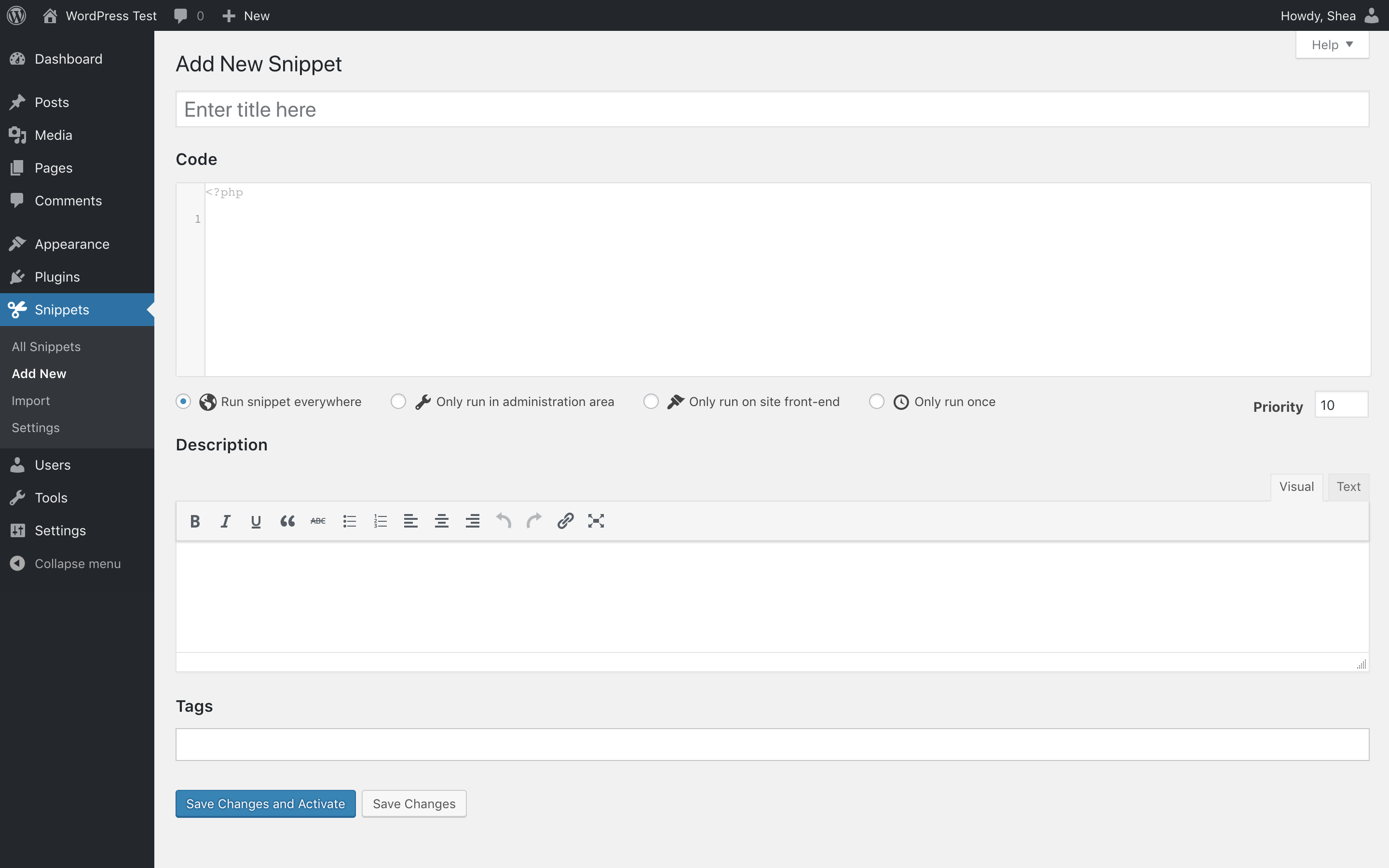
    The provided custom code is in PHP language. So please put the custom code under PHP tab.

    For more information, please check this video: https://www.youtube.com/watch?v=29jD2BcBX5w&ab_channel=FerdyKorpershoek.

    Screenshots:
    https://ps.w.org/code-snippets/assets/screenshot-2.png?rev=2256244
    https://ps.w.org/code-snippets/assets/screenshot-3.png?rev=2256244

    Hope it helps 🙂

    Avatar: Justin
    Luca Rossi
    Support staff
    June 4, 2024 at 09:06

    You’re most welcome.

    Avatar: Justin
    Luca Rossi
    Support staff
    June 4, 2024 at 07:32

    Hi @ONOFF TECH,

    Could you please confirm that your XStore theme & XStore Core plugin are up-to-date? You can check the latest version here: https://xstore.8theme.com/update-history/.

    If it still doesn’t work, please assist us in identifying any potential conflicts, we kindly request that you conduct a systematic test. This can be done by deactivating each plugin one at a time, with the exception of those that are explicitly included in the list provided by our team.

    For your convenience, you can find the list of included plugins at the following link: https://www.8theme.com/documentation/xstore/plugins/included-plugins/.

    Best Regards,
    8Theme’s Team

    Avatar: Justin
    Luca Rossi
    Support staff
    June 4, 2024 at 07:25

    Dear Allen,

    We hope this message finds you well.

    Regarding your recent inquiry about the placement of additional elements on your website, I would like to inform you that it is not feasible to add content directly above the “Add to Cart” button. However, you can successfully place content above the “Add to Cart” form. For your reference, please view the layout here: https://prnt.sc/yhxfuEZ0IMyr

    As per your requirements, the button on the left should function as a size guide, and the button on the right should be configured to trigger a popup via Elementor. For detailed guidance on setting up the onclick popup button in WordPress using Elementor, you may visit: https://elementor.com/academy/create-a-button-to-trigger-an-onclick-popup-in-wordpress/

    Should you need further assistance or have any more queries, please do not hesitate to contact us.

    Best Regards,
    The 8Theme Team

    Avatar: Justin
    Luca Rossi
    Support staff
    June 4, 2024 at 06:37

    Dear @giakhiemtoys,

    We are pleased to inform you that your issue has been successfully resolved. We kindly ask you to verify the resolution at your earliest convenience.

    Thank you for your patience and cooperation.

    Best Regards,
    The 8Theme Team

    Avatar: Justin
    Luca Rossi
    Support staff
    June 4, 2024 at 05:20

    Dear @giakhiemtoys,

    We hope this message finds you well. We are writing to inform you that following the recent update, we noticed an issue with the theme on your website. We have taken the initiative to upload the correct files to resolve this matter, and we are pleased to report that everything is now functioning properly.

    Could you please take a moment to review the changes at your earliest convenience and confirm that everything meets your satisfaction?

    Thank you for your attention to this matter.

    Best Regards,
    8Theme’s Team

  • 1 2 3 133 134 135 177 178 179
    Viewing 4,020 results - 3,991 through 4,020 (of 5,361 total)
Viewing 30 posts - 3,991 through 4,020 (of 5,361 total)
We're using our own and third-party cookies to improve your experience and our website. Keep on browsing to accept our cookie policy.