

Hello,
Because of some theme peculiarity it is impossible to use for portfolio page such slug as “portfolio”. Please try to use some different, for example “our-portfolio”.
Regards,
Jack Richardson

Hello,
Because of some theme peculiarity it is impossible to use for portfolio page such slug as “portfolio”. Please try to use some different, for example “our-portfolio”.
Regards,
Jack Richardson
Hello,
New update will be released in one month. We’re sorry for the inconvenience.
Regards,
Jack Richardson
Hello,
You should select Top Navigation for Theme locations in Appearance -> Menus.
Regards,
Jack Richardson
Hello,
You should edit a desired page and choose in the filed template -> One column, no sidebar.
Regards,
Jack Richardson
Hello,
Add this code into your custom.css:
.woocommerce-breadcrumb {
    display: none;
}
Here is a video tutorial how to create custom.css: https://www.youtube.com/watch?v=Qok2zRedRMY&feature=youtu.be .
Also if you do some changes in theme files, please create child theme to keep save your changes after theme upgrading.
Regards,
Jack Richardson
Hello,
There is no such feature in our theme and unfortunately it can not be implemented
Regards,
Jack Richardson
Hello,
You have transparent place on your logo image, which cause an illusion, that the image isn’t centered:
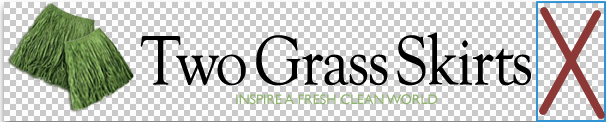
Also please do all style changes in custom.css, because if you do it in style.css, then after upgrading you’ll lose all your changes.
Regards,
Jack Richardson
Hello,
Add the following code to your custom.css:
.page-heading .row-fluid .span12 .back-to {
    display: none;
}
.toolbar .woocommerce-ordering {
    display: none;
}
Here is a video tutorial how to create custom.css: https://www.youtube.com/watch?v=Qok2zRedRMY&feature=youtu.be .
Regards,
Jack Richardson
Hello,
You have old theme version (2.8), but new version of WooCommerce (2.1.9). This is compatibility problem of the theme version with 2.1.x Woocommerce. Please upgrade your theme to the latest version, but before upgrading delete woocommerce folder from wp-content/themes/blanco.
Regards,
Jack Richardson
Hello,
You have old theme version (2.8), but new version of WooCommerce (2.1.9). This is compatibility problem of the theme version with 2.1.x Woocommerce. Please upgrade your theme to the latest version, but before upgrading delete woocommerce folder from wp-content/themes/blanco.
Regards,
Jack Richardson
Hello,
Could you please provide us with wp-admin access?
Regards,
Jack Richardson
Hello,
Please provide us with access to FTP and wp-admin panel.
Regards,
Jack Richardson
Hello,
You need to edit column and add extra class “border-after” as it shown on screenshot.
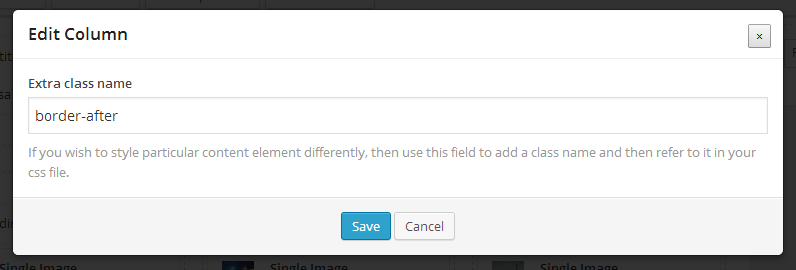 Also inside of the column should be following content: title, image and text. If problem will persist provide us with FTP and wp-admin credentials.
Regards,
Jack Richardson
Hello,
Yes, it’s possible. But to create multilingual site you should install WPML plugin.
Regards,
Jack Richardson
Hello,
How many menu items do you have? Do you face such problem with default theme too? If yes it could be WP limit. Read this topic, maybe you’ll find a workaround http://wordpress.org/support/topic/wordpress-menu-item-limit
Please provide us with access to wp admin panel and FTP in case problem persists with our theme only.
Regards,
Jack Richardson
Hello,
You should rename your default.custom.css to custom.css.
Regards,
Jack Richardson
Hello,
Add this code to your custom.css:
.main-nav .menu > li.menu-full-width.open-by-click .nav-sublist-dropdown .container > ul > li.et-col2 {
margin-left: 2.127659574468085%;}
Here is a video tutorial how to create custom.css: https://www.youtube.com/watch?v=Qok2zRedRMY&feature=youtu.be .
Regards,
Jack Richardson
Hello,
Please provide us with the login details to admin panel and FTP.
Do you mean it works with default theme, but it doesn’t appear with our theme, right? Or there is no such functionality by default and you want to implement it?
Regards,
Jack Richardson
Hello,
Firstly add some widget to the Single product page sidebar (it can be even an empty text widget) to activate Single product page sidebar. Then create brands and specify them for desired products. For more information about the brands creation read in documentation https://www.8theme.com/demo/docs/legenda/index.html#!/single_product_page .
Regards,
Jack Richardson
Hello,
This is variable product. Read here how to create this type of product http://docs.woothemes.com/document/product-variations/ .
Regards,
Jack Richardson
Hello,
Don’t worry, it doesn’t influence theme work and will be fixed in the next update. Now just click “hide this notice”.
Regards,
Jack Richardson
Yes, Daniel, you can paste this into the style.css in your child theme. If it won’t work, then create custom.css in parent theme.
Regards,
Jack Richardson
Hello,
Unfortunatly there is no settings for changing image size on single product page in our theme. You can enable sidebar by adding widgets to Single product page Sidebar area (Appearance > Widgets), and thus slightly decrease image block width.
Regards,
Jack Richardson
We’re sorry, but there is no such feature as left sidebar on single product page in our theme. We just can place the existing sidebar at the left side (with the same width as it has now) but such customization will be paid service.
Regards,
Jack Richardson
Hello,
Please, add this lines of code to your custom.css:
#main-nav > ul > li.current_page_item > a {
	color: #desired-color-of-active-item !important;
}
#main-nav > ul > li > a:hover, #main-nav > ul > li > ul > li a:hover {
	color: #desired-color-on-hover !important;
}
and change “#desired-color-of-active-item”, “#desired-color-on-hover” on your desired color.
If you didn’t enable custom.css before, please visit this link (following tutorial is for Legenda, but for Blanco actions are analogical) https://www.youtube.com/watch?v=Qok2zRedRMY&feature=youtu.be .
Regards,
Jack Richardson
Hello,
To add your own sidebar on the single product page you should go to Blanco Theme Settings -> Single Product Page section and there in the “Enter custom content you would like output to the product right sidebar” field clear all.
After this you can add desired widgets to the single product page by draging it to the Single product sidebar area in Appearence -> Widgets.
Regards,
Jack Richardson









