

Hello,
Please watch carefully the video tutorial how to create footer: https://www.youtube.com/watch?v=HL7wtSaTcMU&feature=youtu.be and read documentation https://www.8theme.com/demo/docs/legenda/#!/footer .
Jack Richardson

Hello,
Please watch carefully the video tutorial how to create footer: https://www.youtube.com/watch?v=HL7wtSaTcMU&feature=youtu.be and read documentation https://www.8theme.com/demo/docs/legenda/#!/footer .
Jack Richardson
Hello,
Replace your shortcode.php with new one from archive: https://www.8theme.com/wp-content/uploads/2014/05/shortcodes.zip .
Regards,
Jack Richardson
Hello,
Add this code into your custom.css:
quick-view-popup .product-info .posted_in, .single-product-page .product-info .posted_in {
display: inline-block;
}
Regards,
Jack Richardson
Hello,
Please send us shortcodes.php which is located at wp-content/themes/xmarket/code.
Regards,
Jack Richardson
Hello,
You’re welcome!
If you have any questions don’t hesitate to contact us.
Regards,
Jack Richardson
Hello,
What theme version do you use? Could you please provide us with FTP and wp-admin access?
Regards,
Jack Richardson
Hello,
Could you please provide us with FTP and wp-admin credentials?
Regards,
Jack Richardson
Hello,
Please create custom.css as it shown on video tutorial: https://www.youtube.com/watch?v=Qok2zRedRMY&feature=youtu.be and provide us with FTP and wp-admin credentials.
Regards,
Jack Richardson
Hello,
Please provide us with FTP and wp-admin credentials.
Regards,
Jack Richardson
Hello,
Please provide us with access to FTP and wp-admin panel.
Regards,
Jack Richardson
Hello,
You should change an image which is located at /wp-content/themes/legenda/images/star-active.png using PhotoShop or some other image editor.
Regards,
Jack Richardson
Hello,
Are you sure that you’re importing the correct zip file? Please read carefully how to import the slider in documentation at https://www.8theme.com/demo/docs/legenda/index.html#!/slideshow .
Regards,
Jack Richardson
Hello,
Then insert this piece of code into your custom.css:
.footer-top {
background: #ccc;
}
And change “#ccc” to your desired color.
Regards,
Jack Richardson
Hello,
You can see all footer variants in Theme Options > Footer. If you unsatisfied with proposed variants, then add the following code into your custom.css:
.footer-top .container {
    background: #ccc;
}
And change “#ccc” to your desired color.
Here is a video tutorial how to create custom.css: https://www.youtube.com/watch?v=Qok2zRedRMY&feature=youtu.be .
Regards,
Jack Richardson
Hello,
Because of some theme peculiarity it is impossible to use for portfolio page such slug as “portfolio”. Please try to use some different, for example “our-portfolio”.
Regards,
Jack Richardson
Hello,
New update will be released in one month. We’re sorry for the inconvenience.
Regards,
Jack Richardson
Hello,
You should select Top Navigation for Theme locations in Appearance -> Menus.
Regards,
Jack Richardson
Hello,
You should edit a desired page and choose in the filed template -> One column, no sidebar.
Regards,
Jack Richardson
Hello,
Add this code into your custom.css:
.woocommerce-breadcrumb {
    display: none;
}
Here is a video tutorial how to create custom.css: https://www.youtube.com/watch?v=Qok2zRedRMY&feature=youtu.be .
Also if you do some changes in theme files, please create child theme to keep save your changes after theme upgrading.
Regards,
Jack Richardson
Hello,
There is no such feature in our theme and unfortunately it can not be implemented
Regards,
Jack Richardson
Hello,
You have transparent place on your logo image, which cause an illusion, that the image isn’t centered:
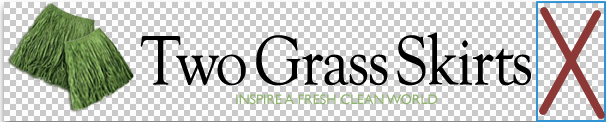
Also please do all style changes in custom.css, because if you do it in style.css, then after upgrading you’ll lose all your changes.
Regards,
Jack Richardson
Hello,
Add the following code to your custom.css:
.page-heading .row-fluid .span12 .back-to {
    display: none;
}
.toolbar .woocommerce-ordering {
    display: none;
}
Here is a video tutorial how to create custom.css: https://www.youtube.com/watch?v=Qok2zRedRMY&feature=youtu.be .
Regards,
Jack Richardson
Hello,
You have old theme version (2.8), but new version of WooCommerce (2.1.9). This is compatibility problem of the theme version with 2.1.x Woocommerce. Please upgrade your theme to the latest version, but before upgrading delete woocommerce folder from wp-content/themes/blanco.
Regards,
Jack Richardson
Hello,
You have old theme version (2.8), but new version of WooCommerce (2.1.9). This is compatibility problem of the theme version with 2.1.x Woocommerce. Please upgrade your theme to the latest version, but before upgrading delete woocommerce folder from wp-content/themes/blanco.
Regards,
Jack Richardson
Hello,
Could you please provide us with wp-admin access?
Regards,
Jack Richardson
Hello,
Please provide us with access to FTP and wp-admin panel.
Regards,
Jack Richardson
Hello,
You need to edit column and add extra class “border-after” as it shown on screenshot.
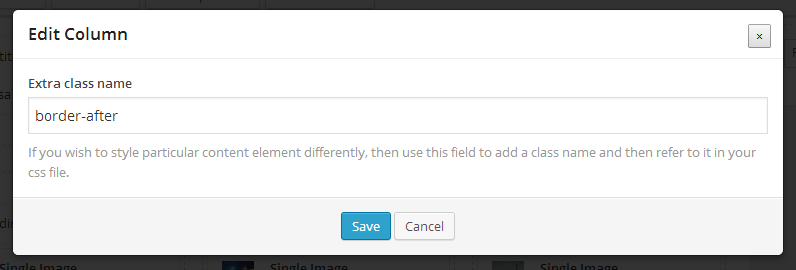 Also inside of the column should be following content: title, image and text. If problem will persist provide us with FTP and wp-admin credentials.
Regards,
Jack Richardson
Hello,
Yes, it’s possible. But to create multilingual site you should install WPML plugin.
Regards,
Jack Richardson
Hello,
How many menu items do you have? Do you face such problem with default theme too? If yes it could be WP limit. Read this topic, maybe you’ll find a workaround http://wordpress.org/support/topic/wordpress-menu-item-limit
Please provide us with access to wp admin panel and FTP in case problem persists with our theme only.
Regards,
Jack Richardson
Hello,
You should rename your default.custom.css to custom.css.
Regards,
Jack Richardson









