Hi Rose,
This is the access.
Please be careful as I am planning to deploy this version live.
Best regards,
F.

Hi Rose,
This is the access.
Please be careful as I am planning to deploy this version live.
Best regards,
F.
Hi Rose,
I uploaded the font through the custom font upload option in the theme settings and I can see the tff font uploaded in the server.
However, when I run the CSS the Cairo font is not loaded. It looks like the css cannot trigger the Cairo font.
Could you please have a look?
Thanks,
F.
Hi Rose,
Thanks for the code suggestion!
I am going to test it. Could you please also tell me the correct way to permanently add the Cairo font to the theme (in a way that the next theme update will not erase it)?
Thanks,
F.
Hi Rose,
This is the URL.
Thanks for the help.
F.
Dear Rose,
I performed the test with the standard theme and everything works fine, I can click the purchase button. At this stage the problem is due to Xstore.
Inspecting the code I realized that for some reasons the button is disabled and applicable only when a user is not logged in. Please see the below image:
https://snipboard.io/ukyDrZ.jpg
If you need I have the standard theme loaded on my staging site, in case you need to make a comparison. The front end access is given in the private area.
Please let me know as soon as possible as I am loosing a lot of sales 🙁
Thanks in advance,
F.
Hi Rose,
Thanks a lot for your help, I really appreciate.
Concerning problem 1:
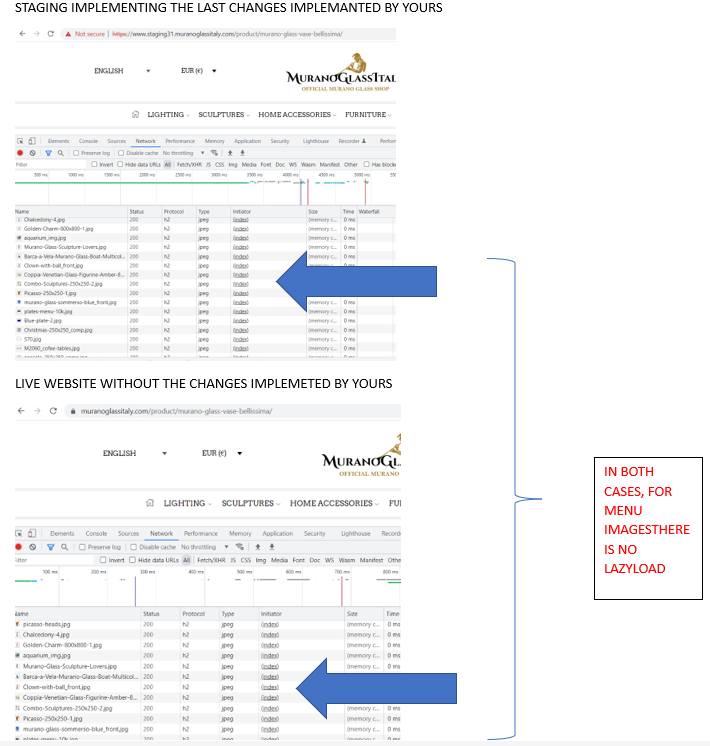
I made a test comparing the staging31 where you have just implemented the changes and the live website with no modifications, the menu images appear in both cases not be lazy loaded. Please find below the evidence.
https://snipboard.io/0LyXuV.jpg
The product page image instead is loaded with lazy load, but after all menu images are loaded. Please find here the evidence:
https://snipboard.io/0ZhKpb.jpg
On this basis I am afraid to report that I do not see the issue yet solved, if possible I would really appreciate you further help.
Problem 2:
Thanks for the improvement, it looks fine with me.
Could you please explain in words the improvements that you have implemented in the script? what is the effect?
Finally, could you please tell me what should I copy and where, in order to transfer these changes to the the staging that will be deployed (as you remember I explained that staging31 is for testing and will not be deployed)
Best regards,
Fabio
To add to my previous message, please find in the following the answer that I got from the hosting provider concerning the relevant class for problem 2 and suggestion for problem 1:
“The class that gets added when an image is lazy-loaded from our plugin hosting related is lazyload. Please also ask them to check what’s the difference at theme level, between the images added in the menus and the images that are actually lazy-loaded so they can provide you with information on how to add/insert them the same way into the menus, so they can be compatible with wordpress lazy-load functionality that represents the basis for our hosting related caching plugin to work. ”
Thanks in advance for your help.
F.
Dear Rose,
Thanks for your reply. I was working on creating a staging for your so that you can enter and see. Please find the credentials below.
Please note that this is not a staging that I am planning to deploy, changes that you implement would need to be copied on a different staging. I would then suggest that you keep track of the changes and let me know.
Problem 1:
In the mean time, you provided a CSS code and I made a test on my live website. The new code is making the problem even worse.
Please have a look at the evidence: https://snipboard.io/q9rOLA.jpg
You can see that images from the submenus do take even more time for loading and they are not defer to the end, the main product page image is loaded after all menu images.
Could you please further investigate and help me to find a solution?
Problem 2:
I will ask the hosting provider and come back to you shortly.
Thanks in advance for your help.
F.
Please find the access details below.
Thanks in advance for the help and let me know how you will fix it.
Best regards,
F.
Dear Tony,
Please find attached the access details.
I kindly ask you to be careful not to break the website as I would like to deploy this staging once fixed.
Thanks in advance for you help, I really hope that you will manage to fix the fatal error.
Best regards,
F.
Yes! That was the problem, i did it and it works now
Thanks Rose!
Shall i wait the release of the next theme version for using this functionality?
F
Dear Awais,
Thanks for your reply, yes I agree this most probably happened during the staging deployment. However, I am not sure how to fix it now.
I am not using a custom font, this is one of the theme fonts.
In order to fix the problem, what should i do? do i need to run a search and replace in the database, or modify any of the files part of the theme structure?
Thanks for the explanation,
Fabio
Dear Olga,
Please find the access details attached.
Fabio.
Dear Rose,
Please find the access details attached.
Fabio.
Dear Olga,
Please find the images attached.
I hope that you could provide me a solution.
Fabio.
Dear Rose,
Thank you for your response. I understand that you cannot guarantee full compatibility of the theme with any plugin, at the same time considering that the inbuilt feature of the theme is not fully developed I cannot use it. This is the reason why I was forced to buy an external plugin, however if the theme does not allow the external plugin to work because of compatibility issue, there is no solution to implement single product variation. This is a problem.
Allow me to provide you more details about the issue. XStore has the single variation inbuilt feature, however it does not allow to hide specific variations. This is a problem because, although there are needs to display single variations for example because the product has different colors there are other type of variations that do not require (cannot) to be displayed. If the product has different sizes, you do not want to display single variation of the product. This is not adding anything to the product listing, on the contrary is making the product listing messy. For example we would have a product listing with the same product image, listed multiple time for each of the size variation.
I tried the external single variation plugin on a different theme and works fine.
What I kindly ask is either to fix the compatibility issue or further develop the inbuilt theme single variation feature in a way that i could hide products that should not be listed because the variation is not relevant. At the moment the feature is either showing everything (all possible variations) or nothing (no variations).
I hope that you could be provide a working solution.
Best regards.
Anita
Thank you for your response.
But there is no meaning in displaying the same product with different sizes on the shop page or the catalogue. Is it possible to have an option at the product variations (backend) to hide certain variations so that I will be able to hide the variations regarding the size and can display the ones based on color?
Hello,
Please find the access details in the private area.
Hello,
Can you please let me know the need of the FTP access. I can provide you with the wp-admin access, but for the FTP access please let me know whether it is really necessary and the requirement as I am not comfortable to share it with.
We are using the latest version (V8.0.5) of the theme and core plugin. Please find the wp-admin access details in the private area
Hello,
While I am trying to activate the theme in my live site I am facing the limit issue as it shows that the activation code is incorrect. Can you please help me with unblocking the activation so that I can activate the theme in my live site. Till now I have only activated the theme in local server.
Hi,
I haven’t activated the theme yet as I wanted to check the transition from another theme to Xstore in a local server before doing it in a live site.
Does this prevent me from accessing the theme options?
While trying the above mentioned steps the website is showing error message “Sorry, you are not allowed to access this page.”
Can you please let me know why this issue arises?
Do I need to activate the theme for accessing this page
Hi,
After going through the privacy policies of theme forest, it does not mention about activating the license in a local server and a live site of the same end product simultaneously. What I have understood from the privacy polices is that I have to store the item in a single place that is accessible to everyone. Does this mean that I have to activate the theme in a live website and work on it rather than having it in local servers?
So if I activate it in local server and for testing a migration to the Xstore theme from another theme (only for testing purpose and not planning to migrate the local server to live site), will it not be possible to activate it again in the live site?
I have renamed my menu in English as the Main Menu and currently the menu is displayed in English. After saving the changes, I have initiated the sync of the menu from WP Menus sync from the WPML plugin. But now the menu is displayed in English for all translations. I have contacted WPML and they have informed me about contacting Xstore support for translations as Xstore doesn’t use standard menu location settings. Could you please let me know what should be done for making the translations work properly.
Please let me know how will you recognize the same project? Is it with the URL or the site name defined in WordPress?
I am having a copy of my website in my local machine. Once when I activate the theme in my local machine and if I want to activate the theme simultaneously on a staging website is it possible?
Once after activating the theme in local server, If I am not planning to migrate the site from my local server to live site and I want to activate the theme again in my live site does this also be considered as the same project? Will I be allowed to activate the theme this way?
I am having a single activation key for my Xstore theme. If I activate the theme in my local machine using this activation code for importing the demo templates, will it create a problem for me when I try to activate the theme in my live website?
I need to import specific demo pages. Can it be achieved by downloading it in .xml format? or is there any other method through which I can import only specific pages of the demo to my wordpress site?
The video you have provided is about the one click demo installation. Not about the installation of templates. On installing the templates by following the steps provided in the article you have given in the link, It is showing the error.
Error prevailing after following all the steps.