
Hello,
You can send login details in Private Content on this forum. Private Content is visible only for administrators.
Thank you.
Regards,
Eva Kemp.

Hello,
You can send login details in Private Content on this forum. Private Content is visible only for administrators.
Thank you.
Regards,
Eva Kemp.
Hello,
Unfortunately that is the max width of the wide layout. If you want to make some parts more wider you should style them in custom.css file.
Please take our apologies for inconveniences.
Regards,
Eva Kemp.
Hello,
Please refer to this link how to make Revolution Slider full width: http://theme-fusion.com/knowledgebase/how-to-make-a-full-screen-revolution-slider/
Regards,
Eva Kemp.
Hello,
In this case we recommend you to create a ticket at https://support.8theme.com/ and our specialists will look into this issue more deeply.
Thank you.
Regards,
Eva Kemp.
Hello,
Please try to check the site load speed with default wordpress theme to compare. Or provide us with wp-admin panel credentials in Private Content.
Regards,
Eva Kemp.
Hello,
To create “mailto” link for team member you need edit the file wp-content/themes/legenda/framework/shortcodes.php, find the code <a href="'.$a['email'].'">'.$a['email'] (line 1496) and replace it with this one <a href="mailto: '.$a['email'].'">'.$a['email']
Regards,
Eva Kemp.
Hello,
We’ve already replied on the topic regarding error log.
Regards,
Eva Kemp.
Hello,
“Read More” button on the products page is related to Woocommerce plugin, so to change its text you need edit the file wp-content/plugins/woocommerce/includes/class-wc-product-simple.php (line 48).
Regards,
Eva Kemp.
Hello,
Please provide us with the link where product variations are displayed. Also we don’t recommend to change styles in the original style.css file, but use custom.css. Here is the tutorial how to create it: http://www.youtube.com/watch?v=Qok2zRedRMY&list=PLMqMSqDgPNmD4uhGI1IBhr1iaEy81TMff&feature=share&index=1 (The video is related to Legenda theme, but the process is identical).
Regards,
Eva Kemp.
Hello,
To close the first category in the sidebar you need edit the file wp-content/themes/idstore/js/script.js. Find the code jQuery('.categories-group.has-subnav:first').addClass('opened').find('ul').show(); (line 307) and comment it.
Regards,
Eva Kemp.
Hello,
According to your error log I’ve not found any notification regarding woocommerce plugin and legenda theme. Please try to check your site with default wordpress theme as well. Are you experiencing any problems with your site currently?
Regards,
Eva Kemp.
Hello,
I’ve just viewed your site and popup window hasn’t appeared.
Please try to check it with some other browser or clear the cache of your current browser.
Regards,
Eva Kemp.
Hello,
I’m unable to enter Plugins menu in admin panel. Have you installed any 3rd-party plugins?
Please provide us with FTP credentials as well.
Thank you.
Regards,
Eva Kemp.
Hello,
Please note we provide support only for one domain that uses our theme. You can use the theme for two domains on your own decision but tech support from our side will be provided only for one site. If you want to have our support for 2 domains in future you have to buy 2 licenses.
Regards,
Eva Kemp.
You need deactivate the plugin “YITH WooCommerce Wishlist” in admin panel > Plugins.
Regards,
Eva Kemp.
Hello,
Could we also have wp-admin panel credentials?
Thank you.
Regards,
Eva Kemp.
I’ve checked Wishlist button with many products on your site and haven’t seen the error. According to the error you were getting “headers already sent by (output started at /home/karissma/public_html/wp-content/plugins/yith-woocommerce-wishlist/yith-wcwl-ajax.php:47)” – the problem occurs in yith-wcwl-ajax.php file. You may check it or contact Wishlist plugin developer.
Regards,
Eva Kemp.
Hello,
Your site is under maintenance mode, so we’re unable to view it. Please provide us with wp-admin panel in Private Content.
Regards,
Eva Kemp.
Hello,
Could you please specify how we can replicate the problem as the site is loading fine on our site? Have you checked it with another browser?
Thank you.
Regards,
Eva Kemp.
Hello,
You’re welcome.
Regards,
Eva Kemp.
Hello,
Please provide us with wp-admin panel and FTP credentials in Private Content.
Regards,
Eva Kemp.
Sorry, but without FTP access we can’t investigate the problem. Perhaps you’re using some control panel at your hosting provider. You can provide us with the access to it.
Regards,
Eva Kemp.
Hello,
Please provide us with FTP credentials to check the issue further.
Thank you.
Regards,
Eva Kemp.
Hello,
1. The default values are:
Product Images Width: 500px
Product Images Height: 700px
Product Thumbnails Width: 120px
Product Thumbnails Height: 130px
I’ve checked and product image is displayed in the middle on preview. Could you please clarify with more details and show us a screenshot?
2. To remove the second “Add to wishlist” button you need go to Woocommerce > Settings > Wishlist tab > select “Use shortcode” for Position field.
3. We’ve tested your site speed with our theme and it is loaded in 3.14s and with default theme its load time is 11.28s, even slower than with our theme.
So we recommend you to ask you hosting provider regarding this issue.
Regards,
Eva Kemp.
Hello,
There is some mistake in the functions.php file of the child theme. I’ve just tested Text element without this file and it has been loaded fine.
So please check the code in the file attentively.
Regards,
Eva Kemp.
Hello,
We recommend you to disable 3rd-party plugins one by one to check if some is causing the issue. There may be some conflict between our theme and one of the plugins.
Regards,
Eva Kemp.
Hello,
On our demo we have subcategories added under the category submenu, like:
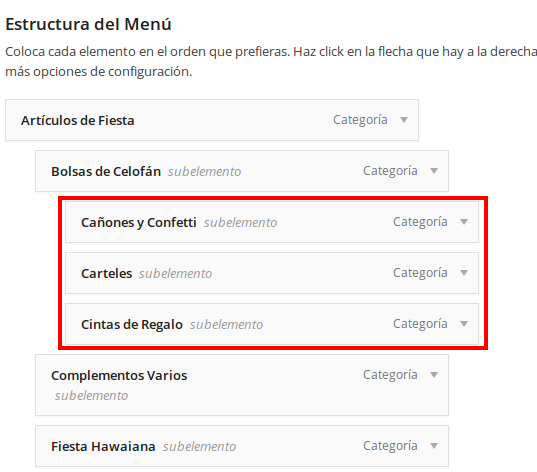
Not like you have submenus currently. So if you wish to have the same menu like on the demo you need create subcategories as well. Otherwise you have to customize it with columns.
Regards,
Eva Kemp.
Hello,
I’ve imported LayerSlider to your home page. Please check it.
On our demo site we used “8theme – Subcategories List” widget in Appearance > Widgets > “Product Page sidebar” widget area. Please read our documentation:
https://www.8theme.com/demo/docs/blanco/index.html#!/widgets
It will work for the page which you selected as Shop page in Woocommerce > Settings > Products tab > Product Archive / Shop Page field.
Regards,
Eva Kemp.
Hello,
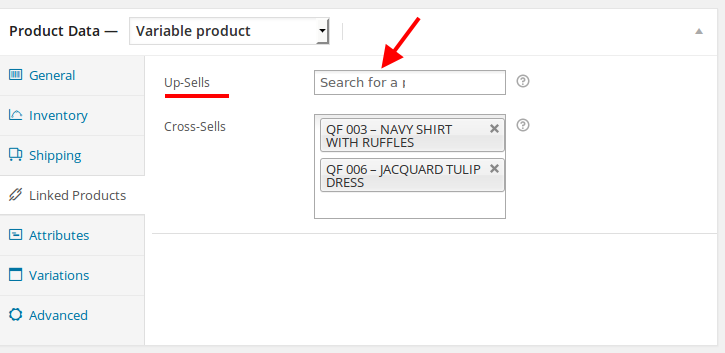
I’ve just checked each product you’ve added in admin panel and only for one “BLACK PUMP WITH GOLD LINE BY QUPID” cross-sells are selected, but you didn’t set up-sells and cross-sells for other products:
I’ve checked that product and cross-sells are displayed fine on the Cart page:
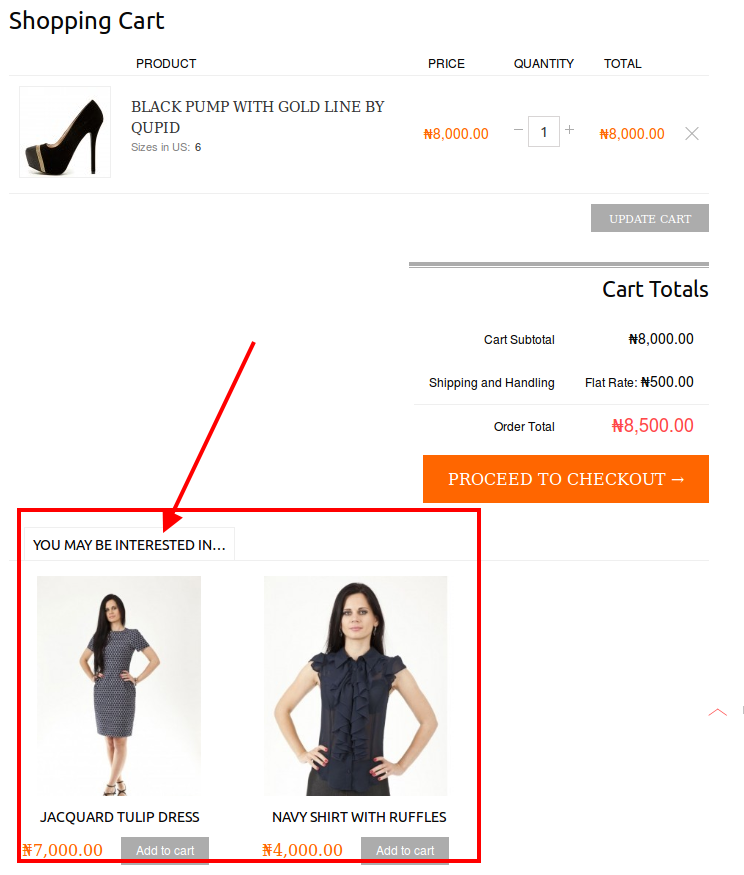
So you need add upsells for the products you need.
Could you please show a screenshot where you want to add the text on the Checkout page?
Regards,
Eva Kemp.
Hello @BaggityBags,
Please provide us with wp-admin panel credentials in Private Content to check the issue.
Regards,
Eva Kemp.









