Forum Replies Created

Viewing 30 posts - 28,951 through 28,980 (of 31,382 total)
  • Avatar: Eva
    Eva Kemp
    Participant
    July 29, 2014 at 11:04

    Hello,

    I’ve just written the code inline instead of block:
    [tabs][tab active='1' title="Bio"]Content tab 1[/tab][tab title="Story"]Content tab 2[/tab][tab title="Credentials"]Content tab 3[/tab][tab title="Services"]Content tab 4[/tab][/tabs]

    If you need more help let us know.

    Regards,
    Eva Kemp.

    Avatar: Eva
    Eva Kemp
    Participant
    July 28, 2014 at 22:39

    Hello,

    You’re welcome.

    Regards,
    Eva Kemp.

    Avatar: Eva
    Eva Kemp
    Participant
    July 28, 2014 at 20:29

    Hello,

    You’re welcome.

    Regards,
    Eva Kemp.

    Avatar: Eva
    Eva Kemp
    Participant
    July 28, 2014 at 19:37

    Hello,

    I’ve edited the code on the home page in admin panel and now tabs are showing fine.
    Please check and clear browser cache before.

    Regards,
    Eva Kemp.

    Avatar: Eva
    Eva Kemp
    Participant
    July 28, 2014 at 17:28

    Sorry,

    I’ve edited the previous post.
    Please check it now.

    Regards,
    Eva Kemp.

    Avatar: Eva
    Eva Kemp
    Participant
    July 28, 2014 at 17:00

    Hello @presumedetucasa,

    Sorry, but “500 error” is related to hosting provider and they should try to find the solution. Our theme is compatible either with Windows or with Linux servers. Please ask them to check what is causing that error.
    Thank you.

    Regards,
    Eva Kemp.

    Avatar: Eva
    Eva Kemp
    Participant
    July 28, 2014 at 16:51

    Hello,

    There are few errors with scripts in console ( Failed to load resource: the server responded with a status of 403 (Forbidden) see screenshot)

    Very likely they caused your issue. Please, check if these files exist and permissions for them.

    Regards,
    Eva Kemp.

    Avatar: Eva
    Eva Kemp
    Participant
    July 28, 2014 at 15:30

    Please wait for a reply in the ticket. You’ll be provided with all information in there.
    Thank you.

    Regards,
    Eva Kemp.

    Avatar: Eva
    Eva Kemp
    Participant
    July 28, 2014 at 15:28

    Hello,

    Sorry. It’s added now.
    Please check the site.

    Regards,
    Eva Kemp.

    Avatar: Eva
    Eva Kemp
    Participant
    July 28, 2014 at 15:20

    Hello,

    Could you please clarify your last question?
    Thank you.

    Regards,
    Eva Kemp.

    Avatar: Eva
    Eva Kemp
    Participant
    July 28, 2014 at 15:07

    You’re welcome.

    Regards,
    Eva Kemp.

    Avatar: Eva
    Eva Kemp
    Participant
    July 28, 2014 at 14:55

    Hello,

    It seems some old style.css file is loading on the site. It means you have some cache enabled. Please check it attentively with your host.
    Thank you.

    Regards,
    Eva Kemp.

    Avatar: Eva
    Eva Kemp
    Participant
    July 28, 2014 at 14:26

    Sorry, but it’s still unclear for us.
    Please show the exact link where your images are displayed incorrectly. Are they too small or too big? Are you talking about catalog images (for example, http://www.sexy-bunny.com/produktkategorie/damen-mode/babydolls-negligees) or single product image (like http://www.sexy-bunny.com/produkt/2-teiliges-babydoll-mit-spitzenakzenten-marke-leg-avenue)?
    If you want to change their size you can do this is Theme Options > Product Images Width, Product Images Height or in Woocommerce > Settings > Products tab > Product Image Sizes.
    Also use this plugin http://wordpress.org/plugins/regenerate-thumbnails/ after changing the sizes as suggested by Woocommerce team.

    Regards,
    Eva Kemp.

    Avatar: Eva
    Eva Kemp
    Participant
    July 28, 2014 at 14:18

    The error was caused by my changes in functions.php which was fixed after you provided us with FTP access. Don’t worry. You haven’t been hacked.
    But we still need wp-admin credentials to check the issue with style.css in the child theme.

    Regards,
    Eva Kemp.

    Avatar: Eva
    Eva Kemp
    Participant
    July 28, 2014 at 14:05

    Sorry, but we need access to admin panel. Try to resolve the login issue with your host and provide us with the correct credentials to wp-admin panel and FTP.
    Thank you.
    Also please note don’t make any changes after you ask us to help as we may edit some files and this may cause more problems if you start making changes as well.
    Thank you for understanding.

    Regards,
    Eva Kemp.

    Avatar: Eva
    Eva Kemp
    Participant
    July 28, 2014 at 13:58

    As this is Woocommerce configuration you should contact them regarding this issue.
    Thank you for understanding.

    Regards,
    Eva Kemp.

    Avatar: Eva
    Eva Kemp
    Participant
    July 28, 2014 at 13:36

    You’re welcome.

    Regards,
    Eva Kemp.

    Avatar: Eva
    Eva Kemp
    Participant
    July 28, 2014 at 13:34

    This url slug is related Woocommerce plugin. You need edit wp-content/plugins/woocommerce/includes/class-wc-order.php (line 1151).

    Regards,
    Eva Kemp.

    Avatar: Eva
    Eva Kemp
    Participant
    July 28, 2014 at 13:18

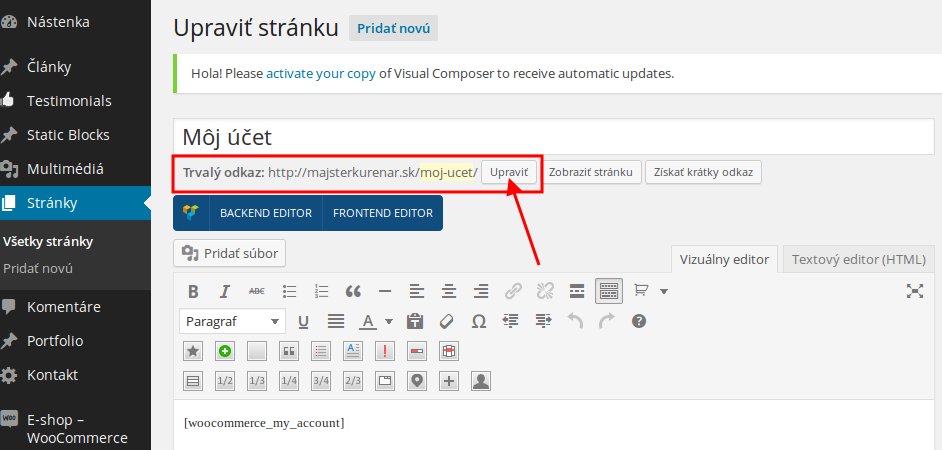
    You can edit the slug in admin panel:

    Regards,
    Eva Kemp.

    Avatar: Eva
    Eva Kemp
    Participant
    July 28, 2014 at 13:09

    Please provide us with FTP credentials.
    Thank you.

    Regards,
    Eva Kemp.

    Avatar: Eva
    Eva Kemp
    Participant
    July 28, 2014 at 13:08

    Thank you for the links.
    Please specify what sizes you want images to be shown? Should it be changed for single product image or catalog images?
    Concerning the translation:
    “Logout” word can be translated in wp-content/themes/idstore/et-links.php (line 4).
    You can translate “Latest products” in admin panel > Pages > edit your Home page and you’ll find this text in the text editor.
    “Return to Shop” is written in the files wp-content/themes/idstore/woocommerce/archive-product.php (line 117)and wp-content/themes/idstore/woocommerce/cart/cart-empty.php (line 22).

    Regards,
    Eva Kemp.

    Avatar: Eva
    Eva Kemp
    Participant
    July 28, 2014 at 12:51

    Please provide us with wp-admin panel and FTP credentials in Private Content.
    Thank you.

    Regards,
    Eva Kemp.

    Avatar: Eva
    Eva Kemp
    Participant
    July 28, 2014 at 12:49

    Hello,

    Please provide us with FTP credentials.
    Thank you.

    Regards,
    Eva Kemp.

    Avatar: Eva
    Eva Kemp
    Participant
    July 28, 2014 at 12:22

    The “Recent Orders” block can be translated in the file wp-content/themes/legenda/woocommerce/myaccount/my-orders.php
    “Logout” word is written in wp-content/themes/legenda/framework/woo.php (line 769).

    Regards,
    Eva Kemp.

    Avatar: Eva
    Eva Kemp
    Participant
    July 28, 2014 at 12:00

    Hello,

    Please write your question in the correct forum topic. This one is related to WordPress Xmarket theme.

    Regards,
    Eva Kemp.

    Avatar: Eva
    Eva Kemp
    Participant
    July 28, 2014 at 11:58

    Hello,

    Concerning the Shopping Cart widget we recommend you to create a ticket at http://support.8theme.com/ . Our specialists will look into the issue more deeply.
    Please provide us with the correct links of the screenshots.
    Thank you.

    Regards,
    Eva Kemp.

    Avatar: Eva
    Eva Kemp
    Participant
    July 28, 2014 at 11:04

    Hello,

    “Sign In”, “Logout”, “Your account” words can be translated in the file wp-content/themes/legenda/framework/theme-functions.php (lines 1004, 1010, 987).
    “Home” and “Successfully added to your shopping cart” text is also can be translated in wp-content/themes/legenda/framework/theme-functions.php (line 2524 and line 832).

    Please clarify where you want to translate “recent order view and logout”.
    Thank you.

    Regards,
    Eva Kemp.

    Avatar: Eva
    Eva Kemp
    Participant
    July 28, 2014 at 10:50

    Hello,

    1. I’ve checked Shopping Cart widget and it’s working fine. The info has been updated when I clicked on Home page. Try to clear your browser cache or check it in some other browser.
    2. Also I don’t see any issues with images. Please provide us with the exact link where you’re experiencing the problem.
    3. Please specify what exactly you want to translate and show us the links.
    Thank you.

    Regards,
    Eva Kemp.

    Avatar: Eva
    Eva Kemp
    Participant
    July 28, 2014 at 10:34

    Unfortunately we’re unable to assist you as we can’t investigate the problem. Seems the problem is related to your server. Try to reinstall it or install the theme at some hosting provider.

    Regards,
    Eva Kemp.

    Avatar: Eva
    Eva Kemp
    Participant
    July 28, 2014 at 10:32

    Hello @presumedetucasa,

    Sorry, but you have to contact your host regarding “Internal Server Error”. They should check error logs on the server.

    Regards,
    Eva Kemp.

  • 1 2 3 965 966 967 1,045 1,046 1,047
    Viewing 28,980 results - 28,951 through 28,980 (of 31,382 total)
Viewing 30 posts - 28,951 through 28,980 (of 31,382 total)
We're using our own and third-party cookies to improve your experience and our website. Keep on browsing to accept our cookie policy.