Forum Replies Created

Viewing 30 posts - 28,111 through 28,140 (of 31,382 total)
  • Avatar: Eva
    Eva Kemp
    Participant
    September 8, 2014 at 20:22

    Hello,

    If you’ve already added your own content and now want to install our demo content, your site may be corrupted. You may try to do this but you must create a back up of the site and database before making changes.
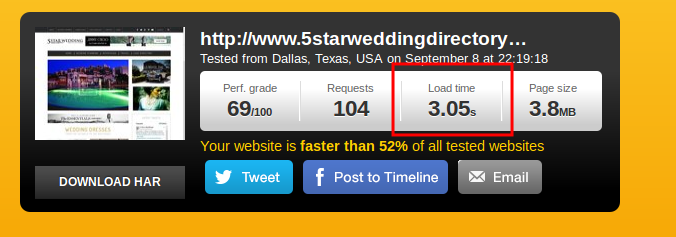
    We’ve tested the time load of your site and the result was 3 seconds:
    Regards,
    Eva Kemp.
    Avatar: Eva
    Eva Kemp
    Participant
    September 8, 2014 at 20:03

    Hello,

    Please provide us with the link to your site and wp-admin panel credentials in Private Content. Also please clarify what exactly you want to edit.
    Thank you.

    Regards,
    Eva Kemp.

    Avatar: Eva
    Eva Kemp
    Participant
    September 8, 2014 at 20:01

    Hello,

    Sorry, but the only way is to click “Dismiss” button to close the notifications.

    Regards,
    Eva Kemp.

    Avatar: Eva
    Eva Kemp
    Participant
    September 8, 2014 at 17:58

    Hello,

    Yes, you may. We recommend to install demo content at first and then upload your own.

    Regards,
    Eva Kemp.

    Avatar: Eva
    Eva Kemp
    Participant
    September 8, 2014 at 17:26

    Hello @acuariopro,

    The archives have been uploaded to your FTP account.

    Let us know if you need more help.

    Regards,
    Eva Kemp.

    Avatar: Eva
    Eva Kemp
    Participant
    September 8, 2014 at 16:27

    Hello @acuariopro,

    I’ve just connected to FTP account but there are no files. Is the account correct?
    Also please provide us with wp-admin panel credentials.

    Thank you.

    Regards,
    Eva Kemp.

    Avatar: Eva
    Eva Kemp
    Participant
    September 8, 2014 at 15:40

    Hello,

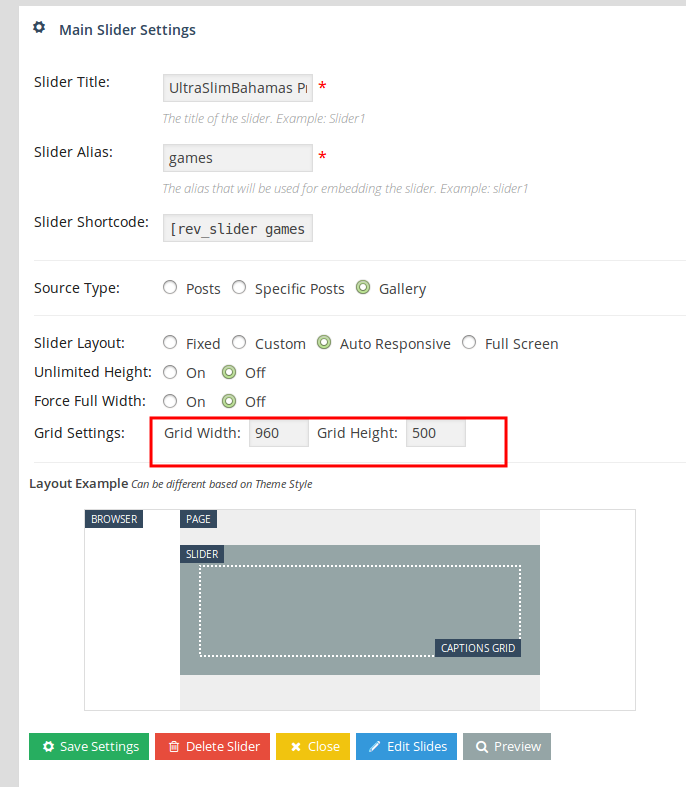
    You can change slider height in the Revolution Slider Settings:

    Regards,
    Eva Kemp.

    Avatar: Eva
    Eva Kemp
    Participant
    September 8, 2014 at 15:36

    Hello,

    I’ve just checked your site again and haven’t replicated the same problem. The rows and elements are deleted successfully in Visual Composer editor. Have you tried to check it in another browser? Please do this. Also try to clear the cache and cookies of your current browser.

    Thank you.
    Regards,
    Eva Kemp.

    Avatar: Eva
    Eva Kemp
    Participant
    September 8, 2014 at 15:31

    Hello,

    You’re welcome.

    Regards,
    Eva Kemp.

    Avatar: Eva
    Eva Kemp
    Participant
    September 8, 2014 at 15:19

    Hello,

    I’ve added the following code into custom.css file:

    #main-nav > ul > li > a:hover, #main-nav > ul > li.current_page_item > a {
        background-color: #262424;
    }

    Please check the menu now and clear browser cache before.

    Regards,
    Eva Kemp.

    Avatar: Eva
    Eva Kemp
    Participant
    September 8, 2014 at 14:21

    You’re welcome.

    Regards,
    Eva Kemp.

    Avatar: Eva
    Eva Kemp
    Participant
    September 8, 2014 at 14:19

    Hello,

    As this plugin is related to Woocommerce we recommend you to contact their support team.
    Thank you for understanding.

    Regards,
    Eva Kemp.

    Avatar: Eva
    Eva Kemp
    Participant
    September 8, 2014 at 14:07

    Hello,

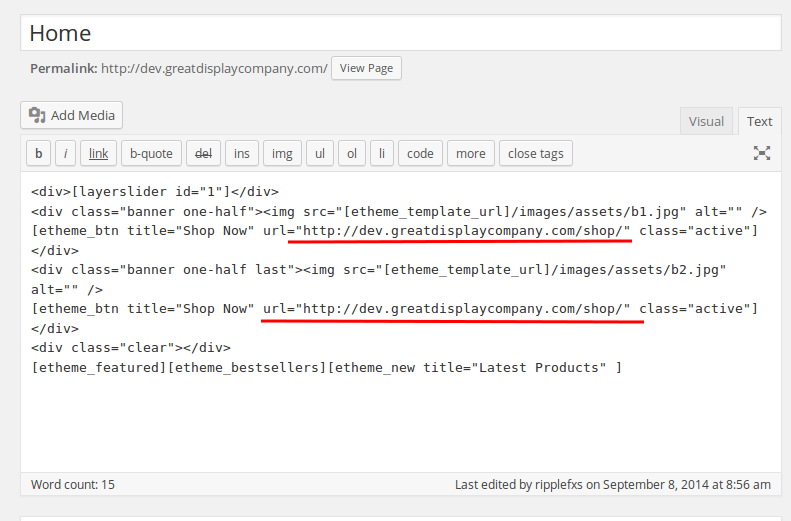
    You have 2 home pages. I’ve copied the code from one home page to the current one you’re using and now it’s working fine. Also if you want to change the link for Shop now buttons on the banners you need write your links in the home page editor:

    Currently I’ve written the links of your Shop page.

    Regards,
    Eva Kemp.

    Avatar: Eva
    Eva Kemp
    Participant
    September 8, 2014 at 13:51

    Hello,

    Isn’t this ultraslimbahamas.com your site? You provided us with the info in Private Content.
    What browser are you using when editing the site?

    Regards,
    Eva Kemp.

    Avatar: Eva
    Eva Kemp
    Participant
    September 8, 2014 at 13:46

    Hello,

    Please provide us with FTP and wp-admin panel credentials.

    Regards,
    Eva Kemp.

    Avatar: Eva
    Eva Kemp
    Participant
    September 8, 2014 at 13:43

    Hello,

    Please read this article how to add featured products:
    https://support.8theme.com/index.php?/Knowledgebase/Article/View/9/0/how-to-mark-products-as-featured-and-new-ones

    Regards,
    Eva Kemp.

    Avatar: Eva
    Eva Kemp
    Participant
    September 8, 2014 at 13:03

    Hello,

    As I see you didn’t install Woocommerce plugin. We recommend you to reinstall the theme because Woocommerce must be installed before the theme installation.
    Please follow the instructions described in our documentation:
    https://www.8theme.com/demo/docs/xmarket/#!/installation

    Regards,
    Eva Kemp.

    Avatar: Eva
    Eva Kemp
    Participant
    September 8, 2014 at 12:54

    Please describe your issues with the details. What page are you editing and what elements in Visual Composer? We need to replicate this error from our side to be able to assist you.
    Thank you.

    Regards,
    Eva Kemp.

    Avatar: Eva
    Eva Kemp
    Participant
    September 8, 2014 at 12:24

    Hello,

    Where have you sent the credentials?
    You can write them in this topic in Private Content. Only administrators will be able to view it.

    Thank you.

    Regards,
    Eva Kemp.

    Avatar: Eva
    Eva Kemp
    Participant
    September 8, 2014 at 12:22

    You’re welcome.

    Regards,
    Eva Kemp.

    Avatar: Eva
    Eva Kemp
    Participant
    September 8, 2014 at 12:01

    Hello,

    You have only one widget for Shop page – Woocommerce Recently Viewed Products in Appearance > Widgets > Shop Sidebar and it’s shown in the sidebar only when at least one product is viewed.
    Please check it from your side.

    Regards,
    Eva Kemp.

    Avatar: Eva
    Eva Kemp
    Participant
    September 8, 2014 at 11:26

    Hello,

    Could you please clarify with more details what you’re trying to achieve?
    Also please provide us with wp-admin panel credentials in Private Content.
    Thank you.

    Regards,
    Eva Kemp.

    Avatar: Eva
    Eva Kemp
    Participant
    September 8, 2014 at 11:20

    Hello,

    I’m checking your wp-admin panel. Please show us a screenshot of the issue you’re getting. Have you checked it via other browser?
    Thank you.

    Regards,
    Eva Kemp.

    Avatar: Eva
    Eva Kemp
    Participant
    September 8, 2014 at 10:20

    Hello,

    I’ve just tried to edit Home page via Visual Composer editor and haven’t seen any problems. The elements are opened and closed successfully. Please try to check it with some other browser.
    Are you editing the elements via backend or frontend editor?

    Regard,
    Eva Kemp.

    Avatar: Eva
    Eva Kemp
    Participant
    September 8, 2014 at 10:12

    Hello,

    You’re welcome.

    Regards,
    Eva Kemp.

    Avatar: Eva
    Eva Kemp
    Participant
    September 8, 2014 at 09:37

    Hello,

    We couldn’t replicate described problem on our installations and it’s most likely caused by one of the following items. Please perform each item below to see if it fixes your issue, be sure to clear your browser cache and empty the plugin cache, because you are using a cache plugin. Once you have checked them all, please reply back in the case the issue is still present. Please keep all plugins deactivated and then provide your FTP credentials so we can check it out.

    1. deactivate all plugins
    2. clear cache
    3. remove all custom CSS and check any other customizations
    4. reload original theme files

    Regards,
    Eva Kemp.

    Avatar: Eva
    Eva Kemp
    Participant
    September 8, 2014 at 09:12

    Hello,

    Sorry, but I don’t see the error on the Shop page. Could you please show a screenshot?
    Please provide us with FTP credentials as well.
    Thank you.

    Regards,
    Eva Kemp.

    Avatar: Eva
    Eva Kemp
    Participant
    September 8, 2014 at 09:08

    Hello,

    Please provide us with FTP and wp-admin panel credentials in Private Content.

    Regards,
    Eva Kemp.

    Avatar: Eva
    Eva Kemp
    Participant
    September 8, 2014 at 09:04

    Hello,

    You’ve added Revolution Slider into Homepage Sidebar widget in Appearance > Widgets. You need remove it from there.

    Regards,
    Eva Kemp.

    Avatar: Eva
    Eva Kemp
    Participant
    September 8, 2014 at 08:56

    Hello,

    Unfortunately we don’t have such option. Sorry.

    Regards,
    Eva Kemp.

  • 1 2 3 937 938 939 1,045 1,046 1,047
    Viewing 28,140 results - 28,111 through 28,140 (of 31,382 total)
Viewing 30 posts - 28,111 through 28,140 (of 31,382 total)
We're using our own and third-party cookies to improve your experience and our website. Keep on browsing to accept our cookie policy.