
Hello,
Sorry, but it can’t be done as you want because you’re using static block for Copyright area and not separate widgets.
Regards,
Eva Kemp.

Hello,
Sorry, but it can’t be done as you want because you’re using static block for Copyright area and not separate widgets.
Regards,
Eva Kemp.
Hello,
We’re glad the issue has been resolved even with the help of the update.
If you have any questions feel free to contact us.
Regards,
Eva Kemp.
Hello,
Please try to resave permalinks in Settings > Permalinks.
If the issue still persists please please provide us with wp-admin panel credentials and FTP.
Thank you.
Regards,
Eva Kemp.
Hello,
Sorry, but that is the only solution that we could find to fix the issue with menu items.
Please take our apologies.
Regards,
Eva Kemp.
Hello,
Please use this code in custom.css file:
@media (max-width: 480px){ .header .shopping-cart-widget {
    top: -57px;
    display: none;
}
.header-type-6 .shopping-cart-link {
float: left;
}}
Regards,
Eva Kemp.
Hello,
Please check this error with your hosting provider if port 80 isn’t blocked on your server.
Thank you.
Regards,
Eva Kemp.
Hello,
You need use this code to add your icons for my account and logout links:
.my-account-link:before {
    content: url('link_to_your_icon') !important;
}
.logout-link:before {
    content: url('link_to_your_icon') !important;
}
Regards,
Eva Kemp.
Hello,
Could you please show a screenshot what exactly you want to achieve?
Thank you.
Regards,
Eva Kemp.
Hello,
You need edit the files via FTP using some ftp client (filezilla, for example). Files are located in the wp-content/themes/royal and wp-content/themes/royal/framework directories.
Please note this is a temporary solution and it’ll be fixed in the next update.
Thank you.
Regards,
Eva Kemp.
Hello,
Sorry, but it can’t be done in custom.css as js files need to be modified.
Thank you.
Regards,
Eva Kemp
Hello,
You can translate Search form text via FTP in the files wp-content/themes/royal/framework/theme-functions.php (lines 1105, 1106) and wp-content/themes/royal/woosearchform.php (line 14).
Keep these files safe not to lose the changes after the theme update or create a child theme.
Thank you.
Regards,
Eva Kemp.
Hello,
You entered space in the field for Customer Key. I’ve deleted it and your twitter notes are showing now.
Please check.
Regards,
Eva Kemp.
Hello,
You didn’t give us FTP password.
Please provide us with it.
Thank you.
Regards,
Eva Kemp.
Hello,
Sorry for a long delay.
Thank you for the explanation. We understood you.
You’re right and we’ll change it in our next update.
Thank you.
Regards,
Eva Kemp.
Hello,
Could you please provide us with the link to your Twitter profile?
Thank you.
Regards,
Eva Kemp.
Hello,
1. To remove banner on the Shop page you need go to Theme Options > Shop > Product Page Banner.
Also I’ve added the following code into custom.css file to remove Woocommerce breadcrumbs:
.woocommerce-breadcrumb {display: none;}
2. To remove custom tab go to Theme Options > Single Product Page and remove the text for “Custom Tab Title”.
3. To delete slider title please add this code into custom.css:
.product-slider .slider-title {
 display: none;
}
To remove padding use this code:
.carousel .slider {
  height: 80%;
}
.container_footer_bg {
    margin-top: -50px;
}
Regards,
Eva Kemp.
Hello,
Here https://www.8theme.com/demo/docs/idstore/index.html#!/widgets we have an instruction how to add Twitter widget. Please read the paragraph “The Third Footer Widget Area”.
Thank you.
Regards,
Eva Kemp.
Hello,
Sorry, but if the issue persists with default WordPress theme too you have to contact Woocommerce or WordPress support teams. Perhaps there are some bugs in the new updates.
Regards,
Eva Kemp.
Hello,
Sorry for a delay. We’re still investigating the issue with the contact form.
How to add a map you can read in this article:
https://support.google.com/maps/answer/72644?hl=en
Regards,
Eva Kemp.
Hello,
I’ve checked the products with default WordPress theme and the issue persists there too. After adding a product to the cart I’ve been redirected to the empty cart page. So the problem isn’t related to our theme.
You can contact Woocommerce support regarding this issue or ask your hosting provider to check error logs (to find out what is causing the problem).
Thank you.
Regards,
Eva Kemp.
Hello @gotoddrun,
You’re welcome.
If there are any questions feel free to contact us.
Regards,
Eva Kemp.
Hello,
Sorry for inconveniences. We’ll take this into our account.
Please provide us with FTP and wp-admin panel credentials to check other issues.
Regards,
Eva Kemp.
Hello,
No, it shouldn’t make any effect on SEO.
Regards,
Eva Kemp.
Hello @gotoddrun,
This issue persists with default WordPress theme too. So it’s not related to our theme. In this case we recommend you to contact your hosting provider and ask them to check error logs. The problem may be caused by the lack of memory, so ask your host to increase its value. Also you can contact Woocommerce and WordPress support teams concerning these issues as our theme is not the only one where such issue occurs.
Thank you.
Regards,
Eva Kemp.
Hello,
Unfortunately we don’t have such option for categories. Sorry.
Regards,
Eva Kemp.
Hello,
I’ve just checked this issue with default WordPress theme and the problem persists there too.
In this case please contact your hosting provider and ask them to check error logs on the server. Perhaps you need increase memory limit value.
Thank you.
Regards,
Eva Kemp.
Hello,
I’ve tested the products and they have been added successfully to the cart.
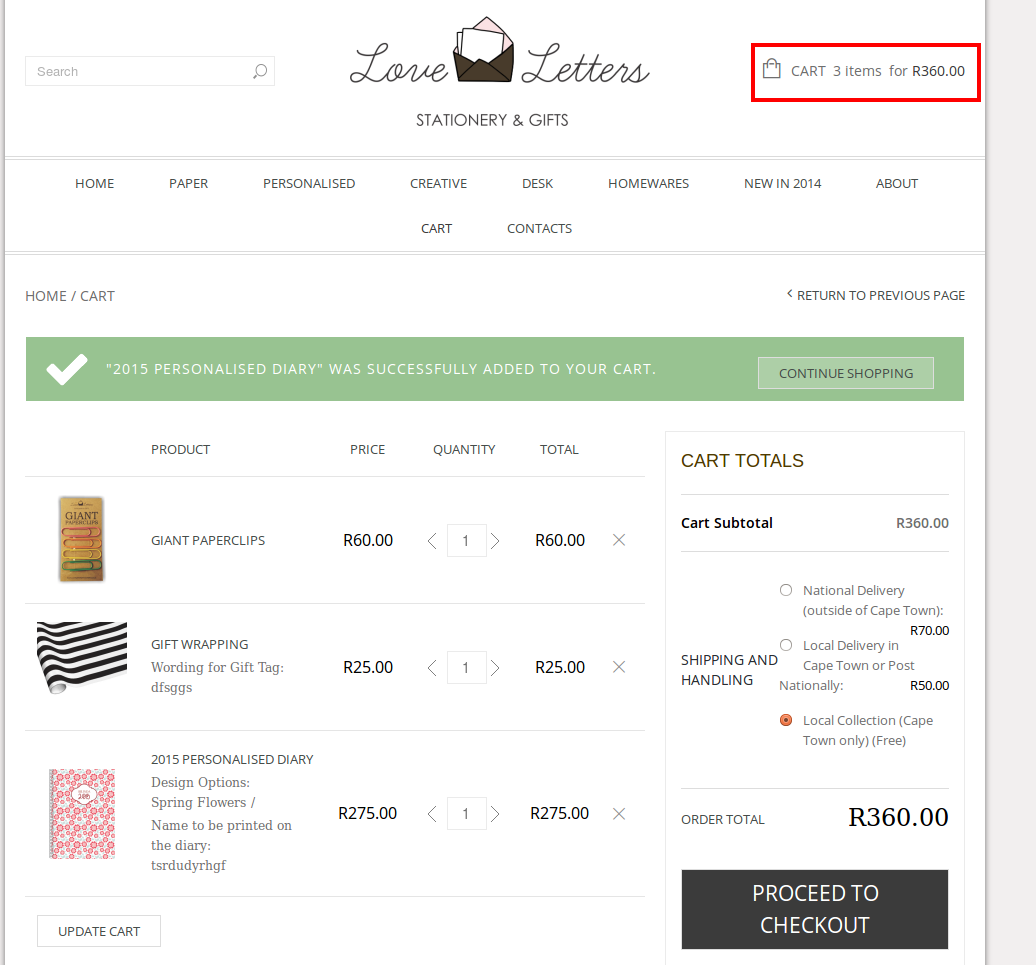
What do you mean saying “The variables are not adding to the same cart as a single product.”?
What is the different cart?
Is the issue persist in all browsers and with default WordPress theme too?
Regards,
Eva Kemp.
Hello,
As I see you have old Woocommerce plugin and our theme versions. Please update them. Please follow the instructions in our documentation how to update the theme to 2.3 version:
https://www.8theme.com/demo/docs/legenda/index.html#!/upgrade
Thank you.
Regards,
Eva Kemp.
Hello,
Please provide us with FTP credentials.
Thank you.
Regards,
Eva Kemp.
Hello,
1. Please try to add this code into custom.css file:
.sxy-zoom-mode-dock .sxy-zoom-viewport {
   right: 190px !important;
}
2. Concerning the second question you have to contact Woocommerce and WPML support teams.
How to create custom.css you can watch in this video tutorial. The tutorial is for Legenda theme but the process is the same.
Thank you.
Regards,
Eva Kemp.









