
Hello,
Please check if this issue persists with default WordPress theme.
If so you should contact Woocommerce support concerning this problem.
Thank you.
Regards,
Eva Kemp.

Hello,
Please check if this issue persists with default WordPress theme.
If so you should contact Woocommerce support concerning this problem.
Thank you.
Regards,
Eva Kemp.
Hello,
You’re welcome.
Regards,
Eva Kemp.
Hello,
You can download a new version of the theme from themeforest site: http://themeforest.net/item/legenda-responsive-multipurpose-wordpress-theme/5888906
In our documentation you can find how to upgrade the theme:
https://www.8theme.com/demo/docs/legenda/index.html#!/upgrade
Regards,
Eva Kemp.
Hello,
The code for the 1st header type is:
.header1 .logo img {
max-width: 500px;
}
Regards,
Eva Kemp.
Hello,
You can deactivate plugins one by one to find out what plugin is causing the issue.
Thank you.
Regards,
Eva Kemp.
Hello,
Please provide us with the link to the page and wp-admin panel credentials in Private Content.
Thank you.
Regards,
Eva Kemp.
Hello,
Please provide us with the correct wp-admin panel credentials.
Thank you.
Regards,
Eva Kemp.
Hello,
Those words can be translated in .po file in wp-content/themes/royal/languages.
Please make sure you’ve done everything correctly as described in our documentation:
https://www.8theme.com/demo/docs/royal/#!/0_how_to_translate
Regards,
Eva Kemp.
Hello,
You can add those widgets into Shop Sidebar widget area in Appearance > Widgets and select Layout in Theme Options > Products Page Layout.
Thank you.
Regards,
Eva Kemp.
Hello,
Please provide us with the login details to wp-admin panel and FTP.
Thank you.
Regards,
Eva Kemp.
Hello,
You’re welcome.
Regards,
Eva Kemp.
Hello,
Please update the theme to the latest 2.4.1 version.
Thank you.
Regards,
Eva Kemp.
Hello,
You’re welcome.
Regards,
Eva Kemp.
Hello,
Sorry, but that pop up works only for simple products, not variable ones.
Please provide us with wp-admin panel credentials to check the issue with the background color for notification.
Thank you.
Regards,
Eva Kemp.
Hello,
Please provide us with wp-admin panel credentials and FTP access in Private Content and we’ll help you.
Thank you.
Regards,
Eva Kemp.
Hello,
Sorry, but there is no problem with the theme.
You have to contact your hosting provider where you installed the certificate or the company where you bought it.
Thank you.
Regards,
Eva Kemp.
Hello @joekustom,
You’re welcome.
Regards,
Eva Kemp.
Hello,
Please provide us with wp-admin panel and FTP credentials in Private Content.
Thank you.
Regards,
Eva Kemp.
Hello,
Now you have subcatecories under the Tables category. To make it shown correctly you need move those subcategories so they all are sub items for one parent category Tables & Accessories:
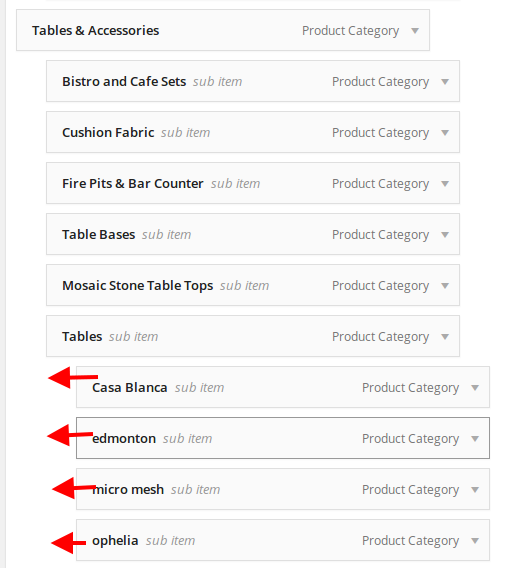 \
\
The same is for the subcategories of the Garden Accents item.
Thank you.
Regards,
Eva Kemp.
Hello @Tim1212,
You should contact your hosting provider regarding this issue.
Thank you.
Regards,
Eva Kemp.
Hello,
We’ve checked the product with default WordPress theme and the issue persists there too.
So you need contact Woocommerce support regarding this problem as it’s not related to our theme.
Thank you.
Regards,
Eva Kemp.
Hello,
The reason is you have too high columns in the menu, that’s why when they reach bottom border of a browser, they go upper automatically, so a user will be able to view all submenu content.
As we can see on your screenshot, your browser isn’t opened for full height, what is causing the issue. In this case we can suggest you to divide the current columns to several shorter ones.
Thank you.
Regards,
Eva Kemp.
Hello,
Please provide us with the link to your site and wp-admin panel credentials in private content.
Thank you.
Regards,
Eva Kemp.
Hello,
To make the second menu the same as the first one you need modify it as I showed you on the screenshot in the previous post.
Regards,
Eva Kemp.
Hello,
I’ve fixed the problem for the category you provided.
To correct all categories you need go to Products > Categories > open category and re-save it. Errors will disappear. The problem is related to changes made in category header editor.
Regards,
Eva Kemp.
Hello,
Looks like the ZipArchive PHP extension is not installed on your server.
You should contact your host regarding this issue.
Thank you.
Regards,
Eva Kemp.
Hello,
I’ve checked your site and haven’t found any errors.
Have you fixed it already?
If not please provide us with the direct link.
Regards,
Eva Kemp.
Hello,
1. Please add this code in custom.css file:
.price {font-size: 15px;}
2. This is the code for the second query:
.page-heading h1 {
   font-size: 20px;
}
Thank you.
Regards,
Eva Kemp.
Hello,
Please add this code in custom.css file:
.fixed-header-area .fixed-header .logo-with-menu {
    margin-top: 14px !important;
}
Regards,
Eva Kemp.
Hello,
Sorry, but the login details are incorrect.
Please check them.
Thank you.
Regards,
Eva Kemp.









