
Hello,
Sorry, but your request is a bit unclear.
Top bar is transparent as well.
What are you trying to achieve?
Thank you.
Regards,
Eva Kemp.

Hello,
Sorry, but your request is a bit unclear.
Top bar is transparent as well.
What are you trying to achieve?
Thank you.
Regards,
Eva Kemp.
Hello,
Could you please clarify with more details what problems you’re experiencing when implementing the plugin in our theme?
Thank you.
Regards,
Eva Kemp.
Hello,
Please read our documentation carefully: https://www.8theme.com/demo/docs/royal/#!/0_how_to_translate .
Pay attention to this paragraph:
Next edit wp-config.php located in the root folder of WordPress and use the $locale with prefix with your language name which should be similar to the translation file name. For example: $locale=’de_DE’;
You need use $locale='fr_FR'; instead of define(‘WPLANG’, ‘fr_FR’); in wp-config.php file.
Thank you.
Regards,
Eva Kemp.
Hello,
In this case you need to use wpml plugin http://wpml.org to achieve what you want.
Thank you.
Regards,
Eva Kemp.
Hello,
Sorry but in this case you should contact the plugin developer to find how to implement this.
Thank you.
Regards,
Eva Kemp.
Hello,
Please read in our documentation how to add video background:
https://www.8theme.com/demo/docs/royal/#!/visual_composer
Have you installed mailchimp plugin? https://wordpress.org/plugins/mailchimp-for-wp/
Also you can read their knowledge base: http://kb.mailchimp.com/
Thank you.
Regards,
Eva Kemp.
Hello,
I’ve added some code to your custom tab content.
Please check it.
Thank you.
Regards,
Eva Kemp.
Hello,
Sorry but it requires additional customization and is a paid service.
If you agree you may create a ticket at https://support.8theme.com/ .
Thank you.
Regards,
Eva Kemp.
Hello,
Sorry, but it requires additional customization and is a paid service.
Regards,
Eva Kemp.
Hello,
I’ve added this code:
.payment_methods li:first-child, p.form-row.terms {
width: 300px;
}
input#place_order {
width: 176px !important;
}
Please check it now.
Thank you.
Regards,
Eva Kemp.
Hello @rcghunt,
As you are using very old theme version and now Visual Composer is no longer built-in, but is implemented in the theme as a separate plugin, which is suggested to be installed immediately after the theme installation. The plugin archive is included in the theme archive and to start working with it you just need to click “Install plugin” button.
Also delete wpbakery folder from wp-content/themes/legenda before update.
Don’t forget to create a backup of all your files and databases before upgrading, and read instructions carefully on how to update your template properly: https://www.8theme.com/demo/docs/legenda/index.html#!/installation
Thank you.
Regards,
Eva Kemp.
Hello,
There is an error for plugins folder:
Failed to load resource: the server responded with a status of 403 (Forbidden)
Please check its permissions via FTP.
If changing permissions doesn’t help please provide us with FTP and wp-admin panel credentials in Private Content.
Thank you.
Regards,
Eva Kemp.
Hello @andheg,
What theme version are you using? Is it older than 2.2 version?
Please provide us with wp-admin panel credentials in Private Content.
Thank you.
Regards,
Eva Kemp.
Hello,
This is a bug of VC with our theme. You have to update the theme to the latest version. Visual Composer is separated and can be installed as a plugin. There is no such bug.
How to update the theme you’ve been already informed in this topic: https://www.8theme.com/topic/seo-ranking/
Don’t forget to create a back up.
Thank you.
Regards,
Eva Kemp.
Hello,
I’ve checked breadcrumbs on your site and haven’t found any issues.
Try to check it in other browser.
Thank you.
Regards,
Eva Kemp.
Hello,
Unfortunately we don’t have such feature. Sorry.
We’ll take this into our account and try to implement it in future updates.
Thank you.
Regards,
Eva Kemp.
Hello,
Do you mean you want to remove additional information tab?
Please provide us with a link to your product page.
Thank you.
Regards,
Eva Kemp.
Hello,
You’re welcome.
Regards,
Eva Kemp.
Hello,
Have you checked this issue with your Internet provider? As this problem may be caused by them.
Thank you.
Regards,
Eva Kemp.
Hello,
I have selected 1 column in Posts Grid settings and added the following code to custom css on the page “blog-prueba”:
.wpb_teaser_grid.teaser-border-on.grid_layout-title_thumbnail_text .et_isotope-item, .wpb_teaser_grid.teaser-border-on.grid_layout-title_text .et_isotope-item {
     width: 870px;
}
Also I have added “read more” button code into excerpts of your posts. You can check them.
Thank you.
Regards,
Eva Kemp.
Hello,
You need rename default.custom.css to custom.css via FTP in wp-content/themes/legenda/ directory. Also check if you enabled custom.css in Theme Options > Custom CSS.
Thank you.
Regards,
Eva Kemp.
Hello,
You’re welcome.
Regards,
Eva Kemp.
Hello,
You need change the settings for Screets Chat plugin. Go to Chat Console > Options > General Settings > uncheck “Always show in homepage” if you don’t want it to be displayed on the Home page.
Thank you.
Regards,
Eva Kemp.
Hello,
I’ve added the following code into custom.css to center the blocks for the shipping details:
input#ship-to-different-address-checkbox {
margin-left: 400px;
}
label.checkbox {
width: 600px;
}
p#order_comments_field {
margin-left: 400px;
}
Unfortunately it requires additional customization in the files to move the rows and it’s paid service.
I’ve added this code to increase height of the row:
form .form-row input.input-text, form .form-row textarea, form .form-row input.input-text, form .form-row textarea {
    line-height: 2em;
}
Please check text now.
Thank you.
Regards,
Eva Kemp.
Hello,
I’ve added a product to the cart as a guest and the cart isn’t empty.
Please see a screenshot:

Try try to clear your browser cache and cookies or check with some other browser.
Thank you.
Regards,
Eva Kemp.
Hello,
As I see there are a lot of errors of missed files:
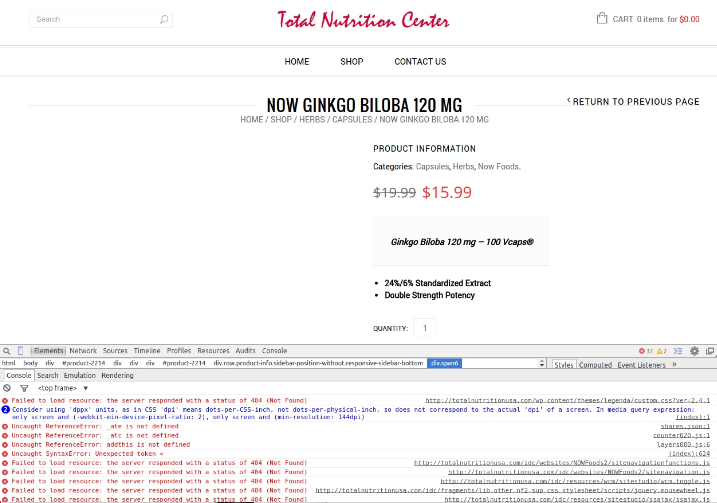
Please check if you uploaded all files to the site.
Thank you.
Regards,
Eva Kemp.
Hello,
You’re welcome.
Regards,
Eva Kemp.
Hello,
You can download the latest version of Woocommerce plugin here:
https://wordpress.org/plugins/woocommerce/
Regards,
Eva Kemp.
Hello,
The pagination issue has been fixed.
Please check.
Regards,
Eva Kemp.
Hello,
Could you please clarify your request with more details?
Thank you.
Regards,
Eva Kemp.









