
Hello,
My colleague meant he did nothing, just checked Registration page from his side and it was working for him.
Perhaps your page was cached in a browser.
Thank you.
Regards,
Eva Kemp.

Hello,
My colleague meant he did nothing, just checked Registration page from his side and it was working for him.
Perhaps your page was cached in a browser.
Thank you.
Regards,
Eva Kemp.
Hello,
Yes, please provide us with FTP login details.
You can ask for them at your hosting provider.
Thank you.
Regards,
Eva Kemp.
Hello,
Could you please clarify your issue with more details?
Did hosting company provide you with the reason of CPU issue?
Thank you.
Regards,
Eva Kemp.
Hello,
Please go to wp-admin panel > Settings > Visual Composer and select Content Types.
Thank you.
Regards,
Eva Kemp.
Hello,
1. If the issue persists with Contact form 7 too, then you need contact your host and ask them to check if emails were sent from your site.
To edit the text of contact form you need edit the file wp-content/themes/royal/framework/shortcodes.php, find the following block
// **********************************************************************//
// ! Contact form
// **********************************************************************//
and edit the needed fields.
2. You can recreate the footer as described in our documentation to be able to edit it:
https://www.8theme.com/demo/docs/royal/#!/8_footer
Also please update the theme to 1.4 version as some bugs have been fixed there.
Thank you.
Regards,
Eva Kemp.
You’re welcome.
Regards,
Eva Kemp.
Hello,
Do you still have the issue with blog posts in IE?
We’ve added the code in custom.css file for the solution.
Clear browser cache and check again.
Thank you.
Regards,
Eva Kemp.
Hello,
I’ve selected that product as Simple product and set the price:
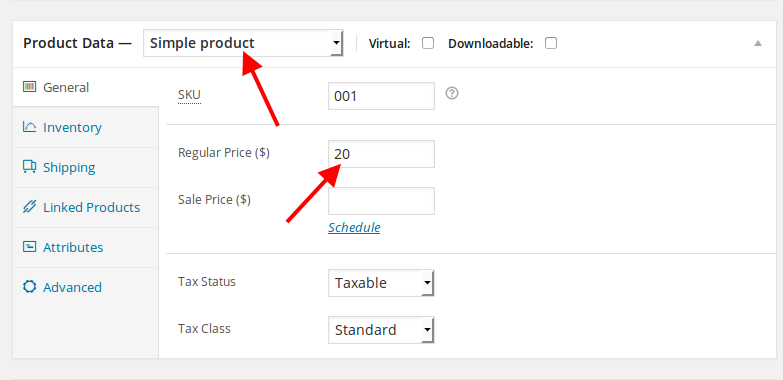
After that “Add to Cart” button has appeared.
Please check.
Concerning ajax search we need more time to look into it.
We’ll let you know as soon as possible.
Thank you.
Regards,
Eva Kemp.
Hello,
Please provide us with FTP credential as well.
Thank you.
Regards,
Eva Kemp.
Hello,
We’re unable to access the site.
Are there any problems on a server at your host?
Regards,
Eva Kemp.
Hello,
Please check Shop page in wp-admin panel > Pages if you didn’t select Sidebar Position “Without Sidebar” in Page Layout box on the right side.
Also make sure you disabled “Hidden sidebar” in Theme Options > Products Page Layout.
Thank you.
Regards,
Eva Kemp.
Hello,
Please provide us with wp-admin panel and FTP credentials in Private Content.
Thank you.
Regards,
Eva Kemp.
Hello,
You have added Brand attribute to the product http://myautoformula.com/shop/module/ignition-control-module-1992-93-94-95-96-for-ford-e150-e250-e350-lx241-4-9l-5-8l/ but there is no such attribute in Products > Attributes.
Please create it first and Terms as well.
Sorry, but we can’t advise you any search form plugin as we didn’t test them.
You may try to check some of them.
Please take our apologies for inconveniences.
Thank you.
Regards,
Eva Kemp.
Hello,
Could you please clarify where you see that issue?
As I see the categories on the Home page are shown fine.
Thank you.
Regards,
Eva Kemp.
Hello,
Please add this code to custom.css file:
div#attachment_23444 {
margin-left: 650px !important;
}
How to create custom.css you can watch here (it’s for Legenda theme but the process identical):
https://www.youtube.com/watch?v=Qok2zRedRMY
Thank you.
Regards,
Eva Kemp.
Hello,
Please check it now.
Thank you.
Regards,
Eva Kemp.
Hello,
Please try to use this code in custom.css file:
.wp-caption, .wp-caption-text, .gallery-caption, .bypostauthor, .aligncenter {
    margin-left: 100px !important;
}
How to create custom.css you can watch here.
Regards,
Eva Kemp.
Hello,
You can try these solutions:
http://www.skyverge.com/blog/hide-woocommerce-product-image/
http://stackoverflow.com/questions/16922849/woocommerce-hide-featured-image-on-product-detail-page
Regards,
Eva Kemp.
Hello,
We’ve updated the plugins for you.
Please check.
Thank you.
Regards,
Eva Kemp.
Hello,
In this case please create a ticket at http://support.8theme.com/ and our specialists will look into this issue.
Thank you.
Regards,
Eva Kemp.
Hello,
We’re glad you’ve found the solution.
If there are any questions let us know.
Regards,
Eva Kemp.
Hello,
Please try to add this code in custom.css file:
div#currency_sel_widget-2 {
margin-left: 150px;
margin-top: -23px;
}
Thank you.
Regards,
Eva Kemp.
Hello,
You’re welcome.
Regards,
Eva Kemp.
Hello @Bernard,
I’ve enabled debug mode in wp-config.php file and the error has appeared on the site:
Fatal error: Allowed memory size of 67108864 bytes exhausted (tried to allocate 388160 bytes) in /var/www/vhosts/metrocycles.com.au/httpdocs/wp-admin/index.php on line 13
You need contact your host and ask them to increase memory value.
Thank you.
Regards,
Eva Kemp.
Hello,
You have moved the pages My account, Cart, Checkout, Shop etc. to the trash, that’s why they weren’t shown.
I’ve restored them in wp-admin panel > Pages.
Regards,
Eva Kemp.
Hello,
Could you please provide us with a link where we can reproduce the problem?
Also please give us access to wp-admin panel.
Thank you.
Regards,
Eva Kemp.
Hello,
Do you have brands created in Products > Brands? You need add Brands widget into Single Product Page sidebar area in Appearance > Widgets.
Concerning ‘Our offers’ block you need add up-sells to your products.
Please read Woocommerce documentation:
http://docs.woothemes.com/document/related-products-up-sells-and-cross-sells/
You can select the position of up-sells in Theme Options > Single Product Page.
Thank you.
Regards,
Eva Kemp.
Hello,
Seems your Internet provider might cache the site content. You should wait till it’s updated.
Thank you.
Regards,
Eva Kemp.
Hello,
This has been fixed.
Please check Spanish version now.
Thank you.
Regards,
Eva Kemp.
Hello,
You should have variable products to be able to filter them by the attributes.
If no products are assigned to the attributes they won’t be shown:
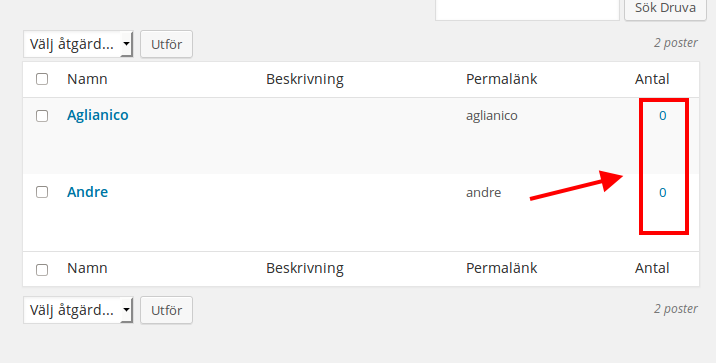
Regards,
Eva Kemp.









