
Hello,
Sorry, but could you please clarify with more details what are the exact problems you’re experiencing?
Also please provide us with the correct FTP and wp-admin panel credentials.
Thank you.
Regards,
Eva Kemp.

Hello,
Sorry, but could you please clarify with more details what are the exact problems you’re experiencing?
Also please provide us with the correct FTP and wp-admin panel credentials.
Thank you.
Regards,
Eva Kemp.
Hello,
Unfortunately there is no possibility to keep title only on a single product page. It can be removed on all pages.
Please provide us with FTP and wp-admin panel credentials to check the issue with the products descriptions.
Have you made any changes in the original theme files?
Thank you.
Regards,
Eva Kemp.
Hello,
Please provide us with login details to wp-admin panel and FTP.
Thank you.
Regards,
Eva Kemp.
Hello,
Please provide us with the link to your page to check the issue.
Thank you.
Regards,
Eva Kemp.
Hello,
Please provide us with a page link to have clear understanding what button you’re talking about.
Thank you.
Regards,
Eva Kemp.
Hello,
You’re welcome.
Regards,
Eva Kemp.
Hello,
To change image size you need set it in Posts Grid settings > Thumbnail size field.
I’ve added the following code to custom.css file to fix the issue with rows for blog posts:
.wpb_teaser_grid.teaser-border-on.grid_layout-title_thumbnail_text .et_isotope-item, .wpb_teaser_grid.teaser-border-on.grid_layout-title_text .et_isotope-item {
    width: 970px;
}
Please check the page now.
Thank you.
Regards,
Eva Kemp.
Hello,
Please try to use this code in custom.css file:
img.hide-image {
height: 360px;
}
Thank you.
Regards,
Eva Kemp.
Hello,
You need add the following code into Text widget in Appearance > Widgets and drag it into Prefooter Sidebar area:
<div class="custom-info-block a-left"><span>Follow Us:</span>
<a href="#"><i class="icon-youtube"> </i></a>
<a href="#"><i class="icon-twitter"> </i></a>
<a href="#"><i class="icon-facebook"> </i></a>
<a href="#"><i class="icon-rss"> </i></a></div>
In the code you can see #, you need replace each of them with a link to your individual social pages.
Thank you.
Regards,
Eva Kemp.
Hello @pblasio,
This problem should be checked by our developers.
Please create a ticket at http://support.8theme.com/ for further investigation.
Don’t forget to provide your FTP and wp-admin panel credentials in the ticket.
Thank you.
Regards,
Eva Kemp.
Hello,
Sorry, but the credentials are incorrect.
Please check them.
Do you mean your main menu isn’t appearing on the site?
Thank you.
Regards,
Eva Kemp.
Hello,
We’re sorry for a delay, but there is a bug in the theme which will be fixed in the next update.
Please take our apologies for the caused inconveniences.
Thank you.
Regards,
Eva Kemp.
Hello,
The code below has been added to custom.css:
@media (max-width: 1200px) {.fixed-header-area .menu {
    width: 740px !important;
} }
Please check the site now.
Regards,
Eva Kemp.
Hello,
We’ve fixed the issue with pagination.
Please check it now.
Thank you.
Regards,
Eva Kemp.
Hello,
Text element of Visual Composer editor is used there and the background color for that column set is rgba(247,247,247,0.3).
Thank you.
Regards,
Eva Kemp.
Hello @leadgenix,
Please specify what you’re trying to register.
Thank you.
Regards,
Eva Kemp.
Hello,
Our theme works with @import in a child style.css file. I’ve added @import url(../royal/style.css); to style.css of your child theme and renamed functions.php. Now your site is working fine. Please check it.
Thank you.
Regards,
Eva Kemp.
Hello,
I’ve updated Essential Grid plugin to 1.5.1 version.
Please check it now.
Thank you.
Regards,
Eva Kemp.
Hello,
Please provide us with the permissions to be able to edit the files via FTP as we are unable to do this:
Error: /wp-content/themes/royal-child/functions.php: open for write: permission denied
Error: File transfer failed
Thank you.
Regards,
Eva Kemp.
Hello,
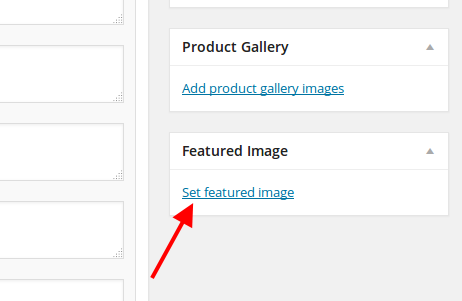
Concerning your products where images aren’t shown, the problem is you didn’t set featured products them. Go to Product > select a product you need to edit and set a featured image at the bottom on the right side:
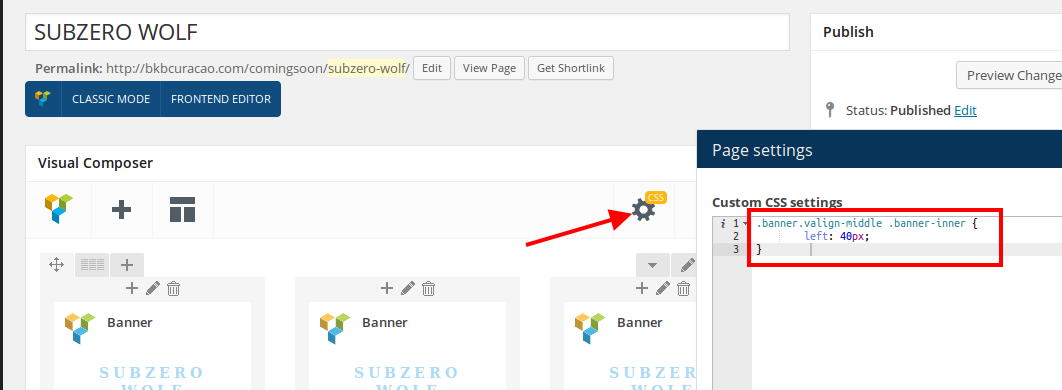
To fix the banners text alignment I’ve added the following code into CSS editor on the page “SUBZERO WOLF”
You can install Interiors template and check how layers are added in the slider.
As I see on your home page only Partners logos are displayed and there are no products.
Could you please specify on which page you see the transparent image?
Thank you.
Regards,
Eva Kemp.
Hello,
Concerning this issue you need contact our developers via ticket system at http://support.8theme.com/ .
They should provide you with some advice.
Thank you.
Regards,
Eva Kemp.
Hello,
In this case you can use Image Gallery element in Visual Composer editor and select the settings you need.
Thank you.
Regards,
Eva Kemp.
Hello,
We’ve checked the site with default Royal theme and it works fine on a mobile device.
The issue persists with your child theme. Please re-check the modifications you have made, perhaps some code that you added is causing the issue.
Thank you.
Regards,
Eva Kemp.
Hello,
We’ve checked the site with default Royal theme and it works fine on a mobile device.
The issue persists with your child theme. Please re-check the modifications you have made, perhaps some code that you added is causing the issue.
Thank you.
Regards,
Eva Kemp.
Hello @Royal Fan,
Please provide us with wp-admin panel and FTP credentials in Private Content.
We’ll try to fix that problem.
Thank you.
Regards,
Eva Kemp.
Hello,
Unfortunately we don’t have such features.
Sorry for inconveniences.
Regards,
Eva Kemp.
Hello,
Sorry, but this feature doesn’t work on Shop page as there is special Woocommerce configuration. We’ll try to fix it in future update.
Sorry for inconveniences.
Regards,
Eva Kemp.
Hello,
You can re-save the categories yourself, just go to Products > Categories, open each category and subcategory and click “Update”, you’ll just re-save it. The errors will disappear after that.
Thank you.
Regards,
Eva Kemp.
Hello,
1. You need create your own footer as described in our documentation https://www.8theme.com/demo/docs/legenda/index.html#!/footer
To add facebook icon you need create custom widget area in Appearance > Widgets, drag Text widget in there and add the code for facebook. Then you’ll be able to add widgetised sidebar to you footer static block.
2. You can create such pages and use Products element of Visual Composer editor for each page. Then add those pages to your menu.
3. You need add Woocommerce Price Filter and Woocommerce Product Categories widgets into Shop Sidebar area in Appearance > Widgets.
4. Do you wish to add a video to the menu container or create a menu item and link it to some video?
Thank you.
Regards,
Eva Kemp.
Hello,
You’ve been replied in the ticket.
Please check your email.
Thank you.
Regards,
Eva Kemp.









