Forum Replies Created

Viewing 30 posts - 24,931 through 24,960 (of 31,382 total)
  • Avatar: Eva
    Eva Kemp
    Participant
    November 21, 2014 at 17:03

    Hello,

    You need also translate Woocommerce .po file in the directory wp-content/plugins/woocommerce/i18n/languages. There you’ll find “Product Description” text.
    Please refer to Woocommerce documentation: http://docs.woothemes.com/document/woocommerce-localization/
    “Oops! Page not found” text can be found in the .po file in wp-content/themes/theleader/languages.
    Please check it carefully.

    Regards,
    Eva Kemp.
    Avatar: Eva
    Eva Kemp
    Participant
    November 21, 2014 at 16:55

    Hello,

    Sorry, but we are still unable to open the links.
    Are you able to open this link http://firstparts.net/test/shop/track-link-assy/ ?
    Are there any restrictions on a server or in .htaccess file of your site?

    Also please provide us with wp-admin panel and FTP credentials.

    Thank you.
    Regards,
    Eva Kemp.

    Avatar: Eva
    Eva Kemp
    Participant
    November 21, 2014 at 16:40

    Hello,

    Could you please clarify your issue?
    As I see the header is shown on the site.

    Thank you.
    Regards,
    Eva Kemp.

    Avatar: Eva
    Eva Kemp
    Participant
    November 21, 2014 at 16:36

    Hello,

    Sorry, but we are unable to connect to FTP with the provided credentials.
    Please clarify FTP login details at your hosting provider.

    Thank you.
    Regards,
    Eva Kemp.

    Avatar: Eva
    Eva Kemp
    Participant
    November 21, 2014 at 16:29

    Hello,

    We can upgrade the theme for you. Please provide us with FTP credentials and create a back up of your files and database.

    Thank you.
    Regards,
    Eva Kemp.

    Avatar: Eva
    Eva Kemp
    Participant
    November 21, 2014 at 16:23

    Hello,

    Unfortunately there is the same thing with portfolio slider.
    Please update the theme to the latest version – 1.5 as some bugs were fixed there:
    https://www.8theme.com/demo/docs/royal/#!/installation_upgrade (paragraph “1.5 Theme Upgrade”).

    Don’t forget to create a back up of your files and database.

    Thank you.
    Regards,
    Eva Kemp.

    Avatar: Eva
    Eva Kemp
    Participant
    November 21, 2014 at 16:03

    Hello,

    Please add this code into custom.css file:

    @media (max-width: 480px) {.fixed-header-area .header-logo img {
    width: 200px !important;
    }}

    Regards,
    Eva Kemp.

    Avatar: Eva
    Eva Kemp
    Participant
    November 21, 2014 at 14:54

    Hello,

    Sorry, but we are unable to access wp-admin panel getting 404 error.
    What theme version are you using. Please update it to the latest version 1.5.
    https://www.8theme.com/demo/docs/royal/#!/installation_upgrade (paragraph “1.5 Theme Upgrade”).

    Thank you.
    Regards,
    Eva Kemp.

    Avatar: Eva
    Eva Kemp
    Participant
    November 21, 2014 at 14:51

    Hello,

    You need create slides as described in the documentation:
    http://revolution.themepunch.com/documentation/#post_based_slider

    Please read it carefully.

    Thank you.
    Regards,
    Eva Kemp.

    Avatar: Eva
    Eva Kemp
    Participant
    November 21, 2014 at 14:30

    Hello @gemscentre,

    Please provide us with a link to your site as well.

    Thank you.
    Regards,
    Eva Kemp.

    Avatar: Eva
    Eva Kemp
    Participant
    November 21, 2014 at 14:29

    Hello,

    1. Please update the theme to the latest version – 1.5. Some bugs were fixed there.
    https://www.8theme.com/demo/docs/royal/#!/installation_upgrade (paragraph “1.5 Theme Upgrade”).

    2. I’ve added the following code into custom.css file:

    .fixed-header-area .menu > li a {
        color: #FFF !important;
    }
    .fixed-header-area .menu .nav-sublist-dropdown ul > li > a {
        color: #767676 !important;
    }
    .fixed-header-area .menu > li a:hover {
        color: orange !important;
    }

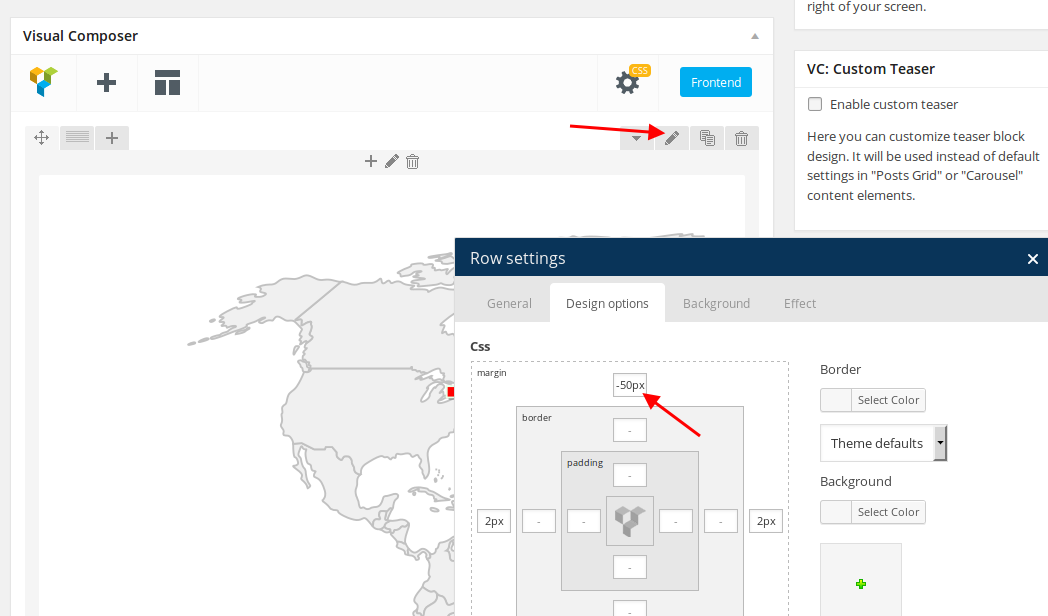
    3. I’ve added margin value to the row where map is added:

    4. I’ve added this code to custom.css to remove the space between the footer and slider:

    .main-footer {
       margin-top: -91px !important;
    }

    Regards,
    Eva Kemp.

    Avatar: Eva
    Eva Kemp
    Participant
    November 21, 2014 at 13:44

    Hello,

    Please provide us with full access to wp-admin panel and FTP credentials as well.

    Thank you.
    Regards,
    Eva Kemp.

    Avatar: Eva
    Eva Kemp
    Participant
    November 21, 2014 at 13:39

    Hello,

    Sorry, but we are unable to log in to wp-admin panel:

    Please check the link.
    Thank you.
    Regards,
    Eva Kemp.

    Avatar: Eva
    Eva Kemp
    Participant
    November 21, 2014 at 13:32

    Hello,

    What categories are you talking about?
    Do you wish to use the same slider on other pages?
    To remove hover effect and a button add this code in the CSS block:

    .thumbnails-x .zoom > i {
        background-color: transparent !important;
    }
    .post-slide .btn_group a {
        display: none !important;
    }

    Regards,
    Eva Kemp.

    Avatar: Eva
    Eva Kemp
    Participant
    November 21, 2014 at 13:25

    Hello,

    Sorry, but as the posts are displayed in the slider they can’t be linked to larger image. You may create portfolio projects and use etheme_portfolio instead of the posts.

    Regards,
    Eva Kemp.

    Avatar: Eva
    Eva Kemp
    Participant
    November 21, 2014 at 13:01

    Hello,

    You may need to recreate the pages with sections and parallax effect in Visual Composer editor, not the products pages.
    Please upgrade the theme and create a back up of the files and database before.

    Thank you.
    Regards,
    Eva Kemp.

    Avatar: Eva
    Eva Kemp
    Participant
    November 21, 2014 at 12:58

    Hello,

    Sorry, but there is a bug with frontend editor. We recommend you to use backend editor instead.
    We’ll try to fix this issue in future updates.

    Please take our apologies for inconveniences.

    Regards,
    Eva Kemp.

    Avatar: Eva
    Eva Kemp
    Participant
    November 21, 2014 at 12:55

    Hello,

    You’re welcome.

    Regards,
    Eva Kemp.

    Avatar: Eva
    Eva Kemp
    Participant
    November 21, 2014 at 12:54

    Hello,

    This issue may be related to your server configuration, not to the theme.
    Please read this article:
    http://www.wpbeginner.com/wp-tutorials/how-to-fix-error-too-many-redirects-issue-in-wordpress/

    Thank you.
    Regards,
    Eva Kemp.

    Avatar: Eva
    Eva Kemp
    Participant
    November 21, 2014 at 12:28

    Hello,

    You can change “Size Guide img” title in the file wp-content/themes/legenda/framework/theme-options.php (line 1464) and “Sizing Guide” title – in the file wp-content/themes/legenda/woocommerce/content-single-product.php (line 84).
    We recommend you to make changes in a child theme not to lose modifications after the theme update.

    Thank you.
    Regards,
    Eva Kemp.

    Avatar: Eva
    Eva Kemp
    Participant
    November 21, 2014 at 12:15

    Hello,

    You need add this code to an excerpt of each post:
    <a href="link_to_your_full_post" class="button right read-more">Read More</a>

    Regards,
    Eva Kemp.

    Avatar: Eva
    Eva Kemp
    Participant
    November 21, 2014 at 12:13

    Hello,

    Unfortunately there is no such feature in the theme.
    We’re sorry.
    We’ll take your request into our account and try to implement such option in future updates.

    Thank you.
    Regards,
    Eva Kemp.

    Avatar: Eva
    Eva Kemp
    Participant
    November 21, 2014 at 12:10

    Hello,

    1. Unfortunately there is no such possibility.
    2. You can place Search widget in “Place in header top bar” widget area in Appearance > Widgets.

    Thank you.
    Regards,
    Eva Kemp.

    Avatar: Eva
    Eva Kemp
    Participant
    November 21, 2014 at 12:09

    Hello,

    Have you checked if this issue persists with default WordPress theme?
    Please specify how we can replicate that error from our side.

    Thank you.
    Regards,
    Eva Kemp.

    Avatar: Eva
    Eva Kemp
    Participant
    November 21, 2014 at 11:14

    Hello,

    You’re welcome.

    Regards,
    Eva Kemp.

    Avatar: Eva
    Eva Kemp
    Participant
    November 21, 2014 at 10:51

    Hello,

    You can add the block under main menu using this code:

    <div class="custom-info-wrap">
    <div class="custom-info-block a-left"><a href="#">Do You Have Any Question? Contact Us</a></div>
    <div class="custom-info-block a-center"><a href="#">Get 15% Off When You Spend Over $100</a></div>
    <div class="custom-info-block a-right"><a href="#">Free Shipping! All Orders Over $199</a></div>
    </div>

    Add it to your homepage before the slider shortcode.
    Concerning the banners under the slider you need use Visual Composer editor. Divide the row into 2 columns and use Banner element from Visual Composer editor.

    Thank you.
    Regards,
    Eva Kemp.

    Avatar: Eva
    Eva Kemp
    Participant
    November 21, 2014 at 09:37

    Hello,

    I’ve added the following code into custom.css file to align Wishlist icon:

    .single-product-page .product-info .single_add_to_wishlist {
        margin-top: -5px !important;
    }

    and this one to display share buttons:

    .yith-wcwl-share li {
        display: inline-flex !important;
    }

    Regards,
    Eva Kemp.

    Avatar: Eva
    Eva Kemp
    Participant
    November 21, 2014 at 09:22

    Hello,

    I’ve edited custom.css file.
    Please check the logo display now.

    Regards,
    Eva Kemp.

    Avatar: Eva
    Eva Kemp
    Participant
    November 21, 2014 at 09:02

    Hello,

    Unfortunately there is to such option in Twitter widget.
    Sorry.

    Regards,
    Eva Kemp.

    Avatar: Eva
    Eva Kemp
    Participant
    November 21, 2014 at 01:22

    Hello,

    The posts have been removed.

    Regards,
    Eva Kemp.

  • 1 2 3 831 832 833 1,045 1,046 1,047
    Viewing 24,960 results - 24,931 through 24,960 (of 31,382 total)
Viewing 30 posts - 24,931 through 24,960 (of 31,382 total)
We're using our own and third-party cookies to improve your experience and our website. Keep on browsing to accept our cookie policy.