
Hello,
You’re welcome.
Regards,
Eva Kemp.

Hello,
You’re welcome.
Regards,
Eva Kemp.
Hello,
What Revolution Slider version are you using?
It may require an update.
Regards,
Eva Kemp.
Hello,
You shouldn’t worry about the message of outdated files. It won’t affect your site work.
This issue will be fixed in the next update.
Could you please clarify your second question? Please show us a screenshot.
Regards,
Eva Kemp.
Hello,
Please refer to our documentation:
https://www.8theme.com/demo/docs/legenda/index.html#!/legenda_shortcodes > “Pricing tables” section.
Regards,
Eva Kemp.
Hello,
You’re welcome.
Regards,
Eva Kemp.
Hello,
Please look at the screenshot, the drop down menu is working
http://imgur.com/08u7bcu
What browser are you checking in? Try to use another one.
You can add confirmation field for email address modifing the file et-registration.php.
If you have necessary skills you may do this yourself.
Regards,
Eva Kemp.
Hello,
Please provide us with wp-admin panel credentials in Private Content.
Thank you.
Regards,
Eva Kemp.
Hello,
You’re welcome.
Notify us if any assistance is required.
Regards,
Eva Kemp.
Hello,
You need upload your image to the same directory where the current one is present wp-content/themes/legenda/images. Rename your image to the same title as the old image and the old image to some other name.
Regards,
Eva Kemp.
Hello,
Please provide us with wp-admin panel and FTP credentials in Private Content.
We’ll update VC plugin for you.
Regards,
Eva Kemp.
Hello,
Please update the theme to the latest 1.5.1 version and check the site after that:
https://www.8theme.com/demo/docs/royal/#!/installation_upgrade (paragraph “1.5 Theme Upgrade”).
Regards,
Eva Kemp.
Hello,
You can only do this using the code which you can find on Instagram help page.
Unfortunately we don’t have default Instagram icon in the theme. Sorry.
Regards,
Eva Kemp.
Hello,
Please provide us with a page link you’re talking about.
Thank you.
Regards,
Eva Kemp.
Hello,
To have full width menu you need add menu-full-width in Classes CSS and how many columns to display you can choose from menu-column1 to menu-column5. So, for example, if you want to have 2 columns of sub items and full width menu you should type: menu-full-width menu-column2
Regards,
Eva Kemp.
Hello,
I’ve added the following code to custom.css:
.main-footer, .copyright-3, .copyright {
 background-image: url('http://ukfragrances.co.uk/wp-content/uploads/2014/12/pixel_weave_@2X.png');
 background-repeat: repeat;
}
Please check footer now.
Regards,
Eva Kemp.
Hello,
Sorry for a delay.
We’re investigating it. We’ll notify you as soon as possible.
Thank you.
Regards,
Eva Kemp.
Hello,
Please update the theme to the latest 1.5.1 version and check your site after that:
https://www.8theme.com/demo/docs/royal/#!/installation_upgrade (paragraph “1.5 Theme Upgrade”).
Regards,
Eva Kemp.
Hello,
I’ve deactivated all 3rd-party plugins and single product image has been shown fine.
Please try to deactivate them one by one to find out what plugin is causing the issue.
Thank you.
Regards,
Eva Kemp.
Hello,
1. You can translate contact form in .po file in wp-content/themes/royal/languages directory: https://www.8theme.com/demo/docs/royal/#!/1_how_to_translate
2. To have google map full width you need use Google map element of Visual Composer:
http://imgur.com/KxXSQi1
Regards,
Eva Kemp.
Hello,
1. Please add this code into custom.css file:
.mobile-nav-heading {color: white !important;}
2. Sorry, but I don’t see issues with “quick view” button. Could you please show a screenshot?
How to create custom.css you can watch in this tutorial (it’s for Legenda theme but the process is the same).
Thank you.
Regards,
Eva Kemp.
Hello,
Please provide us with a page link where you have problems with icons and your wp-admin panel credentials in Private Content.
As I understood you want to link the icon itself don’t you?
Regards,
Eva Kemp.
Hello,
I’ve added the code in CSS block of Visual Composer editor on the page “Verkooppunten”:
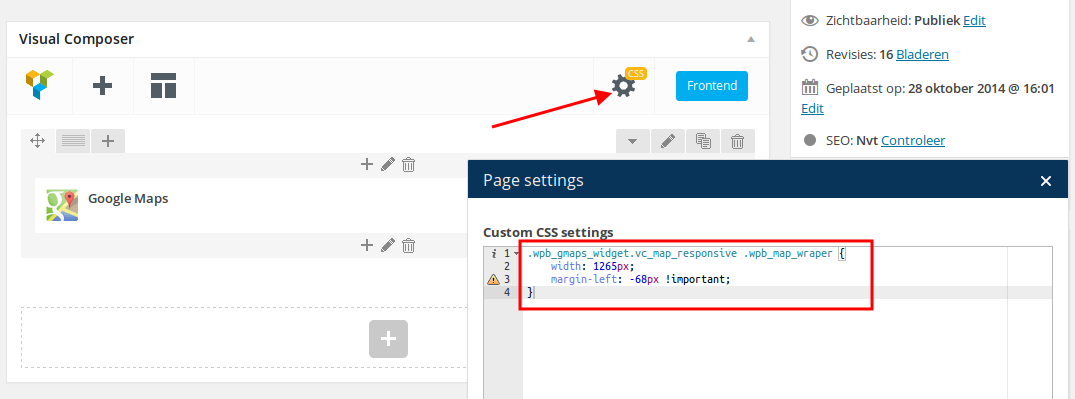
Please check.
Regards,
Eva Kemp.
Hello,
I’ve edited the code and now buttons background color is transparent.
Please check.
Regards,
Eva Kemp.
Hello,
Please provide us with wp-admin panel credentials in Private Content.
Thank you.
Regards,
Eva Kemp.
Hello,
We’re glad you’ve managed to find the solution.
If there are any questions feel free to contact us.
Regards,
Eva Kemp.
Hello,
You’re welcome.
Regards,
Eva Kemp.
Hello,
Sorry, but there is no such page.
Regards,
Eva Kemp.
Hello,
You can use Google fonts.
Do you want to use some other ones?
Regards,
Eva Kemp.
Hello,
You can try to add Custom Menu widget in “Place in header top bar” widget area in Appearance > Widgets.
Regards,
Eva Kemp.
Hello,
Please add this code into custom.css file:
.login-link .login-popup {
   display: none !important;
}
How to create custom.css you can watch in this tutorial (it’s for Legenda theme but the process is the same).
Regards,
Eva Kemp.









