
Hello,
If I understood you correctly you want to move search form to the right side, don’t you?
So I’ve added this code into custom.css file:
.header2 .et-mega-search {
    float: right;
    left: 90%;
}
Please check it now.
Regards,
Eva Kemp.

Hello,
If I understood you correctly you want to move search form to the right side, don’t you?
So I’ve added this code into custom.css file:
.header2 .et-mega-search {
float: right;
left: 90%;
}Please check it now.
Regards,
Eva Kemp.
Hello,
I’ve edited header.php file as well.
Please check the home page now.
Regards,
Eva Kemp.
Hello @hartleyjewelers,
Your products aren’t shown because you don’t have any products created in wp-admin panel > Products.
The only product you have isn’t even published, you have it in draft.
So add your products and publish them.
Thank you.
Regards,
Eva Kemp.
Hello @celesy,
Have you made any changes in the original theme files?
Please update the theme to the latest 1.5.1 version:
https://www.8theme.com/demo/docs/royal/#!/installation_upgrade (paragraph “1.5 Theme Upgrade”)
Thank you.
Regards,
Eva Kemp.
Hello,
Have you made any changes in the original theme files?
May we reupdate the theme? Please create a back up of the files and database as well.
Thank you.
Regards,
Eva Kemp.
Hello,
Please add this code into custom.css file:
.single-product-page .product-info .single_add_to_cart_button {
    background-color: red;
    font-size: 12px;
}
Replace color value with yours.
Regards,
Eva Kemp.
Hello,
The login credentials for FTP and wp-admin panel are incorrect.
Please check them.
Thank you.
Regards,
Eva Kemp.
Hello @stseprounof,
Please create a user for us to be able to access wp-admin panel to check the issue with “Add to Cart” button.
You can use any email address and just provide us with the user and password in Private Content.
Thank you.
Regards,
Eva Kemp.
Hello @liekedevink,
The issue with outdated files will be fixed in the next update.
Please take our apologies for inconveniences.
Thank you.
Regards,
Eva Kemp.
Hello,
Please provide us with FTP and wp-admin panel credentials in Private Content.
Thank you.
Regards,
Eva Kemp.
Hello,
Sorry for a delay.
The problem is caused by apostrophes in the words, for example, Continuez d'acheter.
You should replace the apostrophes symbol with the code from this link http://www.ascii.cl/htmlcodes.htm .
Thank you.
Regards,
Eva Kemp.
Hello,
Please set the same settings for products images as described in the documentation:
https://www.8theme.com/demo/docs/royal/#!/woocommerce
Then regenerate thumbnails again.
Thank you.
Regards,
Eva Kemp.
Hello,
You’re welcome.
I’ve removed margin-bottom value in row settings > Design Options tab:
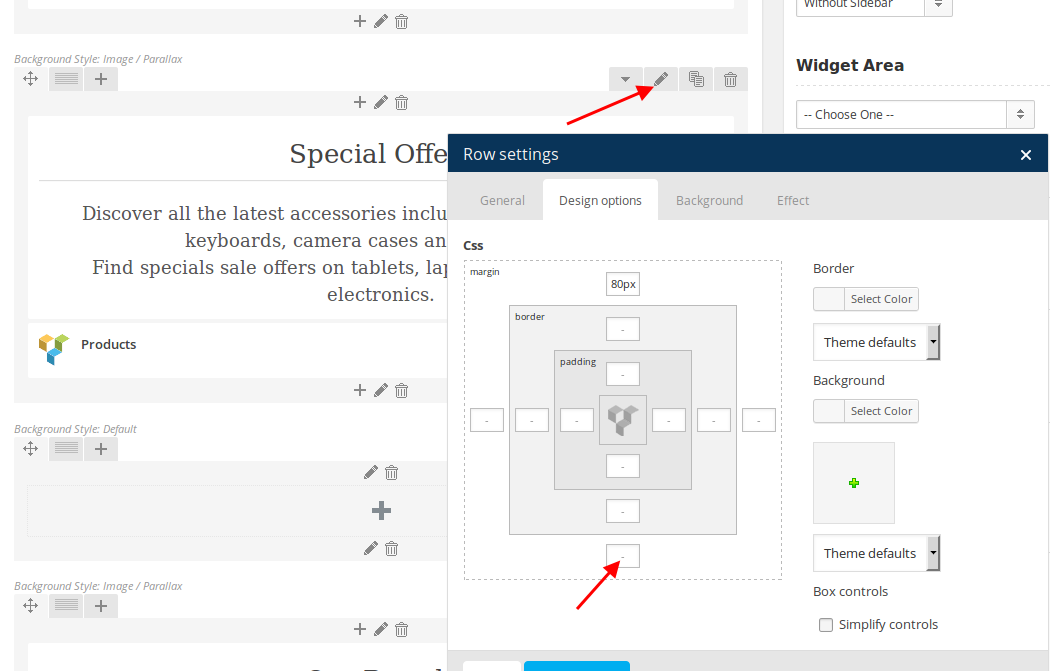
Regards,
Eva Kemp.
Hello @celesy,
You’ve been replied in other topic.
Please check and don’t create multiple requests.
Thank you.
Regards,
Eva Kemp.
Hello,
Please provide us with wp-admin panel and FTP credentials in Private Content to check the issue.
Thank you.
Regards,
Eva Kemp.
Hello,
You’re using old theme version. That feature is included in 1.5.1 version.
Please update the theme.
Regards,
Eva Kemp.
Hello,
You need enable Promo Popup in Theme Options > Promo Popup.
Also make sure you’ve enabled top links and top bar in Theme Options > Header.
Regards,
Eva Kemp.
Hello,
Do you want to change color for Underwear template?
The code for gold color is #CDA85C
Regards,
Eva Kemp.
Hello,
You can disable site loader icon in Theme Options > General > Show loader icon until site loading > Off.
Regards,
Eva Kemp.
Hello,
Sorry, but there is no such feature in the theme.
Regards,
Eva Kemp.
Hello,
I’ve fixed the issue with Info box images and regenerated thumbnails for Shop images.
Please check your site now.
Regards,
Eva Kemp.
Hello,
You can refer to these instructions:
https://wordpress.org/support/topic/plugin-woocommerce-ecommerce-plugin-for-wordpress-disable-the-reviews-tab
Thank you.
Regards,
Eva Kemp.
Hello,
I’ve added the following code into CSS block of Visual Composer editor on your Home page:
.wpb_gallery_slides.wpb_image_grid {
margin-left: 100px;
}
Please check the page now.
Regards,
Eva Kemp.
Hello,
Unfortunately there is no such feature.
Your original image should be these approximate dimensions: 1 425px × 1 900px.
Thank you.
Regards,
Eva Kemp.
Hello,
You can use Revolution slider instead of page title and breadcrumbs.
Go to Portfolio page and on the right side in the “Page layout” box select “Show revolution slider instead of breadcrumbs and page title”.
Regards,
Eva Kemp.
Hello,
You can create pages “His”, “Hers” and add them to your menu. In the pages editor add Product Categories element from Visual Composer editor and type category ID you need to display.
Regards,
Eva Kemp.
Hello,
You’re welcome.
Regards,
Eva Kemp.
Hello,
If you want to redirect visitors to your facebook page you need use “share” button and not “like” button.
You can find “Facebook share button” code in Facebook helpbase.
Regards,
Eva Kemp.
Hello,
Please add this code into custom.css file:
.boxed .login-link .login-popup {
    left: -250px !important;
}
How to create custom.css you can watch in this tutorial (it’s for Legenda theme but the process is the same).
Thank you.
Regards,
Eva Kemp.
Hello,
Please provide us with FTP and wp-admin panel credentials in Private Content.
Thank you.
Regards,
Eva Kemp.









