Hello,
You can change the icon color only editing it with some image editor as the cart icon is an image and placed in wp-content/themes/royal/images/sprite/icons.png.
Thank you.
Regards,
Eva Kemp.

Hello,
You can change the icon color only editing it with some image editor as the cart icon is an image and placed in wp-content/themes/royal/images/sprite/icons.png.
Thank you.
Regards,
Eva Kemp.
Hello,
1. As I see you’ve already added the code in custom.css to remove currency and languages.
2. I’ve unchecked dropdown option for Product Categories widget in Shop Sidebar in Appearance > Widgets.
3. Please add this code into custom.css file:
div#woocommerce_product_categories-5 {
border: red 3px solid;
}
.sidebar-widget .widget-title {
border-top: none;
background-color: red;
}
.widget-title span {
background-color: red;
color: white;
padding-left: 40px !important;}
.product-categories > li > a {
padding-left: 20px;
}
4. You can create your own footer using static blocks:
https://www.8theme.com/demo/docs/royal/#!/9_footer
Thank you.
Regards,
Eva Kemp.
Hello,
Please specify font for what elements needs to be changed and we’ll provide you with the code.
Thank you.
Regards,
Eva Kemp.
Hello,
Please check it now.
Thank you.
Regards,
Eva Kemp.
Hello,
Sorry for a delay.
We’ve checked your site resizing a browser and on a mobile device.
We don’t see the issue you described.
Please check the site on mobile devices if the issue persists there.
Thank you.
Regards,
Eva Kemp.
Hello,
I’ve edited settings in Settings > Permalinks. Please check the links now and clear browser cache before.
Thank you.
Regards,
Eva Kemp.
Hello,
Please provide us with wp-admin panel credentials and a page link where the shortcode isn’t working.
Thank you.
Regards,
Eva Kemp.
Hello,
Please update the theme to the latest 1.5.2 version.
https://www.8theme.com/demo/docs/royal/#!/installation_upgrade (1.5 Theme Upgrade)
Thank you.
Regards,
Eva Kemp.
Hello,
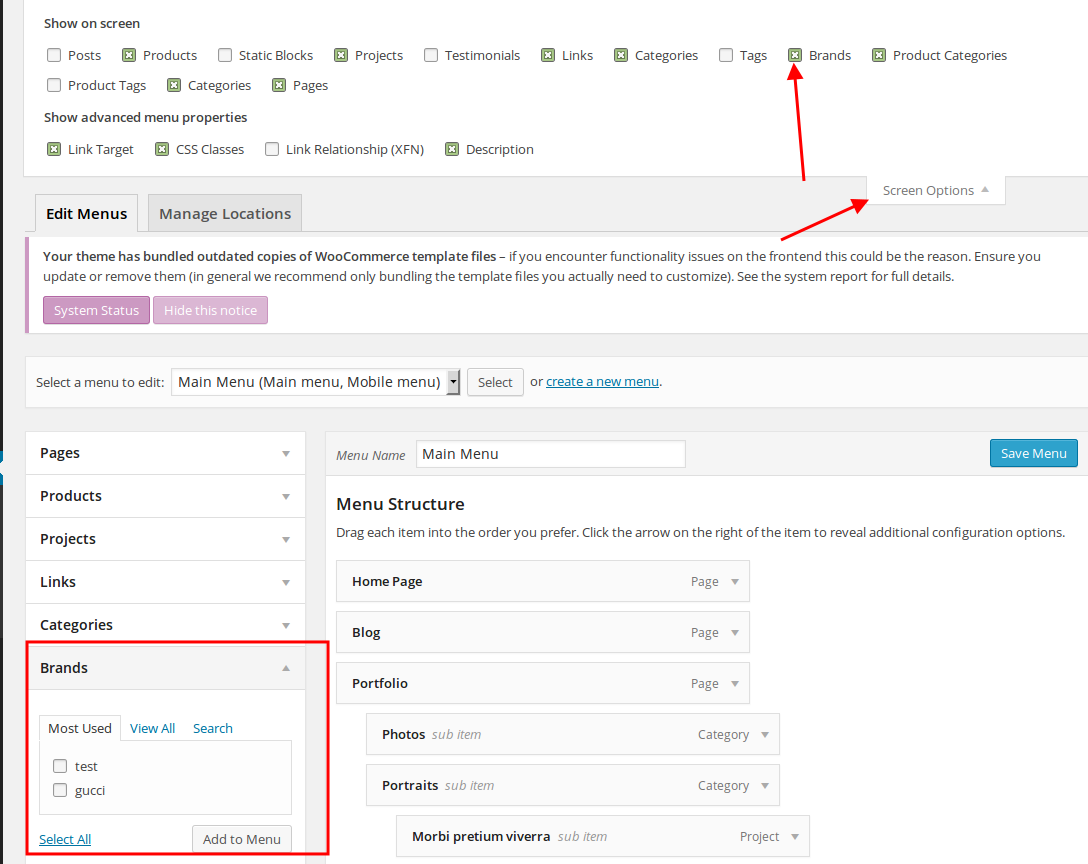
You need create a brand in Products > Brands, then you’ll be able to add in Appearance > Menus (see screenshot https://s3.amazonaws.com/fvd-data/notes/168674/1418735861-QgZexP/screen.png )
Thank you.
Regards,
Eva Kemp.
Hello,
Please add this code in custom.css file:
.slider-container .show-all-posts {
    display: none !important;
}
Thank you.
Regards,
Eva Kemp.
Hello,
You need select the elements for which font needs to be changed and write css code for them in custom.css file.
Thank you.
Regards,
Eva Kemp.
Hello,
Please try to add this code in .htaccess file in the site directory via FTP:
<IfModule mod_headers.c>
   Header set Access-Control-Allow-Origin "*"
</IfModule>
Thank you.
Regards,
Eva Kemp.
Hello,
Please update the theme to the latest version – 3.6
http://themeforest.net/item/idstore-responsive-multipurpose-ecommerce-theme/4792186
https://www.8theme.com/demo/docs/idstore/index.html#!/upgrade
Don’t forget to create a back up of your files and database before update.
If you have difficulties please provide us with FTP credentials and we’ll help you to update the theme.
Thank you.
Regards,
Eva Kemp.
Hello,
Please update the theme to 3.6 latest version:
http://themeforest.net/item/idstore-responsive-multipurpose-ecommerce-theme/4792186
https://www.8theme.com/demo/docs/idstore/index.html#!/upgrade
Don’t forget to create a back up of your files and database before update.
Thank you.
Regards,
Eva Kemp.
Hello,
Please try to use one of the solutions:
https://wordpress.org/support/topic/should-not-load-css-after-child-theme
http://wordpress.stackexchange.com/questions/115637/how-can-i-make-new-css-file-in-child-theme-override-styles-in-child-themes-sty
Thank you.
Regards,
Eva Kemp.
Hello,
You’re welcome.
Regards,
Eva Kemp.
Hello,
You’re welcome.
Regards,
Eva Kemp.
Hello,
You’re welcome.
Regards,
Eva Kemp.
Hello,
You can refer to this WordPress topic: https://wordpress.org/support/topic/wordpress-seo-yoast-duplicate-site-title concerning duplicate titles.
Thank you.
Regards,
Eva Kemp.
Hello,
The problem is caused by site movement:
http://gyazo.com/3c851832f193999a36d03c704a9441d0
You can fix this issue adding the code <link href="//maxcdn.bootstrapcdn.com/font-awesome/4.2.0/css/font-awesome.min.css" rel="stylesheet"> in header.php file before closing tag </head>.
Regards,
Eva Kemp.
Hello,
Could you please show a screnshot of an issue? As I see the background image is shown for the Contact section:

Thank you.
Regards,
Eva Kemp.
Hello,
Sorry, but you have to add images to the gallery manually.
Please provide us with a page link where products slider is shown and your wp-admin panel credentials in Private Content.
Thank you.
Regards,
Eva Kemp.
Hello,
I’ve added the lat menu item “About”. Please check it on your site and clear browser cache before.
Thank you.
Regards,
Eva Kemp.
Hello,
We’ve checked it on our demo site and aren’t experiencing such problem.
The image gallery scroll is working with the disabled zoom option.
Please try to deactivate all 3rd-party plugins and check it again.
Thank you.
Regards,
Eva Kemp.
Hello,
I’ve restored the pages. Now Checkout page is working. Please check.
Also you need update the theme to the latest version 1.5.2:
https://www.8theme.com/demo/docs/royal/#!/installation_upgrade (“1.5 Theme Upgrade”)
Thank you.
Regards,
Eva Kemp.
Hello,
We’ve resaved the menu and now it’s working.
Please check and clear browser cache before.
Thank you.
Regards,
Eva Kemp.
Hello @cetownsend,
1. I’ve added this code to “Footer Links” widget area:
<div class="copyright-payment pull-right"> <img src="https://www.8theme.com/demo/royal/wp-content/themes/royal/images/assets/payments.png"> </div>
Please check footer now.
2. Please specify on which page you’re trying to add “Call To Action”. I don’t see it on your Home page.
Thank you.
Regards,
Eva Kemp.
Hello,
You may try to use https://wordpress.org/plugins/nav-menu-images/ . Please note we don’t guarantee its full compatibility with the theme as this is 3rd-party plugin.
Thank you.
Regards,
Eva Kemp.
Hello @hcMtom,
This is not an error, just a notice. Do you have debug enabled in wp-config.php file?
We’re looking for your reply with the credentials.
Thank you.
Regards,
Eva Kemp.
Hello,
Please provide us with wp-admin panel credentials in Private Content.
Thank you.
Regards,
Eva Kemp.