
Hello,
I’ve added the following code into custom.css file:
.icon-facebook:before, .icon-twitter:before, .icon-instagram:before {font-size: 20px;}
Please check the icons now.
Regards,
Eva Kemp.

Hello,
I’ve added the following code into custom.css file:
.icon-facebook:before, .icon-twitter:before, .icon-instagram:before {font-size: 20px;}
Please check the icons now.
Regards,
Eva Kemp.
Hello,
As I see your theme version is 2.4 and not 2.5. Please update it to the latest version.
Don’t forget to create a back up before update.
Thank you.
Regards,
Eva Kemp.
Hello,
1. Sorry, but there is no such option to change breadcrumbs.
2. The plugins work fine without activation. You don’t need to enter any codes. We update plugins with theme updates from time to time so plugins will be also updated with each next theme update. The option with registering of the plugins has been already added to plugin and this only allows you to get automatic updates and support for this plugin directly from an author if you need. You don’t need to register the products because it is not required but if you want to get those features, then you need to purchase a plugin directly from the author. This is how it works for all themes on Themeforest and not only in our case.
Thank you.
Regards,
Eva Kemp.
Hello,
I’ve updated VC plugin and imported the slider, it’s called “Full Width”.
To remove the second “Wishlist” button go to Woocomerce > Settings > Wishlist and choose “Use shortcode” in “Position” option.
Don’t forget to save the changes.
Regards,
Eva Kemp.
Hello,
You have to reload a page after resizing a browser window because of the loader script. So if you want to use this function, there is no other solution. Please note that users of mobile devices don’t experience such problem. If you don’t like the variant with page reloading, then disable loader function in Blanco Settings > Show loader icon until site loading on mobile devices > disable.
Thank you.
Regards,
Eva Kemp.
Hello,
As I see you still have 1.5 theme version, and not 1.5.2:
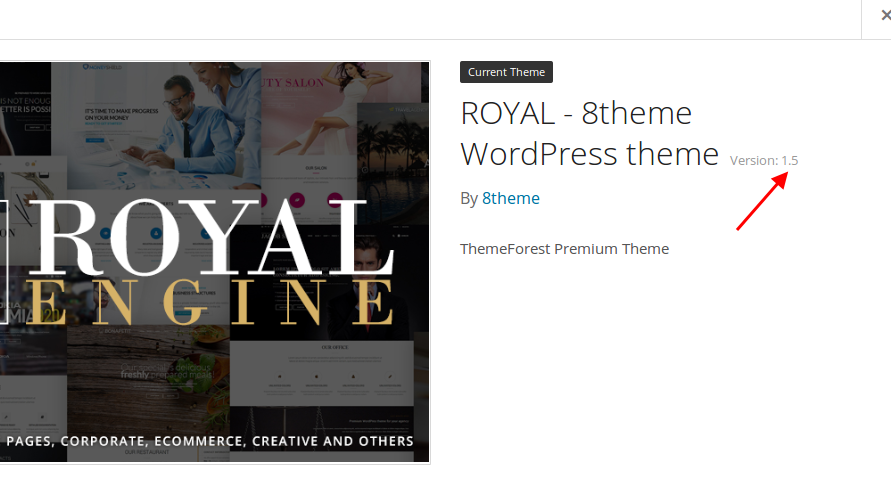
Please provide us with FTP credentials and we’ll update the theme for you.
Confirm you have created a back up of your site.
Thank you.
Regards,
Eva Kemp.
Hello,
1. Sorry, but don’t guarantee full compatibility of 3rd-party plugins with our theme, so some plugins may not be compatible with the theme.
2. Please provide us with FTP credentials. We’ll check the problem.
3. I’ve added this code into custom.css file to change the button color:
button.single_add_to_cart_button.etheme-simple-product.button.alt {
color: white;
}
4. Sorry, but in this case you have to upload images with similar dimensions.
Thank you.
Regards,
Eva Kemp.
Hello,
Please update the theme to the latest version 1.5.2. Don’t forget to create a back up of your files and database.
https://www.8theme.com/demo/docs/royal/#!/installation_upgrade (“1.5 Theme Upgrade”)
Thank you.
Regards,
Eva Kemp.
Hello,
Sorry, but there is no such possibility. You can add brands only to sidebar.
Please take our apologies for inconveniences.
Regards,
Eva Kemp.
Hello,
You didn’t write the tab title in Theme Options > Single Product Page.
I’ve written it.
Please check the tabs now.
Regards,
Eva Kemp.
Hello,
Please provide us with wp-admin panel crednetials. We’ll try to fix it with some css code.
Thank you.
Regards,
Eva Kemp.
Hello,
You can add brands to page content using Brand element in Visual Composer editor.
Please try it.
Thank you.
Regards,
Eva Kemp.
Hello,
Thank you for your understanding and patience.
Merry Christmas.
Regards,
Eva Kemp.
Hello,
Please provide us with wp-admin panel and FTP credentials in Private Content to investigate the issue.
Thank you.
Regards,
Eva Kemp.
Hello,
You can add widgets into “Place in header top bar” area in Appearance > Widgets.
Please try.
Thank you.
Regards,
Eva Kemp.
Hello,
You’re welcome.
Regards,
Eva Kemp.
Hello,
I’ve updated the file archive-product.php in wp-content/themes/idstore/woocommerce directory.
Please check the categories now and clear browser cache before.
Thank you.
Regards,
Eva Kemp.
Hello,
I’ve checked the shop page with default WordPress theme and the issue with pagination persists there too. So you need contact Woocommerce support and ask them to investigate this problem.
Thank you.
Regards,
Eva Kemp.
Hello,
If you just update the files (overwrite js_composer folder with a new one) without plugin deactivation, the changes won’t be removed. But if you reinstall the plugin your modifications may be lost. So we recommend you to create a backup of the files and database before update.
Thank you.
Regards,
Eva Kemp.
Hello,
The plugin archive has been sent to your email address.
Please check.
Regards,
Eva Kemp.
Hello,
To change hover color for menu items add this code to custom.css:
.menu > li > a:hover {
color: red !important;
}
Regards,
Eva Kemp.
Hello,
Sorry for a delay.
I’ve updated plugins for you and the tabs are working now.
Please check and clear browser cache before.
Thank you.
Regards,
Eva Kemp.
Hello @bymedia,
We’re glad you’ve managed to resolve the issue.
Don’t hesitate to contact us if there are any questions.
Thank you.
Regards,
Eva Kemp.
Hello,
For fixed header please add this code:
.fixed-header-area .menu {
width: 800px !important;
}
Regards,
Eva Kemp.
Hello,
As I told you, you have to reload a page when check the site resizing browser window.
So please try to reload a page when you resize your browser.
Thank you.
Regards,
Eva Kemp.
Hello,
Have you checked other twitter shortcodes using some plugins?
Does the problem persist only with our widget?
Thank you.
Regards,
Eva Kemp.
Hello,
I’ve disabled the plugin “Root Relative URLs” which caused conflict with the theme and now the slider is behind the menu. Please check.
To edit the element on the Home page you need edit Corporate One Page in wp-admin panel > Pages.
Regards,
Eva Kemp.
Hello,
You’re welcome.
Regards,
Eva Kemp.
Hello,
You’re welcome.
Regards,
Eva Kemp.
Hello,
The font family is “Roboto”,Georgia,sans-serif.
Let us know if you need more help.
Regards,
Eva Kemp.









