Forum Replies Created

Viewing 30 posts - 23,431 through 23,460 (of 31,382 total)
  • Avatar: Eva
    Eva Kemp
    Participant
    December 29, 2014 at 18:08

    Hello,

    You need create your own footer as described in our documentation:
    https://www.8theme.com/demo/docs/royal/#!/9_footer

    To create brands go to Products > Brands in wp-admin panel, then drag 8theme – Brands filter widget into Single Product Page Sidebar in Appearance > Widgets.

    Thank you.
    Regards,
    Eva Kemp.
    Avatar: Eva
    Eva Kemp
    Participant
    December 29, 2014 at 18:04

    Hello,

    All plugins are external extensions which are included into theme because for each product we purchase “Extended license” and that’s why we are able to include it into them. This plugin works fine without activation and you can always get actual version if you want directly from us. Just ask and we’ll send a current version to you. We update plugins with theme updates from time to time so plugins will be also updated with each next theme update. The option with registering of the plugins has been already added to plugin and this only allows you to get automatic updates and support for this plugin directly from an author if you need. You don’t need to register this product because it is not required but if you want to get those features, then you need to purchase this plugin directly from the author. This is how it works for all themes on Themeforest and not only in our case.

    I’ve updated Visual Composer plugin and the site is working now.
    Please check.

    Regards,
    Eva Kemp.

    Avatar: Eva
    Eva Kemp
    Participant
    December 29, 2014 at 18:02

    Hello @sammyslo,

    There is a bug with frontend editor of Visual Composer plugin. We recommend you to use backend editor instead.

    Thank you.
    Happy New Year too.

    Regards,
    Eva Kemp.

    Avatar: Eva
    Eva Kemp
    Participant
    December 29, 2014 at 17:57

    Hello,

    We can’t view your site as it’s under maintenance mode.
    Please provide us with wp-admin panel credentials in Private Content.

    Thank you.
    Regards,
    Eva Kemp.

    Avatar: Eva
    Eva Kemp
    Participant
    December 29, 2014 at 17:56

    Hello,

    We can’t view your site as it’s under maintenance mode.
    What theme version are you using?
    Please update it to 2.5 version and don’t forget to create a back up before update.

    Thank you.
    Regards,
    Eva Kemp.

    Avatar: Eva
    Eva Kemp
    Participant
    December 29, 2014 at 17:54

    Hello,

    Could you please clarify what you want to center?
    Please show us a screenshot.

    Thank you.
    Regards,
    Eva Kemp.

    Avatar: Eva
    Eva Kemp
    Participant
    December 29, 2014 at 17:52

    Hello,

    Please provide us with wp-admin panel credentials in Private Content.

    Thank you.
    Regards,
    Eva Kemp.

    Avatar: Eva
    Eva Kemp
    Participant
    December 29, 2014 at 16:02

    Hello,

    Ok, we’re looking forward to your reply.

    Thank you.
    Regards,
    Eva Kemp.

    Avatar: Eva
    Eva Kemp
    Participant
    December 29, 2014 at 16:01

    Hello,

    Sorry, but this section is related to Woocommerce plugin.
    You should contact their support regarding your request.

    Thank you.
    Regards,
    Eva Kemp.

    Avatar: Eva
    Eva Kemp
    Participant
    December 29, 2014 at 15:59

    Hello,

    1. I’ve added this code into custom.css for the top bar:

    .header-type-6 .top-bar {
        background-color: #000;
    }

    2. Also I’ve added this code to remove credit cards icons:

    .copyright-2 .copyright-payment, .copyright .copyright-payment {
        display: none;
    }

    Please check.

    Regards,
    Eva Kemp.

    Avatar: Eva
    Eva Kemp
    Participant
    December 29, 2014 at 15:48

    Hello,

    As I see you’re using very old theme version.
    We recommend you to update the theme to the latest 2.5 version as translation bugs are fixed there.
    How to update the theme you can watch in our video tutorial.

    Don’t forget to create a back up of your files and database before update.

    Also update Woocommerce plugin.

    Thank you.
    Regards,
    Eva Kemp.

    Avatar: Eva
    Eva Kemp
    Participant
    December 29, 2014 at 15:27

    Hello,

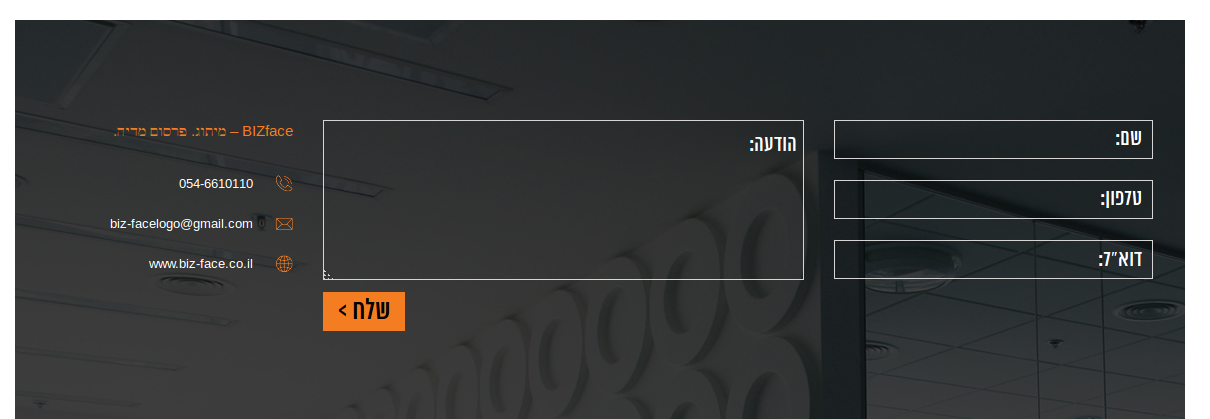
    When I follow your instructions Contact link is working fine. When I click the menu item “אודות” at first and then “צור קשר” I’m redirected to this section of the Home page:

    Please clear your browser cache, check in some other browser.
    Also try to check it via proxy service: http://anonymouse.org/cgi-bin/anon-www.cgi/http://biz-face.co.il

    Thank you.
    Regards,
    Eva Kemp.

    Avatar: Eva
    Eva Kemp
    Participant
    December 29, 2014 at 15:20

    Hello,

    Thank you.
    What is your site name?

    Please let us know.
    Regards,
    Eva Kemp.

    Avatar: Eva
    Eva Kemp
    Participant
    December 29, 2014 at 15:13

    Hello,

    Such problem may be caused by your Internet connection.
    I’ve just published “Test post” and haven’t received any errors.
    Try to check it with other theme and other provider.

    Thank you.
    Regards,
    Eva Kemp.

    Avatar: Eva
    Eva Kemp
    Participant
    December 29, 2014 at 15:02

    Hello,

    1. Unfortunately there is a bug with frontend editor. Sorry. We recommend you to use backend editor instead.
    2. Please read our documentation how to create parallax effect https://www.8theme.com/demo/docs/leader/#!/visual_composer
    3. Have you downloaded the latest theme version 1.6?

    Thank you.
    Regards,
    Eva Kemp.

    Avatar: Eva
    Eva Kemp
    Participant
    December 29, 2014 at 15:01

    Hello,

    I’ve added the following code into custom.css file:

    .st-content-inner {
        background: url("http://allstatesmovingstorage.com/wp-content/uploads/2014/12/bg.jpg") repeat-x scroll 0% 0% #457395 !important;
    }

    Please check your site now.

    Thank you.
    Regards,
    Eva Kemp.

    Avatar: Eva
    Eva Kemp
    Participant
    December 29, 2014 at 14:13

    Hello,

    The login credentials are incorrect.
    Please check them.

    Thank you.
    Regards,
    Eva Kemp.

    Avatar: Eva
    Eva Kemp
    Participant
    December 29, 2014 at 14:08

    Hello,

    Please provide us with FTP and wp-admin panel credentials in Private Content.

    Thank you.
    Regards,
    Eva Kemp.

    Avatar: Eva
    Eva Kemp
    Participant
    December 29, 2014 at 12:19

    Hello,

    1. To have the menu beside the logo you need select the 3rd or 4th header type in Theme Options > Header.
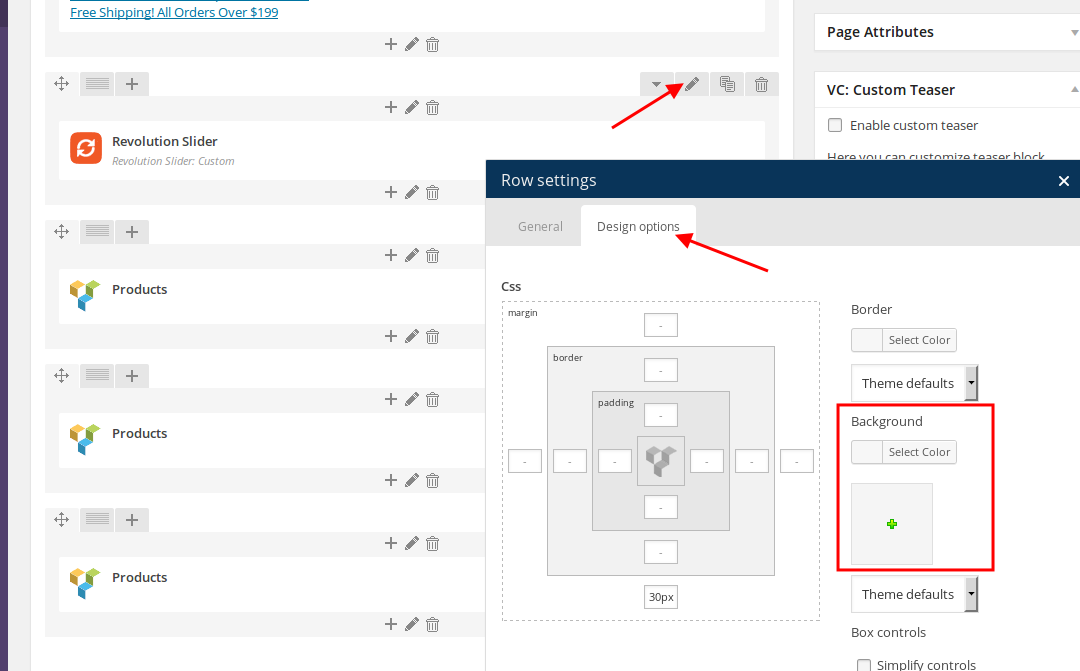
    2. To set background picture you can edit a row in Visual Composer editor:

    Thank you.
    Regards,
    Eva Kemp.

    Avatar: Eva
    Eva Kemp
    Participant
    December 29, 2014 at 10:29

    Hello,

    Try to watch the tutorials on youtube site:

    Thank you.
    Regards,
    Eva Kemp.

    Avatar: Eva
    Eva Kemp
    Participant
    December 29, 2014 at 10:27

    Hello,

    Sorry but we can’t guarantee full compatibility of 3rd-party plugins with our theme as they weren’t tested with it.
    You may try to use some plugins to check the compatibility.

    Sorry for inconveniences.
    Regards,
    Eva Kemp.

    Avatar: Eva
    Eva Kemp
    Participant
    December 29, 2014 at 10:11

    Hello,

    I’ve updated the theme.
    Please check your site now.

    Thank you.
    Regards,
    Eva Kemp.

    Avatar: Eva
    Eva Kemp
    Participant
    December 29, 2014 at 09:44

    Hello @Yoram Kaldes,

    You’re welcome.

    Thank you for congratulations.
    Happy New Year too!

    Regards,
    Eva Kemp.

    Avatar: Eva
    Eva Kemp
    Participant
    December 29, 2014 at 09:43

    Hello,

    Please provide us with FTP and wp-admin panel credentials in Private Content.

    Thank you.
    Regards,
    Eva Kemp.

    Avatar: Eva
    Eva Kemp
    Participant
    December 29, 2014 at 09:41

    Hello,

    We’re glad you’ve found the solution.

    Have a nice day.

    Regards,
    Eva Kemp.

    Avatar: Eva
    Eva Kemp
    Participant
    December 29, 2014 at 09:40

    Hello,

    I’ve turned off “Disable KenBurn On Mobile” in Revolution Slider settings > Mobile Visibility.
    Please check it now.

    Regards,
    Eva Kemp.

    Avatar: Eva
    Eva Kemp
    Participant
    December 29, 2014 at 09:35

    Hello,

    Please provide us with FTP credentials as well.

    Thank you.
    Regards,
    Eva Kemp.

    Avatar: Eva
    Eva Kemp
    Participant
    December 29, 2014 at 09:33

    Hello,

    You need go to Portfolio > Add new in wp-admin panel and create your own projects.

    Regards,
    Eva Kemp.

    Avatar: Eva
    Eva Kemp
    Participant
    December 29, 2014 at 09:31

    Hello @Qefx,

    This line @import url(http://fonts.googleapis.com/css?family=Open+Sans); is placed in style.css file in the theme folder. Please check it.

    Regards,
    Eva Kemp.

    Avatar: Eva
    Eva Kemp
    Participant
    December 29, 2014 at 09:27

    Hello,

    Please add this code into custom.css file:

    .product-category .mask-container .block-mask {
        display: none !important;
    }

    How to create custom.css you can watch in this tutorial.

    Thank you.
    Regards,
    Eva Kemp.

  • 1 2 3 781 782 783 1,045 1,046 1,047
    Viewing 23,460 results - 23,431 through 23,460 (of 31,382 total)
Viewing 30 posts - 23,431 through 23,460 (of 31,382 total)
We're using our own and third-party cookies to improve your experience and our website. Keep on browsing to accept our cookie policy.