
Hello,
Unfortunately we don’t have other code for buttons, you may find some plugins and use their shortcodes for buttons.
Sorry for inconveniences.
Regards,
Eva Kemp.

Hello,
Unfortunately we don’t have other code for buttons, you may find some plugins and use their shortcodes for buttons.
Sorry for inconveniences.
Regards,
Eva Kemp.
Hello,
Thank you for congratulations.
Happy New Year to you too!
Did you contact Woocommerce support team?
If you check pagination with default WordPress theme you’ll the same problem. The issue is with Woocommerce plugin. Please ask them to test pagination with default theme on your site.
Thank you for understanding.
Regards,
Eva Kemp.
Hello,
I’ve updated MasterSlider plugin for you as well as Essential Grid and Revolution Slider plugins.
Thank you.
Regards,
Eva Kemp.
Hello @Agan-san, @Evelyn,
We’ve sent the latest version of masterslider plugin to your email address.
Please check.
Regards,
Eva Kemp.
Hello @mleihs,
Sorry for misunderstanding.
You can change “Projects” in the file legenda/framework/portfolio.php, edit the code 'name' => _x('Projects', 'post type general name'), (line 13) and write your text instead of “Projects”.
Thank you.
Regards,
Eva Kemp.
Hello @inetb italia,
Please provide us with a link where Team Member element is added.
Thank you.
Regards,
Eva Kemp.
Hello,
You’re welcome.
Regards,
Eva Kemp.
Hello,
In Appearance > Menus you have “Description” block enabled for Liverpool Gifts sub item
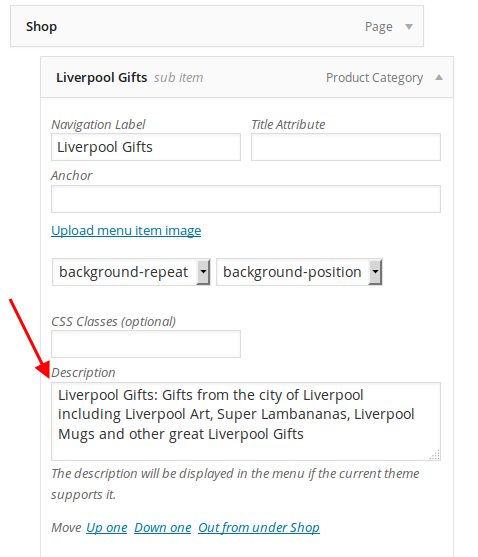
Remove the description from there.
Regards,
Eva Kemp.
Hello @CJMillar82,
The problem was that child theme didn’t have such widgets as you created in the parent theme. So I’ve added the same widgets to the child theme and now footer is working fine.
Please check.
Regards,
Eva Kemp.
Hello,
Sorry for a delay.
There is some issue with customization.
We’ll fix it in the next update.
Please take our apologies for inconveniences.
Regards,
Eva Kemp.
Hello,
The credentials to wp-admin panel are incorrect.
Please check them.
Thank you.
Regards,
Eva Kemp.
Hello,
Sorry for a delay.
We’re investigating that issue. Once there is a solution we’ll notify in the previous topic.
Thank you for your patience.
Regards,
Eva Kemp.
Hello,
Sorry, but we don’t have video tutorials how to create child theme, but you can read WordPress documentation:
http://codex.wordpress.org/Child_Themes
Regards,
Eva Kemp.
Hello,
Sorry for a long delay.
The problem is Woocommerce widgets work only on Shop page and products categories pages. Unfortunately it can’t be fixed from our side as this is Woocommerce configuration.
Sorry for inconveniences.
Regards,
Eva Kemp.
Hello,
You can remove that file from the directory legenda/woocommerce/checkout and the default Woocommerce one will be used.
Thank you.
Regards,
Eva Kemp.
Hello,
Is your issue resolved now?
Regards,
Eva Kemp.
Hello,
Please add this code in custom.css:
@media (max-width: 479px) { .header .logo img {
  margin-left: 0px;
} }
Thank you.
Regards,
Eva Kemp.
Hello @Mijat,
The problem with icons was caused by site urls. Perhaps you moved site to other domains. I’ve fixed the issue in .htaccess file as described here: http://454media.com/cross-origin-resource-sharing-cors-fix/
Concerning the outdated files you shouldn’t worry as this won’t affect your site work. We are using modified files from Woocommerce in the theme, that’s why after Woocommerce update some files may be of different versions. But it won’t cause any problems.
Thank you.
Regards,
Eva Kemp.
Hello,
You had inserted spaces in the beginning of the strings in Twitter Widget fields. I’ve removed them and the tweets are shown.
To change links for buttons on banners edit your Home page and in the code [etheme_btn title="Shop Now" url="test_url" class="active"] change test_url to the link you want.
Regards,
Eva Kemp.
Hello,
Please provide us with wp-admin panel credentials in Private Content.
Thank you.
Regards,
Eva Kemp.
Hello,
The theme is compatible with the latest WordPress version.
There are a lot of errors on your site:
http://imgur.com/4foO59q
Try to reupdate the theme and don’t create multiple folder, just overwrite old files:
https://www.8theme.com/demo/docs/idstore/index.html#!/upgrade
Thank you.
Regards,
Eva Kemp.
Hello,
Are you using Wide layout in Theme Options > General > Site Layout?
Also check if you disabled sidebar for those pages in Pages editor (Page Layout box > Sidebar Position).
Thank you.
Regards,
Eva Kemp.
Hello,
When I tried to upload an image via Media in wp-admin panel I got the following error:
Is its parent directory writable by the server?
So the problem is folder with images has wrong permissions.
Could you please provide us with FTP credentials to check it? We won’t update anything without your permission.
Thank you.
Regards,
Eva Kemp.
Hello,
As I see in .po file in /wp-content/themes/blanco/languages directory you don’t have “Update Tag” translated.
Please check it.
Regards,
Eva Kemp.
Hello,
As I see you’re using old theme version. Please update it to 2.9.4 version.
https://www.8theme.com/demo/docs/blanco/index.html#!/upgrade
Don’t forget to create a back up of the files and database before update.
Thank you.
Regards,
Eva Kemp.
Hello,
Your site is giving “Server not found” error.
Please check it with your host.
Thank you.
Regards,
Eva Kemp.
Hello,
Please provide us with FTP credentials as well.
Thank you.
Regards,
Eva Kemp.
Hello,
Could you please clarify your issue with more details?
What are the problems with buttons?
Please provide us with with FTP and wp-admin panel credentials in Private Content.
Thank you.
Regards,
Eva Kemp.
Hello,
Have you made any changes in the original theme files?
Please provide us with FTP credentials.
Thank you.
Regards,
Eva Kemp.
Hello,
Please add this code in custom.css file:
.header-type-3 .logo-with-menu img {
    width: 400px;
}
.header-type-3 .main-nav .menu {
    width: 730px;
}
How to create custom.css you can watch in this tutorial.
Thank you.
Regards,
Eva Kemp.









