
Hello,
I’ve imported one page template. You can check it in Pages > “One page”.
Thank you.
Regards,
Eva Kemp.

Hello,
I’ve imported one page template. You can check it in Pages > “One page”.
Thank you.
Regards,
Eva Kemp.
Hello,
I’ve edited header.php file and commented the code wp_title( '|', true, 'right' (line 16). Now only one title is shown in a browser tab.
Please check.
Thank you.
Regards,
Eva Kemp.
Hello,
Could you please show a screenshot what option you’re talking about?
Please provide us with wp-admin panel credentials in Private Content.
Thank you.
Regards,
Eva Kemp.
Hello,
Sorry but that was changed by Woocommerce and not by our team.
Regards,
Eva Kemp.
Hello,
Please provide us with wp-admin panel and FTP credentials in Private Content.
Thank you.
Regards,
Eva Kemp.
Hello,
You’re welcome.
Regards,
Eva Kemp.
Hello,
Please provide us with wp-admin panel credentials in Private Content.
To add anchors to rows and make one page menu you need refer to our documentation:
https://www.8theme.com/demo/docs/royal/#!/3_one_page
Thank you.
Regards,
Eva Kemp.
Hello,
Please add this code in custom.css:
.sku_wrapper {display: none;}
Thank you.
Regards,
Eva Kemp.
Hello,
You need add this code in custom.css file:
.quick-view-popup .product-name {
color: black;
}
Regards,
Eva Kemp.
Hello,
You need extract responsive-ecommerce-wordpress-theme-2.zip file and inside of the extracted folder you’ll find woopress.zip archive. Extract it too. Then upload woopress folder via FTP to the directory wp-content/themes, allow to overwrite the existing folder.
After update go to Theme Options in wp-admin panel and click “Save Changes”. And your theme is up to date.
Thank you.
Regards,
Eva Kemp.
Hello,
I’ve added margin value for Revolution Slider row in Visual Composer editor:
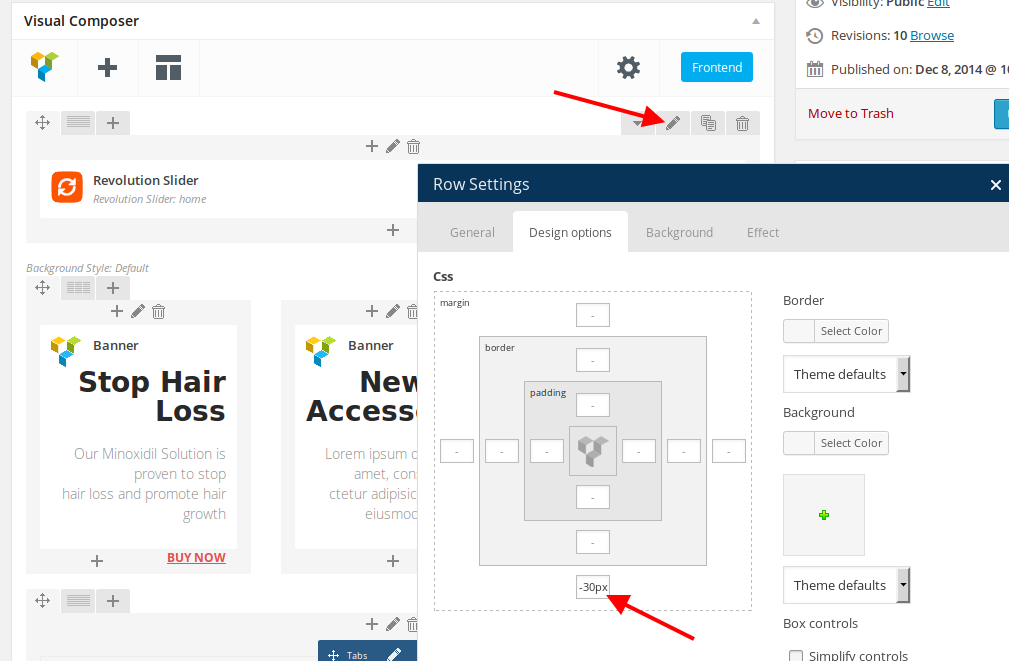
Please check your home page now.
Thank you.
Regards,
Eva Kemp.
Hello @Businessbro,
You need add this code in functions.php file in the theme directory.
Thank you.
Regards,
Eva Kemp.
Hello,
Please clarify what problems you’re experiencing on the site?
Thank you.
Regards,
Eva Kemp.
Hello,
Please add this code in custom.css file:
i.Defaults-play {
vertical-align: -webkit-baseline-middle;
}
@media only screen and (max-width: 992px) { .menu > li > a {
color: white;
}} Thank you.
Regards,
Eva Kemp.
Hello,
Unfortunately we don’t have such function in our theme. Sorry.
Regards,
Eva Kemp.
Hello,
Did you receive our previous post?
Please provide us with wp-admin panel credentials in Private Content.
Thank you.
Regards,
Eva Kemp.
Hello,
You need select Brand element in Visual Composer editor.
Please check it.
Thank you.
Regards,
Eva Kemp.
Hello,
1. Could you clarify your question concerning “the accordion products option”? Could you please show a screenshot?
3. You can install various templates in Theme Options > Import/Export.
4. To remove language links you need add empty Text widget into “Place in header top bar” area in Appearance > Widgets.
5. Concerning Newsletter at the bottom of the page, it’s created for our site only. Sorry. You can just add Newsletter to the content of your page as described in our documentation you were provided.
Thank you.
Regards,
Eva Kemp.
Hello,
Your original image is too small – 450px × 600px, but it should be 712px × 950px approximately or larger. Please reupload original image with higher resolution.
Thank you.
Regards,
Eva Kemp.
Hello,
Please add this code in custom.css file:
.header-type-10 .menu-wrapper {
    background-color: pink;
}
.header-type-10 .menu-wrapper .navbar-collapse .menu-main-container .menu > li > a {
    color: #AEAEAE;
    border-color: transparent;
}
Change color values to yours.
Thank you.
Regards,
Eva Kemp.
Hello,
1. What theme version and Woocommerce version are you using? I’ve tried to delete custom tab on our test site and it has been removed successfully, even after resaving a page.
2. Please add this code in custom.css file:
div#content_tab_description h2 {
display: none;
}
How to create custom.css you can watch in this tutorial (it’s for Legenda theme but the process is the same).
Thank you.
Regards,
Eva Kemp.
Hello,
Have you checked all products whether all tags are added correctly in products descriptions?
Please check it.
Thank you.
Regards,
Eva Kemp.
Hello,
You’re welcome.
Regards,
Eva Kemp.
Hello,
We’re glad the issue has been fixed.
Regards,
Eva Kemp.
Hello,
You can use Static Blocks to create pop up window or footer.
Please read our documentation:
https://www.8theme.com/demo/docs/legenda/index.html#!/static_blocks
Thank you.
Regards,
Eva Kemp.
Hello,
You’re welcome.
Regards,
Eva Kemp.
All plugins are external extensions which are included into theme because for each product we purchase “Extended license” and that’s why we are able to include it into them. This plugin works fine without activation and you can always get actual version if you want directly from us. Just ask and we’ll send a current version to you. We update plugins with theme updates from time to time so plugins will be also updated with each next theme update. The option with registering of the plugins has been already added to plugin and this only allows you to get automatic updates and support for this plugin directly from an author if you need. You don’t need to register this product because it is not required but if you want to get those features, then you need to purchase this plugin directly from the author. This is how it works for all themes on Themeforest and not only in our case.
Thank you.
Regards,
Eva Kemp.
Hello,
You can add this code in custom.css file:
.main-nav .menu > li.menu-full-width .nav-sublist-dropdown {
padding: 25px 0 0px !important;
}
Thank you.
Regards,
Eva Kemp.
Hello,
I’ve resaved Theme Options and images are shown on single product pages.
Please clear your browser cache and check again.
There is compatibility bug with new version of Wishlist plugin and our theme.
I’ve uploaded old plugin version for you via FTP.
A new fix will be implemented in the next theme update.
Please take our apologies for inconveniences.
Thank you.
Regards,
Eva Kemp.
Hello,
You’re welcome.
Regards,
Eva Kemp.









