Hello,
You need use “Video Player” element in Visual Composer editor instead of “Banner” element.
Regards,
Eva Kemp.

Hello,
You need use “Video Player” element in Visual Composer editor instead of “Banner” element.
Regards,
Eva Kemp.
Hello,
The reason is the following code you added in CSS block of VC editor:
div.pp_overlay, .pp_content_container, div.pp_pic_holder {
   display: none !important;
}
.mfp-bg, .mfp-wrap {
 display: none !important;
}
Unfortunately to make popup working you need remove this code.
Regards,
Eva Kemp.
Hello,
1. Please add this code in custom.css file:
.menu > li a {
    font-family: Lato !important;
    font-size: 13px !important;
    padding-left: 30px !important;
}
2. We’ll discuss this query and try to resolve it in future updates.
Thank you.
Regards,
Eva Kemp.
Hello,
Sorry for the delay.
The issue has been fixed. Please clear browser cache and check.
Regards,
Eva Kemp.
Hello,
Please provide us with correct url to wp-admin panel as we’re getting a page with maintenance mode enabled using the link you provided.
Thank you.
Regards,
Eva Kemp.
Hello,
Use this code in custom.css file:
.menu-icon::before {
 color: red !important;
}
Write your color value.
Regards,
Eva Kemp.
Hello,
Please provide us with correct wp-admin panel credentials in private content.
Thank you.
Regards,
Eva Kemp.
Hello,
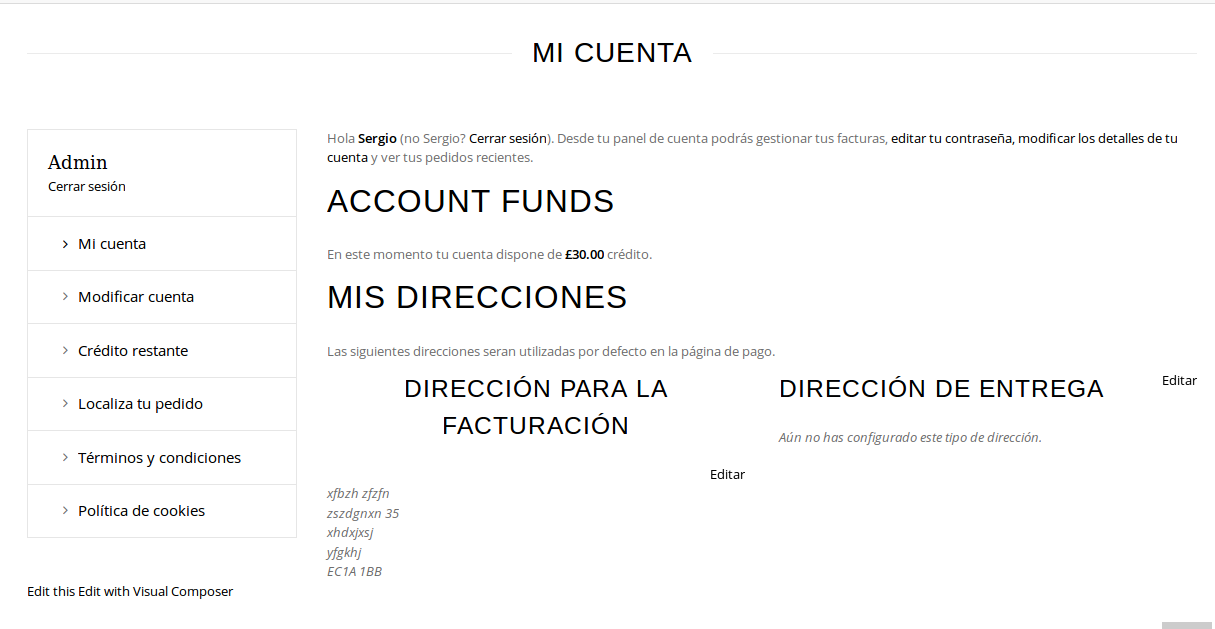
“Billing Address” section has other style, it’s divided into columns because on the right “Shipping Address” should be displayed. If you want to show this section you need go to Woocommerce > Settings > Shipping tab > Shipping Destination > tick “Default to shipping address”.
Otherwise php file needs to be edited.
To change font use this code in CSS block of Visual Composer editor on “My Account” page:
h2 {
    font-size: 24px;
}
Regards,
Eva Kemp.
Hello,
Just to clarify: do you want to remove featured image inside of a post?
If so you need add this css to a post (using CSS block in Visual Composer editor):
.post-images ul.slides li {display:none;}
Regards,
Eva Kemp.
Hello @rfrigge,
What errors are you getting?
Please provide us with FTP and wp-admin panel credentials in private content.
Thank you.
Regards,
Eva Kemp.
Hello,
I’ve just checked search form and it appears when hovering search icon, when cursor is taken away search form disappears.
Please check it again.
Thank you.
Regards,
Eva Kemp.
Hello,
You can try edit the file woopress/woosearchform.php on line 15 and remove the code <input type="hidden" name="post_type" value="product" />.
Regards,
Eva Kemp.
Hello,
Please update theme to 2.7 version.
Create a back up before update!
https://www.youtube.com/watch?v=KdWESIIPU1k
Regards,
Eva Kemp.
Hello,
You’re welcome.
Regards,
Eva Kemp.
Hello,
Your files should have names de_DE.po and de_DE.mo but not woopress-de_DE.po and woopress-de_DE.mo.
Please correct this.
Also in wp-config.php file this code must be written:
$locale='de_DE';
Regards,
Eva Kemp.
Hello,
You’re welcome.
Regards,
Eva Kemp.
Hello,
What shortcodes are you talking about?
As I see “Quick View” is working fine.
Please describe the issue with more details.
Thank you.
Regards,
Eva Kemp.
Hello,
I’ve enabled “Show page heading” in the editor of Shop page.
Now breadcrumbs banner is shown.
Please clear browser cache and check.
Regards,
Eva Kemp.
Hello,
Please provide us with FTP and wp-admin panel credentials to check the issue.
Thank you.
Regards,
Eva Kemp.
Hello,
Please add this code in custom.css file:
.single-product-page .product-info h4, .single-product-page .product-info .sku_wrapper, .single-product-page .product-info .posted_in {
 display: none;
}
How to create custom.css you can watch in this tutorial.
Thank you.
Regards,
Eva Kemp.
Hello,
You need rename default.custom.css to custom.css.
How to create custom.css you can watch in this tutorial.
Regards,
Eva Kemp.
Hello,
Unfortunately for portfolio categories description can’t be shown. Sorry.
Regards,
Eva Kemp.
Hello,
Unfortunately there is no such feature in the theme. You may try to use some plugin to achieve what you want.
Regards,
Eva Kemp.
Hello,
Please provide us with FTP and wp-admin panel credentials in private content.
Regards,
Eva Kemp.
Hello,
Could you please clarify what you want to change for social icons at the top?
Thank you.
Regards,
Eva Kemp.
Hello,
Sorry, but I don’t see any issues:
https://s3.amazonaws.com/fvd-data/notes/168674/1430504458-rRlXlB/screen.png
Could you please specify what are they?
Thank you.
Regards,
Eva Kemp.
Hello,
Please provide us with wp-admin panel and FTP credentials.
Thank you.
Regards,
Eva Kemp.
Hello,
Please update the theme to the latest version.
Don’t forget to create back up of your files and database before update.
https://www.8theme.com/demo/docs/blanco/index.html#!/upgrade
Thank you.
Regards,
Eva Kemp.
Hello,
You’re welcome.
Regards,
Eva Kemp.
Hello,
Please provide us with a direct link where variations aren’t shown.
Thank you.
Regards,
Eva Kemp.