
Hello,
You are welcome.
Regards,
Eva Kemp.

Hello,
You are welcome.
Regards,
Eva Kemp.
Hello,
Please provide us with the FTP and admin panel credentials.
Regards,
Eva Kemp.
Hello,
Please provide us with the FTP and admin panel credentials.
Regards,
Eva Kemp.
Hello,
In admin panel go to Settings > Reading. For the field “Front page displays” choose “A static page”, “Front Page” – Shop.
If you have more questions let us know.
Regards,
Eva Kemp.
Hello,
Ok.
If you need more assistance please let us know.
Regards,
Eva Kemp.
Hello,
You can use the following code to change color of menu items:
.main-nav .menu > li > a, .fixed-header .menu > li > a {
    color: red;
}
Regards,
Eva Kemp
Hello,
Do you mean you want the products to be displayed like shown on the screenshot?
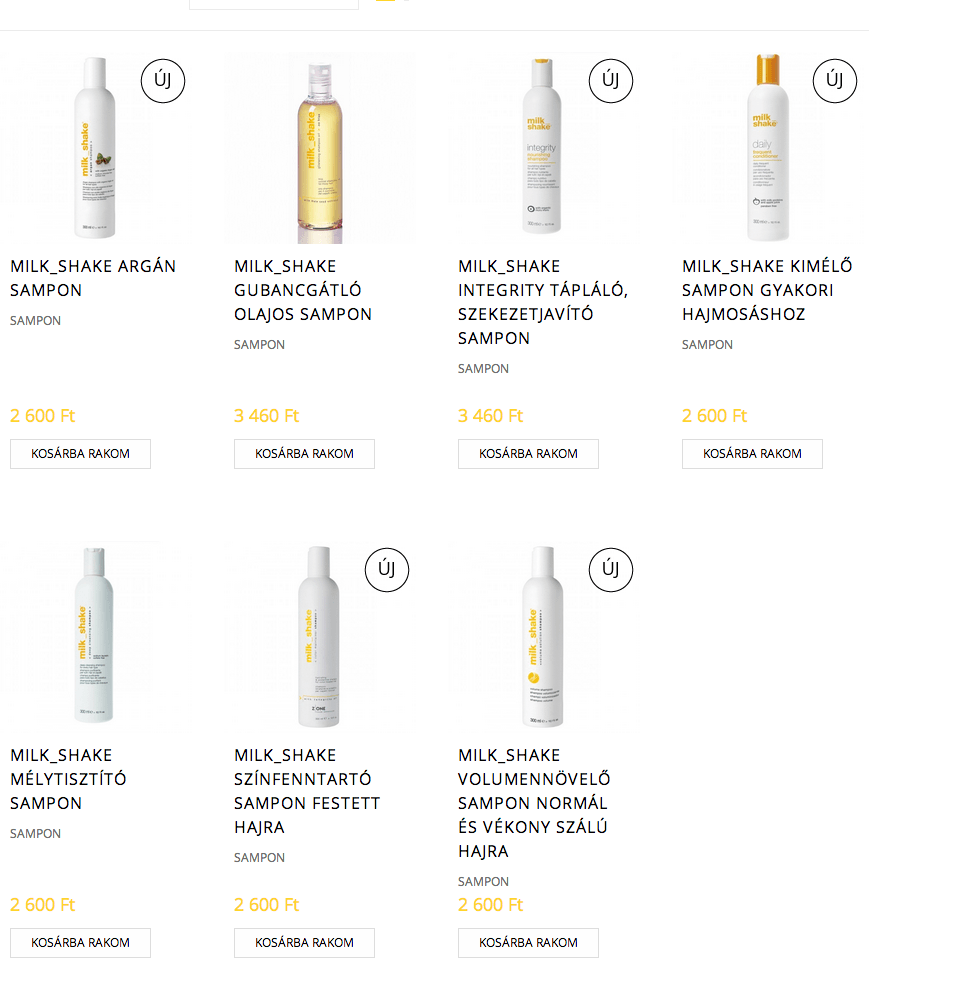
If so please provide us with the admin login details in Private Content.
Please note the short titles will have spaces (visible on the screenshot).
Regards,
Eva Kemp.
You are welcome.
Regards,
Eva Kemp.
Hello @bergtobi,
Sorry but it can’t be done as VC is built into the theme. Next theme version will have it as a separate plugin, so you’ll be able to modify it.
Regards,
Eva Kemp.
Hello,
Please check the site now.
If you want to put columns down as for pricing table, you should add Extra class name: portfolio-price
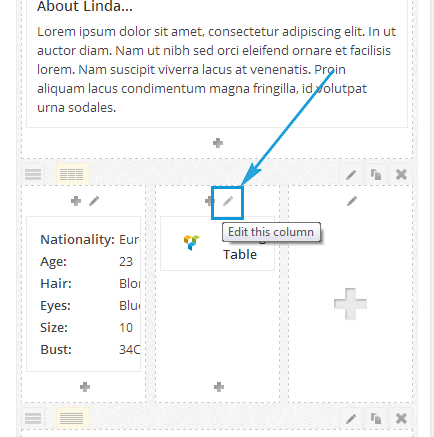
And set attributes for that class in custom.css file.
Regards,
Eva Kemp.
Hello,
We’re glad the problem has been resolved.
Don’t hesitate to contact us if you have any questions.
Regards,
Eva Kemp.
You are welcome.
Regards,
Eva Kemp.
You are welcome.
Regards,
Eva Kemp.
Hello,
We’re very sorry but we don’t know the exact date when the update will be released.
We know only it’s being tested now and if everything is fine it will be produced soon.
Regards,
Eva Kemp.
Hello,
We recommend you to update the theme to the latest version.
If the problem will persist, please let us know.
Regards,
Eva Kemp.
Hello,
Please check the documentation https://www.8theme.com/demo/docs/blanco/index.html#!/how_to_translate if you follow all instructions correctly.
Also you may try to update the translation files https://www.8theme.com/how-to-update-translation-files/
If it doesn’t help, please provide us with the FTP and admin panel credentials.
Regards,
Eva Kemp.
Hello,
Yes, there is a problem in IE. You can fix this issue adding the code into custom.css:
.header2 .et-mega-search { transform: translateX(-50%); }
Please watch here how to create custom.css.
Regards,
Eva Kemp.
Hello,
The problem is you didn’t set the price value for attributes. Please look at the screenshot.
You should set price for all attributes to display them from the dropdown menu.

Regards,
Eva Kemp.
You are welcome.
Regards,
Eva Kemp.
Hello,
I’ve made changes in custom.css file and brands alignment is set properly now.
Please check.
Regards,
Eva Kemp.
Hello,
Unfortunately it can’t be done by default.
You need to create widget area, add the widget WooCommerce Products and choose Show > All, Order by > Date. Such way you’ll see the newly added products.
Then add this widget area in static block for footer.
Regards,
Eva Kemp.
Hello,
If you want to add SEO text for a category you can use the category description for this.
If you want to add it on the Product page, then you can also use description or add it into custom tab. Another way is to create a static block and enable it for a product (please refer to our documentation: https://www.8theme.com/demo/docs/legenda/index.html).
Regards,
Eva Kemp.
Hello,
Thank you for information.
We’ve taken it into account and will fix this in the next update.
For now you can resolve the search form issue such way:
In the file legenda/framework/theme-functions.php you should find the line 'posts_per_page' => $count, (lines 1410, 1429, 1449, 1469) and change it to 'post_status' => 'publish', 'posts_per_page' => $count,
If there are any questions or suggestions, feel free to contact us.
Regards,
Eva Kemp.
Hello,
Please take our apologies for the inconveniences.
Our developers are working on the problem with VC and it’ll be fixed in the next update.
Regards,
Eva Kemp.
Hello,
This is the default content for main sidebar widget area. If you want to remove it completely you can add an empty text widget there. It will fix the problem.
Regards,
Eva Kemp.
Hello,
Please provide us with the FTP and admin panel credentials in Private Content.
Regards,
Eva Kemp.
Hello,
We’ve checked the settings on default theme and the issue persists there too.
Sorry, but the problem isn’t related to our theme.
We advise you to contact the plugin developer regarding this issue.
Regards,
Eva Kemp.
Hello,
You’ve been replied in the ticket. Please check it.
Regards,
Eva Kemp.
Hello,
If you want to remove that price block from a single product page you can do this by editing custom.css file and add the code:
.price-block { display: none; }
Be sure you’ve created custom.css in the theme directory and enabled it in Theme Options > Custom CSS > On.
Regards,
Eva Kemp.
Hello,
You can do this creating a page, for example “Moldings” and add the shortcode [product_category category="footwear"]
You should put the product category slug instead of “footwear”.
Also please check the documentation http://docs.woothemes.com/document/woocommerce-shortcodes/
Regards,
Eva Kemp.






