

Hello,
we have added needed category in Post Grid Settings. Please check your site.

Regards,
Stan Russell.

Hello,
please check your site.
Regards,
Stan Russell.
Hello,
we have added needed category in Post Grid Settings. Please check your site.
Regards,
Stan Russell.
Hello LadyCouture,
unfortunately our theme does not have such feature. You need to find third-party plugin to enable it or code it by yourself. Please note that we can not guarantee work of third-party plugins with our theme.
Regards,
Stan Russell.
Hello hayden34,
you are welcome! If you have any other questions – feel free to ask.
Regards,
Stan Russell.
Hello Mia Maq,
we are happy that you have solved your problem. Have a nice day!
Regards,
Stan Russell.
Hello Mia Maq,
you are welcome!
Regards,
Stan Russell.
Hello hayden34,
Please specify – have you edited theme files?
We have renamed your legenda folder to ‘legenda-old’ and uploaded fresh legenda zip for you. Please check your site. All your changes and settings are still in ‘legenda-old’ folder.
Regards,
Stan Russell.
Hello mildac,
you need to edit file \royal\framework\shortcodes.php on lines 1123 and 1180
We recommend you to make these changes in Child theme.
Read here how to do it right: https://codex.wordpress.org/Child_Themes
Regards,
Stan Russell.
Hello Evelyn,
please make backup of your theme folder, update your theme to latest version, navigate to Theme options > Import/Export and select Simple Page ‘ROYAL HOME’
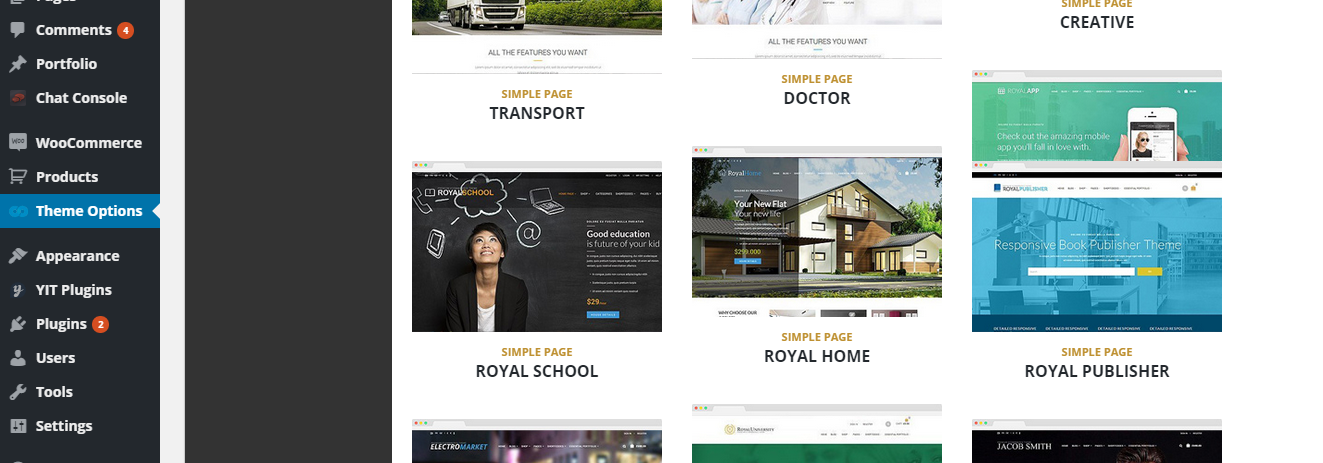
Please do not forget to update plugins too.
To update theme through FTP:
Download the zipped package from ThemeForest and extract to your desktop.
In the extracted package you will find archive Royal_v2.2.zip, which is the WordPress theme.
Extract zip file and upload only extracted royal folder to /wp-content/themes/ folder on your server with overwriting.
Please, re-save your Royal options after upgrading the theme. Navigate to admin panel > Theme Options and hit Save changes.
Plugins bundled with theme can be downloaded here: http://www.8theme.com/download-plugins/
If you have any questions left – feel free to ask.
Regards,
Stan Russell.
Hello,
have you tried to use Font Awesome? Please check it here: https://fortawesome.github.io/Font-Awesome/
Regards,
Stan Russell.
Hello ppeixoto,
we are always happy to help our customers. Have a nice day!
Regards,
Stan Russell.
Hello,
please select needed page, click on ‘Edit page’, after that click on ‘Gear’ icon and add following css code
.page-wrapper {
    background-image: url("http://<strong>link to your image</strong>") !important;
}
Regards,
Stan Russell.
Hello,
please update Visual Composer to latest version and check your site.
You can download it here: http://www.8theme.com/download-plugins/
You do not need to activate Visual Composer plugin. It will work with our theme without any keys but if you want to receive support from plugin developer – you need to buy it.
Regards,
Stan Russell.
Hello Christina Hansen,
please provide us with admin credentials for your site in private content so we will be able to check this issue.
Regards,
Stan Russell.
Hello Mia Maq,
please update Revolution slider to version 5.0.9
you can download it here: https://www.8theme.com/download-plugins/
If this will not help – temporary disable all third-party plugins and check your site.
Regards,
Stan Russell.
Hello Karll,
you are welcome! Have a nice day!
Regards,
Stan Russell.
Hello CIDesign_Media,
you are using old version of Legenda theme(2.5) which does not support latest WordPress and Woocommerce releases you have. Please make backup of theme folder and update theme and required plugins to latest versions. You can download required plugins here: http://www.8theme.com/download-plugins/
Hello Kcharveaux,
thank you for your reply. If you have any problems with our theme – please create new topic and describe problem with more details there.
Regards,
Stan Russell.
Hello mpurse,
please make backup of edited files and update Visual Composer and other required plugins to latest version. After that please check your site. You can download plugins here: https://www.8theme.com/download-plugins/
Regards,
Stan Russell.
Hello,
what version of Visual Composer are you using?
Regards,
Stan Russell.
Hello,
you are welcome!
Regards,
Stan Russell.
Hello mumbomedia,
we are always happy to be helpful! Have a nice day!
Regards,
Stan Russell.
Hello robertlangius,
unfortunately we can not log into your site using credentials you provided us with. Please check them so we will be able to help you.
Regards,
Stan Russell.
Hello aphiwatng,
we will wait for your reply.
Regards,
Stan Russell.
Hello,
unfortunately ‘Yith WooCommerce Waiting List’ is third-party plugin which is not supported by our theme. Sorry for inconvenience.
Regards,
Stan Russell.
Hello Kris,
please add following css code to your custom.css file:
.hover-effect-description .mask-text strong{
color:red;
}
You may change color name to any other.
Regards,
Stan Russell.
Hello,
you are welcome!
Regards,
Stan Russell.
Hello patrick1717,
please provide us with admin credentials for your site in private content.
Regards,
Stan Russell.
Hello mumbomedia,
please try following css code:
.quick-checkout .woocommerce-info{
width:180%!important
}
Regards,
Stan Russell.
Hello Fantasia,
Custom.css file has higher priority than style.css. In addition, style.css file may be overwritten on theme update. That’s why we always recommend to add any css customization to custom.css only.
Regards,
Stan Russell.
Hello Aurore57,
we can not reach your site – it is in Maintenance mode.
Please provide us with admin credentials for it in private content.
Regards,
Stan Russell.

Free AI store scan · SalesMax
Paste your store address. SalesMax AI shows which upsell moments are missing. No signup.

Free AI speed test · FlashMax
Paste your site address. FlashMax runs Google Lighthouse for phone and desktop, checks Core Web Vitals and lists what to fix. No signup.
 Architecture StudioPortfolio
(live demo, opens in a new tab)
 Grocery MarketFood & drinks
(live demo, opens in a new tab)
 Burger StoreFood & drinks
(live demo, opens in a new tab)
 Hosting StoreWPBakery
(live demo, opens in a new tab)
 Minimal ElectronicsPortfolio
(live demo, opens in a new tab)
 Default RTLFashion
(live demo, opens in a new tab)
 X-Phone StoreElectronics
(live demo, opens in a new tab)
 EcoenergyElementor
(live demo, opens in a new tab)
 Sport StoreSports & travel
(live demo, opens in a new tab)
 BusinessBusiness
(live demo, opens in a new tab)
 Underwear StoreFashion
(live demo, opens in a new tab)
 Plants StoreElementor
(live demo, opens in a new tab)
 BarbershopBeauty
(live demo, opens in a new tab)
 KidsstoreBusiness
(live demo, opens in a new tab)
 Marseille 03Fashion
(live demo, opens in a new tab)
 Organic Store 01Food & drinks
(live demo, opens in a new tab)