

Forum Replies Created

Viewing 30 posts - 31 through 60 (of 302 total)
  • Avatar: Oliver_Theis
    Oliver Theiß
    Participant
    September 30, 2024 at 17:22

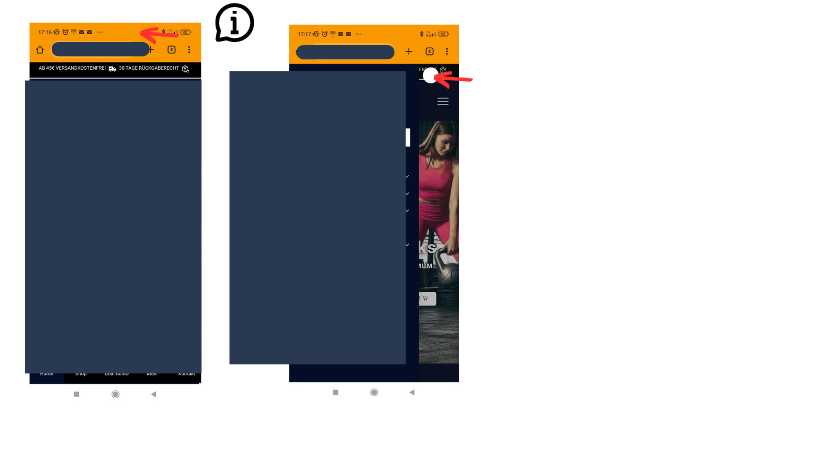
    here ist an other screenshot…
    I have the same Problem in the e-mails for the waitlist.

    Ich habe alles übersetzt , aber nur ein teil wird auf Deutsch angezeigt.
    I have translated everything, but only a part is displayed in German live…… hmmmmmm

    lg Oliver
    Files is visible for topic creator and
    support staff only.
    Avatar: Oliver_Theis
    Oliver Theiß
    Participant
    September 30, 2024 at 17:19

    Hallo jack,

    here is the screenshot of the missing translation…
    i have translated all strings for the waiting list with the loco plugin.

    but it is not displayed in german on the page?
    i don’t know what the problem is… 🙁

    I have attached the screen shot.

    Files is visible for topic creator and
    support staff only.
    Avatar: Oliver_Theis
    Oliver Theiß
    Participant
    September 30, 2024 at 12:12

    hallo Jack,

    thank you. .)

    i mean your costum css code for the mobile view that you have created. this is erroneous. as a result, your waiting list no longer works. See my screenshot.

    Because of your css code the email field of the waiting list is missing in the pop up window.

    https://www.optimumcore.eu/mein-konto/?et-waitlist-page
    and i have the problem that the translation does not work, i have translated the strings in loco to german.

    Lg Oliver

    Avatar: Oliver_Theis
    Oliver Theiß
    Participant
    September 29, 2024 at 18:36

    Hi, I have just tested it live.

    the css es code from you is causing an error …. ;/

    You have set e mail to display non….

    because of this, the email no longer appears in the pop-up window, see my screenshot…

    and i have the problem that the translation is not nageeigt from the text i have translated the string, but it is not displayed in german… hhh

    lg Oliver

    Files is visible for topic creator and
    support staff only.
    Avatar: Oliver_Theis
    Oliver Theiß
    Participant
    September 29, 2024 at 10:21

    hello thanks for the help, 🙂

    I just have one more question.

    The amount of money is at the bottom, what is it for? so it shows 26.90 euros twice?
    Why does it alone mention 26.90 at the bottom?
    I don’t understand that right now, ? :/

    Lg Oliver

    Avatar: Oliver_Theis
    Oliver Theiß
    Participant
    September 26, 2024 at 15:12

    hi, sorry for my late replay.
    in the private area you will find the login data. have a good friday

    lg Oliver

    Please contact administrator
    for this information.
    Avatar: Oliver_Theis
    Oliver Theiß
    Participant
    September 24, 2024 at 13:43

    Hallo Rose,

    thanks for the quick feedback.

    I have a Redmi Note 11 plus
    I used Google crome

    the URL—— i went to the my accout page and then selected the waiting list tab

    https://www.optimumcore.eu/mein-konto/?et-waitlist-page

    with the wish list you have realised it very well on mobile

    lg oliver

    Avatar: Oliver_Theis
    Oliver Theiß
    Participant
    September 23, 2024 at 14:11

    Hallo Jack,

    yes, it worked and all is well… thanks for the friendly support

    lg Oliver

    Avatar: Oliver_Theis
    Oliver Theiß
    Participant
    September 17, 2024 at 19:28

    Hallo Jack,
    thank you very much! I will try it . 🙂

    i think i will have to ask again at this point : “3”

    3. Merge the content from xstore/woocommerce/review-order.php into xstore-child/woocommerce/review-order.php, incorporating any modifications identified in the comparison from step 2 (typically, these involve additions or changes to HTML code).

    i don’t know the tool and my technical english is not that perfect. That’s always difficult ….

    i think i’ll get back to you if i don’t understand how to customise the file… aww

    lg Oliver

    Avatar: Oliver_Theis
    Oliver Theiß
    Participant
    March 22, 2023 at 14:46

    awww….. yes …..

    i think so, but i also know now where the old code is that causes the

    problem..

    I will try both things… thank you. :))

    Avatar: Oliver_Theis
    Oliver Theiß
    Participant
    March 22, 2023 at 11:53

    Hi Rose,
    no no no……… :((((

    this has nothing to do with the css error on my screenshot.
    my screenshot is from the mobile version, 🙂
    See my screenshot again please .

    you see that everything is white you can read nothing. that is my problem.

    I think you understand now what I mean.

    Oliver

    Avatar: Oliver_Theis
    Oliver Theiß
    Participant
    March 8, 2023 at 10:50

    Plugin :Asset CleanUp Pro: Page Speed Booster is the Problem…

    I have to check, what I can change there… :/

    Thnaks for your support

    Avatar: Oliver_Theis
    Oliver Theiß
    Participant
    February 22, 2023 at 13:47

    Hi Tony,

    thank you. Yes, I had thought it was a chaching problem.
    Thanks for your help 🙂

    Avatar: Oliver_Theis
    Oliver Theiß
    Participant
    February 21, 2023 at 17:29

    hello Rose,

    thank you very much for your quick reply. I got it fixed with auto margin. I want to avoid elementor because of the loading time. and it was only about centering the section.

    ——————————————————–
    Two other things… I can’t get the CSS code here with the Google developer tool….. The color of the cross should be blue… something overwrites the color and it is not visible… See V1 Image

    the second thing … my home page was yellow in teh past .. you had also helped, but i changed everything to white and made the design a bit cooler… only on the home page it is yellow now… and it need also to bei white……..

    I need some help here to fx it… on the homepage :(((


    lg Oliver

    Avatar: Oliver_Theis
    Oliver Theiß
    Participant
    February 12, 2023 at 16:44

    thanks for dei feedback. i’ll try it later and get back to you –
    Wish you a nice sunday 🙂

    Avatar: Oliver_Theis
    Oliver Theiß
    Participant
    February 12, 2023 at 16:16

    Hi Rose,

    thank you for the quick reply.

    in the private area the URL but it’s about the backend..I just need to add the brand there because of product catalogs….

    Please contact administrator
    for this information.
    Avatar: Oliver_Theis
    Oliver Theiß
    Participant
    January 30, 2023 at 14:14

    Thanks 😀

    Avatar: Oliver_Theis
    Oliver Theiß
    Participant
    January 30, 2023 at 13:37

    Hi Rose,

    yes, for this button i needed the code. 😀

    Thank you

    Avatar: Oliver_Theis
    Oliver Theiß
    Participant
    January 29, 2023 at 17:55

    Heay Rose,
    Thank you for the support.
    i have done everything and it worked.

    I used this code
    body .popup-added-to-cart-content .woocommerce-message,
    .popup-added-to-cart-content .woocommerce-message p {
    color: #ffff !important;
    } Perfect! 😀

    But here……… Problem……
    I can not find the code for the button “only the button font…. when investigating
    I do not know why the has a different font color than the other button.
    Would you give me the CSS code please it is only the left one…. 🙁

    Oliver

    Avatar: Oliver_Theis
    Oliver Theiß
    Participant
    January 27, 2023 at 12:52

    hello sorry for the late feedback.

    I just have to change the colors in my shop, because colleagues have told me that my orange sucks… and it is not good.

    Thanks for your help.

    I still have questions about this ticket:

    since the change it works in the quick view, but no longer on the normal product page…. ha ha … damn

    The settings options I have somehow not under woocommerce, I have to search….

    3. Since a year ago at my request and for legal reasons we made changes in the Quick view. i have found this code now in line 44-47

    See screenshot. I can remove this now, or

    I prefer to ask..before I remove code

    i don’t want to remove all of it because the Gzd. addtional information should remains.

    can you correct the code , i am unsure about the brackets and do not want to break the code. Sorry.

    4. i have this error message: can this be related to this topic?
    See private area. Many thanks

    5. since i’m resetting my colors and removing the white… i need some help here for the element: i don’t know how to address it…. shoud be ffff siehe screenshot:

    sorry…

    Please contact administrator
    for this information.
    Avatar: Oliver_Theis
    Oliver Theiß
    Participant
    January 25, 2023 at 12:08

    awwww sorry.

    i had to change the password last week… i put the new password in the private area.

    i do not have this function.:(

    the problem is that the ad to card button is not in the quick view. Currently I come from the quick view only to the product page.

    it works in the Shop on the normal product page and everywhere else.

    Please contact administrator
    for this information.
    Avatar: Oliver_Theis
    Oliver Theiß
    Participant
    January 24, 2023 at 20:00

    Look I found the ticket. that was really a long time ago.

    At that time the problem was that I could not select variants in the quick view. and I only have variants articles.

    Actually, I think it should be so: See V2 I think so it is normal

    #302774


    I think that I could now explain well what I mean

    but that has time , I start anyway only at the beginning of February with ads

    sorry for late reply

    Oliver

    Avatar: Oliver_Theis
    Oliver Theiß
    Participant
    January 22, 2023 at 12:00

    Hello, sorry that I’m just now get in touch.

    I’ll send later a detailed explanation of what I mean. I think it’s very simple, but if I try it myself, I would probably destroy everything . lol

    Thank you for the great support and of course, this is very rare in this business.

    so i appreciate your support very much.

    Übersetzter Text

    Zielsprache auswählen. Derzeit ausgewählt:
    Englisch (US)

    of course you can’t remember all the changes. for every customer 😀

    Text you later… Have a nice sunday

    Avatar: Oliver_Theis
    Oliver Theiß
    Participant
    January 19, 2023 at 15:08

    Hallo,.

    i think this is a missunderstanding.. You did this changes for me some month ago. I did not changed it.
    I will try to find the ticket..

    lg Oliver

    Avatar: Oliver_Theis
    Oliver Theiß
    Participant
    January 19, 2023 at 11:13

    Hello Rose ,

    I just wanted to give a quick feedback. Yes , the bug in the quick view is fixed and it works now also with the preselected variants. Many thanks

    But I have a request, this has been bothering me for a while.

    We have months ago changed the button in my quick view.that was then for eu legal reasons…. But the view and function is now okay.

    Can we set it again so that the in the cart button appears in the quick view. Currently I link from the quick view not to the product page.

    but if everything is selected in the quick view i would like to link to the cart

    I think you know what I mean…

    thank you in advance

    Avatar: Oliver_Theis
    Oliver Theiß
    Participant
    January 13, 2023 at 11:01

    okay, thank you. 🙂

    Have a nice weekend….. 😀

    Avatar: Oliver_Theis
    Oliver Theiß
    Participant
    January 13, 2023 at 09:01

    Heay Rose,

    please excuse my late feedback. :/
    Normally I get an email immediately when you reply.I think I missed it.

    Related to the search… I’ll make a video tomorrow and upload it. Have a great weekend already.

    Oliver

    Avatar: Oliver_Theis
    Oliver Theiß
    Participant
    January 6, 2023 at 11:02

    Heray Rose,

    yes… of course…..

    https://support.cloudways.com/en/articles/5119485-guide-to-connecting-to-your-application-using-ssh-sftp

    They told me you need this guide……..
    ————————————————————————————-
    when you’re in via FTP:
    you can also look at what the second error is:
    if I include categories in the cutomizer for the search, it does not work. If I select a category..the search mask closes and you can not do anything.

    many thanks and apologies for the hassle

    Wish you a good day

    Please contact administrator
    for this information.
    Avatar: Oliver_Theis
    Oliver Theiß
    Participant
    January 5, 2023 at 12:38

    Hello Tony ,

    thanks for this and have a nice week. 😀

    Avatar: Oliver_Theis
    Oliver Theiß
    Participant
    January 4, 2023 at 18:40

    Hi tony, maybe you can give me the CSS code. See secreenshot… i can not find it with the developer tool

    Selection problem quickly view – error found!

    there is a compatibility problem with the woocomerce settings at the product level.(So in the backend where I edit my products)

    If I set a fixed standard variant at the product level… So make a variant preselection. Then the selection in the quick view does not work. :((

    On the normal product page I can reset the selection without problems

    I think the problem is not noticed yet, because many do not use the function so.

  • 1 2 3 9 10 11
    Viewing 60 results - 31 through 60 (of 302 total)
Viewing 30 posts - 31 through 60 (of 302 total)
We're using our own and third-party cookies to improve your experience and our website. Keep on browsing to accept our cookie policy.









