

Hello,
This is Copyrights widget area. Just add widget to this area (Appearance > Widgets). You can grab the code and detailed explanation in documentation https://www.8theme.com/demo/docs/blanco/index.html#!/widgets

Hello,
This is Copyrights widget area. Just add widget to this area (Appearance > Widgets). You can grab the code and detailed explanation in documentation https://www.8theme.com/demo/docs/blanco/index.html#!/widgets
Hello,
Unfortunately it’s not possible, because there is no such function in our theme. You may customize theme and try to implement it in case you have such skills. But don’t forget to create child theme before https://codex.wordpress.org/Child_Themes
You are welcome!
Hello,
No, unfortunately it’s not possible by default. But if you want to be able to set which products will be displayed in slider you can add Up-Sell products instead of Related Products slider.
To disable Related Products go to Theme Options > Single product Page > Show related products > OFF.
Watch video tutorial how to add Up-Sells https://www.youtube.com/watch?v=GF8vdvjmrIw
After that go to Theme Options > Single Product Page > Location of upsell products > After Content.
Regards
Hello,
There is zoom function in our theme by default and you can enable it in Blanco settings > Single Product Page > Enable Cloud Zoom for products. Then go to WooCommerce > Settings > General > Scripts > Disable Lightbox.
But as I can see you are using third-party YITH WooCommerce Zoom Magnifier plugin. Probably it’s not compatible with our theme because there are few errors in console. I recommend you to deactivate this plugin and use Blanco zoom function. If you don’t want to use our zoom feature and want to use additional plugin, then contact with plugin author to make it compatible with our theme.
Regards
8theme Ltd
Hello,
You can easy update files by yourself. This article should help and guide you through all necessary steps https://www.8theme.com/how-to-update-translation-files/
Hello,
You are welcome!
Regards
Hello,
Probably catalog mode is enabled. Go to Theme Options > Shop > Just Catalog > set OFF.
Regards
Hello,
2) Go to Products > Attributes and create necessary attributes with terms. Then create products using these custom product attributes.
1) To add filter by attributes go to Appearance > Widgets > add WooCommerce Layered Nav widget to Product Page Sidebar widget area.
Hello,
To display product gallery in our theme you should upload images definitely to this product. For example you can press on Featured image, upload files, then go to Media Library tab, select Uploaded to this page from drop-down list. And you’ll see all images that will be displayed for this product in slider below main image.
Or you are using Gold Cart Plugin for e-Commerce and Product Gallery e-Commerce feature (this option works only with Gold Cart)?
Hello,
Check now, please.
Regards
8theme ltd
Hello,
Could you, please, provide admin panel and FTP accesses in Private Content. We’ll check and try to help you.
Hello,
By default related products slider displays other products from your store that share the same tags or categories as the current product. Please, provide admin panel access in Private content and links to few products where we’ll be able to see this issue.
Hello,
Please, provide FTP and admin panel accesses in Private Content. We’ll help you.
Hello,
1)-3) Very likely you did not install WooCommerce demo pages after WooCommerce plugin installation (My Account, Cart, Checkout etc). Now you should go to WooCommerce > System Status > Tools tab > Install WooCommerce Pages > press Install pages button.
4) You should create variable products. Read WooCommerce documentation how to create such products http://docs.woothemes.com/document/product-variations/
Hello,
1) You can add padding and margin for section see screenshot 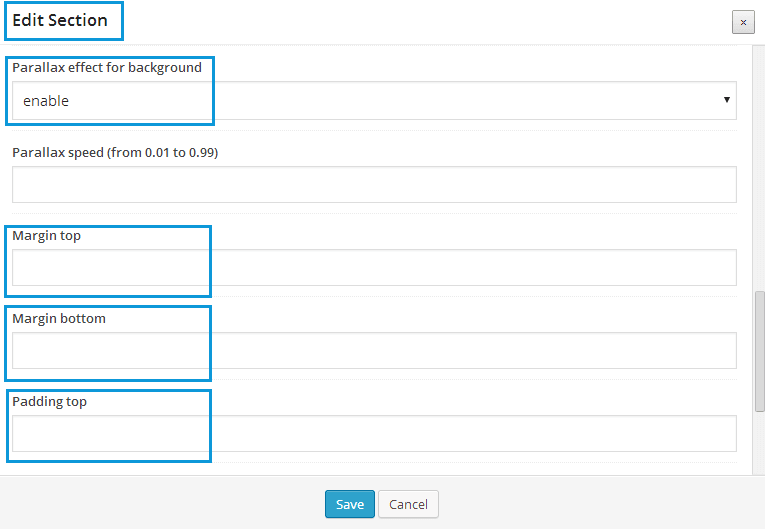
2) Provide admin panel access in Private Content and I’ll try to help you.
Hello,
Are you talking about link in top left corner? You can use languages area to add necessary content. Go to Theme Options > Header > Enable languages area > ON. Then go to Appearance > Widgets > add Text widget with <a href="link_to_your_contact_page">Contact us</a> to Place in header top bar widget area.
Hello,
Very likely you are using portrait image. By default product image block displays 100% width, so your product image looks long and big. Try to use wider images.
Hello,
First of all before the updating you would better do the backup of all your files!
If you have made changes directly in template files you will lose them after update, unfortunately.
To avoid this problem you should make your changes in child theme https://codex.wordpress.org/Child_Themes and css changes place in custom.css, in which you can override the default styling of the theme. All the CSS styles placed in this file will not be lost after upgrading the theme in the future! To create “custom.css” you can rename the file “default.custom.css” which is located in theme directory. To enable it go to Theme Options > Custom CSS > ON.
To update theme:
– Download the zipped package from ThemeForest and extract to your desktop.
– In the extracted package you will find archive blanco_theme_v2.9.1.zip, which is the wordpress theme.
– Extract blanco_theme_v2.9.1.zip file and upload the extracted folder to /wp-content/themes/ folder on your server with overwriting. You can do this via FTP.
Also before update, please, delete woocommerce folder from wp-content/themes/blanco/.
And don’t forget to backup your files!
Regards
Hello,
You should create child theme (https://www.8theme.com/demo/docs/leader/index.html#!/child_theme) and place following code into child theme functions.php:
function theme_name_scripts() {
wp_register_script(‘typeahead’,get_template_directory_uri().’/assets/js/typeahead.bundle.js’,
array(‘jquery’), null, true);
wp_enqueue_script(‘typeahead’);
}
add_action( 'wp_enqueue_scripts', 'theme_name_scripts' );
This article can be helpful http://codex.wordpress.org/Function_Reference/wp_enqueue_script
Hello,
To close first category, edit wp-content/themes/legenda/js/etheme.js file. Find and comment out line 1389
etCats.find('>li').first().find('.open-this').html(minusIcon).parent().addClass('opened').find('ul.children').show();
Hello,
Please send us screenshot with problem and link to your site.
Thanks.
Dear Claudio,
Have you considered our suggestions mentioned above?
Hello,
Thank you for using our theme.
1) Firstly check if you have uploaded Hover image for your product (Products > edit your product > Hover Image). Check also if you selected swap effect in Theme options > Product Page Layout > Product Image Hover > Swap.
2) What do you mean “not the sect head”. Can not you change header type in Theme Options > Header?
Provide admin panel access in Private Content, we’ll check.
Hello,
It’s hard to say. Firstly we did not test Legenda with another sliders, and also we don’t know if there would not be problems with that file. So, I can’t suggest you another plugin.
Regards
Hello,
In this case you can try to install slider plugin manually. Find plugin archive legenda/framework/plugins/revslider.zip and extract to your desktop. Then upload the extracted folder to /wp-content/plugins/ folder on your server via FTP. Go to Dashboard > Plugins and activate Revolution slider plugin.
If it does not help, provide your admin panel and FTP accesses as Private Content and we’ll check.
Hello,
If you inspect your site you’ll see scripts issues in console. Errors in this file http://www.dimofinf.net/unblockform.php cause your issue with Revolution slider. You have made a lot of additional customization and some customization gives problem.
Hello,
I checked and did not face any problems with header types (Theme Options > Header > Header types). Maybe you did not save settings after changing. Try to change it now.
Hello,
What version of slider do you use? Can you preview your slider in admin panel?
Maintenance mode is enabled, so unfortunately I can’t take a look at your site. Provide admin panel access in Private Content section.
You’re welcome Burak, I’m glad you found it so helpful.









