


Hello,
Could you please clarify your question?
It’s may be helpful if you provide us with the link to the page with the issue.
Regards,
Jack Richardson
Hello,
Do you want to place price on the products picture, right? If so please provide us with FTP and wp-admin credentials.
Regards,
Jack Richardson
Hello,
Could you please clarify your question?
It’s may be helpful if you provide us with the link to the page with the issue.
Regards,
Jack Richardson
Hello,
Yes, you can change .flex-viewport max-height to 500px.
To resolve the issue with thumbnails you can try to adjust width of .product-thumbnails-slider class.
Regards,
Jack Richardson
Hello,
You’re welcome!
Regards,
Jack Richardson
Hello,
Please upload bigger image to remove space between the main image and the gallery.
Size of thumbnails you can set in Theme Options -> Single Product Page -> “Product Thumbnails Width” and “Product Thumbnails Height”.
Regards,
Jack Richardson
Hello,
It is better to upload images with bigger sizes.
Please provide us with link to the page where you have the issue with thumbnails formatting.
Regards,
Jack Richardson
Hello,
We’re sorry, but there is no such feature at the moment.
Regards,
Jack Richardson
Hello,
Please provide us with FTP and wp-admin access in Private Content.
Regards,
Jack Richardson
Hello,
You’re welcome!
Regards,
Jack Richardson
Hello,
Post comment box replacement is additional customization and it’s paid service.
To change the body color links add the following code into custom.css:
.content p a {
  color: pink;
}
.content p a:hover {
  color: #f7a29a;
}
Here is the video tutorial how to create custom.css: https://www.youtube.com/watch?v=Qok2zRedRMY&list=PLMqMSqDgPNmD4uhGI1IBhr1iaEy81TMff&feature=share&index=1.
Regards,
Jack Richardson
Hello,
Please read this section in our documentation concerning footer creation: https://www.8theme.com/demo/docs/legenda/#!/footer.
Regards,
Jack Richardson
Hello,
Please provide us with link where you have problem with translation.
Also please read carefully how to translate in our documentation: https://www.8theme.com/demo/docs/xmarket/#!/how_to_translate.
Regards,
Jack Richardson
Hello,
Go to Settings -> Reading -> “Blog pages show at most” and the set the post number to 12.
Regards,
Jack Richardson
Hello,
Please provide us with wp-admin access in Private Content.
Regards,
Jack Richardson
Hello,
What version of theme do you use? If you have latest woocommerce version and not the last theme version, then you have to update your theme by following our documentation: https://www.8theme.com/demo/docs/leader/#!/upgrade.
Regards,
Jack Richardson
Hello,
We hope you resolve the issue soon.
If you have any question don’t hesitate to contact us.
Regards,
Jack Richardson
Hello,
I’ve made changes in style.css. Check it now!
Regards,
Jack Richardson
Hello,
Because of some unknown reasons child theme did’t inherit woocommerce/style.css in parent theme. That’s why I’ve just copied it into child theme.
Regards,
Jack Richardson
Hello,
We’ve made some changes. Check it now!
Regards,
Jack Richardson
Hello,
As we can see “Add to cart” buttons now displaying properly. Could you tell us please what is wrong with slider buttons?
Regards,
Jack Richardson
Hello,
Please provide us with FTP and wp-admin credentials we’ll take a look!
Regards,
Jack Richardson
Hello,
Are you talking about “Add to cart” buttons?
Regards,
Jack Richardson
Hello,
We’ll contact them concerning your issue. When we’ll get reply we’ll inform you here.
Regards,
Jack Richardson
Hello,
If you want to change arrows to default you have to add this code into custom.css:
/* Slider arrows */
.tp-leftarrow.default{ z-index:100;cursor:pointer; position:relative; background:url(images/large_left.png) no-

repeat 0 0; width:40px !important; height:40px !important;}
.tp-rightarrow.default{ z-index:100;cursor:pointer; position:relative; background:url(images/large_right.png) no-

repeat 0 0; width:40px !important; height:40px !important;}
.tp-leftarrow:hover,
.tp-rightarrow:hover{background-position:bottom left; }

.tp-rightarrow.default:before,
.tp-leftarrow.default:before{
 content:"";
}
In the case if you want to create your own arrows you have to modify arrows style as you need.
Regards,
Jack Richardson
Hello,
You’re welcome!
Regards,
Jack Richardson
Hello,
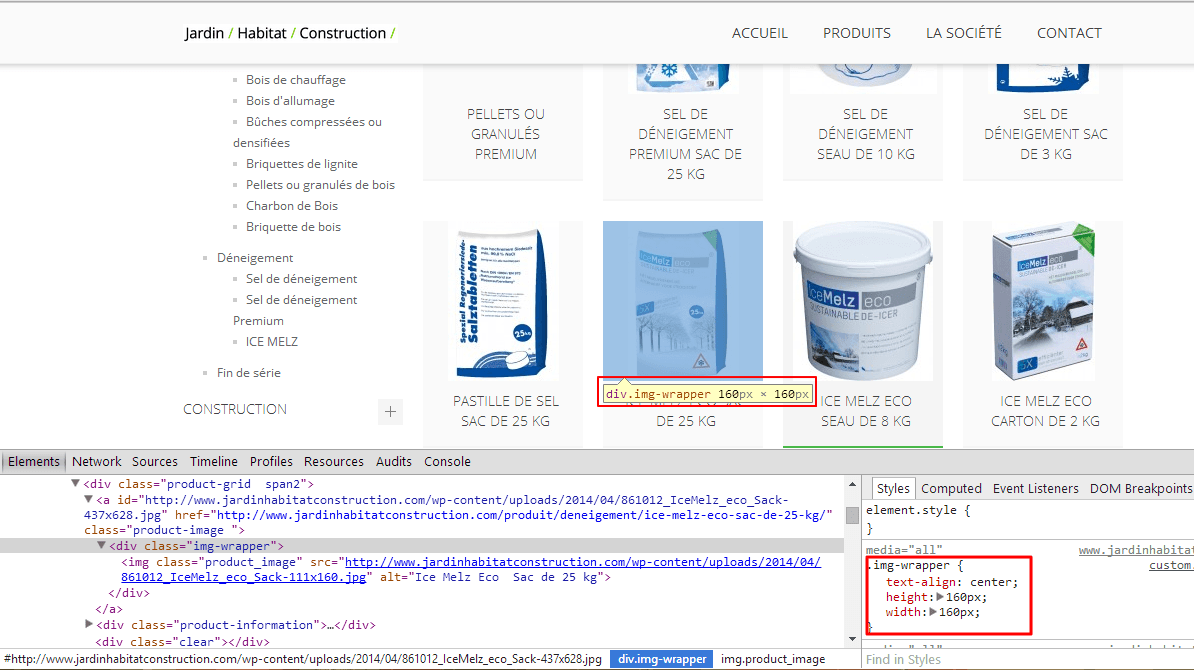
As we can see it’s already has dimensions 160px x 160px.
Could you please clarify what are trying to do?
Regards,
Jack Richardson
Hello,
You can try to contact them in comments on themeforest.net or buy plugin yourself.
If you give us permission to provide your credentials we can try to contact them concerning your issue. But it will take much more time, then if you do it yourself.
Regards,
Jack Richardson
Hello,
You’re welcome!
Regards,
Jack Richardson
Hello,
You are welcome.
We are always happy to help!
Regards,
Jack Richardson
Hello,
It is very difficult to help you without FTP access. We’ve tried to activate Legenda theme and got the white screen.
Now could you please change theme to default and enable WP_DEBUG in wp-config.php.
Regards,
Jack Richardson

Free AI store scan · SalesMax
Paste your store address. SalesMax AI shows which upsell moments are missing. No signup.

Free AI speed test · FlashMax
Paste your site address. FlashMax runs Google Lighthouse for phone and desktop, checks Core Web Vitals and lists what to fix. No signup.
 FishingPortfolio
(live demo, opens in a new tab)
 TravelBusiness
(live demo, opens in a new tab)
 PhotographerPortfolio
(live demo, opens in a new tab)
 Spice StoreFood & drinks
(live demo, opens in a new tab)
 Grocery MarketFood & drinks
(live demo, opens in a new tab)
 Jewelry StoreJewellery
(live demo, opens in a new tab)
 ChurchBusiness
(live demo, opens in a new tab)
 LawyerWPBakery
(live demo, opens in a new tab)
 Chocolate BoutiqueElementor
(live demo, opens in a new tab)
 Marseille 03Fashion
(live demo, opens in a new tab)
 DeliveryWPBakery
(live demo, opens in a new tab)
 TransportBusiness
(live demo, opens in a new tab)
 Babyland 01WPBakery
(live demo, opens in a new tab)
 Mobile StoreElectronics
(live demo, opens in a new tab)
 Default RTLFashion
(live demo, opens in a new tab)
 Gym StoreSports & travel
(live demo, opens in a new tab)