
Hello,
Sorry, but there is no such option.
Regards,
Eva Kemp.

Hello,
Sorry, but there is no such option.
Regards,
Eva Kemp.
Hello,
I didn’t switch off the plugins. This is the standard color for responsive design. If you want to have the whole menu white you need add this code into custom.css file:
@media (max-width: 767px) { .mobile-nav-shown .mobile-nav {
    background-color: white;
}
.side-block .close-block {
    color: #000;
    background-color: #FFF;
} }
.et-mobile-menu li > a {
    background: none repeat scroll 0% 0% white;
}
.et-mobile-menu li .open-child {
    background-color: #FFF;
}
To change the color of “+” icons you need edit the image wp-content/themes/legenda/images/small-plus.png with some image editor.
How to create custom.css file you can watch here.
Regards,
Eva Kemp.
Hello,
You can do this in Theme Options > Responsiveness.
Regards,
Eva Kemp.
Hello,
Please provide us with the link to your site and wp-admin panel credentials in Private Content.
Also please show on screenshots what section IDs you need to find.
Thank you.
Regards,
Eva Kemp.
You’re always welcome.
Have a good day!
Regards,
Eva Kemp.
You’re welcome.
Regards,
Eva Kemp.
Hello,
Please provide us with wp-admin panel credentials in Private Content.
Regards,
Eva Kemp.
Hello,
Sorry, but there is no such option. If you want to display the text instead of an image you may try to create a transparent picture and write some text in there using some image editor and upload it as a thumbnail for your brand.
Regards,
Eva Kemp.
Hello,
We’ve checked your site and haven’t found any problems.
Perhaps you’re using some 3rd-party plugins that may cause incompatibility with the theme.
Regards,
Eva Kemp.
Hello,
Please read about Brands in our documentation:
https://www.8theme.com/demo/docs/legenda/index.html#!/single_product_page
Have you added Brands widget into Single Product Page widget area in Appearance > Widgets?
If you still have problems please provide us with wp-admin panel credentials in Private Content.
Regards,
Eva Kemp.
Hello,
I’ve changed Home page to Homepage 9 in Settings > Reading and selected “Homepage 9” for Front page.
Please check.
To edit this page you need go to Pages in wp-admin panel and select Home page 9.
Regards,
Eva Kemp.
Hello,
Sorry, but there is no such option in the theme to remove Captcha from the Registration page. It requires modifications in the file and is a paid service. If you have needed skills you may try to edit it yourself.
Sorry for inconveniences.
Regards,
Eva Kemp.
Hello,
You’re using old theme version and there is a bug in the theme with Visual Composer. You must update Legenda to 2.3 version as described in our documentation:
https://www.8theme.com/demo/docs/legenda/index.html#!/upgrade
We separated VC as a plugin and you need install it after the theme update.
So please read carefully our instruction.
Thank you.
Regards,
Eva Kemp.
Hello,
As this is Woocommerce feature you’d better contact their support regarding your request.
They should advise you some fix.
Thank you for understanding.
Regards,
Eva Kemp.
Hello,
Sorry, but this requires additional customization and isn’t for free.
If some user doesn’t remember his password he can always reset it on My account page.
Regards,
Eva Kemp.
Hello,
Sorry but there is no such feature in our theme.
Regards,
Eva Kemp.
Hello,
Sorry, but this requires additional customization and it’s not for free. If you agree you may create a ticket at http://support.8theme.com/ providing the full access to wp-admin panel and FTP. Our developers will look into it more deeper.
Regards,
Eva Kemp.
Hello,
As I see you’re using old theme version. Please update it to 2.3 version.
How to update the theme you watch here.
Regards,
Eva Kemp.
Hello,
Sorry, but as this is Woocommerce cart widget we recommend you to contact Woocommerce support regarding this issue.
Perhaps they will suggest you some solution.
Regards,
Eva Kemp.
Hello,
The reason is you have inserted the tax code in Woocommerce > Settings > Tax tab > find “Price display suffix:” field and delete this code {price_excluding_tax}, then save your changes. After that the second price won’t be displayed for the products.
Regards,
Eva Kemp.
Hello,
When the slider is disabled for mobile devices in the settings it won’t be displayed.
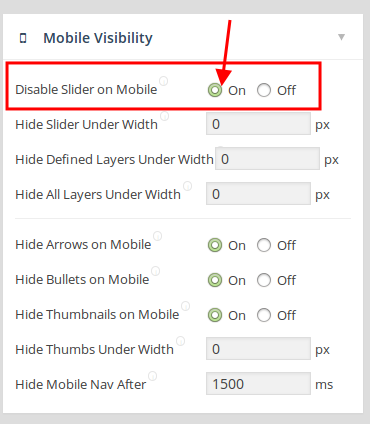
Are you checking on some mobile device or resizing the browser?
Regards,
Eva Kemp.
Hello,
I’ve added the following code into custom.css:
#footer-container {
background-color: white !important;
}
Please check the footer now.
Regards,
Eva Kemp.
Hello,
Do you want to create subcategories as subitems in the menu?
Please clarify your request with more details. It would be better if you provide us with some screenshots and wp-admin access to your site.
Thank you.
Regards,
Eva Kemp.
Hello,
I’ve disabled Lightbox in Woocommerce > Settings > General tab > Styles and Scripts section and unchecked “Enable Lightbox”.
Please check sizing guide image again. Clear your browser cache before.
Regards,
Eva Kemp.
Hello,
1. To have 12 products per page you need change in wp-admin panel > Settings > Reading > Blog pages show at most, and select 12 posts.
2. I’ve strengthen the container to make the content more wider using this code:
.containerInner {
    position: relative;
    width: 1263px !important;
    padding: 1px 0px 0px;
}

.page-template-frontpage-php .banner {
    margin-left: 100px !important;
}
.product-slider {
width: 98% !important;
}
3. Hover color of the menu items has been changed to black. Please check it now.
To change the font to menu subitems (product categories) you need add this code into custom.css file:
#main-nav > ul > li > ul > li a {
    font-family: font_name_you_need;
}
4. Footer links color is now changed to white. I’ve added this code into custom.css:
#footer .copyright .links li > a, .copyright p, .footer-information h5 {
     color: white;
}
If you want to change hover color from red to some other use this code:
a:hover {
color: red !important;
}
(change color value to yours).
Concerning the LayerSlider, try to disable 3rd-party plugins one by one. Perhaps some may cause incompatibility.
Regards,
Eva Kemp.
Hello,
Do you want this footer block to have white background color?

Regards,
Eva Kemp.
Hello,
Have you translated .po files as described in our documentation?
https://www.8theme.com/demo/docs/xmarket/#!/how_to_translate
Text for Contact Us page should be in there.
Regards,
Eva Kemp.
Hello,
Sorry, but we don’t have CSS manual. You can find this information in the web:
http://www.wpzoom.com/tutorial/recommended-practices-for-customizing-a-wpzoom-theme/
http://en.support.wordpress.com/custom-design/css-basics/
http://en.support.wordpress.com/custom-design/custom-css/
http://www.elmastudio.de/en/wordpress-en/custom-css-wordpress/
Regards,
Eva Kemp.
Hello,
I’ve uploaded the full archive of Legenda 2.1 version to your FTP account. Please check it.
Regards,
Eva Kemp.
Hello,
To translate “Logout”, “Your Account” you need edit the file wp-content/themes/xmarket/et-links.php.
For the cart popup please edit this file: wp-content/themes/xmarket/code/woo.php (lines 53, 106, 108).
Could you please specify where “Leave a comment” is displayed?
Cart page can be modified in the files wp-content/themes/xmarket/woocommerce/cart/cart.php and wp-content/themes/xmarket/woocommerce/cart/cart-totals.php.
Regards,
Eva Kemp.









