
Dear @strandcreative,
Have you made any changes in the theme files? As I see there are a lot of errors in Chrome console for your site.
Regards,
Eva Kemp.

Dear @strandcreative,
Have you made any changes in the theme files? As I see there are a lot of errors in Chrome console for your site.
Regards,
Eva Kemp.
Hello,
Sorry for misunderstanding.
If you want to have sidebar on the home page beside the featured slider you have to change the template to Default instead of Front page in the Home page editor.
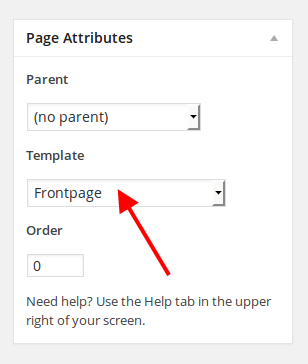
But we don’t recommend you to do this as your home page may be corrupted or you can ask some developer to help you.
Regards,
Eva Kemp.
Hello,
Sorry for a long delay.
As I see you have 4 products per row selected in Theme Options, that’s why you need write the same number in the shortcode. Please try this solution and let us know if you still need more help.
We’ve taken this issue into our account and will try to fix it in our future update.
Thank you.
Regards,
Eva Kemp.
Hello,
We also need the link to your site.
Thank you.
Regards,
Eva Kemp.
Hello @strandcreative,
Have you changed the login details to wp-admin panel? I’m unable to log in.
Also please provide us with FTP credentials as well.
Regards,
Eva Kemp.
Hello,
Please provide us with wp-admin panel and FTP credentials in Private Content.
Regards,
Eva Kemp.
We’re very sorry you’re experiencing such problems but we’re trying to investigate what is causing the issue. If you don’t mind and wish to proceed please reinstall WordPress and the database.
Thank you.
Regards,
Eva Kemp.
Hello,
The reason is Visual Composer plugin needs to be updated. If you have already created your site and have VC installed please provide us with FTP and wp-admin panel credentials in Private Content and we’ll update the plugin.
Thank you.
Regards,
Eva Kemp.
Hello,
I’ve changed the settings for images in Theme Options as well.
Please note if we change the width, the height is set automatically. So you may try to resolve this issue as described in Woocommerce documentation:
http://docs.woothemes.com/document/using-the-appropriate-product-image-dimensions/
http://docs.woothemes.com/document/set-woocommerce-image-dimensions-upon-theme-activation/
Regards,
Eva Kemp.
Hello,
I’m getting the same issue when installing the theme.
Please reinstall WordPress again from scratch and the database as well. Don’t import any backups for now. After you do this please reply back to us and we’ll install the theme again on clear WordPress and database.
Thank you.
Regards,
Eva Kemp.
Hello @xlube,
Please provide us with wp-admin panel and FTP credentials in Private Content.
Regards,
Eva Kemp.
Hello,
Unfortunately we don’t have German translation and you have to translate the theme yourself as described in our documentation:
https://www.8theme.com/demo/docs/legenda/index.html#!/how_to_translate
Regards,
Eva Kemp.
Hello,
Seems there is incompatibility with the variation plugin. We recommend you to add variable products as described in Woocommerce documentation:
http://docs.woothemes.com/document/product-variations/
Sorry, but we don’t guarantee full incompatibility of 3rd-party plugins with our theme.
Please take our apologies.
Regards,
Eva Kemp.
Hello @loudcow,
Thank you. I am able to connect now.
Visual Composer has been updated as well.
Let us know if you need more help.
Regards,
Eva Kemp.
Hello,
Sorry but it’s difficult for us to work in your control panel as it’s not in English.
Do you have FTP account to which we can connect to reinstall the theme via some FTP client?
Thank you.
Regards,
Eva Kemp.
Hello @loudcow,
I’ve updated Revolution Slider via wp-admin panel.
Please check FTP details as we’re unable to connect to the server to update Visual Composer plugin:
Error: Could not connect to server
Regards,
Eva Kemp.
Hello,
Sorry, but I don’t see the error on the page you provided. Could you please show a screenshot?
Also you have old theme version. Please update it to 2.3 version. Follow the instructions written in our documentation https://www.8theme.com/demo/docs/legenda/index.html#!/upgrade
Regards,
Eva Kemp.
Hello,
Seems you’ve installed the theme incorrectly. There are a lot of errors and some files are missed.

Try to reinstall it. Also please follow our instructions https://www.8theme.com/demo/docs/idstore/index.html#!/installation
Please note Woocommerce plugin must be installed before the theme installation.
Regards,
Eva Kemp.
Hello,
Could you please provide us with link of the page concerning what button you’re talking about?
Also please provide us with FTP and wp-admin panel credentials in Private Content.
Regards,
Eva Kemp.
You’re welcome.
Regards,
Eva Kemp.
Thank you for the details.
Please provide us with the exact link where you see the error.
Regards,
Eva Kemp.
Hello,
1. Sorry, but there is no such function to have different banners on different Shop pages.
2. Unfortunately there is only the possibility to upload an image for Products banner.
3. You can add the same widgets you’re using for the Shop page to Homepage Sidebar in Appearance > Widgets. Please note some widgets are showing only on the pages where products are displayed. So if you don’t have products on the Home page then some widgets (like Price Filter, Layered Nav Filter) may not be displayed.
Regards,
Eva Kemp.
Hello,
Ok. We’ll delete it per your request.
Regards,
Eva Kemp.
Hello,
As these statuses are related to Woocommerce, we recommend you to contact their support team concerning this issue.
Thank you.
Regards,
Eva Kemp.
Hello,
Thank you for your suggestion.
We’ve taken this into our account and will try to improve the theme more and more.
Regards,
Eva Kemp.
Hello,
Please provide us with wp-admin panel and FTP credentials and the exact link where the error occurs.
Thank you.
Regards,
Eva Kemp.
Hello,
Please provide us with wp-admin panel and FTP credentials. We’ll update the plugin for you.
Regards,
Eva Kemp.
Hello,
Could you please provide us with FTP credentials as well?
Thank you.
Regards,
Eva Kemp.
Hello,
There is incompatibility with X – Shortcodes plugin. I’ve disabled it and social icons are visible now.
Please check it.
Regards,
Eva Kemp.
Please provide us with the correct login details to wp-admin panel as we are unable to log in using the ones written in your profile.
Regards,
Eva Kemp.









